
1. Introduction
This manual provides essential instructions for the setup, operation, maintenance, and troubleshooting of your Marantz Cinema 50 9.4 Channel 8K Home Theater AV Receiver. Please read this manual thoroughly before using the product to ensure correct and safe operation.

Image 1.1: Front view of the Marantz Cinema 50 AV Receiver. This image displays the receiver's elegant front panel with the central display, input selector, and volume knob.
The Marantz Cinema 50 is designed to deliver immersive audio and video experiences, featuring 9.4 channel amplification, 8K Ultra HD support, Dolby Atmos, DTS:X, IMAX Enhanced, Auro 3D, and HEOS Built-in streaming capabilities.
2. Setup
Proper setup is crucial for optimal performance. Follow these steps to connect your Marantz Cinema 50 AV Receiver.
2.1 Unpacking and Placement
Carefully remove the receiver from its packaging. Place the receiver on a stable, level surface with adequate ventilation. Ensure there is sufficient space around the unit for heat dissipation.
2.2 Connecting Speakers
Connect your speakers to the corresponding speaker terminals on the rear panel of the receiver. Ensure correct polarity (+ to + and - to -) for each speaker. The Cinema 50 supports a 9.4 channel configuration, allowing for various surround sound setups including height channels.
2.3 Connecting Audio/Video Sources
Connect your audio and video sources (e.g., Blu-ray player, game console, streaming device) to the HDMI input ports. The receiver features multiple 8K-compatible HDMI inputs. For audio-only sources, use the optical, coaxial, or analog audio inputs.
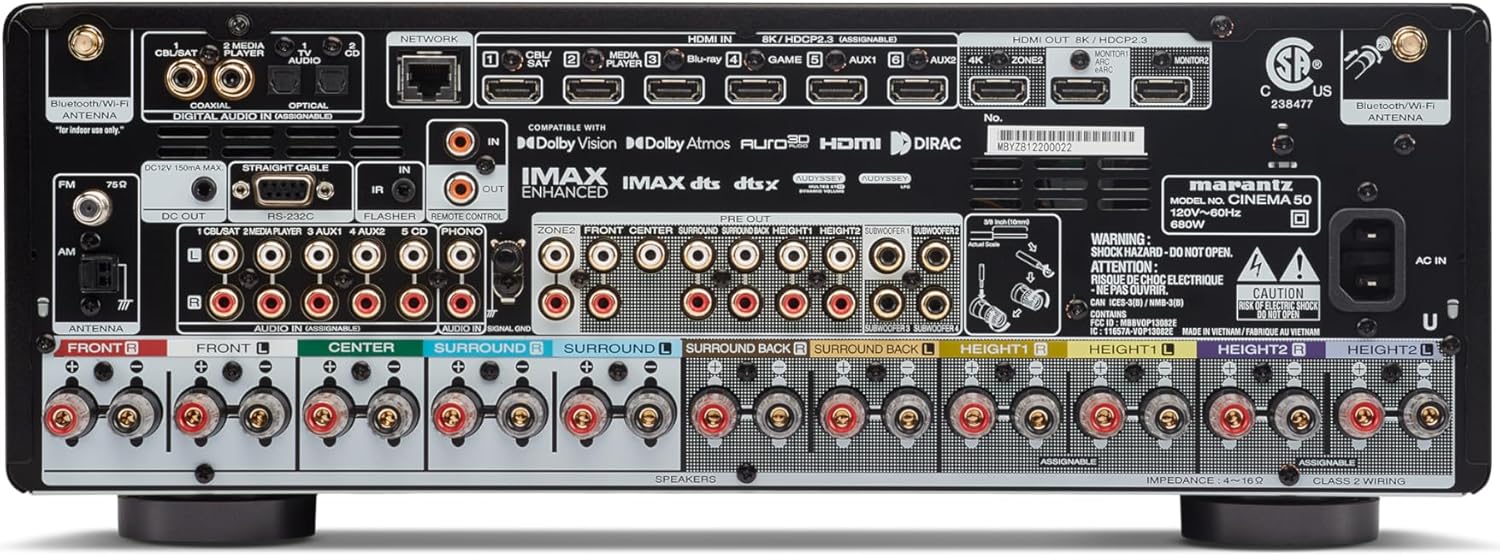
Image 2.1: Rear panel of the Marantz Cinema 50 AV Receiver. This image illustrates the various input and output ports, including HDMI, speaker terminals, and network connections, crucial for system setup.
2.4 Network and Antenna Connections
Connect the receiver to your home network using an Ethernet cable or via Wi-Fi. Attach the supplied Bluetooth/Wi-Fi antennas for wireless connectivity. Connect the FM/AM antennas for radio reception.
2.5 Power Connection and Initial Setup
Once all connections are made, connect the power cord to the receiver and then to a wall outlet. Power on the receiver and follow the intuitive on-screen setup assistant for initial configuration, including speaker calibration and network settings.
3. Operating Instructions
This section covers the basic operation of your Marantz Cinema 50 AV Receiver.
3.1 Power On/Off
Press the power button on the front panel or the remote control to turn the receiver on or off.
3.2 Input Selection
Use the INPUT selector knob on the front panel or the dedicated input buttons on the remote control to switch between connected audio/video sources (e.g., Blu-ray, Game, TV Audio).

Image 3.1: Front panel of the Marantz Cinema 50 AV Receiver, highlighting the central display which shows the current input and volume level during operation.
3.3 Volume Control
Adjust the volume using the VOLUME knob on the front panel or the volume up/down buttons on the remote control.
3.4 Sound Modes
Select various sound modes to optimize your listening experience. The Cinema 50 supports advanced formats like Dolby Atmos, DTS:X, IMAX Enhanced, and Auro 3D, which can be selected via the remote control's sound mode buttons.
3.5 HEOS Built-in
Utilize the HEOS Built-in feature for multi-room audio and access to various streaming services like Spotify and Tidal. Control HEOS functions via the dedicated HEOS app on your smartphone or tablet.
3.6 Remote Control
The included remote control provides full functionality for the receiver. Familiarize yourself with its layout for easy navigation and control of all features.
4. Maintenance
Regular maintenance helps ensure the longevity and optimal performance of your receiver.
4.1 Cleaning
Wipe the exterior of the receiver with a soft, dry cloth. Do not use abrasive cleaners, solvents, or chemical sprays, as these can damage the finish. Avoid spraying liquids directly onto the unit.
4.2 Ventilation
Ensure that the ventilation openings on the receiver are not blocked. Proper airflow is essential to prevent overheating. Do not place the receiver in an enclosed cabinet without adequate ventilation.
4.3 Cable Management
Periodically check all cable connections to ensure they are secure and free from damage. Loose connections can lead to signal loss or poor audio/video quality.
5. Troubleshooting
If you encounter issues with your Marantz Cinema 50, refer to the following common troubleshooting tips.
5.1 No Power
- Check if the power cord is securely connected to both the receiver and the wall outlet.
- Verify that the power outlet is functional by plugging in another device.
5.2 No Sound
- Ensure the correct input source is selected.
- Check all speaker wire connections for correct polarity and secure fit.
- Verify that the volume is not muted or set to a very low level.
- Confirm that the audio output settings on your source device are correctly configured.
5.3 No Picture/Video
- Ensure the correct input source is selected.
- Check all HDMI cable connections between the source, receiver, and TV. Try a different HDMI cable if necessary.
- Confirm that your TV is set to the correct HDMI input.
- If experiencing handshake issues or no display on TV, pressing the HEOS button on the remote can sometimes help reset the connection.
5.4 Remote Control Not Working
- Replace the batteries in the remote control.
- Ensure there are no obstructions between the remote control and the receiver's remote sensor.
- Point the remote control directly at the receiver.
6. Specifications
Key technical specifications for the Marantz Cinema 50 AV Receiver:
| Feature | Specification |
|---|---|
| Model | Cinema 50 |
| Channels | 9.4 |
| Output Wattage | 110 Watts per channel |
| Connectivity Technology | HDMI, Wi-Fi, Bluetooth |
| Total HDMI Ports | 9 |
| Supported Audio Formats | Dolby Atmos, DTS:X, IMAX Enhanced, Auro 3D |
| Streaming Services | Spotify, Tidal (via HEOS Built-in) |
| Product Dimensions | 15.5 x 17.4 x 6.5 inches |
| Item Weight | 36.6 pounds (16.62 Kilograms) |
| Color | Silver |
7. Warranty and Support
As this product is a renewed item, specific warranty details may vary. Please refer to the warranty information provided by your seller at the time of purchase. For technical support, product inquiries, or service, please contact Marantz customer support or visit their official website.
It is recommended to retain your proof of purchase for any warranty claims.


