
1. Introduction
Thank you for choosing the V-Guard VIRC 04 Infrared Induction Cooktop. This appliance is designed to provide efficient and versatile cooking with its 2200-watt power and intuitive touch panel. Unlike traditional induction cooktops, the VIRC 04 uses infrared technology, making it compatible with all types of cooking vessels. Please read this manual thoroughly before operating the cooktop to ensure safe and optimal performance.
2. Important Safety Instructions
To reduce the risk of fire, electric shock, injury to persons, or damage to the cooktop, always follow basic safety precautions, including the following:
- Read all instructions before using the appliance.
- Do not touch hot surfaces. Use handles or knobs.
- To protect against electrical shock, do not immerse cord, plugs, or the appliance in water or other liquid.
- Close supervision is necessary when any appliance is used by or near children.
- Unplug from outlet when not in use and before cleaning. Allow to cool before putting on or taking off parts.
- Do not operate any appliance with a damaged cord or plug, or after the appliance malfunctions or has been damaged in any manner. Contact V-Guard customer service for examination, repair, or adjustment.
- The use of accessory attachments not recommended by the appliance manufacturer may cause injuries.
- Do not use outdoors.
- Do not let cord hang over edge of table or counter, or touch hot surfaces.
- Do not place on or near a hot gas or electric burner, or in a heated oven.
- Extreme caution must be used when moving an appliance containing hot oil or other hot liquids.
- Always attach plug to appliance first, then plug cord into the wall outlet. To disconnect, turn any control to "off," then remove plug from wall outlet.
- Do not use appliance for other than intended use.
- Built-in surge protection up to 4KV safeguards the cooktop against voltage fluctuations. However, avoid using during severe power surges.
3. Product Overview
3.1 Components
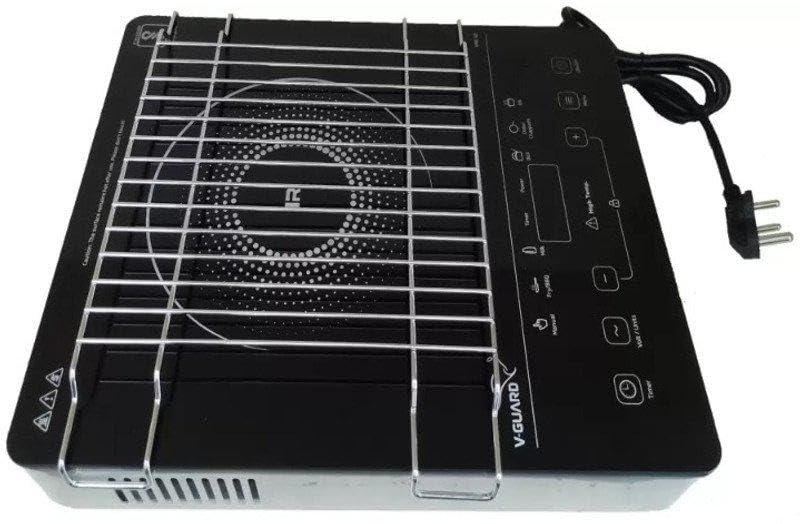
The V-Guard VIRC 04 Infrared Induction Cooktop consists of the main unit, a cooking surface, a removable metal grill, and a power cord.
3.2 Control Panel
The cooktop features an intuitive touch panel and digital display for convenient operation. Key controls include:
- Power Button: To turn the cooktop on or off.
- Digital Display: Shows temperature, power level, or timer settings.
- Temperature/Power Adjustment Buttons (+/-): To increase or decrease heat levels.
- Cooking Mode Buttons: Pre-set functions for various cooking tasks (e.g., Fry/BBQ, Normal, Milk, Curry).
- Timer Button: To set cooking duration.
4. Setup
- Unpacking: Carefully remove the cooktop from its packaging. Retain packaging for future storage or transport.
- Placement: Place the cooktop on a stable, flat, heat-resistant surface. Ensure there is adequate ventilation around the unit (at least 10-15 cm clearance from walls or other appliances). Do not block the ventilation openings.
- Power Connection: Plug the power cord into a standard 240V AC electrical outlet. Ensure the outlet is properly grounded.
- Initial Cleaning: Before first use, wipe the cooking surface and control panel with a damp cloth.
5. Operating Instructions
5.1 Basic Operation
- Place your desired cooking vessel (any type of cookware is compatible) on the center of the cooking surface.
- Press the Power Button to turn on the cooktop. The digital display will illuminate.
- Select a cooking mode or manually adjust the power/temperature.
- To turn off, press the Power Button again. The cooktop will cool down.
5.2 Cooking Modes
The VIRC 04 offers several pre-set cooking modes for convenience:
- Fry/BBQ: Ideal for frying, grilling, or barbecuing.
- Normal: General cooking mode for everyday use.
- Milk: Optimized for heating milk, preventing boil-overs.
- Curry: Suitable for simmering curries and other liquid-based dishes.
Simply touch the corresponding button to activate a mode. You can often adjust the power/temperature within these modes using the +/- buttons.
5.3 Timer Function
To set a cooking timer:
- While the cooktop is operating, press the Timer Button.
- Use the +/- Buttons to set the desired cooking duration.
- The timer will start counting down. Once the time expires, the cooktop will automatically turn off.
6. Care and Maintenance
Proper care ensures the longevity and performance of your V-Guard VIRC 04 cooktop.
- Cleaning: Always unplug the cooktop and allow it to cool completely before cleaning. Wipe the ceramic glass surface with a soft, damp cloth and mild detergent. For stubborn stains, use a non-abrasive cleaner specifically designed for ceramic cooktops.
- Control Panel: Wipe the touch control panel with a soft, dry cloth. Do not use abrasive cleaners or immerse the unit in water.
- Ventilation: Ensure the ventilation openings on the underside and sides of the cooktop are free from dust and debris. Clean periodically with a soft brush or vacuum cleaner.
- Storage: When not in use for extended periods, store the cooktop in a dry, safe place, preferably in its original packaging.
7. Troubleshooting
If you encounter issues with your V-Guard VIRC 04 cooktop, refer to the following table:
| Problem | Possible Cause | Solution |
|---|---|---|
| Cooktop does not turn on. | No power supply; Power cord not properly plugged in; Power button not pressed. | Check power outlet; Ensure cord is securely plugged in; Press the Power button firmly. |
| Cooktop turns off unexpectedly. | Overheating protection activated; Timer expired; Voltage fluctuation. | Allow cooktop to cool down; Check timer settings; Ensure stable power supply. |
| Cooking surface not heating. | Cooktop not turned on; Incorrect power setting. | Ensure cooktop is on and a cooking mode/power level is selected. |
| Digital display shows an error code. | Internal malfunction; Sensor error. | Turn off the cooktop, unplug it, wait a few minutes, then plug it back in and restart. If the error persists, contact customer support. |
If the problem persists after attempting these solutions, please contact V-Guard customer support.
8. Specifications
| Feature | Specification |
|---|---|
| Brand | V-Guard |
| Model | VIRC 04 |
| Type | Infrared Induction Cooktop |
| Power | 2200 Watts |
| Voltage | 240 Volts |
| Control Console | Touch Panel, Digital Display |
| Number of Heating Elements | 1 |
| Burner Type | Coil |
| Material | Acrylonitrile Butadiene Styrene (ABS) |
| Color | Black |
| Special Features | Digital Display, Surge Protection (up to 4KV), Compatible with all cooking vessels |
9. Warranty and Support
9.1 Warranty Information
For detailed warranty terms and conditions, please refer to the warranty card included with your product or visit the official V-Guard website. Keep your purchase receipt as proof of purchase for warranty claims.
9.2 Customer Support
If you have any questions, require technical assistance, or need to report a service issue, please contact V-Guard customer support:
- Website: Visit the official V-Guard website for support resources and contact details.
- Service Centers: Locate authorized V-Guard service centers in your area for professional assistance.