
1. Introduction
This manual provides essential information for the safe installation, operation, and maintenance of your Sihao 1000N Electric Garage Door Opener. Please read this manual thoroughly before installation and use to ensure proper functionality and safety.
The Sihao 1000N Electric Garage Door Opener is designed for various garage door systems, offering a powerful 1000N pulling and pushing force for reliable operation. It features remote control functionality and a self-diagnostic safety system.

Image 1.1: Overview of the Sihao Electric Garage Door Opener highlighting key features.
2. Safety Precautions
Adhere to all safety warnings and instructions to prevent injury or damage. Keep the area around the garage door clear during operation.
- Ensure the garage door is balanced and in good working condition before installing the opener.
- Keep children and pets away from the garage door and remote controls.
- Do not operate the opener if any part is damaged or malfunctioning.
- In case of power outage, use the release key to manually open or close the door.
- The opener has a self-diagnostic safety system and a flashing red light indicator for warnings.

Image 2.1: Self-lock design for manual operation during power failure.
3. Package Contents
Verify that all components listed below are present in your package:
- Garage Door Opener Motor Unit
- C-channel Rail Sections
- Chain Assembly
- Mounting Hardware (brackets, bolts, nuts)
- Two Remote Controls
- Release Key
- Instruction Manual
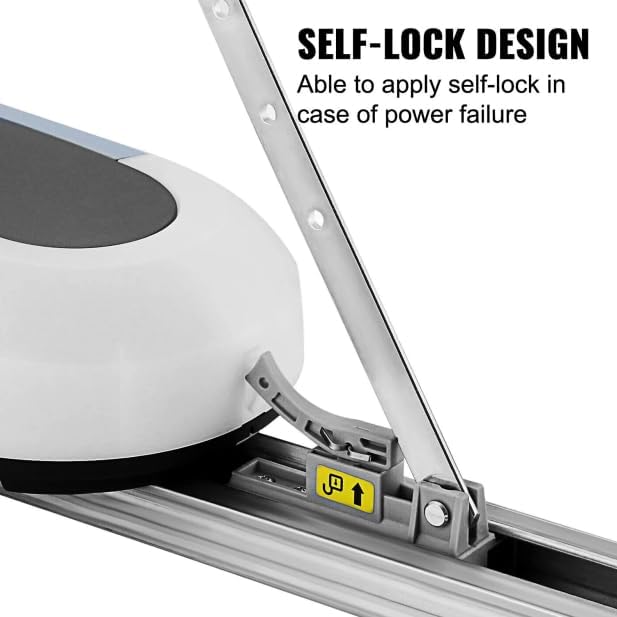
Image 3.1: Complete kit contents of the Sihao 1000N Electric Garage Door Opener.
4. Specifications
| Feature | Detail |
|---|---|
| Model Number | 1000N |
| Pulling/Pushing Force | 1000N |
| Product Dimensions | 42 x 8 x 6 inches (105.4 x 20.3 x 15.2 cm) |
| Remote Control Range | 65-98 feet (20-30 meters) |
| Automatic Closing Time | 60 seconds (adjustable) |
| Compatibility | Chain link, panel, wood gates; push-open and pull-open bidirectional installation |

Image 4.1: Product dimensions of the Sihao 1000N Electric Garage Door Opener.
5. Installation Guide
The Sihao 1000N opener is designed for quick installation and is compatible with various gate types. Follow these general steps for installation:
- Prepare the Door: Ensure the garage door operates smoothly manually and is properly balanced.
- Assemble the Rail: Connect the C-channel rail sections according to the instructions provided in the separate assembly guide.
- Mount the Motor Unit: Securely attach the motor unit to the ceiling or appropriate support structure above the garage door.
- Attach the Rail to the Door: Connect the rail assembly to the garage door using the provided brackets and hardware. Ensure proper alignment.
- Install Safety Features: Mount any safety sensors or warning signs as directed.
- Connect Power: Plug the opener into a grounded electrical outlet.
- Test Operation: Perform initial tests to ensure the door opens and closes correctly and safety features are active.
No additional hardware assembly is required beyond the included kit. The C-channel rail design facilitates faster and easier setup.

Image 5.1: Installation diagram for the Sihao Electric Garage Door Opener.
6. Operation Instructions
6.1 Using the Remote Control
The electric door opener comes with two remote controls for convenient operation. The remote control has an operating distance of 65-98 feet (20-30 meters).
- Press the designated button on the remote control to open or close the garage door.
- The door will automatically close after 60 seconds if no further operation is detected (this setting is adjustable).

Image 6.1: Remote control operation of the garage door opener.
6.2 Manual Release
In the event of a power outage, use the provided release key to disengage the opener from the door, allowing for manual operation.
7. Adjusting Settings
The opener features an adjustable automatic closing function and flexible starting and stopping. Refer to the control panel on the motor unit for adjustments.
- Adjusting Button: Used to modify various settings.
- Display Screen: Shows current settings or status.
- Set Button: Confirms selected settings.
- Pause Button: Temporarily stops door movement.
- Consult the detailed programming section in the full manual for specific steps on adjusting automatic closing times and force settings.

Image 7.1: Control panel for adjusting automatic closing and other settings.
8. Maintenance
Regular maintenance ensures the longevity and safe operation of your garage door opener.
- Monthly: Check the garage door balance. Lubricate moving parts of the door (rollers, hinges, springs) as recommended by the door manufacturer.
- Quarterly: Inspect the chain tension and adjust if necessary. Check all mounting hardware for tightness.
- Annually: Have a qualified technician inspect the entire garage door system, including the opener, for wear and tear.
- Keep the area around the opener and door tracks clean and free of obstructions.
9. Troubleshooting
If you encounter issues with your garage door opener, refer to the following common troubleshooting steps:
- Opener Not Responding: Check power supply. Ensure remote control batteries are not depleted. Verify the manual release is not engaged.
- Door Not Closing: Check for obstructions in the door's path. Ensure safety sensors are clean and properly aligned.
- Door Reverses Unexpectedly: This often indicates an obstruction or that the force settings are too high. Clear any obstructions and adjust force settings if necessary (refer to the detailed programming section).
- Unusual Noises: Inspect the chain and moving parts for wear or lack of lubrication.
For persistent issues, contact customer support.
10. Warranty and Support
Warranty information for your Sihao 1000N Electric Garage Door Opener is typically provided with the product packaging or can be obtained from the point of purchase. Please retain your proof of purchase for warranty claims.
For technical assistance, troubleshooting beyond this manual, or to inquire about replacement parts, please contact Sihao customer support. Contact details can usually be found on the product packaging or the manufacturer's official website.