Introduction
The Braun Series 5 AIO5545 All-in-One Grooming Kit is designed for versatile head-to-toe styling. This 9-in-1 device offers precision for beard trimming, hair clipping, nose and ear hair removal, and body grooming. It features an ultra-sharp blade, SkinGuard Technology for sensitive areas, and a waterproof design for convenient use and cleaning.
For additional product information and support, please visit the official Braun website: Braun Product Information.
Safety Information
Please read all instructions carefully before using this appliance. Keep this manual for future reference.
- This appliance is suitable for cleaning under running water.
- Do not use the appliance with a damaged foil or comb, as this may result in injury.
- Keep the appliance dry when charging.
- This appliance is not intended for use by persons with reduced physical, sensory or mental capabilities, or lack of experience and knowledge, unless they have been given supervision or instruction concerning use of the appliance by a person responsible for their safety.
- Children should be supervised to ensure that they do not play with the appliance.
What's in the Box
Your Braun Series 5 AIO5545 Grooming Kit includes the following components:
- Braun Series 5 AIO5545 Trimmer Unit
- 7 Combs (various lengths for beard, hair, and body)
- SkinGuard Trimmer Head
- Detail Trimmer Head
- Cleaning Brush
- Soft Pouch for storage and travel
- Charging Cable
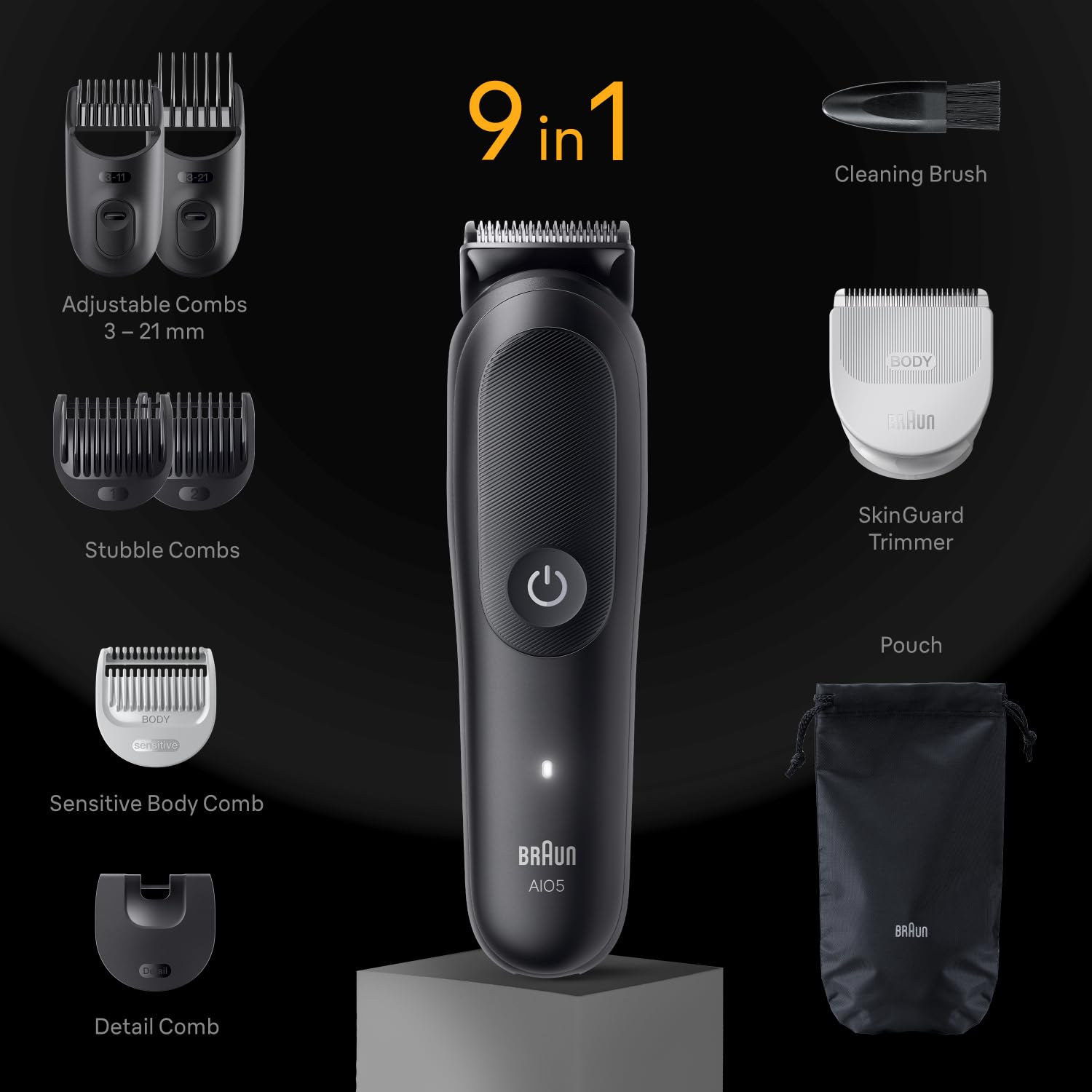
Image: All components of the Braun Series 5 AIO5545 Grooming Kit, including the trimmer, various comb attachments, SkinGuard trimmer, detail trimmer, cleaning brush, and storage pouch.
Setup
Charging the Device
- Ensure the trimmer is switched off.
- Connect the charging cable to the trimmer and plug it into a power outlet.
- The charging indicator light will illuminate. A full charge provides up to 120 minutes of cordless trimming.
- Allow approximately 1 hour for a full charge. A 5-minute quick charge is sufficient for one trim.

Image: Close-up of the Braun Series 5 AIO5545 trimmer highlighting its AquaGrip feature and indicating a 120-minute battery runtime.
Attaching and Removing Trimmer Heads/Combs
- To attach a trimmer head (e.g., SkinGuard, detail trimmer), align it with the main trimmer body and press firmly until it clicks into place.
- To attach a comb, slide it onto the desired trimmer head until it locks.
- To remove, gently pull the comb or trimmer head away from the main unit.
Operating Instructions
The Braun Series 5 AIO5545 is designed for various grooming needs. Always ensure your skin and hair are clean before use.
Beard Trimming
- Attach the beard comb (3-11mm or 13-21mm) to the main trimmer head.
- Select your desired length setting using the precision dial.
- Trim against the direction of hair growth for an even cut.
- For precise lines, remove the comb and use the bare trimmer blade.

Image: A man using the Braun Series 5 AIO5545 to trim his beard, demonstrating its application for facial hair grooming.
Body Grooming with SkinGuard Technology
- Attach the SkinGuard trimmer head for sensitive areas like the chest or groin.
- Move the trimmer gently against the direction of hair growth.
- The SkinGuard is designed to minimize nicks and cuts.

Image: A detailed view of the SkinGuard for Body attachment, designed to minimize nicks and cuts during body grooming.
Hair Clipping
- Use the larger hair combs (if provided, or the longer beard combs) for hair clipping.
- Select the desired length.
- Move the trimmer slowly and steadily against the direction of hair growth.
Detail Trimming
- Attach the detail trimmer head for precise styling of edges, sideburns, or small areas.
- Use short, controlled strokes.
Maintenance
Cleaning
- After each use, switch off the trimmer and remove the attachment.
- Brush away any loose hairs from the trimmer head and combs using the provided cleaning brush.
- Since the device is 100% waterproof, you can rinse the trimmer head and combs under warm running water.
- Allow all parts to air dry completely before reassembling or storing.
- Do not use abrasive cleaners or harsh chemicals.
Blade Care
For optimal performance, it is recommended to oil the blades regularly (e.g., once a month) with light machine oil (not included). Apply a small drop to the blades and run the trimmer for a few seconds to distribute the oil.
Troubleshooting
| Problem | Possible Cause | Solution |
|---|---|---|
| Trimmer does not turn on. | Battery is discharged. | Charge the trimmer for at least 5 minutes. |
| Trimmer pulls hair or cuts poorly. | Blades are dull or clogged with hair. | Clean the blades thoroughly. Oil the blades. If problem persists, consider blade replacement. |
| Trimmer makes unusual noise. | Hair caught in the motor head or blades. | Clean the trimmer head and blades. Ensure no foreign objects are present. |
| Charging indicator not working. | Faulty cable or power outlet. | Try a different power outlet or charging cable. Contact customer support if issue persists. |
Specifications
- Model: Braun AIO5545
- Power Source: Battery Powered (Li-Ion)
- Runtime: Up to 120 minutes (after 1 hour charge)
- Quick Charge: 5 minutes for one trim
- Waterproof: 100% AquaGrip
- Length Settings: 14 (3-21 mm)
- Dimensions (LxWxH): 13 x 6 x 25.2 cm
- Weight: 260 g
- Country of Origin: China
- Manufacturer: Procter & Gamble
Warranty and Support
This Braun product comes with a manufacturer's warranty. Please refer to the warranty card included in your packaging for specific terms and conditions.
For customer support, service, or warranty claims, please contact:
- Braun Customer Care: 1800 – 202 – 1364
- Email: intouch.im@pg.com
You may also visit the official Braun website for more information.


