
1. Introduction
This manual provides detailed instructions for the installation, operation, maintenance, and troubleshooting of your BXLIYER Android 15 Car Stereo. This advanced multimedia system is designed to enhance your driving experience with features like wireless CarPlay, Android Auto, 4G LTE connectivity, DAB+ radio, and a vibrant QLED display.
Please read this manual thoroughly before using the product to ensure proper operation and to prevent damage.
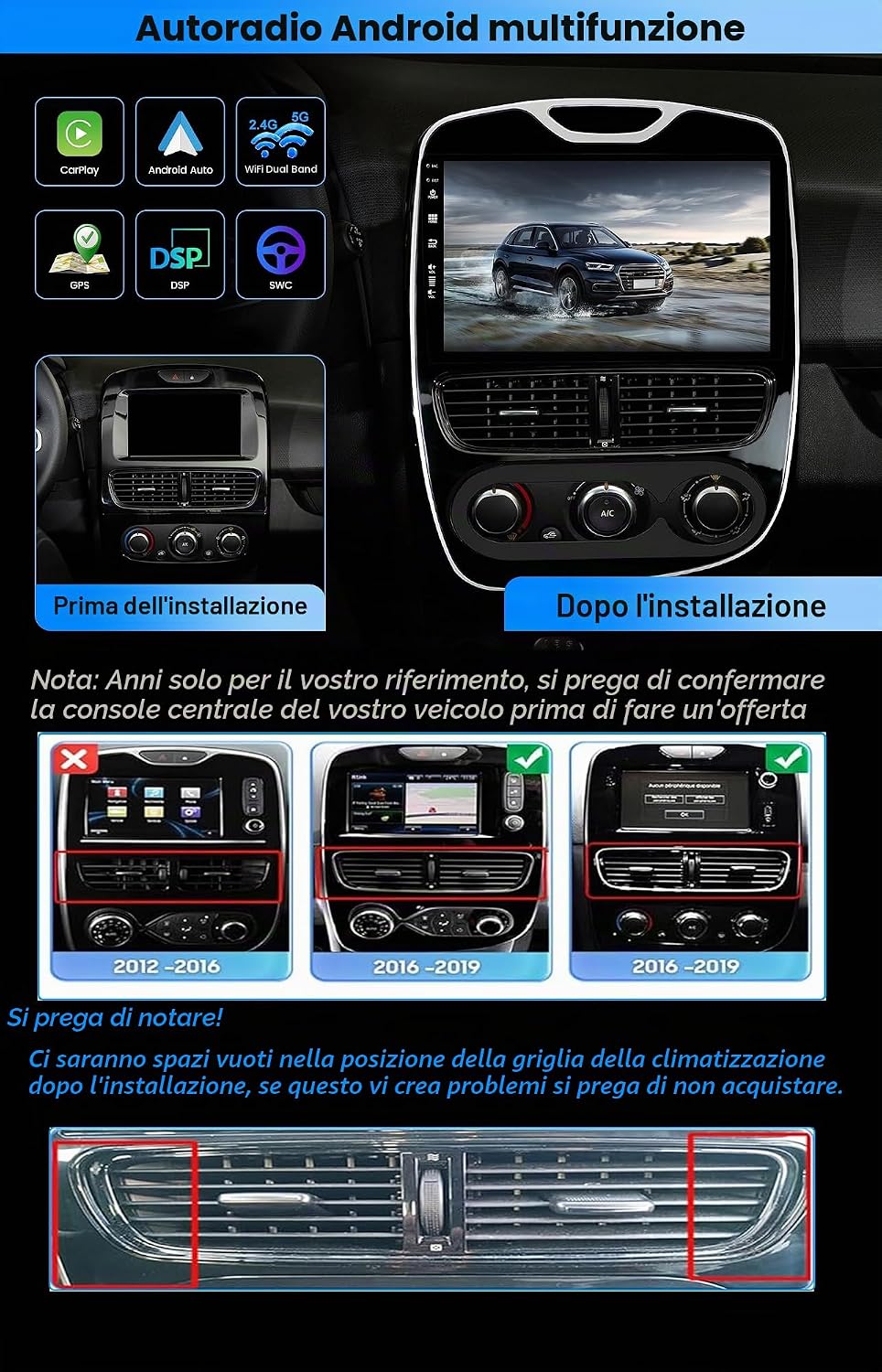
Figure 1: BXLIYER Android 15 Car Stereo main unit. This image shows the front view of the car stereo, highlighting its large display and sleek design.
2. Vehicle Compatibility
This car stereo system is specifically designed for perfect compatibility with Renault Clio 4 models manufactured between 2016 and 2019.
Important Note:
- Years are for reference only. Please confirm your vehicle's center console image before purchase.
- Be aware that there may be empty spaces in the air conditioning grille position. If this is a concern, please do not purchase.
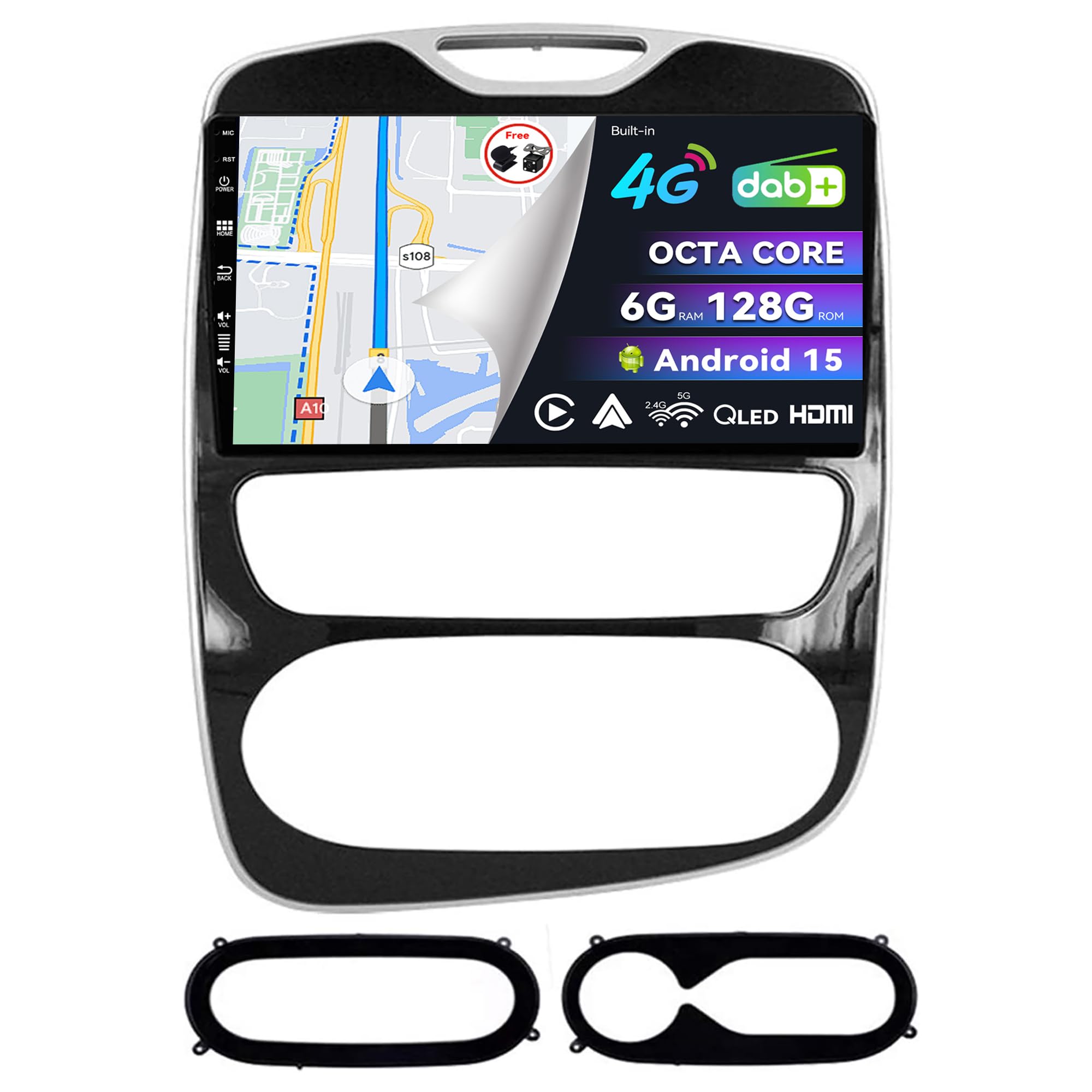
Figure 2: Comparison of Renault Clio 4 dashboard before and after car stereo installation. This image illustrates the visual integration of the new stereo into the vehicle's interior, along with notes on model year compatibility and potential air vent gaps.
3. What's in the Box
The package includes the following components:
- BXLIYER Autoradio Unit
- Power Cable
- Frame Kit
- User Manual (this document)
- Accessories (various cables and connectors)
- LED Rear Camera
- External Microphone
4. Setup and Installation
Installation of the BXLIYER car stereo requires basic automotive electrical knowledge. It is recommended to have the unit installed by a professional technician if you are not familiar with car audio installations.
4.1 Pre-Installation Checks
- Ensure the vehicle's ignition is off and the battery is disconnected before starting installation.
- Verify all included components against the 'What's in the Box' list.
- Review the wiring diagram provided with the power cable for correct connections.
4.2 General Installation Steps
- Carefully remove the original car stereo and dashboard trim.
- Install the provided frame kit into the dashboard opening.
- Connect the power cable, speaker wires, and other accessory cables (GPS antenna, USB, rear camera, external microphone) to the new autoradio unit.
- Secure the autoradio unit into the frame kit.
- Reconnect the vehicle battery and test the system before fully reassembling the dashboard.
- Install the LED rear camera according to its specific instructions, ensuring proper wiring to the reverse light circuit.
Caution: Incorrect wiring can cause damage to the unit or vehicle's electrical system. Consult a professional if unsure.
5. Operating Instructions
Your BXLIYER car stereo runs on Android 15, offering a wide range of features and customization options.
5.1 System Overview
- Operating System: Android 15
- CPU: Rockchip AC8257 A53 Octa-Core, 64-bit, 2.0 GHz
- RAM: 6GB DDR3
- ROM: 128GB
- Fast Boot: Access the Android system in less than 2 seconds.
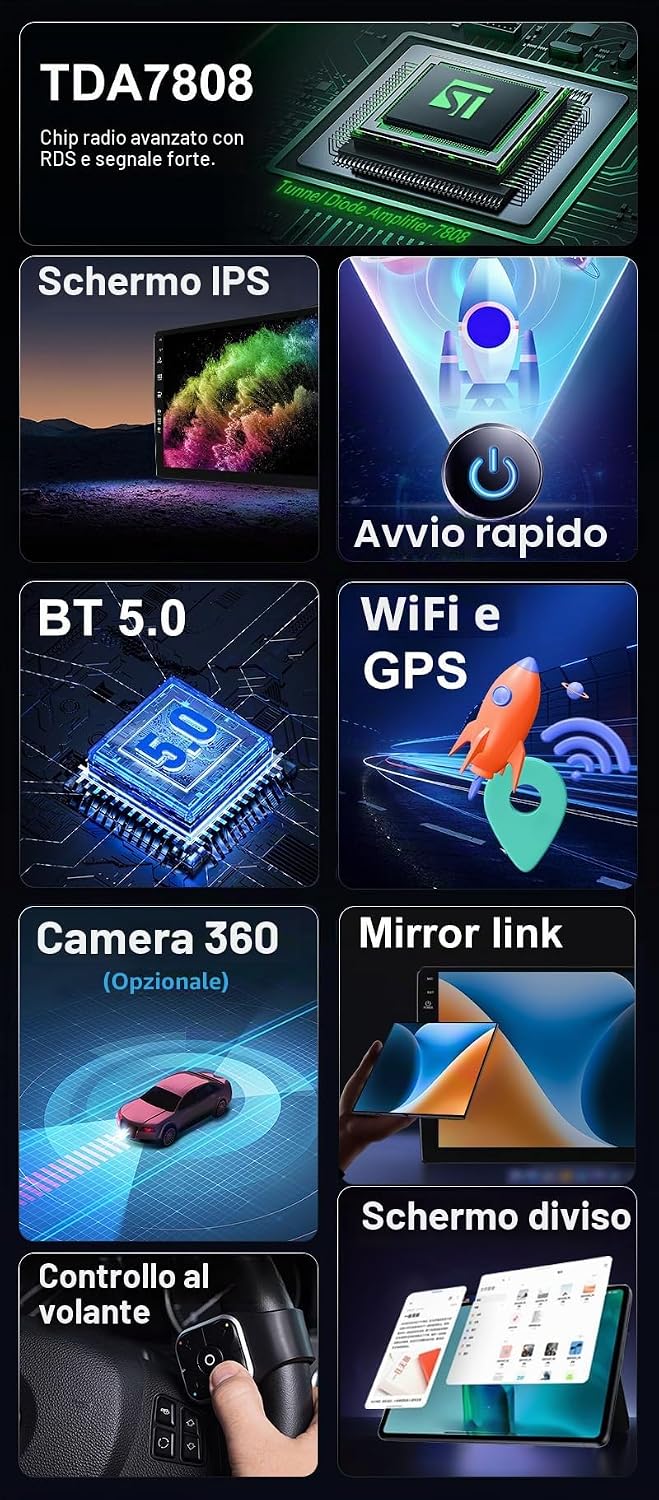
Figure 3: Overview of key features including IPS screen, Fast Boot, Bluetooth 5.0, WiFi & GPS, Mirror Link, Split Screen, and Steering Wheel Control. This image visually highlights several core functionalities of the car stereo.
5.2 Connectivity
- Built-in 4G LTE: Insert a SIM card for global 4G LTE connectivity, supporting 99% of worldwide operators.
- Dual Band WiFi: Stronger signal and faster network speeds for a better internet experience.
- Bluetooth 5.0: For hands-free calling, phonebook access, and audio streaming.

Figure 4: Features such as the 4G module, powerful cooling fan, integrated DAB, and smartphone integration (CarPlay, Android Auto, Mirror-link). This image details the advanced connectivity and audio capabilities of the device.
5.3 Audio and Radio
- Built-in DAB+: Enjoy better sound quality and more powerful digital audio broadcast channels. An external DAB+ antenna is included.
- Built-in DSP (Digital Sound Processor): AKM7739 DSP with a 64-band graphic equalizer allows you to customize sound to your preferences.
- Audio Output: 4*50W max.
- Radio: Built-in AM/FM tuner (worldwide) with RDS. Frequency range: AM 522-1620 KHz, FM 87.5-108 MHz.
5.4 Navigation and Display
- GPS Navigation: Supports both online and offline GPS navigation.
- Display: 10.1-inch QLED IPS touchscreen.
- Split Screen Mode: Run two applications side-by-side, e.g., navigation and music.
- 4K Video Playback: Supports video playback up to 3840x2160 pixels.

Figure 5: Features including WiFi and GPS navigation, built-in HDMI output, integrated DSP, optional 360-degree camera support, and reversing mode with rear camera. This image highlights the multimedia and safety features.
5.5 Smartphone Integration
- Wireless & Wired Apple CarPlay / Android Auto: Access navigation, make calls, send/receive messages directly from the car stereo.
- Mirror Link: Mirroring for Android phones via USB/WiFi, and Airplay for iPhone via WiFi.
5.6 Camera and Parking Assistance
- Rear Camera Input: Supports rear view camera (included). Automatically switches to the rear camera when reversing.
- 360° Panoramic Parking Function (Optional): Requires 4 AHD cameras purchased separately. Provides a clear view of the vehicle's surroundings.
5.7 Other Functions
- HDMI Output: Connect to an external monitor.
- Steering Wheel Control: Compatible with your vehicle's steering wheel controls.
- OBD2 Support: Real-time data and error codes from the vehicle's computer (compatible with most OBD2 and WiFi OBD2 scanners, requires Torque app).
- Dual USB Input: For media playback and connectivity.
6. Maintenance
6.1 Cleaning the Unit
- Use a soft, dry cloth to clean the display and exterior surfaces.
- For stubborn marks, slightly dampen the cloth with water or a mild, non-abrasive cleaner.
- Avoid using harsh chemicals, solvents, or abrasive materials, as these can damage the screen and finish.
6.2 Software Updates
- Periodically check for software updates from the manufacturer's official website or through the device's system settings.
- Follow the update instructions carefully to ensure proper installation and prevent system issues.
6.3 General Care
- Avoid exposing the unit to extreme temperatures, direct sunlight for prolonged periods, or excessive moisture.
- Ensure proper ventilation around the unit to prevent overheating. The built-in cooling fan helps maintain stable operation.
7. Troubleshooting
If you encounter issues with your car stereo, refer to the following common problems and solutions:
| Problem | Possible Cause | Solution |
|---|---|---|
| Unit does not power on. | Loose power connection, blown fuse. | Check power cables and connections. Inspect vehicle's fuse box and the unit's fuse. |
| No sound from speakers. | Incorrect speaker wiring, volume too low, mute activated. | Verify speaker connections. Increase volume. Check if mute function is active. |
| GPS signal loss or inaccurate. | GPS antenna not properly installed or obstructed. | Ensure GPS antenna is securely connected and placed in an unobstructed location (e.g., dashboard). |
| Bluetooth connection issues. | Device not in pairing mode, interference, incorrect pairing steps. | Ensure both devices are in pairing mode. Delete previous pairings and try again. Move closer to the unit. |
| Touchscreen unresponsive. | System freeze, dirt on screen. | Restart the unit. Clean the screen. If issue persists, perform a factory reset (data will be lost). |
If the problem persists after trying these solutions, please contact customer support.
8. Specifications
| Feature | Detail |
|---|---|
| Brand | BXLIYER |
| Model Name | BXLIYER-5449-H04 |
| Operating System | Android 15 |
| CPU | Rockchip AC8257 A53 Octa-Core, 64-bit, 2.0 GHz |
| RAM | 6 GB DDR3 |
| Internal Storage (ROM) | 128 GB |
| Screen Size | 10.1 Inches |
| Screen Type | QLED IPS Capacitive Touchscreen |
| Audio Output Power | 4*50 W Max |
| DSP | AKM7739, 64-band equalizer |
| Connectivity | Built-in 4G LTE, Dual Band WiFi, Bluetooth 5.0 |
| Navigation System | GPS (Online & Offline Maps) |
| Special Features | Wireless CarPlay, Android Auto, DAB+, HDMI Output, Split Screen, Fast Boot, Rear Camera Input, Steering Wheel Control, OBD2 Support, 4K Video Playback |
| Weight | 2.3 Kilograms |
| Country of Origin | China |
9. Warranty Information
This BXLIYER car stereo comes with a 2-year product warranty from the date of purchase. This warranty covers manufacturing defects and malfunctions under normal use.
The warranty does not cover damage caused by:
- Improper installation or unauthorized repairs.
- Accidents, misuse, abuse, or neglect.
- Natural disasters or external causes.
- Normal wear and tear.
Please retain your proof of purchase for warranty claims.
10. Customer Support
For further assistance, technical support, or warranty inquiries, please contact the seller or refer to the contact information provided with your purchase.
When contacting support, please have the following information ready:
- Product Model: BXLIYER-5449-H04
- ASIN: B0FQ551GCD
- Date of Purchase
- A detailed description of the issue