
Introduction
The TobenONE 20-IN-1 Docking Station UDS056 is a versatile solution designed to expand your laptop's connectivity and display capabilities. It allows you to connect your laptop to multiple displays, various peripherals, and a network using a single USB-C cable. This docking station is compatible with Windows (10+), macOS (11+), and Linux systems, as well as full-featured USB-C, Thunderbolt 3/4/5, and USB4 laptops, including MacBook Neo models. A USB-C to USB-A adapter is included for broader compatibility with desktop and USB-A devices.
This docking station supports triple 4K@60Hz display output, utilizing any 3 of its 5 video output ports (3 HDMI + 2 DisplayPort). It also features a 150W power supply for the dock and up to 100W charging for your laptop, alongside dual 45W USB-C charging ports for mobile devices. High-speed data transfer is facilitated by 2x 10Gbps USB-C ports and 2x 5Gbps USB-A 3.2 ports, complemented by USB 2.0 ports for wireless peripherals, an SD/micro SD card reader (up to 104MB/s), and a 1000Mbps Ethernet port for stable network connectivity.
Setup Instructions
Package Contents
Before beginning, please verify that all items are present in the package:
- TobenONE 20-in-1 Triple Monitor Docking Station
- USB-C to USB-C/A Cable
- 150W Power Supply
- User Manual

Figure 1: Package Contents
Driver Installation
This docking station requires a driver for full functionality. Please follow these steps to install the necessary driver:
- Open your web browser and navigate to siliconmotion.com.
- Locate the SM770 driver section.
- Download the appropriate driver for your operating system (Windows, macOS, or Linux).
- Install the downloaded driver.
- For macOS users: After installation, you must authorize screen recording permissions for the InstantView application in your system's Security & Privacy settings. This permission is required for the driver to enable USB to HDMI video output. No information is stored or recorded.

Figure 2: Driver Download and Installation Guide
Hardware Connection
- Connect the provided 150W power adapter to the DC input port on the docking station and plug it into a power outlet.
- Connect the docking station to your laptop using the included USB-C to USB-C/A cable. Use the 'Host' port on the docking station.
- Connect your external monitors to the docking station's HDMI and/or DisplayPort outputs. You can connect up to three monitors for extended or mirrored display.
- Connect any desired USB peripherals (keyboard, mouse, external drives), Ethernet cable, and audio devices to the corresponding ports on the docking station.
Operating Instructions
Port Overview
The TobenONE UDS056 offers a comprehensive array of ports for various connectivity needs:
- Power Button: Located on the top for easy access.
- SD 3.0 & Micro SD 3.0: Card slots supporting synchronous read/write speeds up to 104MB/s.
- USB 2.0 Ports (2): Ideal for connecting wireless mice, keyboards, and other low-bandwidth peripherals.
- 3.5mm Audio Jack: For connecting headphones or speakers.
- USB A 3.0 Ports (2): 5Gbps data transfer, 5V/0.9A power output.
- USB C 3.2 Ports (2): 10Gbps data transfer, 5V/1.5A power output.
- HDMI Ports (3) & DisplayPort (DP) Ports (2): Support triple 4K@60Hz display output. These are driver-based ports.
- LAN (RJ45) Port: 1000Mbps Ethernet for stable wired network connection.
- USB C Charging Ports (2, front): Dedicated 45W Power Delivery (PD) ports for fast charging phones/tablets (single port) or 22W*2 (dual ports). Note: These ports are for charging only and do not support data transfer.
- DC Input: For connecting the 150W power adapter.
- Host Port: Connects to your laptop via the provided USB-C cable.
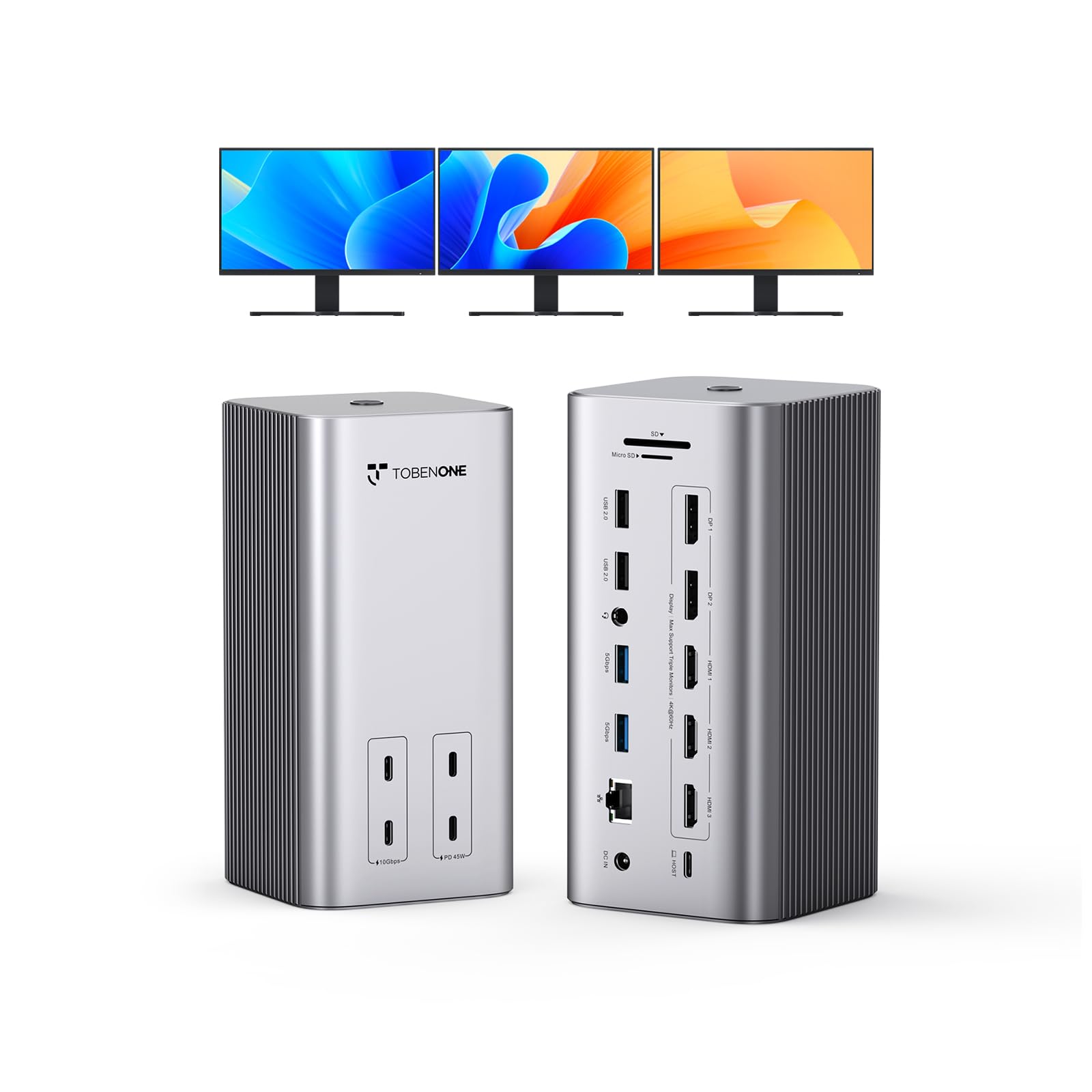
Figure 3: TobenONE UDS056 Port Layout
Display Configuration
The docking station supports connecting up to three external monitors at 4K@60Hz. You can choose between Extended Mode or Mirror Mode:
- Extended Mode: Each external monitor displays independent content, expanding your desktop workspace. Your laptop screen can also be used as an independent display.
- Mirror Mode: All connected external monitors and your laptop screen display the same content.
To configure your displays, access your operating system's display settings (e.g., System Settings > Displays on macOS, Display Settings on Windows). You can arrange monitors, set resolutions, and choose display modes from there.

Figure 4: Triple 4K@60Hz Display Setup

Figure 5: Dual-Mode Switching (Extended and Mirror Modes)
Power Delivery and Charging
The docking station is powered by a 150W adapter, which also provides power to your connected laptop and other devices:
- Laptop Charging: The dock delivers up to 100W Power Delivery to your laptop via the Host USB-C connection.
- Device Charging: The two front USB-C charging ports provide 45W fast charging for a single device (e.g., smartphone, tablet) or 22W simultaneously for two devices.
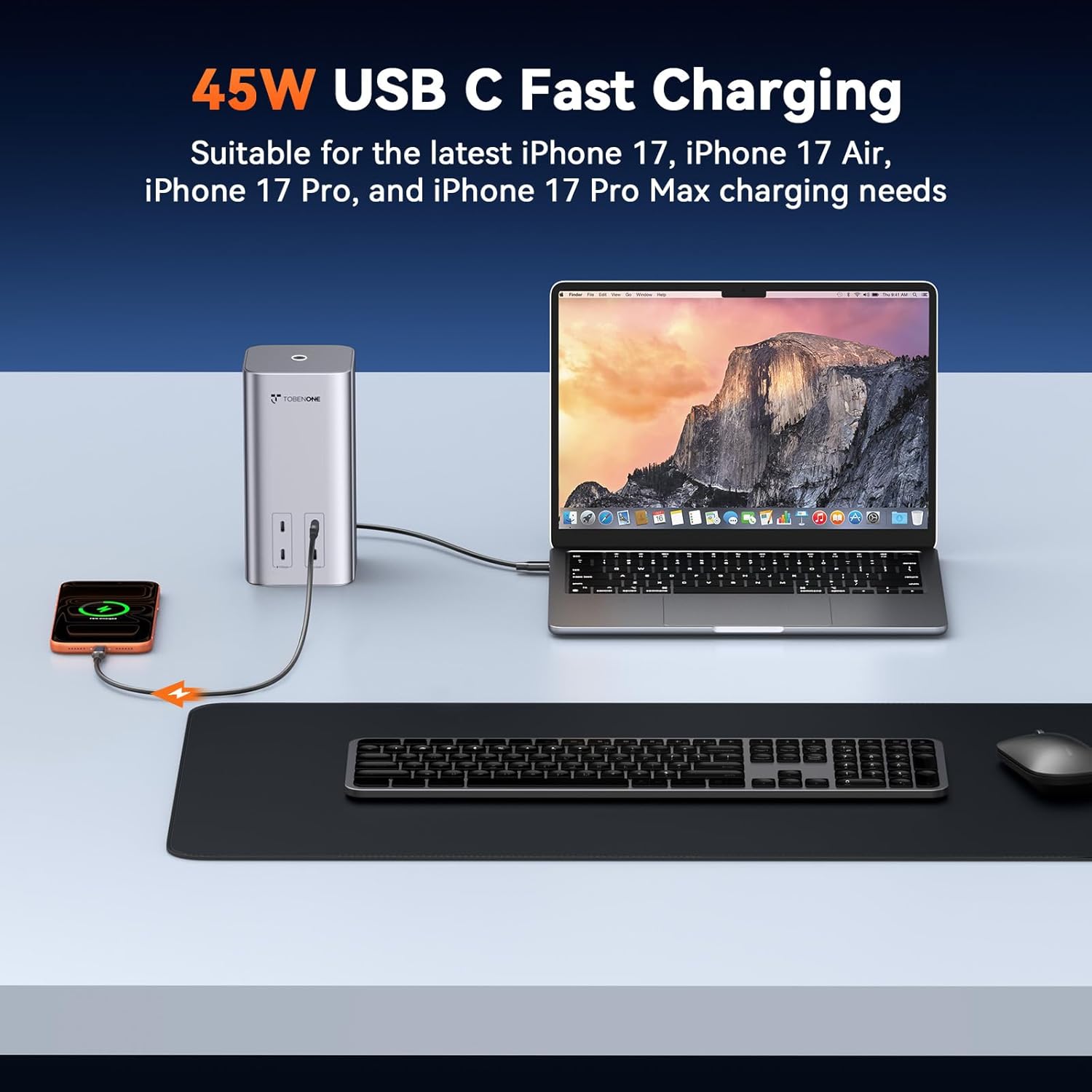
Figure 6: 150W Power Supply and 100W Laptop Charging

Figure 7: 45W USB-C Fast Charging
High-Speed Data Transfer
Utilize the high-speed data ports for efficient file transfers and peripheral connectivity:
- 10Gbps USB-C Ports: For rapid data transfer with compatible devices.
- 5Gbps USB-A 3.2 Ports: For connecting various USB-A devices with fast data speeds.
- SD/Micro SD Card Reader: Quickly transfer photos and videos from memory cards.
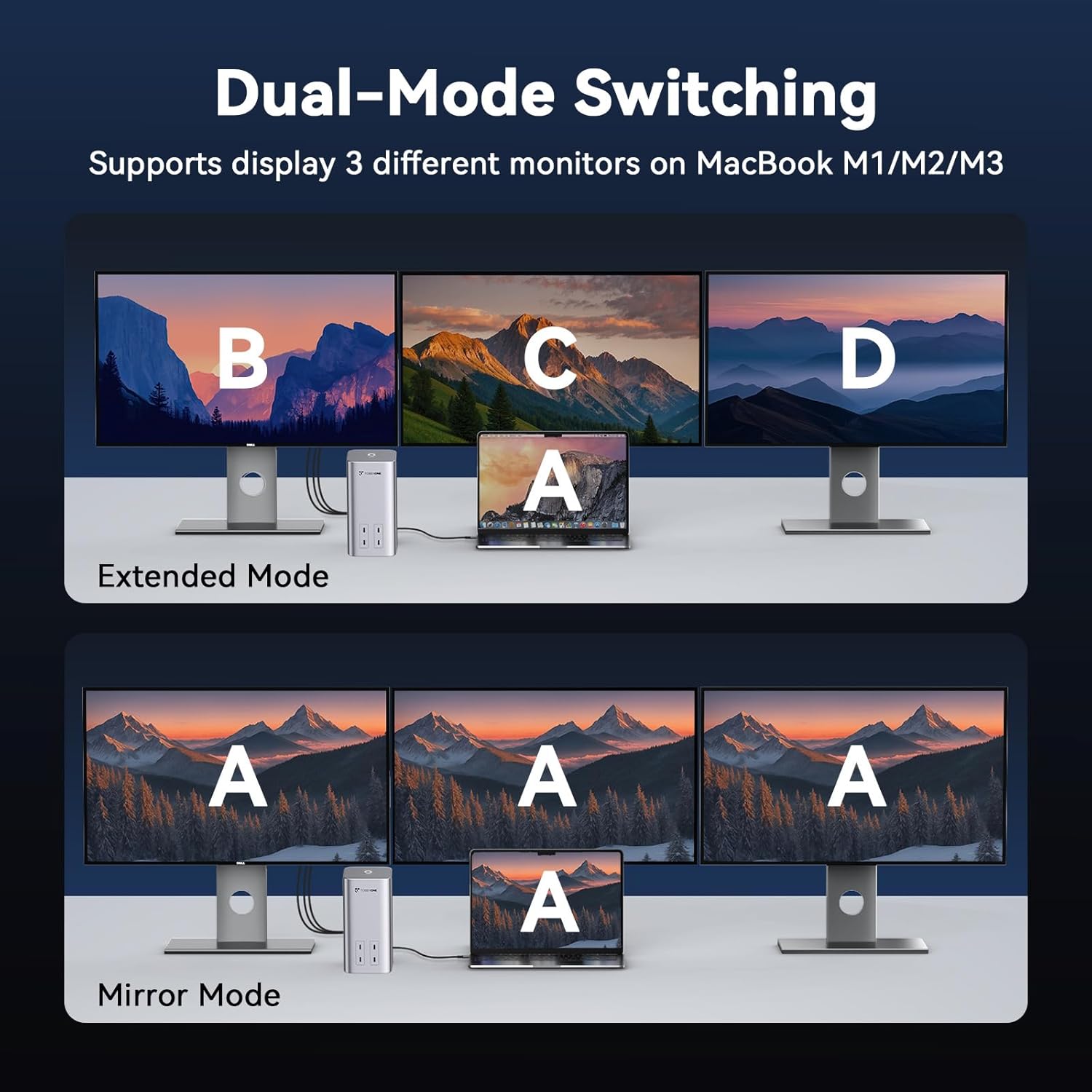
Figure 8: 10Gbps High-Speed Data Transfer
Maintenance
To ensure the longevity and optimal performance of your TobenONE 20-IN-1 Docking Station, please follow these maintenance guidelines:
- Keep the docking station clean by wiping it with a soft, dry cloth. Avoid using harsh chemicals or abrasive cleaners.
- Ensure the device is placed in a well-ventilated area to prevent overheating. Do not block the ventilation slots.
- Protect the docking station from liquids, moisture, and extreme temperatures.
- Avoid dropping or subjecting the device to strong impacts.
- When not in use for extended periods, disconnect the power adapter.
Troubleshooting
If you encounter issues with your docking station, please refer to the following common problems and solutions:
Common Issues and Solutions
- No Display Output or Incorrect Resolution:
- Ensure the InstantView SM770 driver is installed correctly and is the latest version.
- For macOS users, verify that screen recording permissions have been granted to InstantView in Security & Privacy settings.
- Check all HDMI/DisplayPort cables and connections. Try different cables if possible.
- Confirm your monitors are set to the correct input source.
- The docking station supports a maximum of 3 external monitors. If all 5 video ports are connected, 2 monitors will not display. Ensure you are using only up to 3 video outputs simultaneously.
- Restart your laptop and the docking station.
- Charging Issues:
- Ensure the 150W power adapter is securely connected to the DC input of the docking station and a working power outlet.
- The two front USB-C ports are for charging only and do not support data transfer.
- When using the USB-C charging ports simultaneously, the maximum power output to the laptop is 85W.
- Data Transfer Problems:
- Ensure USB devices are properly connected to the correct ports.
- Check if the device requires external power.
- Compatibility with macOS Tahoe 26:
- The latest Tahoe 26 operating system for Mac users may experience compatibility issues due to system bugs. We recommend updating to the latest driver version (V2.3 R003) released on January 5, 2024.
- If issues persist after updating the driver, please contact our support team.
- Cannot View Streaming Content (HDCP):
- It is not possible to view HDCP (High-bandwidth Digital Content Protection) content from platforms such as Netflix, Prime, iTunes, Hulu, etc., through this docking station due to content protection restrictions.

Figure 9: Important Operational Notes
Specifications
| Brand | Tobenone |
| Model Number | UDS056 |
| Color | Grey |
| Dimensions (L x W x H) | 3.15" x 3.15" x 6.69" |
| Item Weight | 1.9 Pounds |
| Number of Ports | 20 |
| Hardware Interface | 3.5mm Audio, DisplayPort, Ethernet, HDMI, MicroSD, USB 3.1 Type A, USB 3.2 Gen 2x2 |
| Total USB Ports | 6 (2x USB-C 10Gbps, 2x USB-A 5Gbps, 2x USB 2.0) |
| Total HDMI Ports | 3 |
| Total DisplayPort | 2 |
| Max Display Resolution | Triple 4K@60Hz |
| Power Delivery | 150W Input, 100W Laptop Output, 2x 45W USB-C Charging (Front) |
| Ethernet | 1000Mbps |
| Card Reader | SD 3.0, Micro SD 3.0 (104MB/s) |
| Compatible Operating Systems | Windows 10/11+, macOS 10.15.x+, Linux, Android 8.0+ |
| Compatible Devices | Dell Pro/Pro Max, XPS, Latitude, Precision, Inspiron series; Microsoft Surface Pro/Go/Book/Laptop/Laptop Studio; HP ProBook, EliteBook, Spectre x360 series; Lenovo ThinkPad, X1, T series, IdeaPad, Yoga series; LG Gram; Samsung Galaxy TabPro S; MacBook M1-M5 Pro/Max, Intel Macs; Thunderbolt 3/4/5, USB4.0, Full-function USB-C/A devices. |

Figure 10: Universal Compatibility Overview
Warranty Information
The TobenONE 20-IN-1 Docking Station UDS056 comes with a 2-Year Warranty from the date of purchase. This warranty covers manufacturing defects and ensures the product meets its specified performance standards under normal use. Please retain your proof of purchase for warranty claims.
Customer Support
If you encounter any problems during use that are not resolved by the troubleshooting steps, or if you have any questions regarding your TobenONE 20-IN-1 Docking Station, please do not hesitate to reach out to our dedicated support team. We are committed to helping you resolve any issues and ensure your satisfaction.
Contact information for support can typically be found on the TobenONE official website or through your purchase platform.


