1. Introduction
This manual provides detailed instructions for the safe and effective use of your Generic Wireless Hair Straightening Comb. This cordless styling tool is designed for convenience and performance, offering three temperature settings for various hair types. Please read this manual thoroughly before first use and retain it for future reference.

Image 1.1: Front and back view of the Generic Wireless Hair Straightening Comb, showcasing its ergonomic design and control panel.
2. Important Safety Information
To ensure safe operation and prevent damage to the product or injury to yourself, please observe the following safety precautions:
- Keep the device away from water or other liquids. Do not use it in a bathroom or near a water source.
- Do not use the device with wet hands.
- This appliance is equipped with heat-resistant materials and features overcharge protection and auto-shutoff functionality for user safety.
- Always ensure the device is fully charged before use to maintain optimal performance.
- Do not attempt to disassemble or repair the device yourself. Contact qualified service personnel for assistance.
- Keep out of reach of children.
- Avoid direct contact of the heated comb with skin, especially the scalp, ears, and neck, to prevent burns.
- Unplug the charging cable when not charging.
3. Package Contents
Verify that all items are present in the package:
- Wireless Hair Straightening Comb
- Storage Pouch
- Styling Comb
- Hair Clips (2 pieces)
- USB Charging Cable
- User Manual (this document)
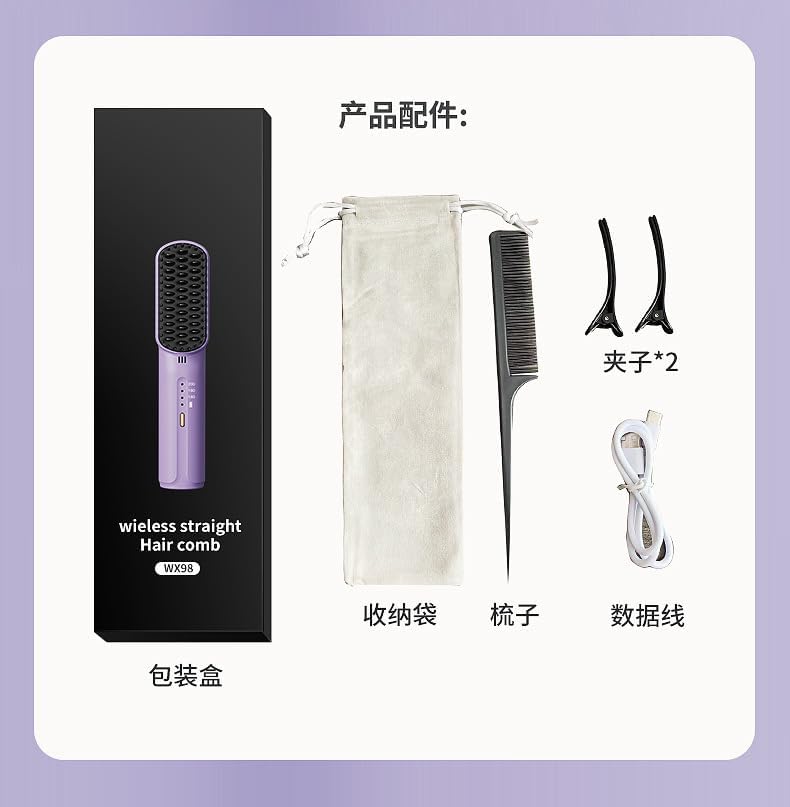
Image 3.1: All components included in the product package, neatly arranged for identification.
4. Setup and Charging
4.1 Initial Charge
Before using your Wireless Hair Straightening Comb for the first time, fully charge the device.
- Connect the provided USB charging cable to the charging port on the straightening comb.
- Connect the other end of the USB cable to a compatible USB power adapter (not included) or a computer's USB port.
- The charging indicator light will illuminate, indicating that the device is charging.
- Allow the device to charge completely. A full charge typically provides 3-5 days of cordless operation, depending on usage.
- Once fully charged, disconnect the USB cable.
5. Operating Instructions
5.1 Powering On/Off
- To power on the device, press and hold the power button for a few seconds until the indicator lights illuminate.
- To power off the device, press and hold the power button again until the indicator lights turn off. The device also features an auto-shutoff function for safety.
5.2 Temperature Settings
The straightening comb offers three precise heat settings to accommodate different hair types.
- After powering on, press the power button briefly to cycle through the temperature settings.
- The indicator lights will show the selected temperature:
- 160°C (320°F): Suitable for fine and soft hair.
- 180°C (356°F): Suitable for ordinary hair types.
- 200°C (392°F): Suitable for rough and hard hair.
- Allow approximately 20 seconds for the device to reach the desired temperature. A built-in temperature sensing chip helps prevent hair damage from fluctuations.

Image 5.1: Temperature control panel with indicators for 160°C, 180°C, and 200°C, along with recommended hair types.

Image 5.2: Visual representation of the rapid heating capability and constant temperature technology for hair care.
5.3 Hair Straightening Process
For best results, ensure your hair is dry and detangled before use.
- Section your hair using the provided hair clips.
- Take a small section of hair and slowly comb through it from root to tip.
- Repeat the process for all sections of hair until desired straightness is achieved.
- The comb features a 3D stereo innovative design with an inner Y-shaped comb to avoid scalding the scalp and dense toothed outer comb for smooth hair grabbing and anti-knotting.
- This device also incorporates negative ion technology to help reduce frizz and enhance shine.

Image 5.3: Demonstration of the straightening comb's effectiveness, showing improved hair texture and appearance.

Image 5.4: Detailed view of the comb's structure, explaining the dual-layer design for effective and safe styling.
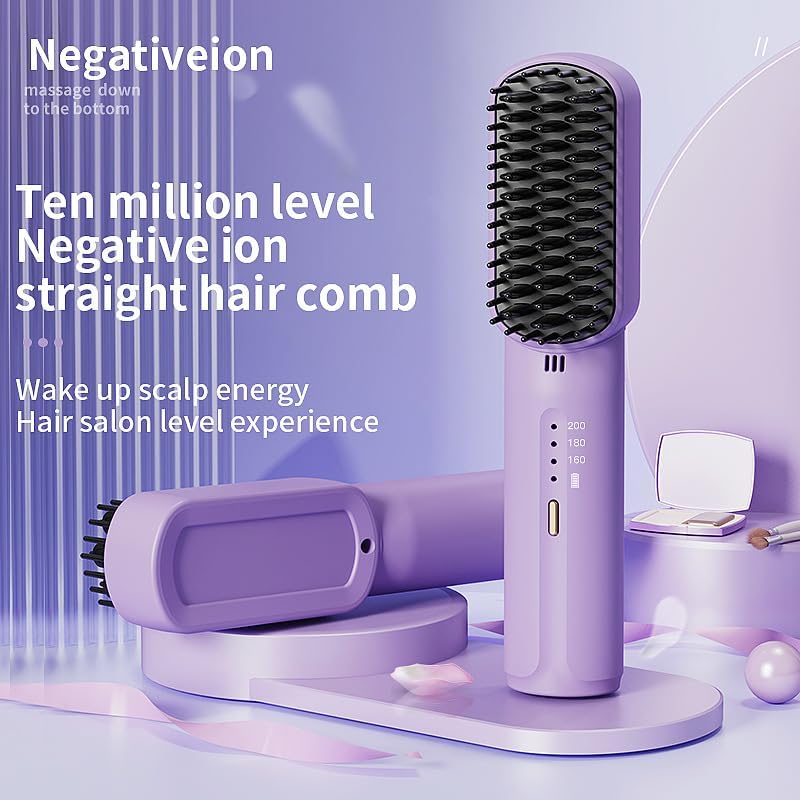
Image 5.5: Illustration of the negative ion technology integrated into the comb for enhanced hair health and shine.
6. Maintenance and Care
6.1 Cleaning
- Ensure the device is powered off and completely cool before cleaning.
- Use a soft, dry cloth to wipe down the exterior of the comb.
- Gently remove any hair strands or product residue from the comb bristles using a small brush or the provided styling comb.
- Do not use harsh chemicals, abrasive cleaners, or immerse the device in water.
6.2 Storage
- Store the straightening comb in a cool, dry place, away from direct sunlight and moisture.
- Use the provided storage pouch to protect the device from dust and damage when not in use or during travel.
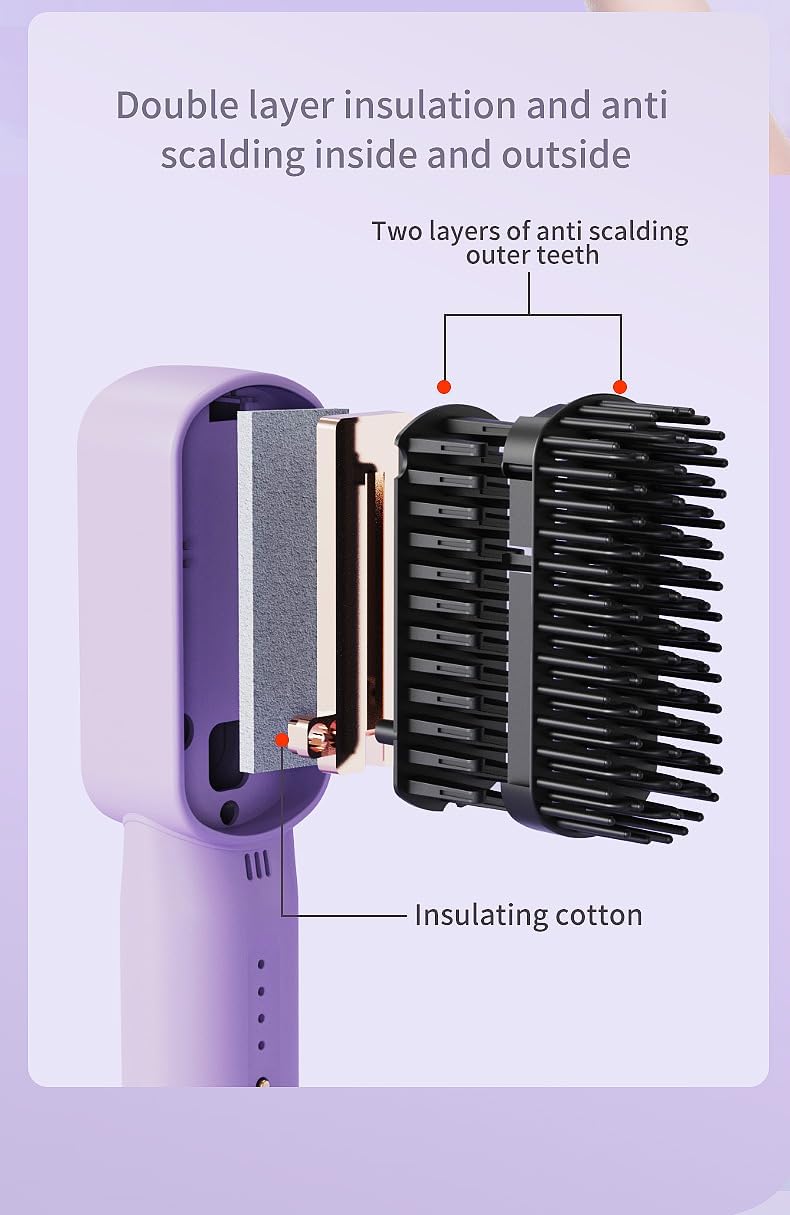
Image 6.1: Internal structure illustrating the double-layer insulation and anti-scalding design for user safety during operation.
7. Troubleshooting
If you encounter any issues with your Wireless Hair Straightening Comb, please refer to the following common problems and solutions:
| Problem | Possible Cause | Solution |
|---|---|---|
| Device does not turn on. | Low battery or no charge. | Charge the device fully using the provided USB cable. |
| Device not heating up. | Incorrect temperature setting or device malfunction. | Ensure a temperature setting is selected. If the issue persists after charging, contact customer support. |
| Battery life is shorter than expected. | Frequent use at highest temperature setting or aging battery. | Reduce usage time or frequency. Ensure full charge before each use. Battery performance may degrade over time. |
| Hair is not straightening effectively. | Hair is too wet, sections are too large, or incorrect temperature. | Ensure hair is completely dry. Work with smaller sections. Increase temperature setting if appropriate for your hair type. |
8. Specifications
| Feature | Detail |
|---|---|
| Model | B0FPYPW171 |
| Brand | Generic |
| Power | 30W |
| Battery Capacity | 3200mAh (rechargeable) |
| Temperature Settings | 160°C (320°F), 180°C (356°F), 200°C (392°F) |
| Material | PET (Plastic) |
| Color | Purple/Black |
| Product Dimensions | 185x40x43mm (7.3 x 1.6 x 1.7 inches) |
| Weight | 160g (9.92 ounces) |
| Product Benefits | Wireless Usage, Negative Ion Technology, Anti-Scald Design |
9. Warranty and Customer Support
For information regarding warranty coverage, please refer to the documentation provided at the time of purchase or contact your retailer.
If you have any questions, require technical assistance, or experience issues not covered in the troubleshooting section, please contact the manufacturer or your point of purchase for support.