1. Introduction
Thank you for choosing the HOOBRO 29.5" Narrow Console Table. This versatile furniture piece is designed to enhance your living space with its functional storage and modern industrial aesthetic. It features a durable metal frame, rustic brown particleboard top, two fabric drawers, and two mesh shelves, providing ample space for organization. Select models also include a convenient charging station with AC outlets and USB ports.
This manual provides detailed instructions for assembly, operation, maintenance, and troubleshooting to ensure you get the most out of your new console table. Please read it thoroughly before assembly and retain it for future reference.

Figure 1: Overview of the HOOBRO Narrow Console Table.
2. Safety Instructions
- Always assemble the product on a soft, clean surface to prevent scratches.
- Ensure all parts are present and undamaged before beginning assembly. Contact customer support if any parts are missing or defective.
- Do not overtighten screws during assembly, as this may damage the material.
- Keep small parts and packaging materials away from children and pets to prevent choking hazards.
- Do not stand or sit on the table.
- Distribute weight evenly across the shelves and tabletop. Do not exceed the maximum load capacity.
- If your model includes a charging station, ensure it is connected to a grounded outlet. Do not overload the power strip.
- Use the anti-tip kit provided to secure the table to a wall, especially if children or pets are present, to prevent tipping accidents.
3. Package Contents
Please check the package carefully to ensure all components are present. The package typically includes:
- Top Panel (Particleboard)
- Metal Frame Components (Legs, crossbars)
- Mesh Shelves (2 units)
- Fabric Drawers (2 units)
- Charging Station (for models BF72XG01)
- Adjustable Feet
- Assembly Hardware (Screws, Allen wrench, etc.)
- Anti-Tip Kit
- Instruction Manual
4. Assembly Instructions
Follow these steps carefully to assemble your console table. It is recommended to have two people for assembly.
- Prepare the Workspace: Clear a spacious area and lay out all components on a soft, clean surface to prevent damage.
- Assemble the Metal Frame: Attach the side frames to the crossbars using the provided screws. Ensure all connections are secure but do not fully tighten screws until the entire frame is assembled.
- Install Mesh Shelves: Slide the two mesh shelves into the designated slots on the metal frame. Secure them with screws as indicated in the diagram.
- Attach Top Panel: Place the particleboard top panel onto the assembled frame. Align the pre-drilled holes and secure it with screws. Fully tighten all screws on the frame and top panel.
- Install Charging Station (if applicable): For models with a charging station (BF72XG01), attach the power strip unit to the side of the metal frame using the provided screws. Ensure the power cord is routed safely.
- Insert Fabric Drawers: Unfold the fabric drawers and insert the bottom panel. Place the assembled drawers into their respective compartments under the top panel.
- Attach Adjustable Feet: Screw the adjustable feet into the bottom of the table legs. Adjust them to ensure the table is stable and level on uneven floors.
- Install Anti-Tip Kit: Secure the anti-tip strap to the back of the table and to a wall stud using the provided hardware. This step is crucial for safety.
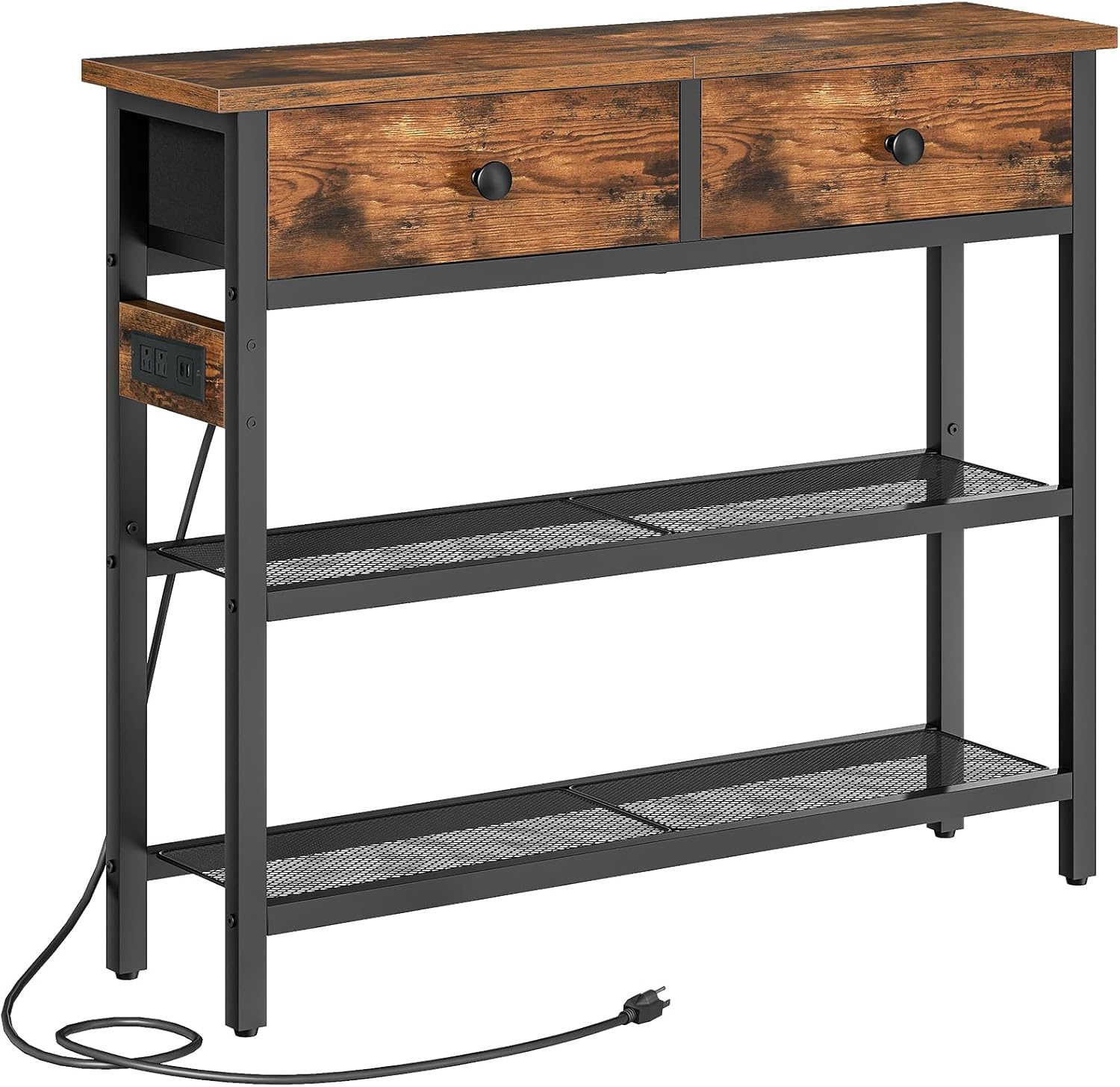
Figure 2: Console table with charging station detail.
5. Operating Instructions
5.1 Using the Storage
- Fabric Drawers: The two fabric drawers are ideal for storing smaller items such as keys, wallets, remote controls, or stationery. To open, gently pull the knob. To close, push the drawer back into its compartment.
- Mesh Shelves: The two lower mesh shelves provide open storage for books, decorative items, storage baskets, or other essentials. Distribute weight evenly to maintain stability.
- Top Surface: The top panel can hold lamps, vases, photo frames, or other display items.
5.2 Using the Charging Station (Model BF72XG01)
If your console table includes a charging station, follow these guidelines:
- Power Connection: Plug the console table's power cord into a standard, grounded wall outlet.
- AC Outlets: Use the AC outlets to power small appliances or charge devices that require a standard plug.
- USB Ports: Use the USB ports to charge smartphones, tablets, and other USB-powered devices.
- Safety: Do not exceed the maximum power rating of the charging station. Avoid spilling liquids near the outlets. Disconnect from power when not in use for extended periods.
6. Maintenance
- Cleaning: Wipe the wooden top and metal frame with a soft, damp cloth. Avoid harsh chemicals or abrasive cleaners, as they may damage the finish.
- Fabric Drawers: The non-woven fabric drawers can be spot cleaned with a mild detergent and a damp cloth. Allow them to air dry completely. Do not machine wash.
- Regular Checks: Periodically check all screws and connections to ensure they remain tight. Retighten if necessary.
- Avoid Direct Sunlight: Prolonged exposure to direct sunlight can cause fading or damage to the wooden top.
- Liquid Spills: Clean up any liquid spills immediately to prevent staining or damage to the materials.
7. Troubleshooting
- Table is Wobbly:
Solution: Check that all screws are securely tightened. Adjust the leveling feet at the bottom of the legs to compensate for uneven floor surfaces. - Drawers Do Not Slide Smoothly:
Solution: Ensure the fabric drawers are correctly assembled and fully inserted. Check for any obstructions in the drawer compartments. - Charging Station Not Working (Model BF72XG01):
Solution: Verify that the power cord is securely plugged into a functional wall outlet. Check if the outlet itself is receiving power (e.g., by plugging in another device). Ensure the charging station is not overloaded. - Missing Parts:
Solution: Carefully re-check the packaging. If parts are genuinely missing, contact HOOBRO customer support with your purchase details.
8. Specifications
| Feature | Detail |
|---|---|
| Model | BF72XG01 (with charging station), BF72UXG01 (without charging station) |
| Dimensions (Overall) | 29.5" L x 9.4" W x 29.5" H (75cm L x 24cm W x 75cm H) |
| Drawer Dimensions | Approx. 13" L x 9.1" W x 5.1" H (33cm L x 23cm W x 13cm H) |
| Material | Particleboard, Metal Frame, Non-woven Fabric |
| Load Capacity (Total) | Up to 88 lb (40 kg) |
| Charging Station (BF72XG01 only) | 1 AC Outlet, 2 USB Ports |
| Style | Modern Industrial |
| Date First Available | August 26, 2025 |

Figure 3: Product dimensions without charging station.
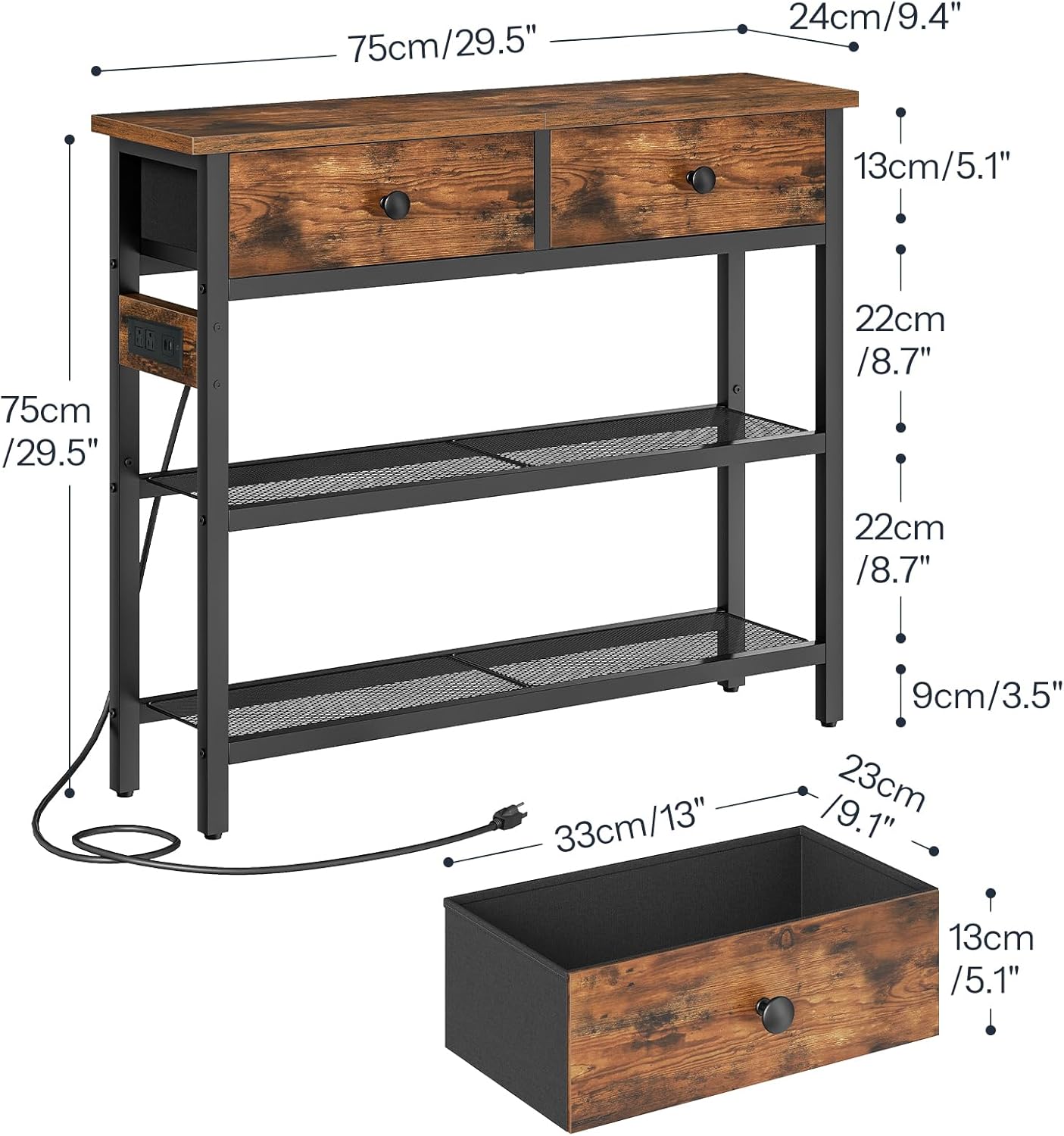
Figure 4: Product dimensions with charging station.
9. Warranty and Support
HOOBRO products are designed for quality and durability. For specific warranty information, please refer to the warranty card included with your purchase or visit the official HOOBRO website. If you encounter any issues or have questions regarding your product, please contact HOOBRO customer support through the retailer where you purchased the item or via the contact information provided on the HOOBRO website.
Please have your model number (BF72XG01 or BF72UXG01) and purchase date ready when contacting support.