
Introduction
This manual provides essential information for the assembly, operation, and maintenance of your Hape Smart Wooden Supermarket. Please read these instructions carefully before use to ensure safe and optimal functionality. This product is designed to encourage imaginative play and develop social and cognitive skills.
Safety Information
Warning: Not suitable for children under 3 years. Contains small parts. Choking hazard.
Remove all packaging materials before giving the toy to a child. Please retain this information for future reference. Minor decorative and color variations may occur.
Setup and Assembly
The Hape Smart Wooden Supermarket requires assembly. Follow the detailed instructions provided in the packaging for proper construction. Ensure all components are securely fastened before allowing children to play.
- Unpack all components and verify against the parts list in the included assembly guide.
- Assemble the main counter structure, ensuring all wooden panels and connectors are correctly aligned.
- Attach the side shelves and the mini-fridge compartment.
- Install the hand-operated conveyor belt mechanism and the interactive cash register unit.
- Place all accessories, such as play food, money, and the shopping bag, in their designated areas.

Figure 1: Overall view of the Hape Smart Wooden Supermarket, showcasing its various play areas and accessories after assembly.
Operating Instructions
The Hape Smart Wooden Supermarket offers multiple interactive features for realistic role-play.
1. Hand-Operated Conveyor Belt
Customers can place their items on the conveyor belt. Turn the red crank handle located on the side of the counter to move items towards the cashier for scanning.
2. Interactive Cash Register and Scanner
The cash register unit includes a smart scanner that displays prices of items. Use the included play bank card with the card reader for simulated transactions. The register also features options for voice recording and music playback to enhance the play experience.
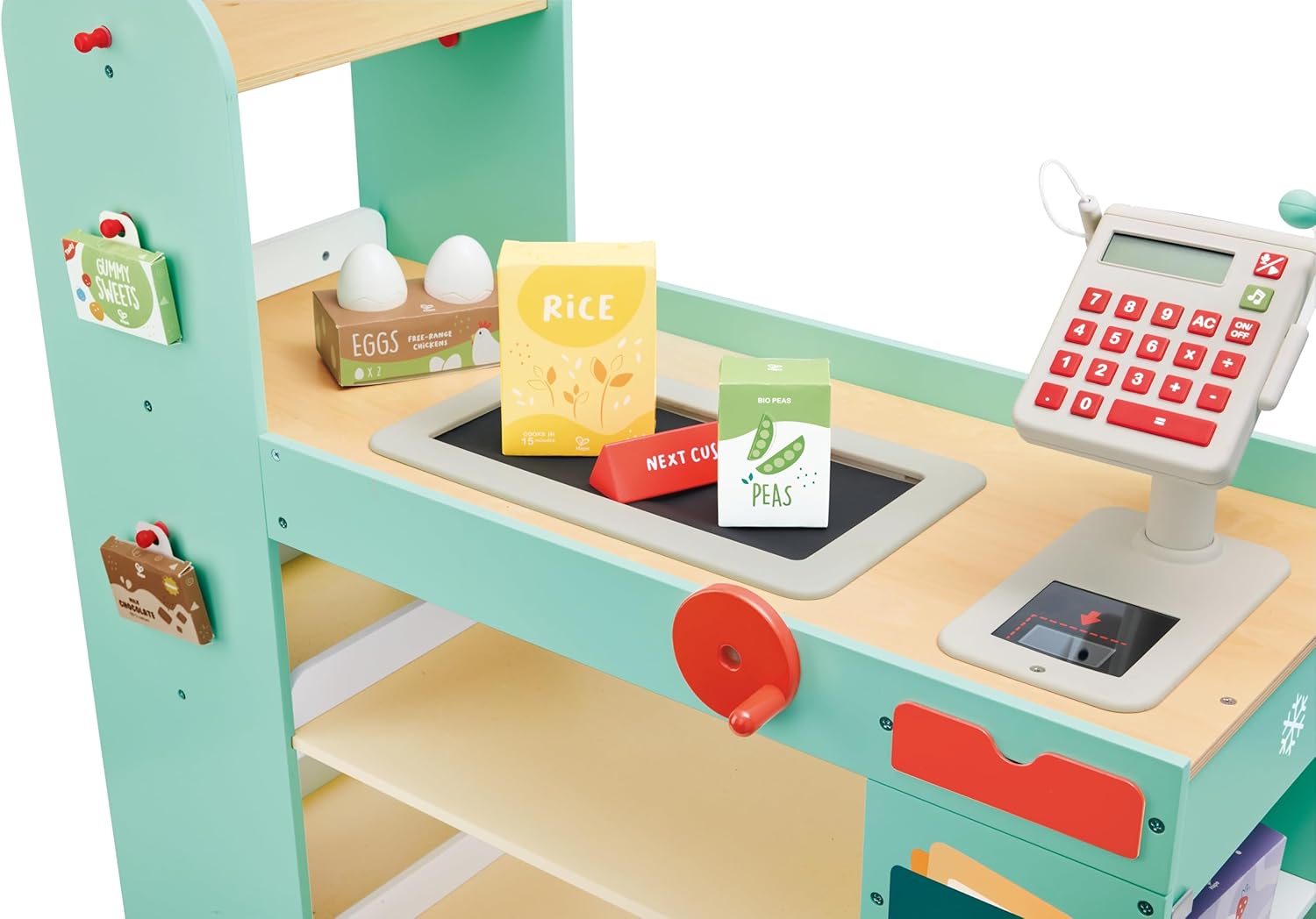
Figure 2: Detailed view of the supermarket's checkout area, including the interactive cash register, scanner, and play food items.
3. Cash Drawer
The cash drawer slides out from beneath the counter, providing a space to store play money and coins for transactions.

Figure 3: View of the cash drawer, containing play money and coins, integrated into the checkout counter.
4. Mini Fridge and Storage
Utilize the mini-fridge on the side of the counter to store play food items. The spacious counter and shelves provide ample space for organizing and displaying various products.

Figure 4: Close-up of the mini-fridge compartment on the side of the supermarket, designed for storing play food items.
5. Accessories and Play Options
The set includes various accessories such as toy groceries, play money, a cotton shopping bag, and flashcards. Use the chalkboard to write prices and discounts, further enhancing imaginative play scenarios.

Figure 5: Rear view of the Hape Smart Wooden Supermarket, showing additional shelving and a hanging fabric shopping bag.

Figure 6: A child applying a barcode sticker to a play item, illustrating the interactive scanning feature.

Figure 7: Children engaging in imaginative play at the Hape Smart Wooden Supermarket, demonstrating its interactive features.
Maintenance
To ensure the longevity of your Hape Smart Wooden Supermarket, follow these maintenance guidelines:
- Cleaning: Wipe surfaces with a slightly damp cloth. Avoid using harsh chemicals or abrasive cleaners, as these can damage the wood finish.
- Storage: Store the toy in a dry environment, away from direct sunlight or extreme temperatures, to prevent warping or fading.
- Inspection: Periodically check all screws and connections to ensure they remain tight. Tighten any loose fasteners as needed.
Troubleshooting
If you encounter any issues with your Hape Smart Wooden Supermarket, consider the following:
- Assembly Issues: If parts do not fit correctly, re-check the assembly instructions to ensure all pieces are oriented and connected as specified.
- Conveyor Belt Not Moving: Ensure the crank handle is properly attached and the belt is free from obstructions.
- Electronic Features (if applicable): If the scanner or cash register's electronic functions are not working, check for battery installation or replacement (batteries not included unless specified).
- Missing Parts: If any parts are missing upon unboxing, contact Hape customer support immediately.
Specifications
| Feature | Detail |
|---|---|
| Product Dimensions | 32.28 x 5.12 x 21.26 inches |
| Item Weight | 31.4 pounds |
| Model Number | E3233 |
| Manufacturer Recommended Age | 36 months - 7 years |
| Material | Wood |
Warranty Information
Specific warranty details for the Hape Smart Wooden Supermarket are not provided in this manual. For information regarding product warranty, please refer to the documentation included with your purchase or contact Hape customer support directly.
Customer Support
For further assistance, questions, or to report any issues with your Hape Smart Wooden Supermarket, please contact Hape customer service. Contact information can typically be found on the product packaging or the official Hape website.