
1. Introduction
Thank you for choosing the FINOTI M66 MAX Professional Drone. This manual provides essential information for safe operation, setup, and maintenance of your drone. Please read it thoroughly before first use to ensure optimal performance and to prevent damage.
Safety Information
Keep away from naked flame or direct heat sources. Always refer to this manual for detailed safety guidelines and operational procedures. Ensure all components are securely attached before flight. Operate the drone in open, clear areas, away from people, animals, and obstacles.
2. Package Contents
The FINOTI M66 MAX Professional Drone package includes the following items:
- 1 x FINOTI M66 MAX Drone
- 1 x Screen Remote Control
- 1 x Battery (Quad Battery variant includes 4 batteries total)
- 1 x Memory Card
- 1 x Card Reader
- 1 x USB Cable
- 1 x Screwdriver
- 4 x Spare Fan Blades
- 1 x Operation Instructions Manual
- 1 x App Instruction Manual
- 1 x Carrying Case
3. Product Features
- Foldable Design: Compact and easy to carry (15×8×7.5cm).
- 8K HD Dual-Lens Camera: Captures high-resolution photos and videos with adjustable shooting angle.
- Screen Remote Control: Features a 4.3-inch screen for real-time 5G WiFi FPV transmission.
- Altitude Hold Mode: Maintains a stable altitude for steady flight.
- Optical Flow Positioning: Enhances stability for precise hovering.
- 360° Obstacle Avoidance: Intelligent perception to prevent collisions.
- One-Key Return: Automatically returns the drone to its takeoff point.
- Headless Mode: Simplifies control by eliminating the need to adjust the drone's orientation.
- Brushless Motors: Provides powerful and quiet flight with strong wind resistance.
- Extended Flight Time: Up to 25 minutes per 3000mAh battery.
- 2.4GHz Anti-Interference Technology: Ensures stable signal transmission.
- Six-Axis Gyroscope: For smoother and more convenient control.
- LED Lights: Enhances visibility and creates spectacular effects, especially in the dark.
- WiFi FPV Function: Connects to the application for real-time transmission and control via mobile phone.
- Trajectory Flight: Draw a flight path on the screen, and the drone will automatically follow it.
- Dual-Lens Switch Function: Allows switching between different camera views.

Figure 1: Visual representation of key drone features.
4. Setup
4.1. Battery Installation
Before operating the drone, ensure the battery is properly installed and charged. Remove any insulating stickers from the battery terminals if present.
Video 1: Demonstrates how to install the battery into the drone and power it on. (Source: QQCHGOL D18 Drone with Dual Camera for Adults 2K)
4.2. Remote Control Setup
The remote control features a built-in screen for direct FPV viewing. Familiarize yourself with the button layout and functions.
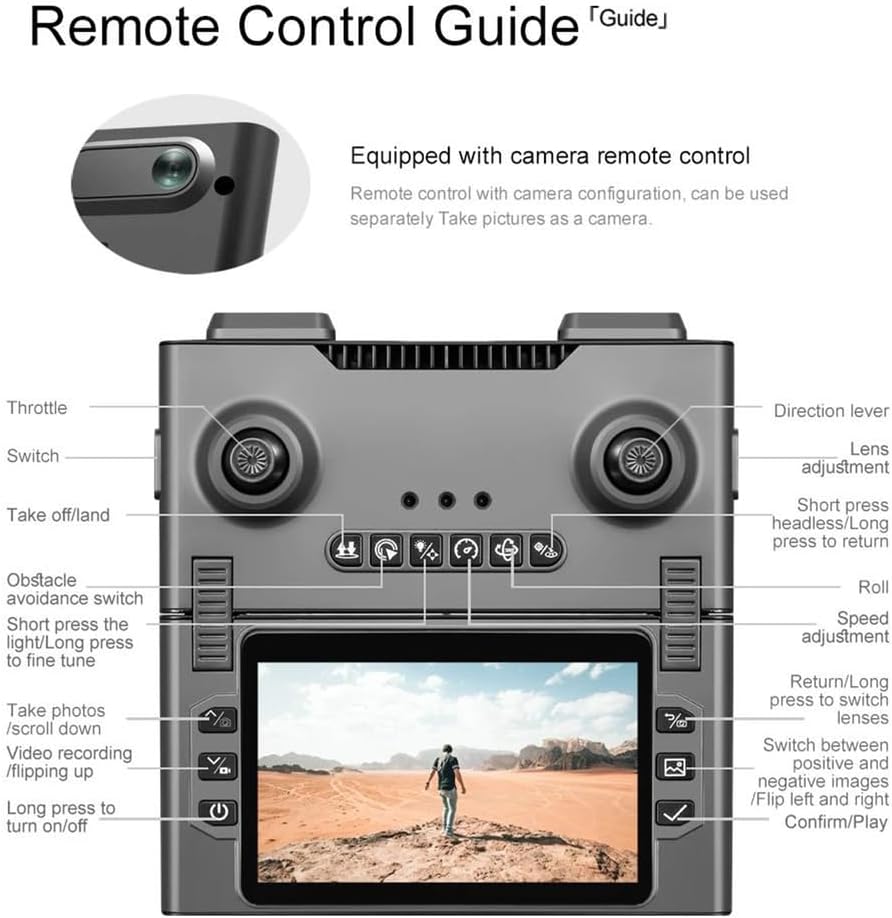
Figure 2: Detailed guide to the remote control buttons and their functions.
To pair the remote control with the drone:
- Power on the drone by pressing and holding the power button.
- Power on the remote control.
- Push the left joystick up and down quickly. The remote will beep, and the drone's lights will become solid, indicating successful pairing.
Video 2: Shows the remote control pairing process with the drone. (Source: QQCHGOL D18 Drone with Dual Camera for Adults 2K)
4.3. App Connection (for Mobile Device FPV)
For mobile device FPV and advanced features, download the companion app:
- Scan the QR code provided in the App Instruction Manual to download the KY UFO app.
- Ensure your phone's GPS location is turned on.
- Connect your mobile device to the drone's Wi-Fi network (usually starts with