
1. Introduction
The DOOGEE Note56X Pro is an Android 16 smartphone designed for optimal performance and user experience. It features a sleek design, a powerful octa-core processor, a high-capacity battery, and advanced camera capabilities. This manual provides essential information for setting up, operating, and maintaining your device.

This image displays the DOOGEE Note56X Pro smartphone in light blue and black, showcasing its sleek profile and key features such as its 8.45mm ultra-thin design, 6150mAh silicon-carbon battery, integrated Gemini AI with Android 16, 128GB expandable ROM, and a 6.56-inch HD+ 90Hz display.
2. What's in the Box
Verify that all items are present in your product packaging:
- 1 x DOOGEE Note56X Pro Smartphone
- 1 x Charging Cable
- 1 x Charger
- 1 x Screen Protector (pre-applied)
- 1 x SIM Card Ejection Tool
- 1 x Protective Case
- 1 x Packaging Box
- 1 x User Manual
- 1 x Service Card
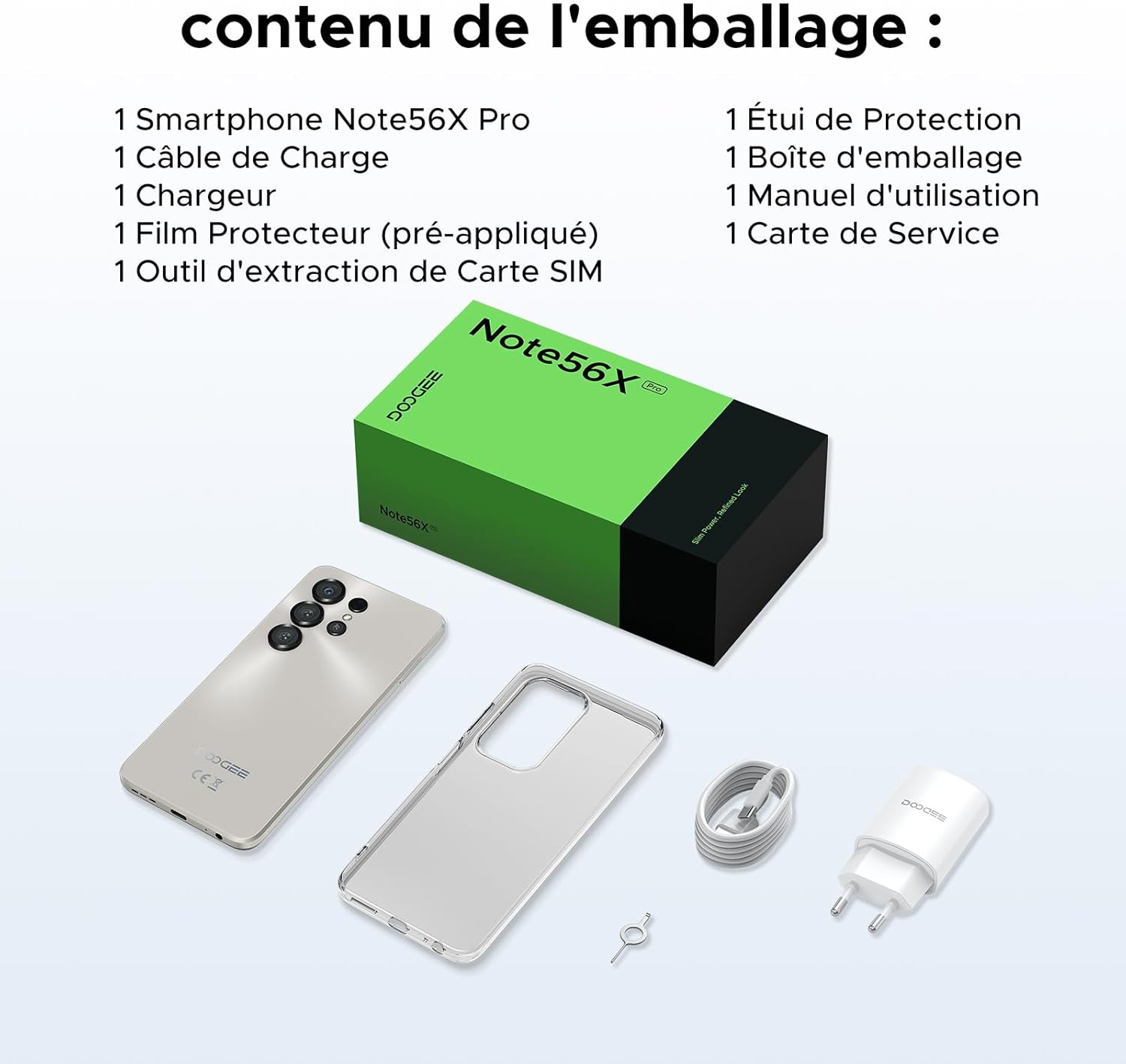
This image shows the contents included in the DOOGEE Note56X Pro packaging: the smartphone, a charging cable, a charger, a pre-applied screen protector, a SIM card ejection tool, a protective case, the packaging box, a user manual, and a service card.
3. Getting Started
3.1. Inserting SIM Cards
The DOOGEE Note56X Pro supports Dual SIM functionality. To insert your SIM card(s):
- Locate the SIM card tray on the side of the device.
- Use the provided SIM ejection tool to open the tray.
- Place your Nano-SIM card(s) and/or microSD card into the tray with the gold contacts facing down.
- Carefully push the tray back into the slot until it is flush with the device.
3.2. Powering On/Off
- To Power On: Press and hold the Power button until the DOOGEE logo appears.
- To Power Off: Press and hold the Power button until the power options appear on the screen, then select "Power off".
- To Restart: Press and hold the Power button until the power options appear, then select "Restart".
3.3. Initial Setup
Upon first power-on, follow the on-screen prompts to complete the initial setup:
- Select your language.
- Connect to a Wi-Fi network.
- Sign in with your Google account or create a new one.
- Set up screen lock (PIN, pattern, password, fingerprint, or Face ID).
- Review and accept terms and conditions.
4. Operating Your Device
4.1. Display
The Note56X Pro features a 6.56-inch HD+ IPS Waterdrop display with a 90Hz refresh rate, offering smooth visuals and vibrant colors. The 90% screen-to-body ratio provides an immersive viewing experience.

This graphic highlights the display features of the DOOGEE Note56X Pro, including a 90Hz refresh rate for smooth visuals, support for 16.7 million colors, and a 90% screen-to-body ratio for an immersive viewing experience.
A brief video demonstrating the smooth gaming experience on the DOOGEE Note56X Pro's 6.56-inch HD+ 90Hz display, showing responsive gameplay.
4.2. Performance
Powered by an UNISOC T7225 Octa-Core processor, the Note56X Pro ensures fluid multitasking and efficient application launch. It comes with 32GB of RAM (4GB physical + 28GB virtual) and 128GB of internal storage, expandable up to 2TB via a TF card (sold separately).

This image presents a technical diagram of the UNISOC T7225 Octa-Core processor, highlighting its 1.8 GHz high frequency and Mali G57 ARM GPU, ensuring smooth performance for web browsing, online learning, and chats.

This graphic illustrates the memory configuration of the DOOGEE Note56X Pro, featuring 32GB RAM (4GB physical + 28GB virtual) and 128GB ROM, expandable up to 2TB with a TF card (sold separately), providing ample space for applications and media.
A short video highlighting the internal components of the DOOGEE Note56X Pro, specifically the Octa-Core UNISOC T7225 processor and the 32GB RAM (4GB + 28GB virtual) and 128GB ROM configuration.
4.3. Battery
Equipped with a 6150mAh Silicon-Carbon battery, the Note56X Pro offers extended usage time and supports 5W reverse charging. The battery is designed for durability, with up to 1000 charge/discharge cycles and an estimated 4-year lifespan.

A detailed diagram showing the internal structure of the 6150mAh Silicon-Carbon battery within the DOOGEE Note56X Pro, emphasizing its extended endurance, 1000 charge/discharge cycles, 4-year lifespan, 20% reduced size, and 5W reverse charging capability.
A short video showcasing the sleek design, vertical lens arrangement, ultra-thin 8.45mm body, lightweight 195g build, and available colors (Midnight Black, Glacier Blue, Titanium Grey Mist) of the DOOGEE Note56X Pro.
4.4. Camera
Capture clear and vibrant photos with the Note56X Pro's camera system:
- Main Camera: 13MP with AI recognition, HDR, Pro Mode, Smile Capture, Panoramas, Burst Mode, Night Mode, and Fun Filters.
- Front Camera: 8MP with Beauty Mode and Portrait Mode for natural selfies.

This graphic highlights the features of the 13MP main camera on the DOOGEE Note56X Pro, including AI recognition, HDR, Pro Mode, Smile Capture, Panoramas, Burst Mode, Night Mode, and Fun Filters, illustrated with a landscape photo taken by the phone.

This image showcases the 8MP front camera features of the DOOGEE Note56X Pro, including Beauty Mode and Portrait Mode, designed to simplify photography and produce bright, natural selfies.

This graphic details the intelligent features of the Google Smart Camera on the DOOGEE Note56X Pro, such as displaying search results, text extraction and translation, homework analysis, plant and animal identification, and online search capabilities.
4.5. Connectivity
The device supports 4G cellular networks, Wi-Fi, Bluetooth 5.0, and NFC for secure contactless payments. It also includes GPS for precise navigation and OTG functionality for connecting external devices.
4.6. Security Features
The Note56X Pro offers multiple security options to protect your data:
- Face ID: Unlock your phone using facial recognition.
- Fingerprint Recognition: A side-mounted fingerprint sensor provides quick and secure access.
- Standard PIN, Pattern, and Password options are also available.
4.7. Operating System and AI
Running on Android 16, the Note56X Pro provides an intuitive and secure user experience. It integrates Google Gemini AI, offering intelligent assistance for various tasks.

A visual representation of the Android 16 operating system interface on the DOOGEE Note56X Pro, showcasing various application icons and a clean, intuitive user experience.

This image shows the Google Gemini AI chat interface on the DOOGEE Note56X Pro, demonstrating its capability for planning vacations, discussing current events, and practicing interview questions.
5. Specifications
| Feature | Specification |
|---|---|
| Brand | DOOGEE |
| Model Name | Note56X Pro |
| Operating System | Android 16 |
| Screen Size | 6.56 Inches |
| Screen Resolution | 720 x 1612 |
| Refresh Rate | 90 Hz |
| Processor | UNISOC T7225 Octa-Core |
| Installed RAM Size | 32 GB (4GB physical + 28GB virtual) |
| Memory Storage Capacity | 128 GB (Expandable up to 2TB) |
| Battery Type | Lithium-polymer |
| Battery Capacity | 6150 mAh |
| Cellular Technology | 4G |
| Wireless Carrier | All carriers (Unlocked) |
| Connectivity | Wi-Fi, Bluetooth 5.0, NFC |
| Special Features | Dual SIM, Integrated GPS, USB OTG Support, Face ID, Fingerprint Recognition |
| Audio Jack | 3.5 mm |
| Dimensions (Thickness) | 8.45 mm |
| Weight | 195 g |

A side view of the DOOGEE Note56X Pro, emphasizing its ultra-thin 8.45mm profile and lightweight 195g construction, designed for easy portability and comfortable handling throughout the day.

This image displays the DOOGEE Note56X Pro in its available elegant colors: Midnight Black, Titanium Grey Mist, and Glacier Blue, showcasing the aesthetic options for the device.
6. Maintenance
To ensure the longevity and optimal performance of your DOOGEE Note56X Pro, follow these maintenance guidelines:
- Cleaning: Use a soft, lint-free cloth to clean the screen and body. Avoid abrasive materials or harsh chemicals.
- Software Updates: Regularly check for and install system updates to benefit from the latest features, security patches, and performance improvements. Go to Settings > System > System update.
- Battery Care: Avoid extreme temperatures. Do not let the battery completely drain frequently. Use the original charger for optimal charging.
- Storage Management: Periodically clear unnecessary files and uninstall unused apps to free up storage space and maintain device speed.
- Protection: Use the provided protective case and screen protector to guard against scratches and minor impacts.
7. Troubleshooting
If you encounter issues with your DOOGEE Note56X Pro, try the following solutions:
- Device Not Turning On: Ensure the battery is charged. Connect the charger and wait a few minutes before attempting to power on again.
- Screen Unresponsive: Force restart the device by pressing and holding the Power button for about 10-15 seconds.
- Apps Crashing/Freezing: Clear the cache of the problematic app (Settings > Apps > [App Name] > Storage & cache > Clear cache). If the issue persists, uninstall and reinstall the app.
- Poor Battery Life: Check background app usage (Settings > Battery). Reduce screen brightness, disable unused features like Wi-Fi, Bluetooth, GPS when not needed.
- Network Connectivity Issues: Toggle Airplane Mode on and off. Restart the device. Check SIM card insertion. Reset network settings (Settings > System > Reset options > Reset Wi-Fi, mobile & Bluetooth).
- Fingerprint/Face ID Not Working: Ensure your fingers are clean and dry for fingerprint scanning. For Face ID, ensure adequate lighting and that your face is clearly visible to the front camera. Re-register your fingerprint or face if necessary.
- Slow Performance: Close unused background apps. Clear cache and temporary files. Consider a factory reset as a last resort (Settings > System > Reset options > Erase all data (factory reset) - Note: This will erase all data on your phone. Back up important information first.).
8. Warranty and Support
Your DOOGEE Note56X Pro comes with a 24-month warranty and a 30-day return policy. For any questions or assistance, please contact DOOGEE customer service via Amazon. Our dedicated support team is available to help you.

This image displays DOOGEE's customer service commitments: a 30-day money-back and free return guarantee, a 2-year limited warranty, and 24/7 online individual assistance.


