1. Introduction
Welcome to the instruction manual for your Godox LE200BI LITEMONS Bi-Color LED Light. This document provides essential information for the safe operation, proper setup, and effective maintenance of your device. Please read this manual thoroughly before using the product to ensure optimal performance and longevity.
2. Safety Instructions
To prevent damage to the product or injury to yourself or others, please observe the following safety precautions:
- Do not expose this product to rain or moisture.
- Do not disassemble. If repairs become necessary, this product must be sent to an authorized maintenance center.
- Keep out of reach of children.
- Do not operate in the presence of flammable gases or liquids.
- Always use the specified power adapter and ensure the voltage is compatible with the device.
- Avoid direct eye exposure to the light source, as it can cause eye damage.
- Ensure proper ventilation during use to prevent overheating.
3. Package Contents
Please check that all items are included in your package:
- Light Body x1
- Reflector BR30A x1
- AC Power Cord x1

Image description: The Godox LE200BI Bi-Color LED Light unit, a BR30A reflector, and an AC power cord, along with a cleaning cloth, illustrating the complete package contents.
4. Product Overview and Features
The Godox LE200BI is a high-performance bi-color LED light designed for various photography and filmmaking applications, offering versatility and precise control.
4.1 All-in-One Design
The LE200BI features an integrated power supply, eliminating the need for an external adapter. This design enhances portability and simplifies setup, making it easier to transport and quicker to deploy on set.
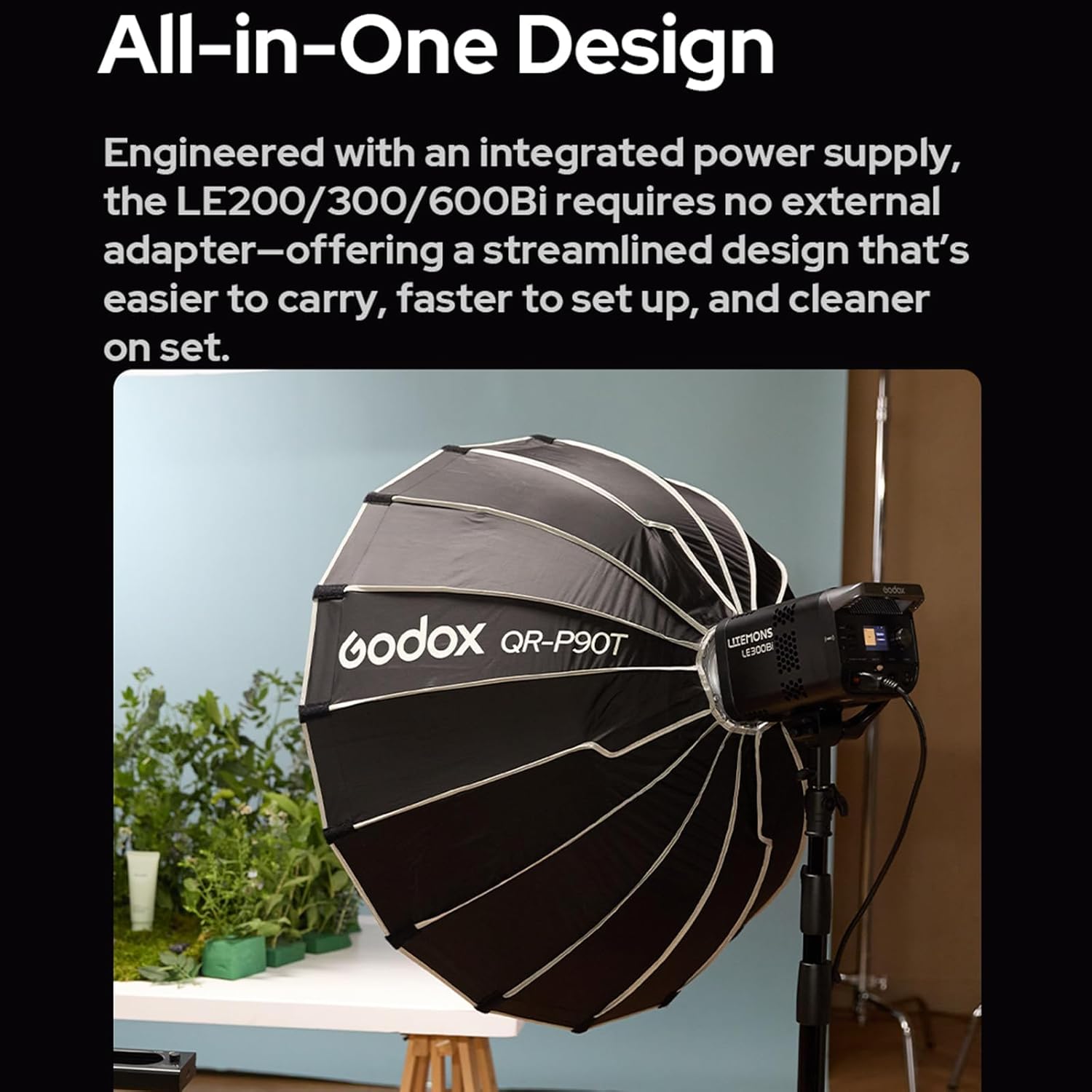
Image description: A Godox LE200Bi light unit attached to a large parabolic softbox, demonstrating its compact, integrated design and ease of use in a studio setting.
4.2 Exceptional Color Accuracy
This light boasts high TLCI and CRI ratings of up to 98, ensuring accurate color reproduction. This makes it suitable for professional video production, livestreaming, and photography where precise color rendition is critical.

Image description: A person being illuminated by the Godox LE200Bi light, highlighting its color accuracy for skin tones and overall scene rendering in a vibrant setting.
4.3 Adjustable CCT with Built-in Creative FX
The LE200BI offers an adjustable Correlated Color Temperature (CCT) range from 2800K (warm) to 6500K (cool). It also includes 11 built-in special effects (FX), such as TV flicker, lightning, and candlelight, to add creative energy to productions.

Image description: Two Godox LE series lights, one set to a warm 2800K and the other to a cool 6500K, illustrating the bi-color temperature adjustment range from soft glows to bright tones.
4.4 Professional and Efficient Control
Control options include wired DMX, CRMX network integration (with optional TimoLink RX), and wireless Bluetooth control via the Godox Light App. These methods allow for seamless adjustments of brightness, CCT, and FX effects.

Image description: A collage showing three control methods for the Godox LE series: a TimoLink RX module connected to the light, a DMX control board in use, and a smartphone displaying the Godox Light App interface.
4.5 Ultra-Cool and Whisper-Quiet Operation
Constructed with a robust metal body and an ultra-quiet fan, the LE200BI ensures efficient heat dissipation and consistent performance, even during extended use, without introducing fan noise into recordings.

Image description: A Godox LE300Bi light unit with a visual representation of cool air flowing through its vents, emphasizing its quiet and efficient cooling system.
4.6 Bowens Mount Compatibility
The Godox LE series supports both flat and standard Bowens mount accessories, providing extensive flexibility for attaching various light modifiers such as softboxes, reflectors, and snoots.

Image description: A Godox LE series light shown with various Bowens mount light modifiers, including a UL-Box, QR-PT Quick Release Parabolic Softbox, and UL-Octa Box, demonstrating its versatility.
5. Setup
5.1 Attaching the Reflector
- Align the three mounting pins on the BR30A reflector with the corresponding slots on the light's Bowens mount.
- Insert the reflector into the mount and twist clockwise until it locks securely into place.
5.2 Power Connection
- Connect the provided AC power cord to the power input port on the back of the LE200BI light.
- Plug the other end of the AC power cord into a standard wall power outlet.
5.3 Mounting the Light
- Attach the integrated mounting bracket of the LE200BI to a compatible light stand.
- Secure the light to the stand by tightening the locking knob on the mounting bracket.
- Adjust the tilt angle of the light as needed and tighten the tilt locking knob.
6. Operating Instructions
6.1 Powering On/Off
Press the power button located on the control panel to turn the light on or off.
6.2 Adjusting Brightness and Color Temperature
Use the dedicated control dials on the back of the unit to adjust the light's brightness (0-100%) and color temperature (2800K-6500K). Rotate the dials clockwise to increase values and counter-clockwise to decrease them.
6.3 Using FX Effects
Access the menu on the control panel to browse and select from the 11 built-in FX effects. Once an effect is selected, you can often adjust its parameters (e.g., speed, intensity) using the control dials.
6.4 Bluetooth Control (Godox Light App)
- Download the 'Godox Light' App from your mobile device's app store (available for iOS and Android).
- Ensure Bluetooth is enabled on your mobile device.
- Open the Godox Light App and follow the on-screen instructions to search for and connect to your LE200BI light.
- Once connected, use the app interface to wirelessly control brightness, CCT, and FX effects.
- If connection issues occur, press the Bluetooth reset button on the light unit and try reconnecting.
6.5 DMX Control
Connect a DMX controller to the light's DMX input and output ports using standard DMX cables. Configure the DMX address on the light's control panel. Refer to the DMX channel chart (typically found in a separate DMX manual or on the manufacturer's website) for specific control parameters.
7. Maintenance
Proper maintenance ensures the longevity and optimal performance of your Godox LE200BI light:
- Cleaning: Use a soft, dry cloth to clean the light body. For stubborn dirt, a slightly damp cloth can be used, followed by a dry one. Do not use abrasive cleaners, solvents, or strong detergents.
- Ventilation: Regularly check that the ventilation openings are clear of dust and debris to ensure efficient heat dissipation.
- Storage: When not in use, store the light in a dry, cool environment, away from direct sunlight and excessive humidity.
- Cable Care: Inspect power cables and connections periodically for any signs of wear or damage. Replace damaged cables immediately.
8. Troubleshooting
If you encounter issues with your LE200BI light, refer to the following common problems and solutions:
8.1 Light Does Not Turn On
- Check Power Connection: Ensure the AC power cord is securely connected to both the light and a functional power outlet.
- Power Outlet: Test the power outlet with another device to confirm it is supplying power.
- Power Button: Confirm the power button has been pressed firmly.
8.2 Light Flickers or Output is Inconsistent
- Power Supply: Verify that the power supply is stable and within the specified voltage range.
- Cable Connections: Check all cable connections for looseness or damage.
- Overheating: Ensure the light has adequate ventilation and is not operating in an excessively hot environment.
8.3 Bluetooth Connection Issues
- Bluetooth Enabled: Confirm Bluetooth is enabled on your mobile device.
- App Restart: Close and restart the Godox Light App.
- Light Restart: Turn the LE200BI light off and then on again.
- Bluetooth Reset: Press the dedicated Bluetooth reset button on the light unit, then attempt to reconnect via the app.
9. Specifications
| Model | LE200BI |
| Power Output | 220W |
| Color Temperature Range | 2800K~6500K |
| CRI (Color Rendering Index) | ≈98 |
| TLCI (Television Lighting Consistency Index) | ≈98 |
| FX Effects | 11 built-in effects |
| Mount Type | Bowens Mount |
| Control Methods | On-board, DMX, Bluetooth App |
| Package Dimensions | 16.73 x 11.02 x 8 inches |
| Item Weight | 9.26 pounds |
| Manufacturer | Godox |
| Date First Available | September 5, 2025 |
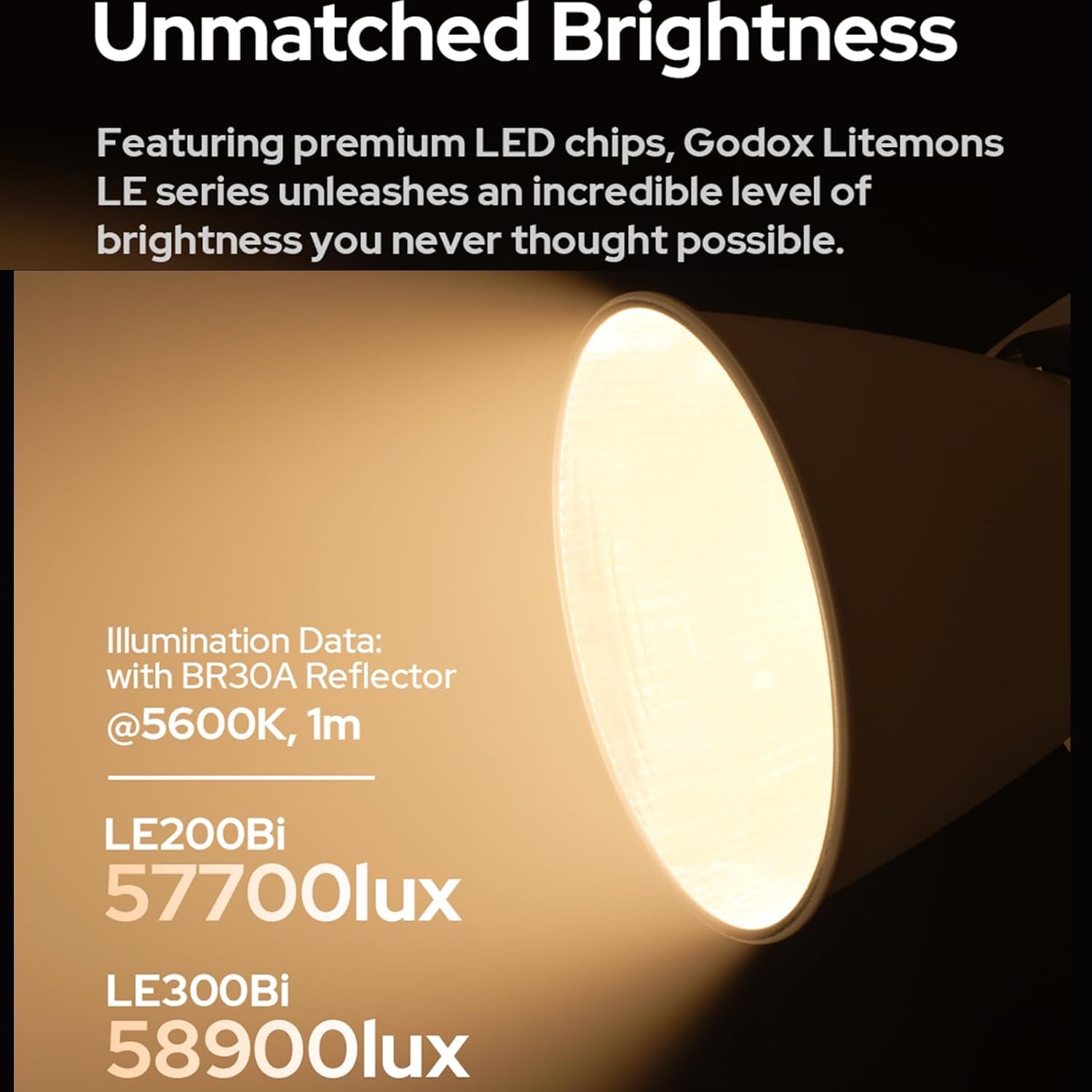
Image description: Illumination data for the Godox LE200Bi and LE300Bi lights, showing 57700Lux for LE200Bi and 58900Lux for LE300Bi at 1 meter with a BR30A Reflector at 5600K.
10. Warranty and Support
For detailed warranty information, technical support, or service inquiries, please refer to the official Godox website or contact your local authorized distributor. Please retain your purchase receipt as proof of purchase for any warranty claims.


