1. Introduction
The Blütezeit MWK30 Wireless Keypad provides secure PIN code access for compatible 433MHz automatic gate openers. This manual outlines the installation, setup, operation, and maintenance procedures to ensure optimal performance and longevity of your device. Please read these instructions carefully before installation and use.
2. Safety Information
- Ensure all power to the gate opener system is disconnected before performing any installation or maintenance.
- Keep batteries out of reach of children. If swallowed, seek immediate medical attention.
- Do not disassemble, short circuit, or expose batteries to high temperatures or fire.
- Only use the specified battery type (2 x AA batteries).
- Install the keypad in a location that is easily accessible but protected from direct impact.
3. Package Contents
- 1 × Blütezeit MWK30 Wireless Keypad
- 1 × IP54 Waterproof Protective Cover
- 2 × AA Batteries
- 1 × Mounting Kit (screws and bolts)
- 1 × Small Screwdriver
4. Product Overview
The Blütezeit MWK30 Wireless Keypad is designed for secure and convenient access to your property. It features a durable, weather-resistant design and is compatible with Blütezeit 433MHz gate openers (ME-GO, ME-BG, ME-MS series).
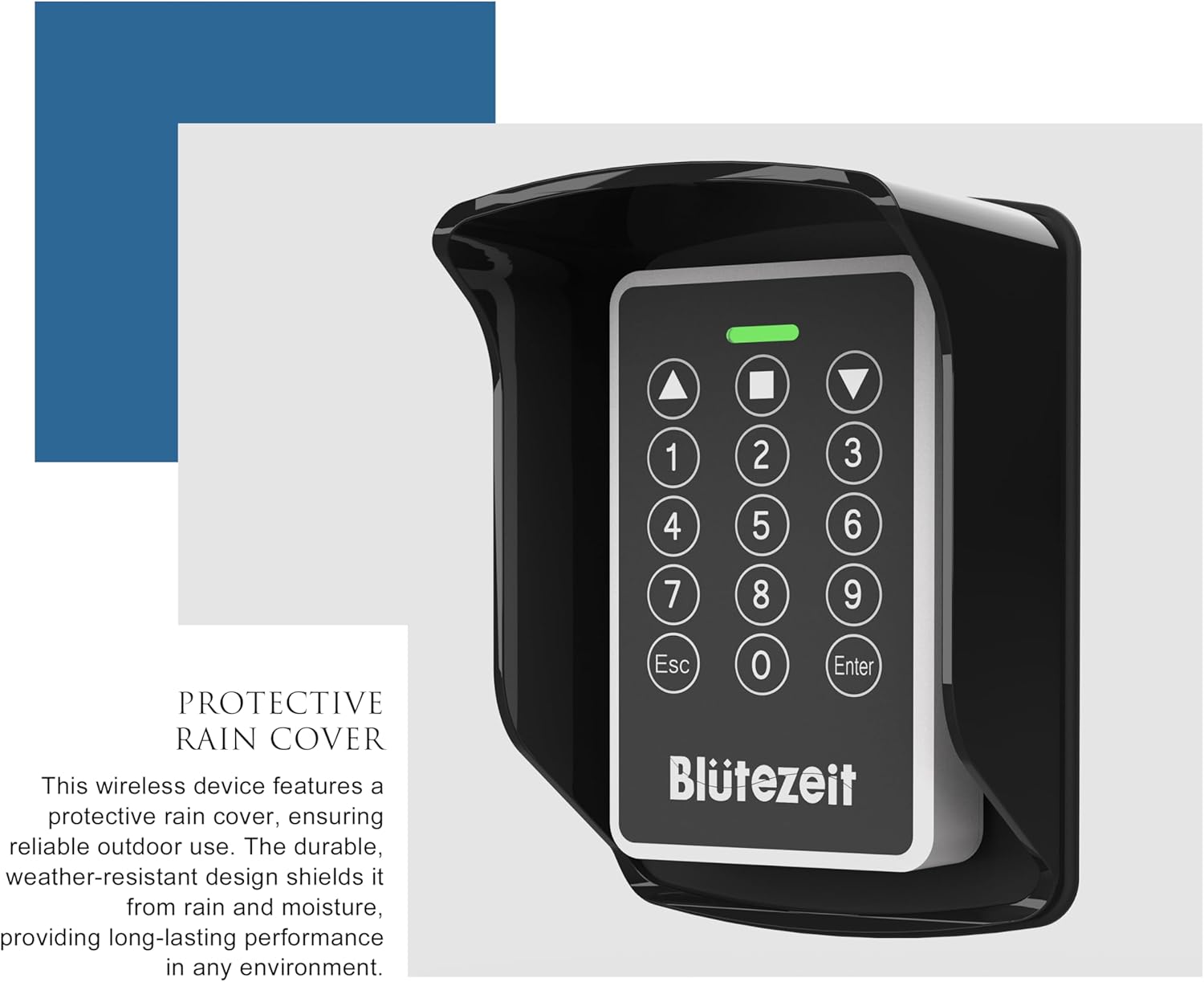
Image 4.1: Blütezeit MWK30 Wireless Keypad with its IP54 waterproof protective cover installed. The cover shields the keypad from environmental elements, ensuring reliable outdoor use.

Image 4.2: The MWK30 keypad is compatible with Blütezeit ME-GO, ME-BG, and MS series sliding and swing gate openers, operating on a 433MHz frequency.
5. Installation
- Open the Keypad: Use the supplied screwdriver to loosen the screw at the bottom of the wireless keypad. Slide off the back cover to access the battery compartment and mounting holes.

Image 5.1: The keypad with its back cover removed, showing the internal components and battery slots.
- Insert Batteries: Insert the two included AA batteries into the battery compartment, ensuring correct polarity (+/-).

Image 5.2: Close-up view of the battery compartment with two AA batteries being inserted, ensuring correct orientation.
- Close the Keypad: Slide the back cover back into place and tighten the screw at the bottom. Press any button to confirm the keypad is powered on and functioning.
- Mount the Keypad: Use the provided mounting kit (screws and bolts) to securely attach the keypad to a desired surface. Ensure the location allows for optimal signal transmission to your gate opener.

Image 5.3: The MWK30 keypad mounted on a wall, demonstrating a typical installation scenario for convenient access.
- Install Waterproof Cover: For outdoor installations, secure the IP54 waterproof protective cover over the keypad to shield it from dust and rain.
6. Setup and Pairing
The MWK30 keypad can be paired with your Blütezeit gate opener remote in two modes: Loop Mode and 4-Button Mode. Ensure your original remote is working properly before proceeding.
6.1. Pairing in Loop Mode
- Clear Existing Codes: Enter your personal password on the keypad. The LED will turn green, and you'll hear three beeps. Press the 'Up Arrow' and 'Square' buttons together. The green LED will stay on, and the red LED will flash rapidly, indicating successful code clearing.
- Pair Remote: Press the 'Up Arrow' key on the keypad. Then, point your round MS remote at the 'Enter' area of the keypad and press its first button. A fast-flashing red LED on the keypad confirms successful pairing.
- Test: Test the keypad by entering your password and pressing the paired button. The gate opener should respond normally.
Video 6.1: Detailed instructions on how to pair the Blütezeit MWK30 Keypad with an MS Remote in Loop Mode. This video demonstrates the steps for clearing existing codes and successfully pairing the keypad for gate operation.
6.2. Pairing in 4-Button Mode
- Switch Remote to 4-Button Mode: Press and hold the S2 button on your gate opener's control board for 5 seconds to enter the Advanced Menu. The display will show "tm". Press the S1 button 8 times to switch to RM (Radio Mode). Press S2 to confirm, then S1 again to switch to "4b" (4-button mode). Press S2 again to confirm. The display will show "OK" and return to RM. Wait for the system to complete the setup.
- Clear Keypad Codes: Enter your personal password on the keypad. Once the LED turns green, press the 'Up Arrow' and 'Square' buttons together to clear the codes.
- Pair Open Button: Press the 'Up Arrow' button on the keypad. Point your MS remote at the 'Enter' area of the keypad and press the 'Open' button on the remote. A fast-flashing red LED confirms success.
- Pair Stop and Close Buttons: Repeat the same steps to pair the 'Stop' (Square) and 'Close' (Down Arrow) buttons on the keypad with the corresponding functions on your remote.
- Test: Test the keypad by entering your password and pressing the paired buttons. The gate opener should respond smoothly.
Video 6.2: This video provides a comprehensive guide on how to pair the Blütezeit MWK30 Keypad with an MS Remote in 4-Button Mode, including switching the remote mode and pairing each function.
7. Operation
7.1. Accessing the Gate
- Ensure the keypad is active (press any button if the lights are off).
- Enter your 6-digit PIN code.
- Press the 'Enter' button.
- If the PIN is correct, the green LED will light up, and the gate will operate according to the programmed function (open, close, stop).
- If the PIN is incorrect, the red LED will flash, and a long beep will sound. Re-enter the correct PIN.
7.2. Changing the Password
Important: The keypad can store only one password at a time. Once a new password is set, it cannot be reset if forgotten. Be sure to remember your new password.
- When the keypad is in standby mode (lights off), press and hold the 'Enter' button for 5 seconds until the buzzer sounds 5 times.
- Enter the current 6-digit password. The buzzer will sound 3 times if correct.
- Enter your new 6-digit password. The buzzer will sound 3 times.
- Re-enter the new 6-digit password to confirm. The buzzer will sound 3 times, indicating the password has been successfully changed.
- Test the new password to ensure it works correctly.
8. Maintenance
- Battery Replacement: When the keypad's response becomes slow or the LED indicator is dim, it's time to replace the batteries. Loosen the bottom screw, slide off the back cover, replace the two AA batteries, and re-secure the cover.
- Cleaning: Clean the keypad surface with a soft, damp cloth. Do not use abrasive cleaners or solvents.
- Protective Cover: Regularly check the IP54 waterproof cover for any damage or cracks, especially if installed outdoors. Replace if necessary to maintain weather protection.
9. Troubleshooting
| Problem | Possible Cause | Solution |
|---|---|---|
| Keypad not responding | Dead batteries | Replace AA batteries. |
| Gate not opening/closing after entering PIN | Incorrect pairing or cleared codes | Re-pair the keypad with your gate opener remote (refer to Section 6). |
| Red LED flashes rapidly during pairing | Successful code clearing/pairing | This is normal. Proceed to the next step. |
| Cannot change password | Incorrect current password entered | Ensure you are entering the correct current password. If forgotten, the password cannot be reset. |
| Keypad not working in wet conditions | Waterproof cover not installed or damaged | Ensure the IP54 waterproof cover is correctly installed and undamaged. |
10. Specifications
- Model: MWK-30
- Frequency: 433 MHz
- Power Source: 2 × AA Batteries
- Waterproof Rating: IP54 (with protective cover)
- Dimensions: 2.95 x 0.98 x 4.72 inches
- Item Weight: 4.9 ounces
- Compatibility: Blütezeit ME-GO, ME-BG, ME-MS series gate openers
11. Warranty and Support
Blütezeit products are designed for reliability and performance. For any questions or support, please do not hesitate to contact us:
- Email: support@blutezeit.com
- Tel: +1 (213) 257-6838 (US) - Monday-Friday: 24-hour Service
- Website: www.blutezeit.com
Kindly include your Product Model, Purchasing Date & Site, Order, and your contact information. All your concerns will be replied within 24 hours.


