
1. Product Overview
This manual provides detailed instructions for the Karcher Cordless Pressure Washer OC Handy Compact CB 1.328-125.0 and the Karcher Handheld Cleaner CVH 3 1.198-357.0. These devices are designed for convenient and efficient cleaning tasks both indoors and outdoors. The Cordless Pressure Washer offers portable high-pressure cleaning without the need for a fixed water tap or power source, while the Handheld Cleaner provides quick and easy vacuuming for various surfaces.
Key Features of the Cordless Pressure Washer:
- Portability: Compact, palm-sized design for easy transport.
- Independence: Operates without a direct water tap connection or external power supply.
- Versatility: Ideal for quick cleaning of outdoor equipment such as sports gear, camping items, fishing equipment, and bicycles.
Key Features of the Handheld Cleaner:
- Lightweight: Extremely light, comparable to a single plastic bottle, for comfortable use.
- Powerful Suction: Efficiently cleans various surfaces.
- Large Dust Container: 0.15L capacity reduces the frequency of emptying.
- Wide Application: Suitable for cleaning sofas, window sashes, bathroom floors, car interiors, stairs, kitchen counters, and more.
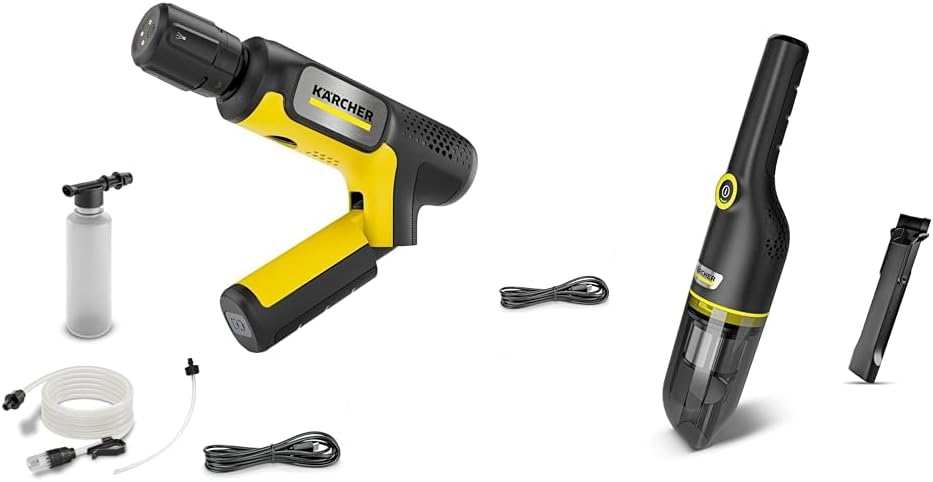
Image 1.1: The Karcher Cordless Pressure Washer OC Handy Compact CB 1.328-125.0 and Handheld Cleaner CVH 3 1.198-357.0 included in the set.
2. Setup
2.1 Cordless Pressure Washer Setup
- Charge the Battery: Before first use, fully charge the device's battery using the provided charger. Ensure the charging indicator shows a full charge.
- Connect Water Supply:
- Using a Bucket: Place the suction hose with filter into a bucket of clean water. Ensure the filter is fully submerged.
- Using a Water Tap (Optional Adapter): If using an optional adapter for direct tap connection, attach it securely to the device and the tap.
- Attach Spray Nozzle: Select the appropriate spray nozzle for your cleaning task and securely attach it to the spray gun.
2.2 Handheld Cleaner Setup
- Charge the Battery: Fully charge the handheld cleaner's battery before initial use. The charging status will be indicated by the device's LED.
- Assemble Attachments: Attach any desired nozzles or brushes (e.g., crevice tool, brush nozzle) to the cleaner's suction inlet as needed for your cleaning task.
- Check Dust Container: Ensure the dust container is empty and properly secured before operation.
3. Operating Instructions
3.1 Operating the Cordless Pressure Washer
- Power On: Press the power button to turn on the pressure washer.
- Prime the Pump: If using a bucket, hold the spray gun open until water flows out steadily, indicating the pump is primed.
- Begin Cleaning: Direct the spray nozzle towards the surface to be cleaned, maintaining an appropriate distance to avoid damage. Adjust the spray pattern if your nozzle allows.
- Power Off: Release the trigger and press the power button to turn off the device after use.
Important: Always test on an inconspicuous area first. Do not aim the spray at people, animals, or electrical equipment.
3.2 Operating the Handheld Cleaner
- Power On: Press the power button to start the handheld cleaner.
- Vacuuming: Move the suction inlet over the area to be cleaned. Use appropriate attachments for corners, crevices, or delicate surfaces.
- Power Off: Press the power button again to turn off the device.
- Empty Dust Container: Regularly empty the dust container to maintain optimal suction power.
3.3 Product Videos
Video 3.1: Demonstration of the Karcher Cordless Pressure Washer in use (0:45 duration).
Video 3.2: Overview of the Karcher Handheld Cleaner features (0:35 duration).
Video 3.3: Detailed usage guide for the Karcher Handheld Cleaner (1:04 duration).
Video 3.4: Comprehensive demonstration of both Karcher devices in various cleaning scenarios (2:28 duration).
Video 3.5: Quick guide to using the Karcher cleaning tools (1:12 duration).
Video 3.6: Short demonstration of the Karcher Handheld Cleaner's effectiveness (0:34 duration).
Video 3.7: Quick overview of the Karcher Cordless Pressure Washer's portability (0:30 duration).
Video 3.8: Demonstration of the Karcher Cordless Pressure Washer's quick setup (0:45 duration).
4. Maintenance
4.1 Cordless Pressure Washer Maintenance
- Clean Nozzles: After each use, rinse the spray nozzle to prevent blockages.
- Filter Cleaning: Regularly check and clean the water intake filter to ensure proper water flow and prevent debris from entering the pump.
- Storage: Store the device in a dry, frost-free location. Ensure all water is drained from the pump and hoses before storing to prevent freezing damage.
- Battery Care: Store the battery in a partially charged state if not used for extended periods. Avoid fully discharging the battery before recharging.
4.2 Handheld Cleaner Maintenance
- Empty Dust Container: Empty the dust container after each use or when it reaches its maximum capacity to maintain suction power.
- Clean Filter: The cleaner's filter should be regularly cleaned according to the instructions in the full product manual. A dirty filter can reduce suction performance.
- Wipe Down: Wipe the exterior of the cleaner with a damp cloth to remove dust and dirt.
- Battery Care: Follow general battery care guidelines, similar to the pressure washer, to prolong battery life.
5. Troubleshooting
5.1 Cordless Pressure Washer Issues
| Problem | Possible Cause | Solution |
|---|---|---|
| No water flow / Low pressure |
|
|
| Device does not turn on |
|
|
5.2 Handheld Cleaner Issues
| Problem | Possible Cause | Solution |
|---|---|---|
| Low suction power |
|
|
| Device does not turn on |
|
|
6. Specifications
| Feature | Detail |
|---|---|
| Brand | Karcher |
| Model (Pressure Washer) | OC Handy Compact CB 1.328-125.0 |
| Model (Handheld Cleaner) | CVH 3 1.198-357.0 |
| ASIN | B0FPX2462K |
| Handheld Cleaner Dust Container Capacity | 0.15 Liters |
| First Available Date | August 31, 2025 |
7. Warranty & Support
For detailed warranty information and customer support, please refer to the official Karcher website or contact Karcher customer service directly. Keep your proof of purchase for warranty claims.
Online Resources: Visit the official Karcher website for product registration, FAQs, and additional support materials.
Contact Support: Contact information for Karcher customer service can typically be found on the product packaging or the official website.


