1. Introduction
Thank you for choosing the YOMILUVE 55 Inch L Shaped Gaming Desk. This desk is designed to enhance your gaming and work experience with its versatile features and robust construction. It offers ample space, integrated power solutions, dynamic lighting, and organized storage to keep your setup efficient and immersive.
This manual provides essential information for the proper assembly, operation, maintenance, and troubleshooting of your new gaming desk. Please read it thoroughly before beginning assembly or use to ensure safe and optimal performance.

Figure 1.1: The YOMILUVE L-Shaped Gaming Desk, showcasing its spacious design, integrated LED lighting, and various storage options for a complete gaming setup.
2. Setup and Assembly
The YOMILUVE L Shaped Gaming Desk is designed for straightforward assembly. All necessary parts, tools, and detailed instructions are included in the product package. Please follow the step-by-step assembly guide provided with your desk for accurate and secure construction.
2.1 Pre-Assembly Checklist
- Verify all components are present against the parts list in the included manual.
- Ensure you have adequate space for assembly.
- Keep children and pets away from the assembly area.
2.2 Assembly Steps (General Guidelines)
- Unpack all components and lay them out on a clean, soft surface to prevent scratches.
- Identify each part using the labels and diagrams in the assembly manual.
- Follow the sequential steps for attaching the frame, desktop panels, and storage units.
- Secure all fasteners tightly, but do not overtighten to avoid damaging the materials.
- Install the fabric drawers into their designated slots.
- Attach the monitor stand and side hooks as per the instructions.
- Connect the LED light strips and power outlets according to the wiring diagram.
- Adjust the non-slip feet to ensure the desk is level and stable on your floor.
2.3 Reversible Design
This desk features a reversible design, allowing you to install the storage shelf and drawers on either the left or right side to best suit your room layout and preferences. Refer to the assembly manual for specific instructions on configuring the desk in your desired orientation.

Figure 2.1: Illustration of the desk's reversible design, demonstrating how the storage and drawer unit can be configured on either the left or right side of the L-shape.
3. Operating Instructions
3.1 Immersive LED Lights
The desk is equipped with LED lights that offer a wide range of color options and 4 dynamic modes to create an exciting gaming atmosphere. The lights are controlled via an included remote control or a dedicated app.
- Power On/Off: Use the power button on the remote or app.
- Color Selection: Choose from over 60,000 colors using the color wheel or preset options.
- Dynamic Modes: Select from various modes such as flash, strobe, fade, and smooth.
- Brightness Adjustment: Increase or decrease the light intensity.
- Music Sync: Activate the music sync feature to make the lights react to audio (if available).
- Timing Function: Set timers for the lights to turn on or off automatically.

Figure 3.1: The gaming desk illuminated by its LED lights, with an overlay showing the remote control and app interface for managing colors, modes, and other functions.
3.2 Integrated Charging Station
The desk includes a built-in charging station with 2 USB ports and 2 AC outlets, providing convenient power access for your electronic devices.
- AC Outlets: Provide 125V/12A power for standard electronics.
- USB Ports: Provide 5V/2A power for charging smartphones, tablets, and other USB-powered devices.
- Ensure the desk's main power cord is securely plugged into a wall outlet for the charging station to function.

Figure 3.2: A detailed view of the recessed power outlet, highlighting the two AC outlets and two USB ports, along with specifications for voltage and current.
3.3 Storage and Organization
- Fabric Drawers: Utilize the three large fabric drawers to store books, headphones, files, and other personal items, keeping your workspace tidy.
- Adjustable Storage Shelves: The open storage rack under the table features adjustable shelves, allowing you to customize the height to accommodate various items like game consoles, books, or decorative pieces.
- Computer Tower Stand: A dedicated shelf is provided to hold your computer host, keeping it off the floor and integrated into the desk's design.
- Side Hooks: Use the two side hooks for hanging headphones, bags, or other accessories.
- Ergonomic Monitor Stand: The elevated monitor stand helps reduce neck fatigue and back strain by positioning your monitor at an optimal viewing height.

Figure 3.3: A close-up view of the three large fabric drawers, illustrating their capacity for organizing various items.

Figure 3.4: The adjustable storage shelves located beneath the desk, showing how their height can be modified to suit different storage needs.
4. Maintenance
Proper maintenance will ensure the longevity and appearance of your YOMILUVE Gaming Desk.
4.1 Cleaning
- The carbon fiber black desktop is waterproof and scratch-resistant. Wipe surfaces with a soft, damp cloth.
- Avoid using harsh chemicals, abrasive cleaners, or polishes, as these may damage the finish.
- For spills, wipe immediately with a dry cloth.
4.2 General Care
- Regularly check all screws and fasteners to ensure they remain tight. Retighten if necessary.
- Ensure the adjustable non-slip feet are properly positioned and adjusted to maintain desk stability and protect your floor.
- Avoid placing excessively heavy items on the desk or shelves beyond their stated weight capacity.
- Keep the desk away from direct sunlight and extreme temperature changes to prevent material degradation.
5. Troubleshooting
This section addresses common issues you might encounter with your gaming desk.
5.1 LED Lights Not Functioning
- Check Power Connection: Ensure the LED light strip is securely connected to its power source and the desk's main power outlet.
- Remote Control Battery: Replace the battery in the remote control if it's unresponsive.
- App Connection: If using the app, ensure your device is properly paired with the LED controller.
5.2 Integrated Charging Station Not Working
- Main Power: Verify the desk's main power cord is firmly plugged into a functional wall outlet.
- Device Compatibility: Ensure the device you are trying to charge is compatible with the USB or AC outlet specifications.
- Overload: Avoid plugging in too many high-power devices simultaneously, which could trip a circuit.
5.3 Desk Instability/Wobbling
- Check Assembly: Ensure all screws and bolts are tightened securely. Refer to the assembly manual to confirm all parts are correctly installed.
- Adjust Feet: Use the adjustable non-slip feet at the bottom of the desk legs to level the desk on uneven floors.
- Even Weight Distribution: Distribute items on the desk evenly to prevent imbalance.
5.4 Missing or Damaged Parts
- If you find any missing or damaged parts upon unboxing, please contact YOMILUVE customer support immediately with your purchase details.
6. Specifications
Detailed specifications for the YOMILUVE 55 Inch L Shaped Gaming Desk:
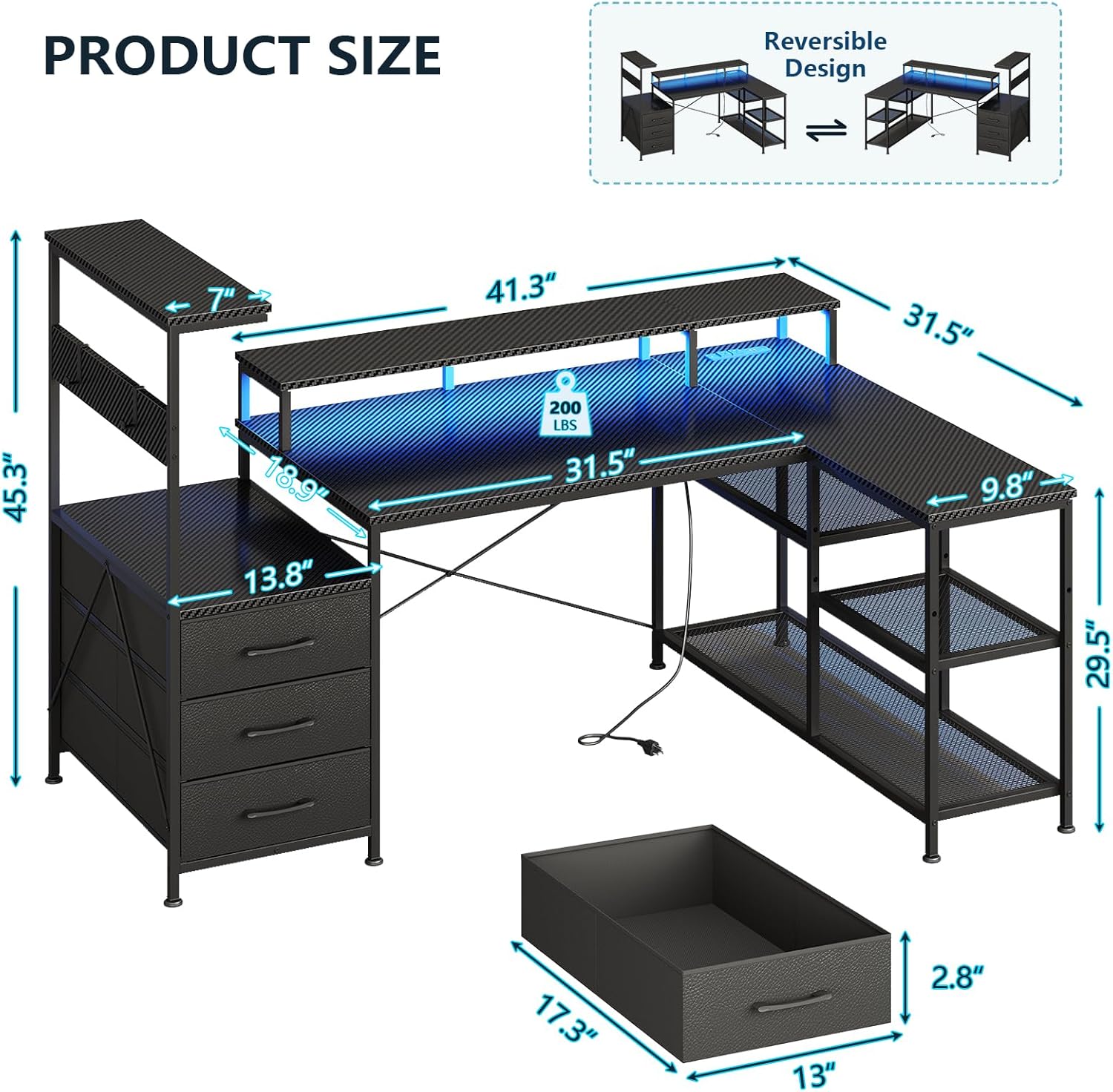
Figure 6.1: A detailed diagram illustrating the overall dimensions of the L-shaped gaming desk, including height, width, and depth measurements for various sections.
| Feature | Specification |
|---|---|
| Brand | YOMILUVE |
| Model Name | Gaming Desk |
| Product Dimensions (D x W x H) | 18.9"D x 55.1"W x 45.3"H |
| Color | Black |
| Style | Modern |
| Base Material | Metal |
| Top Material Type | Engineered Wood (Carbon Fiber Black Finish) |
| Item Weight | 45 Pounds |
| Special Features | Built-In USB Outlet, Ergonomic Monitor Stand, LED Light, Reversible Design, Adjustable Storage Shelves, Computer Tower Stand, Earphone Hooks, 3 Fabric Drawers |
| Integrated Charging Station | 2 AC Outlets (125V/12A), 2 USB Ports (5V/2A), 4.9-Feet Power Cord |
| Assembly Required | Yes |
| Number of Drawers | 3 |
| Shape | L-Shape |
7. Warranty and Support
YOMILUVE is committed to providing high-quality products and customer satisfaction. For any questions, concerns, or assistance with your gaming desk, please refer to the contact information provided in your product packaging or on the official YOMILUVE website.
Warranty Information: Specific warranty details, including coverage period and terms, are typically included with your product documentation. Please retain your proof of purchase for warranty claims.
Customer Support: If you encounter any issues during assembly, operation, or require replacement parts, do not hesitate to contact our customer support team. They are available to assist you with troubleshooting and provide solutions.
We appreciate your business and hope you enjoy your YOMILUVE L Shaped Gaming Desk!


