Important Safety Guidelines
- Suitable for ages: 36+ months (recommended 3-8 years).
- Maximum user weight: 150 lbs.
- Keep away from fire.
- Adult supervision is required to reduce the risk of injury.
- Never use in roadways, near motor vehicles, on or near steep inclines or steps, swimming pools, or other bodies of water.
- Always wear protective clothing and shoes.
- The car features an anti-rollover design with a pyramid-style double triangular chassis, upgraded rear wheels, and a spring shock system for enhanced stability.
Product Overview
The CANKETEC 12V Electric Wiggle Car offers versatile fun with its 2-in-1 design, allowing for both electric and manual operation. It features interactive elements like flashing lights, music, and a turbo spray effect.
Key Features:
- 2-in-1 Wiggle Car: Seamlessly switch between electric mode (pedal-activated) and manual mode (steering wheel or foot-gliding).
- Enhanced Safety: Designed with a maximum speed of 4 mph, adjustable to 1.9 mph for younger riders. Features an anti-tip chassis, upgraded rear wheels, and a spring shock system. A comfortable backrest ensures child security.
- Interactive Play: Includes a bright front light, magnetic flashing wheels (no batteries required), a turbo spray effect, and Bluetooth connectivity for playing favorite tunes.
- Ergonomic Design: An extra-large seat comfortably fits two children, accommodating heights up to 69 inches and a weight capacity of up to 150 pounds.
- Easy Assembly: Features a simple two-step setup process for quick readiness.

Image: Parent-Child Shared Electric Wiggle Car, showcasing its music function and bright front light.

Image: 2-in-1 Electric Wiggle Car, detailing manual and electric mode options.

Image: Light-Up Fun for Interactive Play, showing 360-degree movement, Bluetooth music, and spray features.

Image: Engineered with Safety in Mind, highlighting key safety components like wheels, bearings, and the pyramid-style chassis.
Setup and Assembly
Unboxing and Initial Setup
The CANKETEC 12V Electric Wiggle Car comes mostly pre-assembled. Follow these steps for final setup:
- Carefully remove all components from the packaging.
- Locate the steering column and attach it to the main body of the car. Secure with the provided screws.
- Connect any internal wiring as instructed.
- Ensure the battery is connected.
- Attach the rear spoiler (if included).
Video: Electric Wiggle Car Installation. This video demonstrates the step-by-step assembly process for the CANKETEC Electric Wiggle Car, including connecting the steering column and internal wiring.
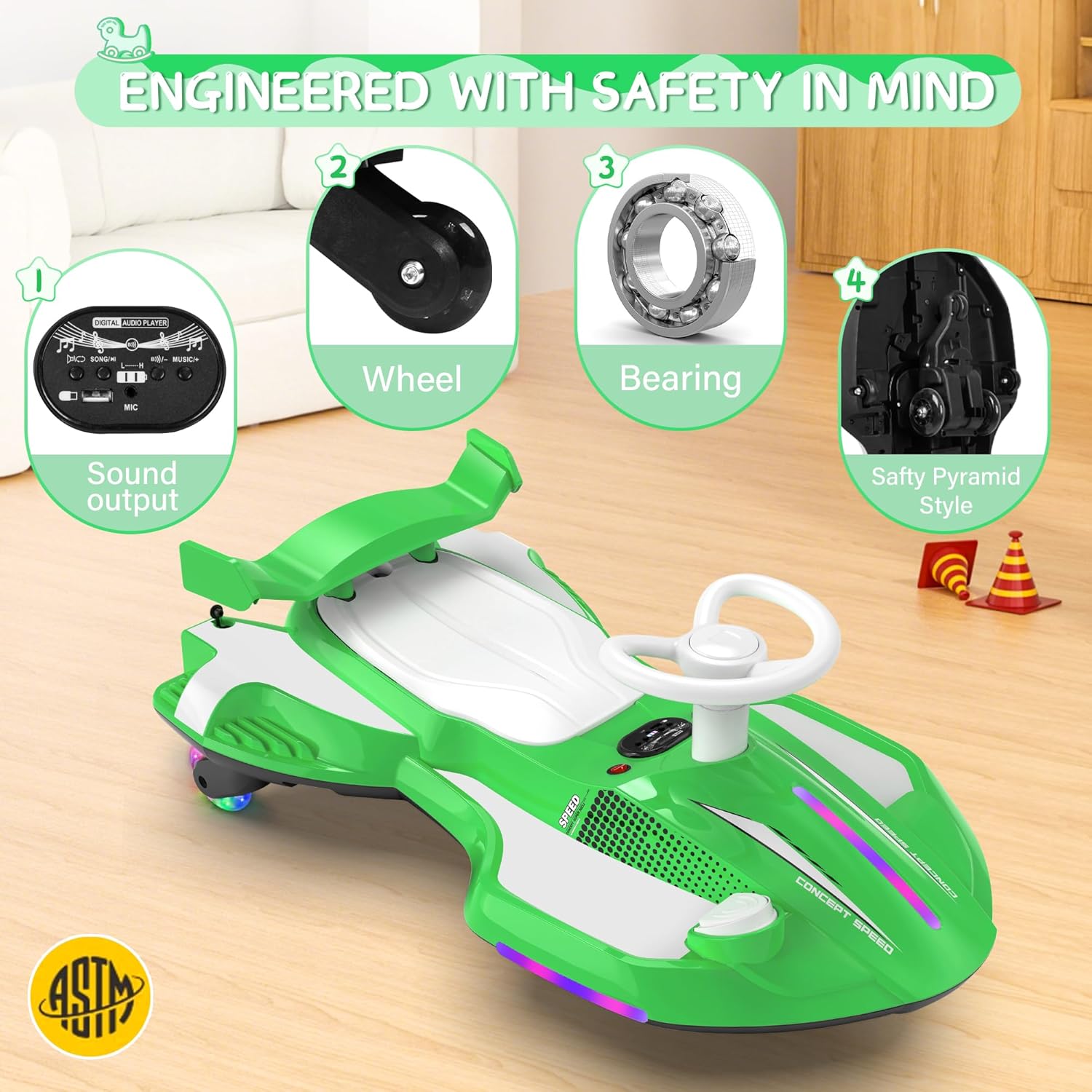
Image: Detail parts for assembly, showing the underside of the car with components to be connected.
Operating Instructions
Power On/Off
The main power switch is located on the underside of the car. Flip it to the "ON" position to activate the vehicle.
Driving Modes
- Electric Mode: Turn on the power switch and press the foot pedal to move forward.
- Manual Mode: With the power off or pedal disengaged, children can propel the car by turning the steering wheel from side to side or by gliding with their feet.
Speed Adjustment
The car features two speed settings. A button located on the bottom of the car allows parents to switch between a maximum speed of 4 mph and a lower speed of 1.9 mph for younger riders.
Video: Speed Adjustment Steps. This video illustrates how to adjust the speed settings on the CANKETEC Electric Wiggle Car using the button located on the underside.
Lights, Music, and Spray
- Lights: The front light illuminates automatically when the car is powered on. The magnetic flashing wheels light up during motion without requiring batteries.
- Music: Connect a Bluetooth device to play music through the car's speakers.
- Turbo Spray: Activate the turbo spray effect for an exciting fog trail.

Image: Speed control button location, showing how to switch between low-speed and high-speed modes.
Charging the Battery
The CANKETEC Electric Wiggle Car is equipped with a rechargeable 12V battery.
- Locate the charging port on the underside of the car.
- Connect the provided power adapter to the charging port and then to a standard electrical outlet.
- Allow the battery to charge fully before first use and whenever the battery indicator shows low power.
- Do not overcharge the battery.
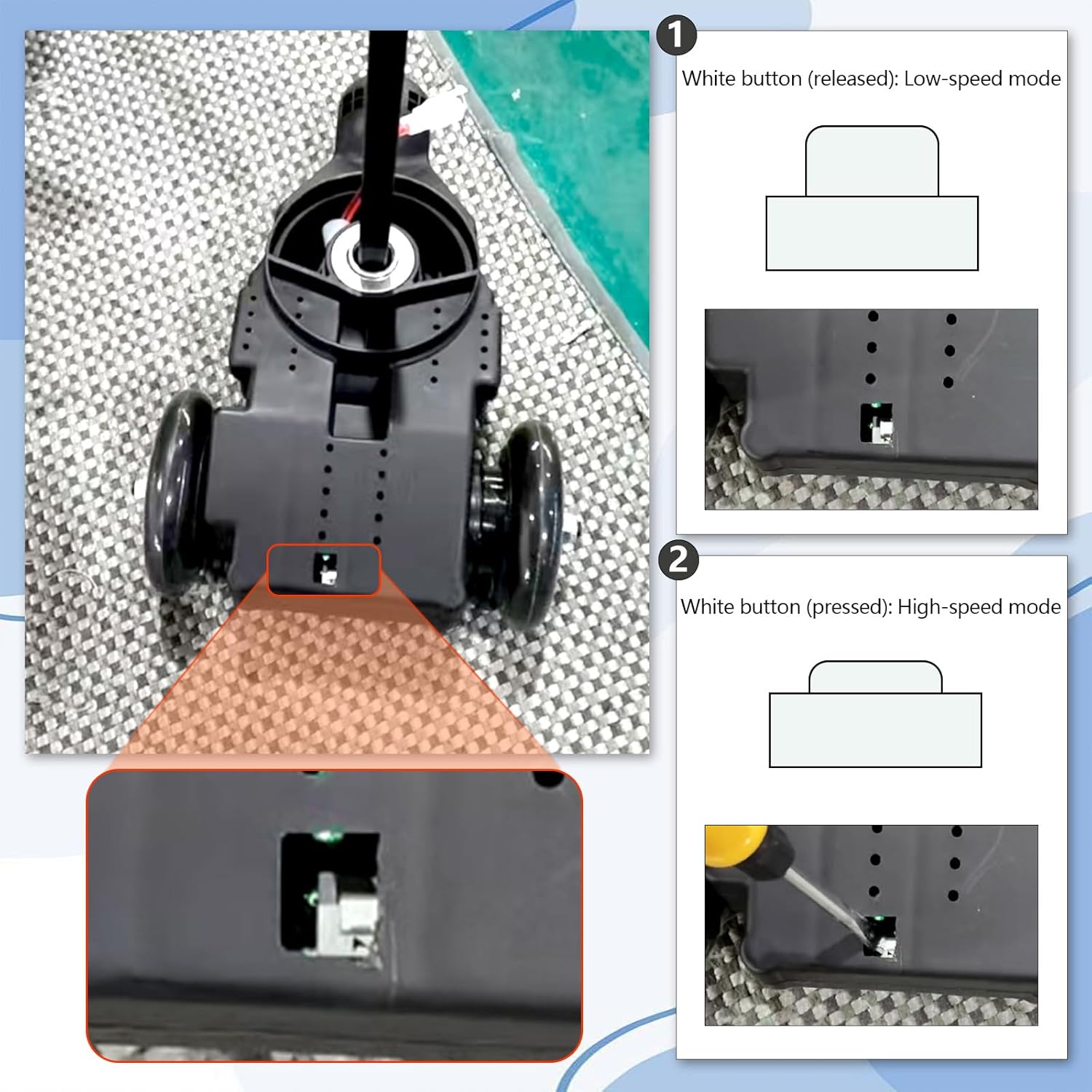
Image: Charging port and power switch, indicating where to plug in the charger and turn the car on/off.
Maintenance
Care and Maintenance
- Cleaning: Wipe the car with a damp cloth. Avoid using harsh chemicals or abrasive cleaners.
- Storage: Store the car in a dry, cool place away from direct sunlight and moisture.
- Battery Care: Charge the battery regularly, even if the car is not in use, to prolong its lifespan.
- Inspection: Periodically check all screws, connections, and moving parts to ensure they are secure and functioning correctly.
Troubleshooting
Common Issues and Solutions
- Car does not move:
- Check if the power switch is in the "ON" position.
- Ensure the battery is charged.
- Verify all electrical connections are secure.
- Lights not working:
- Check power connection. Magnetic wheels light up only when in motion.
- Music not playing:
- Ensure Bluetooth is correctly paired and the volume is up on both the car and the connected device.
- Reduced speed/power:
- Battery may be low; recharge fully.
- Ensure the speed setting is not on the lower mode.
Product Specifications
| Product Dimensions | 32.5 x 18.5 x 12.8 inches |
|---|---|
| Recommended Age | 3 - 8 years (36+ months) |
| Maximum User Weight | 150 lbs |
| Battery | 12V Rechargeable |
| Speed Settings | 1.9 mph (low), 4 mph (high) |
| Features | 2-in-1 Electric/Manual, LED Lights, Bluetooth Music, Turbo Spray, Anti-Rollover Design |
| Manufacturer | CANKETEC |
| ASIN | B0FPWWSL4H |
Customer Support
For any questions, concerns, or warranty inquiries regarding your CANKETEC 12V Electric Wiggle Car, please contact our customer support team.
- Email: Canketec111@outlook.com
- Online Support: Visit the CANKETEC Store on Amazon for FAQs and additional resources.

Image: Customer Service. Contact us for assistance.