
1. Product Overview
The DOOGEE Note 56 is a modern smartphone designed for daily use, featuring a powerful Octa-Core processor, a large 6150 mAh battery, and a vibrant 6.56-inch HD+ display with a 90 Hz refresh rate. This manual provides essential information for setting up, operating, and maintaining your device.

Figure 1.1: Front and back view of the DOOGEE Note 56, showcasing its sleek design and camera setup.
2. What's in the Box
- DOOGEE Note 56 Smartphone
- Power Adapter
- USB Cable
- SIM Ejector Tool
- Quick Start Guide
- Protective Case (may vary by region)
- Screen Protector (pre-applied or included)
3. Setup
3.1 Inserting SIM Cards and MicroSD Card
The DOOGEE Note 56 supports Dual SIM functionality and MicroSD card expansion up to 2TB. Follow these steps to insert your cards:
- Power off your phone.
- Locate the SIM card tray on the side of the device.
- Insert the SIM ejector tool into the small hole next to the tray and push gently until the tray pops out.
- Place your Nano-SIM cards and/or MicroSD card into the designated slots on the tray. Ensure they are correctly oriented.
- Carefully push the tray back into the phone until it clicks into place.
3.2 Powering On/Off and Initial Setup
To power on your device, press and hold the Power button until the DOOGEE logo appears. To power off, press and hold the Power button, then select 'Power off' from the options. On first use, follow the on-screen instructions to set up your language, Wi-Fi, Google account, and security features.
4. Operating Your Device
4.1 Basic Navigation
The DOOGEE Note 56 runs on Android 16, offering an intuitive user interface. Use gestures or the navigation bar at the bottom of the screen to navigate:
- Home: Swipe up from the bottom or tap the Home button to return to the home screen.
- Back: Swipe from the left or right edge, or tap the Back button to go back to the previous screen.
- Recent Apps: Swipe up and hold from the bottom, or tap the Recent Apps button to view and switch between open applications.
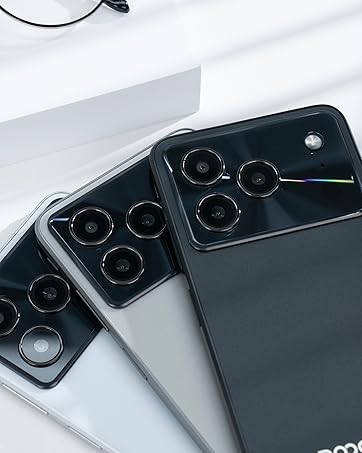
Figure 4.1: Android 16 operating system interface on the DOOGEE Note 56.
4.2 Calls and Messaging
To make a call, open the Phone app, enter the number, and tap the call icon. For messaging, open the Messages app, select a contact or start a new conversation, type your message, and send.
4.3 Camera Functions
The DOOGEE Note 56 features an 8 MP rear camera and a 5 MP front camera. Open the Camera app to access various modes such as Photo, Video, Portrait, and more. Tap the shutter button to capture photos or start/stop video recording.

Figure 4.2: Camera features and AI scene recognition.
4.4 Display Settings
Customize your 6.56-inch HD+ 90 Hz IPS display by going to Settings > Display. Here you can adjust brightness, dark mode, screen timeout, and refresh rate for a smoother visual experience.

Figure 4.3: The 90 Hz HD+ display provides smooth visuals.
5. Storage and Performance
The DOOGEE Note 56 is equipped with 24GB RAM (3GB physical + 21GB virtual) and 64GB of internal storage, expandable up to 2TB via a MicroSD card (sold separately). This configuration ensures smooth multitasking and ample space for your apps, photos, and videos.
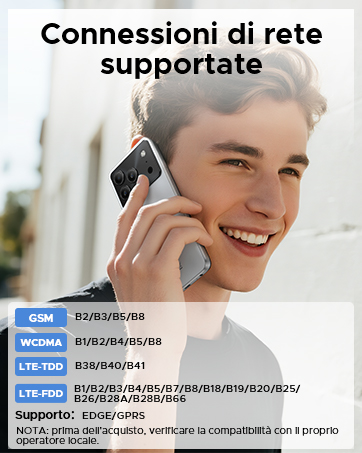
Figure 5.1: Memory configuration of the DOOGEE Note 56.
6. Connectivity and Security
6.1 Network Connectivity
The device supports 4G LTE for fast mobile data. Ensure your SIM cards are active and correctly inserted. For Wi-Fi, go to Settings > Network & internet > Wi-Fi and connect to your preferred network.

Figure 6.1: Supported network connections for the DOOGEE Note 56.
6.2 Face ID
Unlock your phone quickly and securely using Face ID. To set it up, go to Settings > Security > Face Unlock and follow the on-screen instructions to register your face.
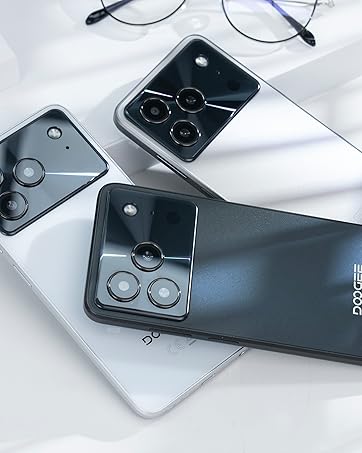
Figure 6.2: Instant facial recognition for unlocking.
6.3 OTG and GPS
The device supports OTG (On-The-Go) for connecting USB accessories like flash drives. GPS functionality provides accurate location services for navigation and location-based apps.
7. Battery Management
The DOOGEE Note 56 is equipped with a 6150 mAh silicon-carbon battery, offering extended usage. It supports 10W fast charging. To optimize battery life:
- Adjust screen brightness.
- Close unused apps running in the background.
- Enable battery saver mode when needed.
- Avoid extreme temperatures.
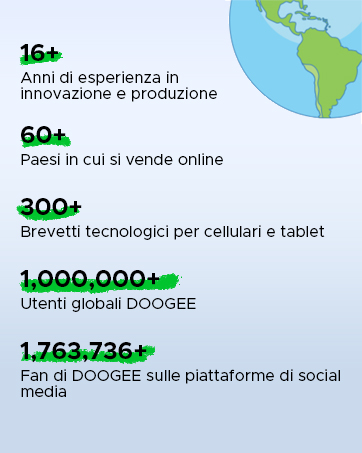
Figure 7.1: The 6150 mAh battery provides long-lasting power.

Figure 7.2: Estimated usage times on a single charge.
8. Maintenance
8.1 Software Updates
Regularly check for software updates to ensure your device has the latest features and security patches. Go to Settings > System > System update to check for and install updates.
8.2 Cleaning Your Device
Use a soft, lint-free cloth to clean the screen and body of your phone. Avoid using harsh chemicals or abrasive materials.
9. Troubleshooting
9.1 Common Issues and Solutions
- Phone not turning on: Ensure the battery is charged. Connect to the charger for at least 10 minutes, then try powering on.
- Apps crashing: Clear the cache of the problematic app (Settings > Apps > [App Name] > Storage & cache > Clear cache). If the issue persists, reinstall the app.
- Poor battery life: Review Section 7 for battery optimization tips.
- Network connectivity issues: Check if SIM cards are properly inserted. Restart the phone. Verify network settings in Settings > Network & internet.
10. Specifications
| Feature | Specification |
|---|---|
| Model | NOTE56 |
| Operating System | Android 16 |
| Display | 6.56-inch HD+ IPS, 90 Hz |
| Processor | Octa-Core |
| RAM | 24 GB (3GB + 21GB virtual) |
| Internal Storage | 64 GB |
| Expandable Storage | Up to 2 TB MicroSD |
| Rear Camera | 8 MP |
| Front Camera | 5 MP |
| Battery Capacity | 6150 mAh |
| Charging | 10W Fast Charging |
| Dimensions | 8.45 mm thickness |
| Weight | 262 g |
| Connectivity | 4G, Dual SIM, Wi-Fi, Bluetooth, GPS, OTG |
| Security | Face ID |
11. Official Product Videos
Video 11.1: DOOGEE Note 56 Plus Smartphone Overview. This video highlights the ultra-thin design, camera features, and overall elegance of the Note 56 Plus, which shares many characteristics with the Note 56 model.
Video 11.2: DOOGEE Note 56 Plus Ultra-thin Smartphone. This video focuses on the slim profile and aesthetic appeal of the Note 56 Plus, demonstrating its comfortable handling and modern look.
12. Warranty and Support
Your DOOGEE Note 56 smartphone comes with a limited warranty. Please refer to the warranty card included in your product packaging for specific terms and conditions. For technical support or service inquiries, please visit the official DOOGEE website or contact their customer service.
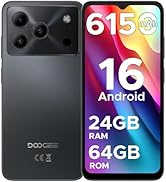
Figure 12.1: DOOGEE customer service details, including warranty and support options.


