1. Introduction
Thank you for choosing the AONIU M4 Electric Scooter. This manual provides essential information for the safe operation, assembly, maintenance, and troubleshooting of your scooter. Please read it thoroughly before your first ride to ensure optimal performance and safety.
Key features of your AONIU M4 Electric Scooter include:
- 800W Peak Powerful Motor for speeds up to 28 mph.
- 31 Miles Max Long Range with a high-capacity battery.
- Heavy-duty aluminum alloy frame supporting riders up to 330 lbs.
- 10-inch pneumatic tires for all-terrain riding.
- Integrated lighting system: bright headlight, warning taillight, and LED ambient lights for enhanced visibility.
- Dual braking system for reliable stopping power.
- 7-shock absorption system for a smooth ride.
- Portable folding design for easy transport and storage.
- LCD display for speed, mode, battery life, and mileage.
- Two riding modes: sit and stand, with a removable seat.
2. Setup
The AONIU M4 Electric Scooter requires minimal assembly. Follow these steps to prepare your scooter for its first ride.
2.1 Unpacking and Initial Assembly
Carefully remove all components from the packaging. Ensure all parts listed in the packing list are present. The main scooter body, seat assembly, charger, and tool kit should be included.
Video: M4 Electric Scooter Assembly Guide. This video demonstrates the unpacking process, seat installation, unfolding, and initial setup of the scooter. (Refer to 0:00-0:23 for unpacking, 0:23-1:17 for seat installation, 1:17-1:55 for unfolding, 2:19-2:59 for booting and controls, 3:45-4:11 for charging).
2.2 Seat Installation
If you wish to use the seat, assemble it using the provided tools. The seat post attaches to the designated slot on the scooter deck. Ensure it is securely fastened. The seat height is adjustable for rider comfort.

Image: AONIU M4 Electric Scooter with the removable seat installed. The seat provides an alternative riding position for extended comfort.
2.3 Unfolding the Scooter
To unfold the scooter, release the main folding mechanism. Ensure the stem locks securely into place with an audible 'click'. Extend the handlebars and tighten the side retainers. Lower the kickstand to support the scooter.

Image: The AONIU M4 Electric Scooter shown in both its folded and unfolded configurations, highlighting its portability.
3. Operating
Familiarize yourself with the controls and riding modes before operating the scooter.
3.1 Powering On and Controls
Insert the key into the ignition and turn it to power on the scooter. Long press the power button on the display to activate the system. The LCD display shows speed, gear mode (1-3), battery level, and total mileage. Use the mode button to cycle through speed gears. The right lever is the accelerator, and the left and right brake levers control the front and rear brakes, respectively. The handlebar also features a horn and light controls.

Image: Close-up of the AONIU M4 Electric Scooter's LCD display and handlebar controls, showing battery, speed, and gear indicators.
3.2 Riding Modes
The AONIU M4 offers both standing and sitting riding modes. Adjust the seat as desired for your journey.
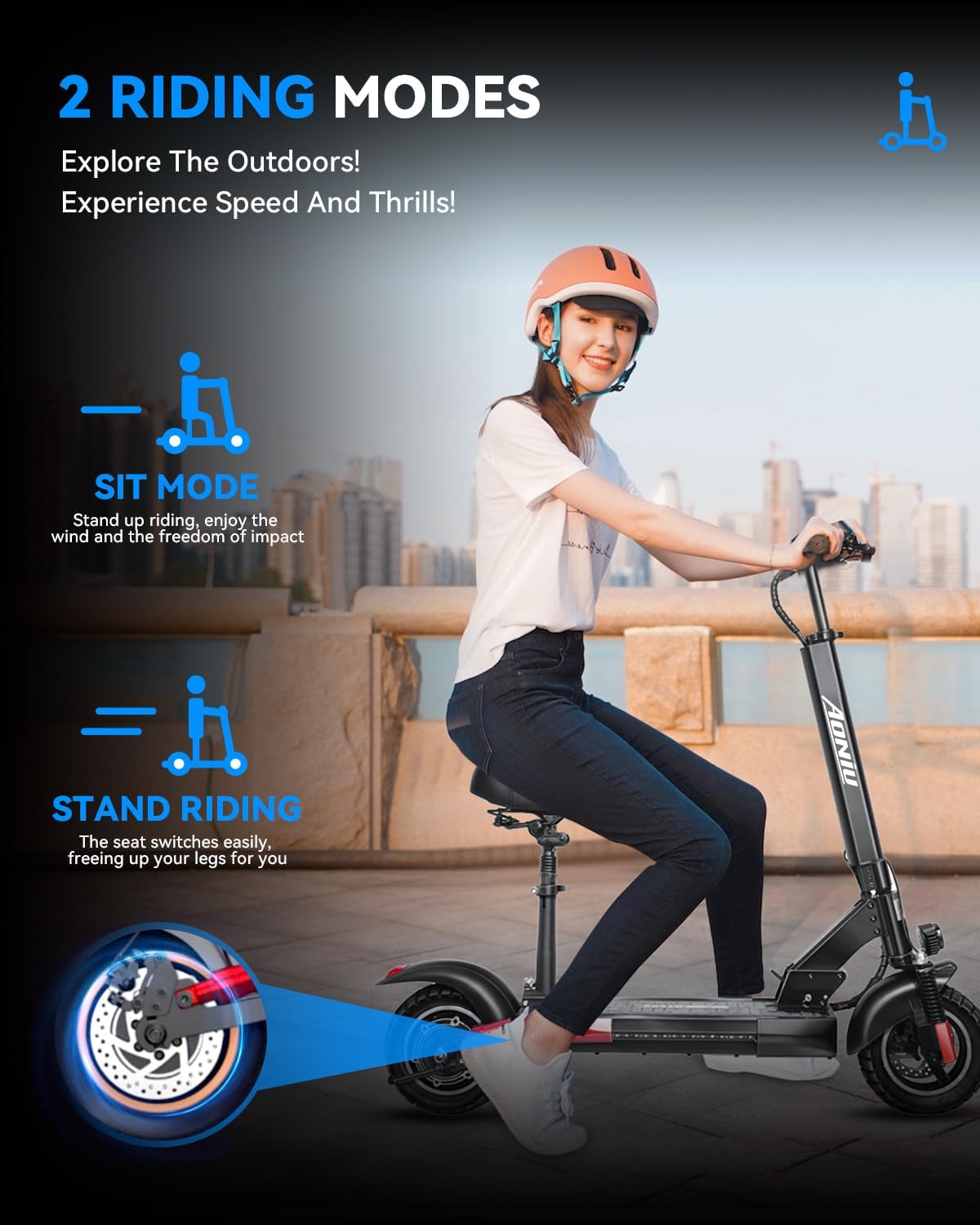
Image: A rider demonstrating both the sitting and standing positions on the AONIU M4 Electric Scooter, highlighting its versatile riding modes.
3.3 Riding the Scooter
Ensure you wear appropriate safety gear, including a helmet and protective pads. Always check local regulations regarding electric scooter usage. Start in a low gear and gradually increase speed as you become comfortable. Use both brakes for effective stopping.
Video: Electric Scooter Smooth City Commute. This video showcases the AONIU M4 Electric Scooter being ridden in an urban environment, demonstrating its agility and smooth performance.
Video: Electric Scooter for Adult. A short clip demonstrating an adult riding the electric scooter, highlighting its ease of use.
Video: Electric Scooter Quick Urban Ride. This video shows the scooter navigating urban paths, emphasizing its suitability for quick commutes.
4. Charging
To charge your AONIU M4 Electric Scooter, locate the charging port on the scooter deck. Open the rubber plug and connect the charger. The charger's indicator light will be red during charging and turn green when fully charged. A full charge typically takes 4-5 hours.

Image: An illustration of the AONIU M4 Electric Scooter's 18650 automotive power battery cell, indicating its 48V 10Ah capacity, 31-mile max range, and 5-hour fast charge time.
5. Folding for Storage and Transport
The AONIU M4 Electric Scooter features a portable folding design. To fold, ensure the scooter is powered off. Release the main folding latch and carefully fold the stem downwards until it locks into place. This compact design makes it easy to carry or store.
Image: The AONIU M4 Electric Scooter demonstrating its portable folding design, showing how it can be compactly stored or transported.
6. Maintenance
Regular maintenance ensures the longevity and safe operation of your scooter.
- Tires: Regularly check tire pressure and inflate to the recommended PSI. Inspect for wear and tear.
- Brakes: Periodically check brake functionality and adjust if necessary. Ensure brake levers are responsive.
- Battery: Avoid fully draining the battery. Charge regularly, especially if storing for extended periods.
- Cleaning: Wipe down the scooter with a damp cloth. Avoid using high-pressure water or harsh chemicals.
- Fasteners: Check all screws and bolts regularly and tighten any loose connections.
7. Troubleshooting
Here are some common issues and their potential solutions:
- Scooter not turning on: Check if the key is fully inserted and turned. Ensure the battery is charged.
- Loss of power during ride: Battery may be low. Charge the scooter fully.
- Brakes feel loose: Adjust the brake cables as per the assembly video or consult a professional.
- Unusual noises: Inspect for loose parts or debris in the wheels. If persistent, seek professional assistance.
8. Specifications
| Feature | Detail |
|---|---|
| Brand | AONIU |
| Model Name | M4 |
| Motor Power | 800W Peak Brushless |
| Max Speed | Up to 28 mph |
| Max Range | Up to 31 Miles |
| Battery | 48V 10Ah (18650 Automotive Power Cell) |
| Charging Time | 4-5 Hours |
| Max Load Weight | 330 lbs |
| Wheel Size | 10 Inches |
| Wheel Type | Pneumatic |
| Frame Material | Aluminum Alloy |
| Brake Style | Front Braking, Rear Braking |
| Special Feature | Foldable, Adjustable Handlebar, Removable Seat |
| Product Dimensions | 47.04"L x 10.23"W x 19.7"H |
| Item Weight | 49.6 Pounds |
9. Warranty & Support
AONIU provides a 12-month or 180-day warranty for different parts of the scooter. For any questions or support needs, please contact the seller, GN Riding, directly. They are committed to responding within 24 hours to assist you with any issues or inquiries.
Seller: GN Riding (ID: A2GAZCLY9V86ZU)
For further assistance, please visit the AONIU Store on Amazon.


