Introduction
This manual provides comprehensive instructions for the TOZO OpenWear T13051 Open Ear Headphones. Designed for comfort and situational awareness, these headphones feature an open-ear design, adjustable ear hooks, and advanced audio technology. Please read this manual thoroughly to ensure proper use and optimal performance of your device.
What's in the Box
Verify that all items listed below are included in your package:
- OpenWear Earbuds (Left and Right)
- Charging Case
- User Manual
- USB-C® (A to C) cable (20")
- Quick Guide
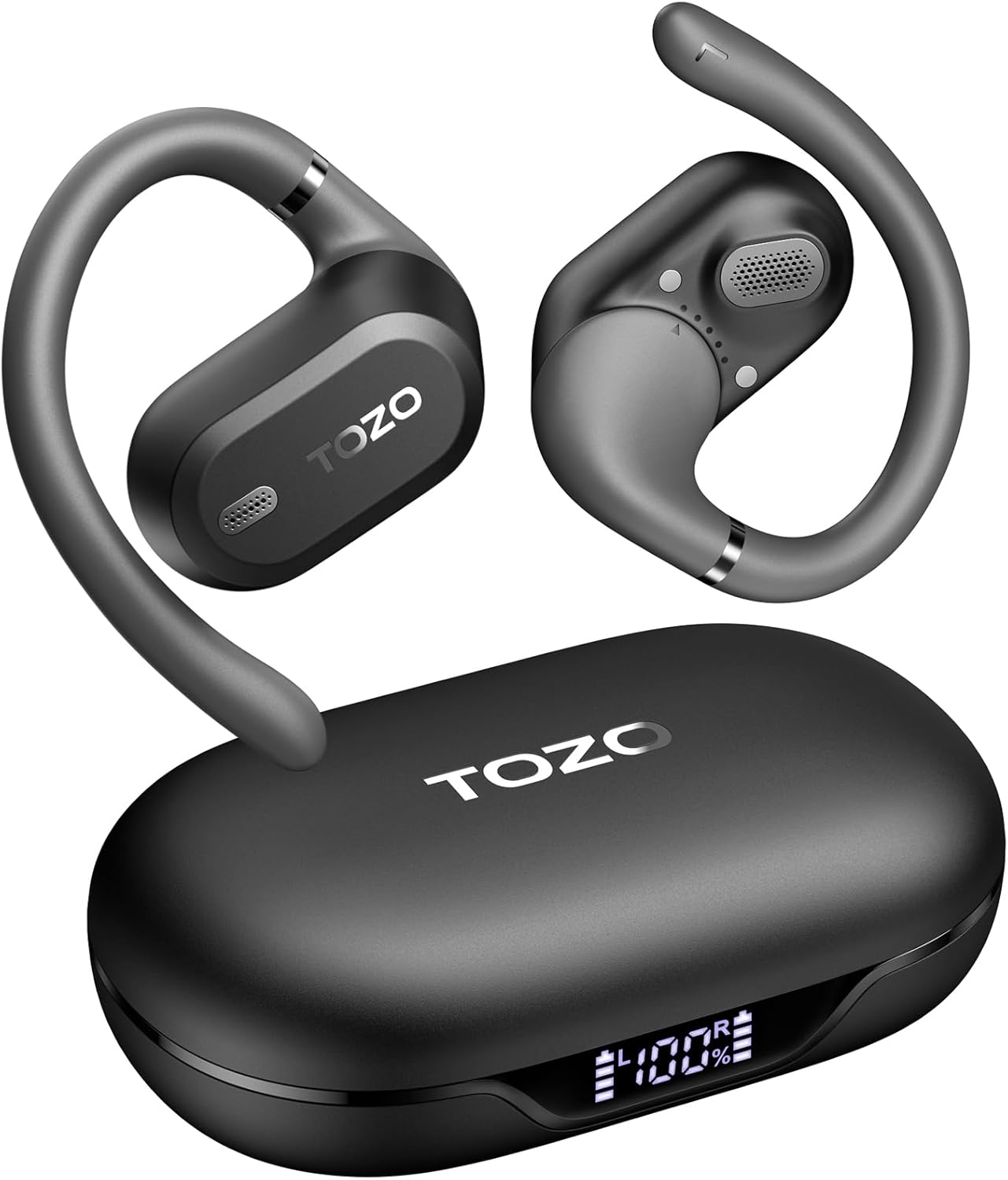
Image: TOZO OpenWear T13051 Open Ear Headphones and Charging Case. The image displays the two black open-ear earbuds with their flexible ear hooks, alongside their matching black charging case. The charging case features a digital display on the front.
Product Overview
Components
The TOZO OpenWear headphones are designed with user comfort and sound quality in mind. Each earbud features a main body housing the audio components and a flexible ear hook for secure placement.

Image: Close-up view of a TOZO OpenWear earbud, highlighting the internal 14.2mm dynamic driver and speaker grille. The image emphasizes the audio technology for clear sound and bass.
Controls
Each earbud is equipped with touch-sensitive controls for managing audio playback, calls, and other functions. Specific control gestures can be customized via the TOZO App.
Video: An overview of the TOZO OpenWear Open Ear Headphones. The video demonstrates the physical design, including the flexible ear hooks and the charging case, providing a general introduction to the product's appearance and features.
Setup
Charging the Headphones
Before first use, fully charge the headphones and charging case.
- Place the earbuds into the charging case. Ensure they are correctly seated; magnets will guide them into position.
- Connect the USB-C cable to the charging port on the case and a power source.
- The digital display on the charging case will show the battery percentage for the case and individual earbuds (L/R).
- A 10-minute charge provides approximately 2 hours of playtime. A full charge offers up to 38 hours of total playtime with the charging case.

Image: The TOZO OpenWear charging case open, showing the earbuds inside and a digital display indicating "38 hrs" of extended battery life, "630 songs", and "38 meetings". This highlights the long battery performance.
Image: A close-up of the TOZO OpenWear charging case's digital display, showing the battery levels for the left earbud (L), the charging case (center percentage), and the right earbud (R).
Pairing with Your Device
- Open the charging case. The earbuds will automatically enter pairing mode.
- On your device (smartphone, tablet, laptop), enable Bluetooth.
- Search for "TOZO OpenWear" in the list of available Bluetooth devices and select it to connect.
- Once connected, a voice prompt will confirm successful pairing.
Image: A TOZO OpenWear earbud shown next to a smartphone displaying its Bluetooth settings, with "TOZO OpenWear" listed as a connected device. The charging case is also visible in the background.
Wearing Instructions
The TOZO OpenWear headphones feature a dual-axis adjustable design for a personalized and secure fit. Proper placement is crucial for both comfort and sound quality.
- Gently place the earbud over your ear, positioning the main body in front of your ear canal.
- Adjust the flexible ear hook to rest comfortably and securely behind your ear.
- Utilize the dual-axis rotation to adapt the earbud's angle both horizontally and vertically until it sits comfortably and the sound is clear.
- Ensure the speaker grille is positioned to direct sound towards your ear canal without blocking it.

Image: A diagram illustrating the dual-axis adjustment feature of the TOZO OpenWear ear hooks. It shows how the ear hook can rotate 40 degrees horizontally and 75 degrees vertically to adapt to different ear shapes for enhanced comfort and stability.

Image: A woman wearing a TOZO OpenWear earbud, demonstrating the comfortable and breathable fit of the open-ear design for all-day wear. The earbud sits gently on the ear without entering the ear canal.
Operating Instructions
Basic Controls
The earbuds feature touch controls for various functions. Refer to the Quick Guide for detailed touch gestures. Common functions include:
- Play/Pause: Single tap on either earbud.
- Next Track: Double tap on the right earbud.
- Previous Track: Double tap on the left earbud.
- Volume Up: Triple tap on the right earbud.
- Volume Down: Triple tap on the left earbud.
- Answer/End Call: Single tap on either earbud.
- Reject Call: Press and hold either earbud for 2 seconds.
Low Latency Mode
Activate low-latency mode for an enhanced audio-visual synchronization, ideal for gaming and video playback. This mode reduces audio delay to 60ms.
- Refer to the TOZO App or Quick Guide for specific instructions on activating/deactivating low-latency mode.
TOZO App Features
Download the official TOZO App for a personalized audio experience. The app allows you to:
- Access 16 custom EQ settings to fine-tune your sound.
- Receive and install firmware updates for improved performance.
- Control various features and settings of your OpenWear headphones.

Image: Screenshots of the TOZO App interface, demonstrating features such as 5 types of EQ sound modes, firmware updates, and detailed EQ adjustment options for a personalized listening experience.
Maintenance
Cleaning
Regular cleaning helps maintain optimal performance and hygiene.
- Wipe the earbuds and charging case with a soft, dry, lint-free cloth.
- Avoid using abrasive materials, solvents, or aerosol sprays.
- Do not submerge the charging case in water.
Storage
Always store the headphones in their charging case when not in use to protect them and ensure they remain charged.
Water Resistance (IPX6)
The TOZO OpenWear headphones are rated IPX6 water-resistant, meaning they can withstand high-pressure water jets from any direction. This makes them suitable for workouts and outdoor activities where sweat and splashes may occur.
- The IPX6 rating applies to the earbuds only, not the charging case.
- Do not intentionally submerge the earbuds in water for extended periods.
- Ensure earbuds are dry before placing them back into the charging case to prevent damage.
Troubleshooting
If you encounter any issues, try the following solutions:
- No Sound: Ensure earbuds are charged, properly paired, and volume is adjusted.
- Pairing Issues: Turn off Bluetooth on your device, place earbuds in case, close and reopen, then try pairing again. Forget "TOZO OpenWear" from your device's Bluetooth list and re-pair.
- Uncomfortable Fit: Adjust the dual-axis ear hooks as described in the "Wearing Instructions" section.
- Charging Problems: Check the USB-C cable and power source. Ensure earbuds are correctly seated in the case.
If issues persist, please refer to the official TOZO website for detailed FAQs or contact customer support.
Specifications
| Feature | Specification |
|---|---|
| Model Name | OpenWear T13051 |
| Brand | TOZO |
| Connectivity Technology | Wireless (Bluetooth 5.4) |
| Ear Placement | Open Ear |
| Audio Driver Size | 14.2 mm Dynamic Driver |
| Battery Life (Earbuds) | Up to 8.5 hours (single charge) |
| Total Battery Life (with Case) | Up to 38 hours |
| Charging Time (Quick Charge) | 10 minutes for 2 hours playtime |
| Water Resistance | IPX6 (Earbuds only) |
| Low Latency Mode | 60ms |
| Control Type | Touch, App Control |
| Compatible Devices | IOS/Android mobile phones, tablets, laptops |
| Item Weight | 1.38 ounces (total) |
Warranty and Support
TOZO products come with a standard manufacturer's warranty. For specific warranty details, registration, or to access customer support, please visit the official TOZO website:
Visit the TOZO Store on Amazon
You can also find additional support resources, FAQs, and contact information on their official website.


