
SWZEC B0FPVHVQ3C
SWZEC Meacode Smart Watch User Manual
Model: B0FPVHVQ3C
1. Introduction
Thank you for choosing the SWZEC Meacode Smart Watch. This manual provides essential information for setting up, operating, and maintaining your device. Please read it carefully to ensure optimal performance and longevity of your smart watch.
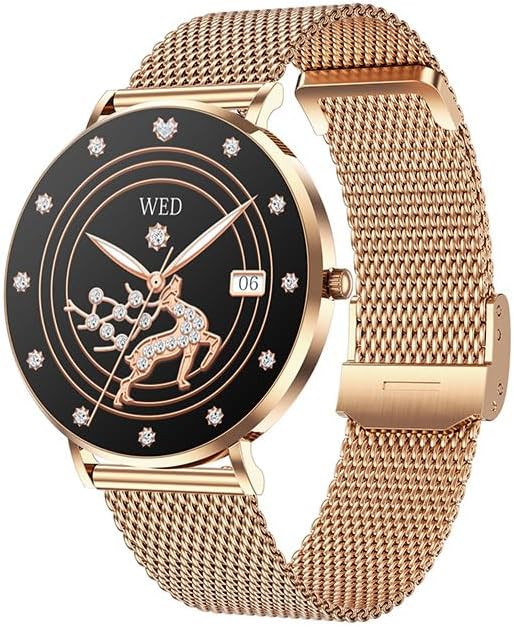
Image: The SWZEC Meacode Smart Watch with a pink strap and rose gold casing, displaying a digital watch face with health metrics.
2. What's in the Box
Verify that all items are present in your package:
- 1 x SWZEC Meacode Smart Watch
- 1 x Charging Cable
- 1 x User Manual
- 2 x Watch Straps (Silicone and Stainless Steel)
3. Initial Setup
3.1 Charging the Device
Before first use, fully charge your smart watch. Connect the provided charging cable to the charging port on the back of the watch and plug the USB end into a power adapter (not included) or a computer's USB port. The watch display will indicate charging status.
3.2 Power On/Off
- To Power On: Press and hold the side button until the screen lights up.
- To Power Off: Navigate to the 'Settings' menu on the watch, then select 'Power Off' and confirm.
3.3 App Installation and Pairing
To unlock the full functionality of your SWZEC Meacode Smart Watch, you need to pair it with your smartphone via the dedicated companion application. The watch is compatible with both iOS and Android devices.
- Download the App: Scan the QR code in the manual (if provided) or search for the official SWZEC app in your smartphone's app store (Apple App Store for iOS, Google Play Store for Android).
- Enable Bluetooth: Ensure Bluetooth is enabled on your smartphone.
- Open the App: Launch the SWZEC app and follow the on-screen instructions to create an account or log in.
- Add Device: In the app, select 'Add Device' or a similar option. The app will search for available devices.
- Pair: Select 'SWZEC Meacode' from the list of found devices. Confirm the pairing request on both your phone and the watch if prompted.
Once paired, the watch will synchronize data with your phone, and you can customize settings through the app.
4. Operating Your Smart Watch
4.1 Basic Navigation
The SWZEC Meacode Smart Watch features a full touchscreen display for easy navigation. Swipe left, right, up, or down to access different functions and menus. Tap to select an option or confirm an action.
4.2 Health Tracking Features
- Heart Rate Monitoring: The watch continuously monitors your heart rate 24/7. View real-time data on the watch or detailed trends in the app.
- Sleep Tracking: Automatically tracks your sleep patterns, including Awake, REM, Light, and Restful sleep stages. Access comprehensive sleep analysis in the app.
- Stress Detection & Breathing Exercises: The watch can detect your stress levels in real-time. Follow guided breathing exercises on the watch to help manage stress.
- Female Health Tracking: A dedicated feature to track menstrual cycles, providing predictions and insights into your body's rhythm.

Image: A woman experiencing discomfort, with the SWZEC Meacode Smart Watch on her wrist displaying a 'Cycle Tracking' interface.
- Activity Tracking: Monitors daily steps, calories burned, and exercise duration. Set daily goals in the app to stay motivated.

Image: A woman running outdoors, with the SWZEC Meacode Smart Watch on her wrist showing steps, calories, and exercise time.
- Blood Oxygen (SpO2) Monitoring: Measures your blood oxygen saturation levels.

Image: A woman lifting weights, with the SWZEC Meacode Smart Watch on her wrist displaying an SpO2 reading of 86%.
4.3 Smart Connectivity
- Smart Notifications: Receive alerts for incoming calls, SMS messages, and app notifications directly on your watch. Customize which app notifications you receive through the companion app.
- Bluetooth Calls: With its built-in microphone, you can make and receive calls directly from your watch when connected to your smartphone via Bluetooth.

Image: A person's wrist wearing the SWZEC Meacode Smart Watch, which shows an incoming call from 'Allen' with options to accept or decline.
- Music Control: Control music playback on your smartphone (play, pause, skip tracks) directly from your watch.
- Camera Remote: Use your watch as a remote shutter for your smartphone camera.

Image: A group of people on a beach, with the SWZEC Meacode Smart Watch on a wrist displaying a camera shutter icon, and a smartphone screen showing a camera preview.
- Find My Phone: Use this feature on your watch to make your paired smartphone ring, helping you locate it.
5. Maintenance
5.1 Cleaning Your Smart Watch
Regularly clean your watch and straps to prevent skin irritation and maintain functionality.
- Wipe the watch screen and body with a soft, lint-free cloth. If necessary, slightly dampen the cloth with water.
- For silicone straps, wash with mild soap and water, then rinse thoroughly and dry.
- For stainless steel straps, wipe with a soft, dry cloth. Avoid harsh chemicals.
- Ensure the charging contacts are clean and dry before charging.
5.2 Water Resistance (IP68)
The SWZEC Meacode Smart Watch has an IP68 water resistance rating, meaning it is resistant to sweat, rain, and can be submerged up to 1.5 meters in fresh water for a limited time. It is suitable for showering and swimming in shallow water.
- Do not use the watch in hot water, saunas, or steam rooms.
- Avoid pressing buttons underwater.
- After exposure to water, wipe the watch dry before charging or using.

Image: A woman in a swimming pool wearing the SWZEC Meacode Smart Watch, which displays a watch face with health metrics.
6. Troubleshooting
If you encounter issues with your smart watch, refer to the following common solutions:
- Watch not turning on: Ensure the watch is fully charged. Connect it to the charging cable and allow it to charge for at least 30 minutes.
- Unable to pair with smartphone:
- Ensure Bluetooth is enabled on your phone and the watch is within range.
- Restart both your watch and smartphone.
- Check if the app is updated to the latest version.
- If previously paired, try unpairing and re-pairing the device through the app.
- Notifications not received:
- Verify that the watch is successfully paired with your phone.
- Check notification settings within the SWZEC app and your phone's system settings to ensure permissions are granted.
- Ensure 'Do Not Disturb' mode is not active on either the watch or phone.
- Inaccurate health data:
- Ensure the watch is worn snugly on your wrist, about one finger's width above the wrist bone.
- Keep the sensor on the back of the watch clean.
- Environmental factors and individual physiology can affect readings.
- Screen unresponsive: Try restarting the watch. If the issue persists, ensure it is charged.
If these steps do not resolve the issue, please refer to the support section.
7. Specifications
| Feature | Specification |
|---|---|
| Model Number | B0FPVHVQ3C |
| Operating System | Android (Compatible with iOS and Android devices) |
| Connectivity Technology | Bluetooth, USB |
| Wireless Communication Standard | Bluetooth |
| Battery Capacity | 380 mAh |
| Battery Composition | Alkaline |
| Display Type | OLED |
| Water Resistance Level | IP68 (up to 1.5 meters) |
| Band Material | Silicone, Stainless Steel |
| Input Method | Touchscreen |
| Supported Application | Phone Call, Music Player, Find My Device, Messaging, Notifications, Fitness Tracker |
| Health Monitoring | Heart Rate Monitor, Sleep Duration, Stress, Female Health, SpO2 |
| GPS Functionality | No GPS |
| Item Dimensions (L x W x H) | 7 x 7 x 7 millimeters |
8. Warranty Information
This SWZEC Meacode Smart Watch comes with a Limited Warranty. Please refer to the warranty card included in your package for specific terms and conditions, including the warranty period and coverage details. Typically, the warranty covers manufacturing defects under normal use.
9. Customer Support
If you have any questions, require technical assistance, or experience issues not covered in this manual, please contact SWZEC customer support. Refer to the contact information provided on the product packaging or the official SWZEC website for the most up-to-date support channels.
Ask a question about this manual
Ask about setup, troubleshooting, compatibility, parts, safety, or missing instructions. Manuals+ will review the question and use this page’s manual context to help answer it.