
Introduction
Thank you for purchasing the Volkano VKX-3000-BK VolkaoX Adder Series Portable Bluetooth Speaker. This manual provides important information regarding the setup, operation, and maintenance of your device. Please read it thoroughly to ensure optimal performance and longevity of your speaker.
The Volkano VKX-3000-BK is a versatile Bluetooth speaker designed to deliver clear audio with powerful bass. It features wireless connectivity, a durable design, long-lasting battery, and an integrated microphone for hands-free calls. Its compact and lightweight design makes it suitable for various environments.
Package Contents
- Volkano VKX-3000-BK VolkaoX Adder Series Portable Bluetooth Speaker
- Charging Cable
- User Manual (this document)
Product Overview
Familiarize yourself with the various components and controls of your Volkano VKX-3000-BK speaker.
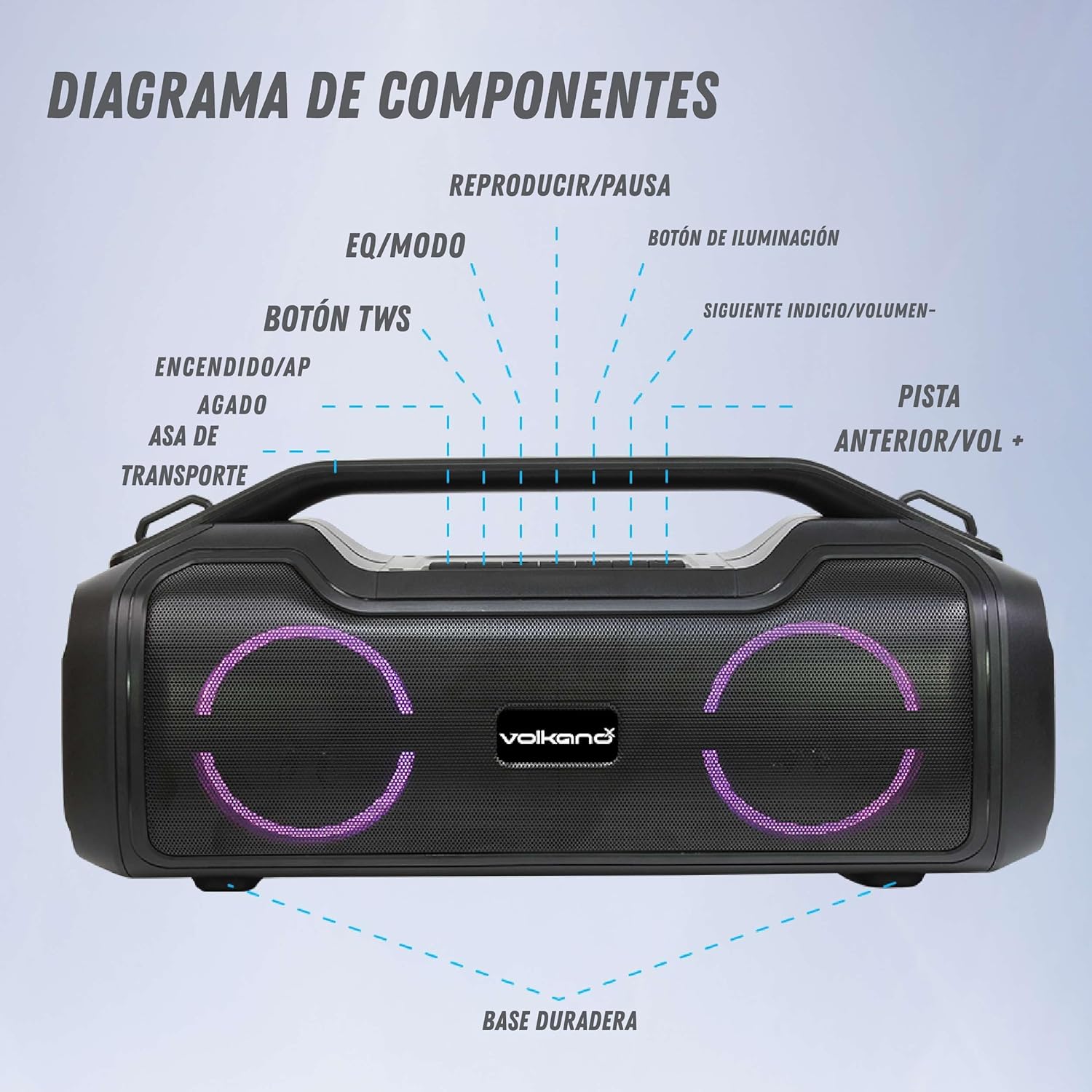
Image: Component Diagram of the Volkano VKX-3000-BK speaker. This image labels the various buttons and features on the top and front of the speaker, including the power button, TWS button, EQ/Mode button, Play/Pause, Illumination button, Next Track/Volume+, Previous Track/Volume-, and the durable base.
- Power On/Off: Button to turn the speaker on or off.
- Transport Handle: Integrated handle for easy portability.
- TWS Button: For True Wireless Stereo pairing with another compatible speaker.
- EQ/Mode Button: To switch between equalizer presets or input modes (Bluetooth, AUX, USB, etc.).
- Play/Pause Button: To control audio playback.
- Illumination Button: To control the speaker's LED lighting effects.
- Next Track/Volume +: Short press for next track, long press to increase volume.
- Previous Track/Volume -: Short press for previous track, long press to decrease volume.
- Durable Base: Provides stability for the speaker.
Setup
1. Charging the Speaker
Before first use, fully charge the speaker. Connect the charging cable to the speaker's charging port and to a suitable USB power adapter (not included). The charging indicator will show the charging status. A full charge typically takes 4-8 hours.

Image: The Volkano VKX-3000-BK speaker positioned next to a pool, illustrating its portability. The image also highlights key battery specifications: 4400 mAh battery capacity, 5V/1A power bank output, and 4-8 hours charging time, providing approximately 7 hours of playback.
2. Powering On/Off
Press and hold the Power On/Off button for a few seconds to turn the speaker on or off. A sound indicator will confirm the action.
Operating Instructions
1. Bluetooth Pairing
- Ensure the speaker is powered on and in Bluetooth mode. The speaker will typically enter pairing mode automatically upon startup, indicated by a flashing LED light.
- On your smartphone, tablet, or other Bluetooth-enabled device, go to the Bluetooth settings.
- Search for available devices and select "Volkano VKX-3000-BK" from the list.
- Once paired, the speaker will emit a confirmation sound, and the LED light will stop flashing.
- You can now play audio from your device through the speaker.

Image: Front view of the Volkano VKX-3000-BK speaker, showcasing its dual speaker grilles with active blue LED illumination. The VolkanoX logo is visible between the speakers, and a sturdy handle is at the top.
2. True Wireless Stereo (TWS) Function
To pair two Volkano VKX-3000-BK speakers for a stereo sound experience:
- Ensure both speakers are powered on and not connected to any other Bluetooth device.
- Press the TWS button on one of the speakers. It will enter TWS pairing mode.
- The speakers will automatically connect to each other. A confirmation sound will indicate successful pairing.
- Now, connect your Bluetooth device to one of the paired speakers as described in the "Bluetooth Pairing" section. Both speakers will play audio in stereo.
3. Controlling Playback and Volume
- Play/Pause: Press the Play/Pause button.
- Next Track: Short press the "Next Track/Volume +" button.
- Previous Track: Short press the "Previous Track/Volume -" button.
- Increase Volume: Long press the "Next Track/Volume +" button.
- Decrease Volume: Long press the "Previous Track/Volume -" button.
4. Changing Modes (EQ/Mode)
Press the EQ/Mode button to cycle through available input modes (e.g., Bluetooth, AUX, USB, FM Radio if supported). Long press the EQ/Mode button to cycle through equalizer presets (e.g., Pop, Rock, Classic, Jazz, Flat).
5. LED Illumination
Press the Illumination button to change or turn off the LED lighting effects on the speaker.
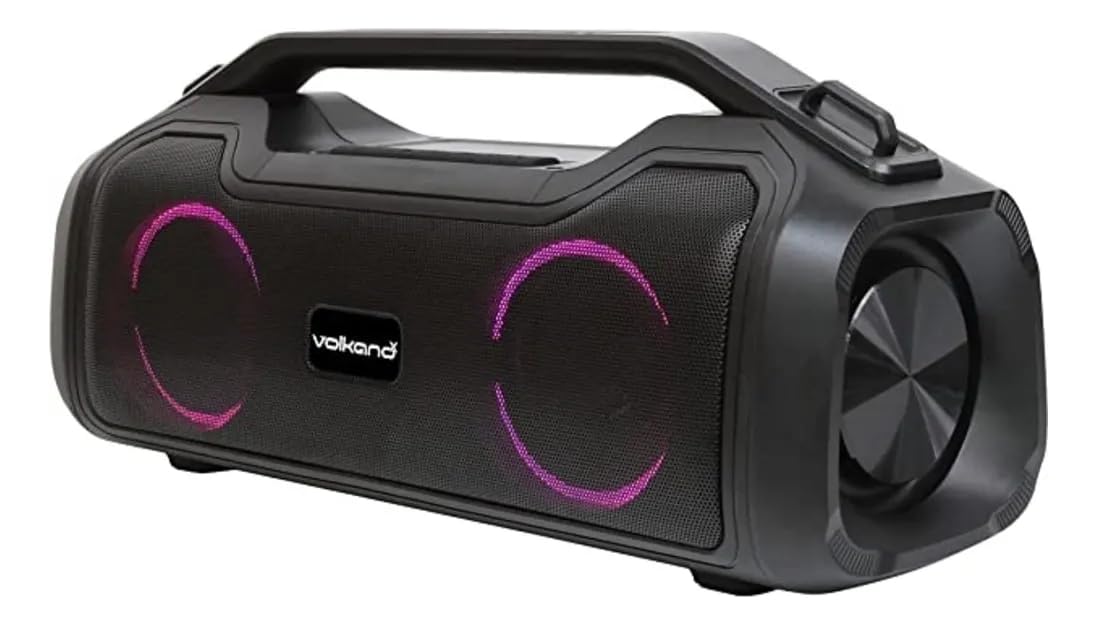
Image: Side view of the Volkano VKX-3000-BK speaker, showing the robust design and the circular speaker grille with purple LED lighting. The top panel with control buttons and the integrated handle are also visible.
6. Hands-Free Calling
When connected to a smartphone via Bluetooth, the speaker's integrated microphone allows for hands-free calls. Press the Play/Pause button to answer or end a call.
Maintenance
- Cleaning: Use a soft, dry cloth to clean the speaker's exterior. Do not use abrasive cleaners or solvents.
- Storage: Store the speaker in a cool, dry place away from direct sunlight and extreme temperatures.
- Battery Care: To prolong battery life, avoid fully discharging the speaker frequently. Charge it regularly, even if not in use for extended periods.
- Water Resistance: While designed for outdoor use, avoid submerging the speaker in water or exposing it to heavy rain.
Troubleshooting
| Problem | Possible Solution |
|---|---|
| Speaker does not turn on. | Ensure the battery is charged. Connect the speaker to a power source and try again. |
| Cannot pair via Bluetooth. |
|
| No sound or low volume. |
|
| TWS pairing fails. |
|
Specifications
| Model | VKX-3000-BK |
| Brand | Volkano |
| Connectivity Technology | Bluetooth, Wireless |
| Color | Black |
| Speaker Type | Portable Bluetooth Speaker |
| Dimensions (L x W x H) | 9.9 x 16 x 15.6 cm |
| Power Source | Battery |
| Compatible Devices | Smartphone, Tablet |
| Bluetooth Compatible | Yes |
| Number of Speakers | 1 (Note: TWS allows for 2 speakers to function as a stereo pair) |
| Audio Output Mode | Stereo |
| Battery Capacity | 4400 mAh (approx. 7 hours playback) |
| Charging Time | 4-8 hours |
| Country of Origin | China |
Warranty and Support
Warranty Information
This product comes with a 30-day seller warranty. Please retain your proof of purchase for any warranty claims. The warranty covers manufacturing defects but does not cover damage caused by misuse, accidents, or unauthorized modifications.
Customer Support
For technical assistance or warranty inquiries, please contact your retailer or visit the official Volkano website for support resources. Ensure you have your product model number (VKX-3000-BK) and proof of purchase ready when contacting support.
Safety Information
- Do not expose the speaker to extreme temperatures, direct sunlight, or high humidity.
- Do not disassemble or attempt to repair the speaker yourself. This will void the warranty.
- Keep the speaker away from children and pets.
- Use only the specified charging cable and power adapter.
- Avoid listening at excessively high volumes for prolonged periods to prevent hearing damage.