
1. Introduction
Thank you for choosing the SIMATE T2 Kick Scooter. This manual provides essential information for the safe assembly, operation, and maintenance of your scooter. Please read it thoroughly before first use and retain it for future reference.
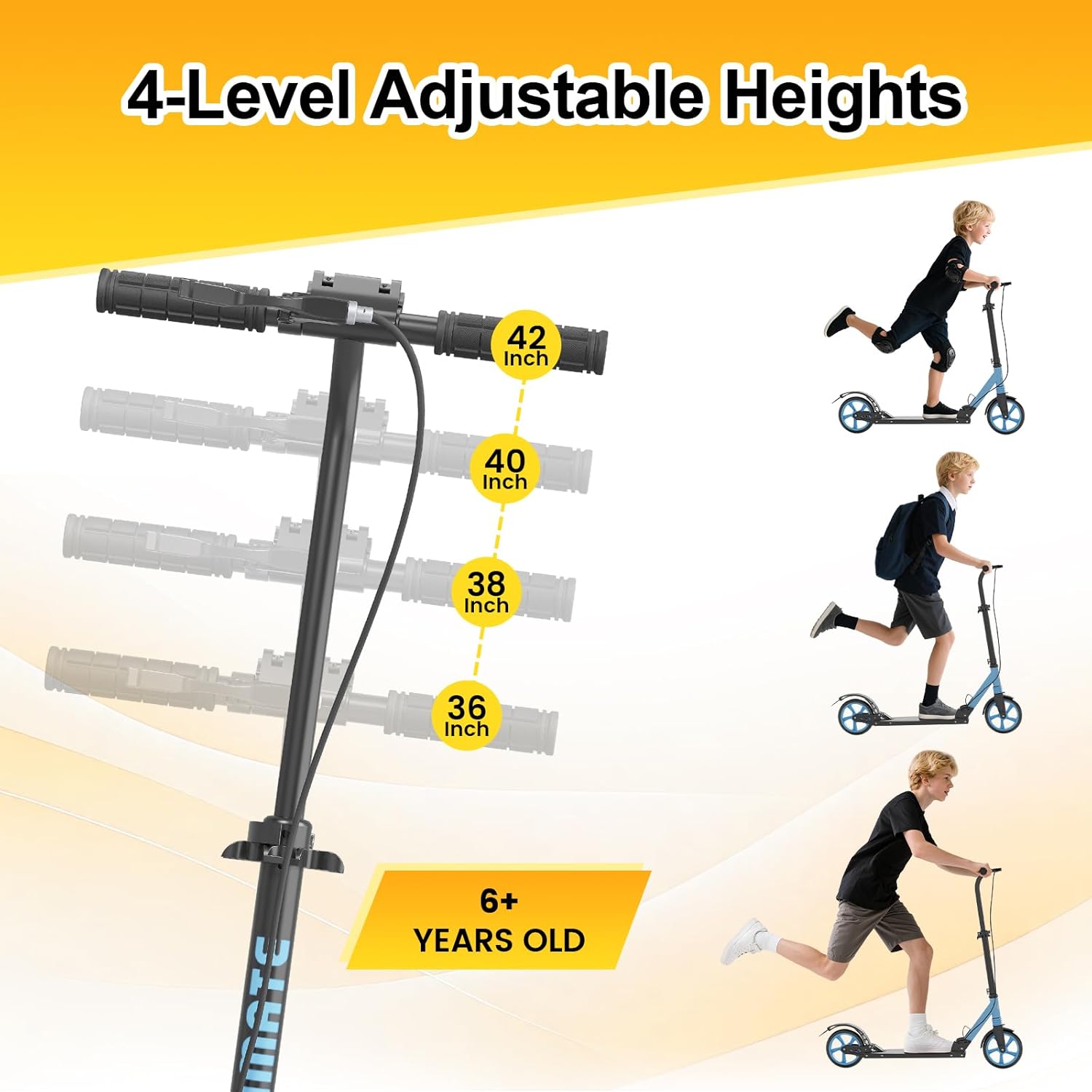
Image: The SIMATE T2 Kick Scooter, showcasing its design and color.
2. Safety Information
Your safety is paramount. Always follow these guidelines when operating the scooter:
- Always wear a helmet and appropriate protective gear (knee pads, elbow pads, wrist guards) when riding.
- Ensure all clamps, bolts, and quick-release mechanisms are securely fastened before each ride.
- Do not ride in wet conditions, on uneven surfaces, or at night.
- Maintain a safe distance from pedestrians, vehicles, and other obstacles.
- The maximum weight limit for this scooter is 220 lbs (100 kg). Do not exceed this limit.
- Children should always be supervised by an adult.
- Familiarize yourself with both the hand brake and foot brake before riding.
3. Package Contents
Upon opening the package, verify that all the following items are included:
- SIMATE T2 Kick Scooter
- Allen Key
- Carry Strap
- User Manual (this document)
4. Assembly and Setup
4.1 Unfolding the Scooter
The SIMATE T2 Kick Scooter comes pre-assembled and folded for transport. To unfold:
- Place the scooter on a flat, stable surface.
- Locate the folding mechanism near the base of the handlebar stem.
- Release the locking lever and carefully lift the handlebar stem until it clicks into the upright position. Ensure the locking mechanism is fully engaged and secure.
4.2 Adjusting Handlebar Height
The handlebar can be adjusted to four different height settings to accommodate various rider heights.
- Locate the quick-release clamp on the handlebar stem.
- Open the quick-release clamp.
- Press the spring-loaded pin and slide the handlebar to your desired height (36", 38", 40", or 42").
- Ensure the pin snaps securely into one of the adjustment holes.
- Close the quick-release clamp firmly to lock the handlebar in place. Verify there is no wobble.

Image: Close-up of the adjustable handlebar mechanism, showing height settings.

Image: Visual representation of the four adjustable handlebar heights (36, 38, 40, 42 inches) and recommended age 6+.
5. Operating Instructions
5.1 Riding the Scooter
To begin riding, place one foot firmly on the deck and use the other foot to push off the ground. Once you gain momentum, place both feet on the deck, one behind the other. Lean gently to steer.
5.2 Braking
The SIMATE T2 features a dual braking system for enhanced control:
- Hand Brake: Located on the handlebar, squeeze the lever to engage the front wheel brake. Apply gently to avoid sudden stops.
- Foot Brake: Located over the rear wheel, press down firmly on the fender with your heel to engage the rear wheel brake.
Practice braking at low speeds in a safe area before riding in traffic or crowded spaces.

Image: Detail of the hand brake lever and the foot brake over the rear wheel.
5.3 Suspension System
The scooter is equipped with a dual suspension system to provide a smoother ride over varied terrains. This system absorbs shocks and vibrations, improving comfort and stability.

Image: A person riding the scooter, illustrating the effect of the suspension system on uneven ground.

Image: The scooter's 8-inch wheels are designed for smooth riding across different surfaces like pavement, gravel, and grass.
5.4 Official Product Video
Video: This video demonstrates the SIMATE T2 Kick Scooter's features, including its foldable design, dual brakes, suspension system, and adjustable height, in practical use.
6. Folding and Storage
The SIMATE T2 Kick Scooter is designed to be foldable and lightweight for easy transport and storage.
6.1 Folding the Scooter
- Ensure the handlebar is at its lowest adjustable setting.
- Locate the folding mechanism at the base of the handlebar stem.
- Release the locking lever and carefully push the handlebar stem downwards until the scooter is fully folded. Ensure the mechanism locks securely in the folded position.
6.2 Using the Carry Strap
Attach the included carry strap to the designated points on the scooter frame for convenient carrying. The scooter weighs approximately 9 lbs, making it easy to transport.

Image: The SIMATE T2 Kick Scooter shown in its folded configuration, highlighting its compact size and the attached carry strap.

Image: Two children carrying their folded SIMATE T2 Kick Scooters, demonstrating its lightweight and portable design.
7. Maintenance
Regular maintenance ensures the longevity and safe operation of your scooter.
- Cleaning: Wipe the scooter with a damp cloth after use. Avoid using harsh chemicals or abrasive cleaners.
- Lubrication: Periodically lubricate moving parts such as wheel bearings and folding mechanisms with a light oil.
- Brakes: Check brake functionality regularly. Adjust cable tension if the brakes feel loose or too tight.
- Wheels: Inspect wheels for wear and tear. Replace worn-out wheels to maintain optimal performance and safety.
- Fasteners: Regularly check all bolts, nuts, and screws to ensure they are tight. Use the provided Allen key for adjustments.
8. Troubleshooting
Here are solutions to common issues you might encounter:
| Problem | Possible Cause | Solution |
|---|---|---|
| Handlebar wobbles | Quick-release clamp not tight enough; adjustment pin not fully engaged. | Ensure the adjustment pin is fully seated in a height hole and tighten the quick-release clamp firmly. |
| Brakes feel loose or ineffective | Brake cable tension is too low; brake pads are worn. | Adjust the brake cable tension using the barrel adjuster or the cable anchor bolt. Replace brake pads if worn. |
| Scooter does not fold/unfold smoothly | Folding mechanism is stiff or dirty. | Clean the folding mechanism and apply a small amount of lubricant. Ensure the release lever is fully disengaged. |
| Noisy ride | Loose fasteners; worn wheel bearings. | Check and tighten all bolts and nuts. If noise persists, inspect wheel bearings for wear and replace if necessary. |
9. Specifications
| Feature | Detail |
|---|---|
| Brand | SIMATE |
| Model Name | T2 |
| Age Range (Description) | Kid, Teen, Adult |
| Weight Limit | 220 Pounds (100 kg) |
| Product Dimensions (LxWxH) | 39" x 15" x 40" (99cm x 38cm x 102cm) |
| Item Weight | 9 lbs (4.08 kg) |
| Number of Wheels | 2 |
| Wheel Size | 8 Inches |
| Wheel Material | Rubber |
| Frame Material | Aluminum |
| Handlebar Type | Adjustable (4 heights: 36", 38", 40", 42") |
| Suspension Type | Dual Suspension |
| Brake Style | Foot brake, Hand brake |
10. Warranty and Support
The SIMATE T2 Kick Scooter comes with a 1-year warranty from the date of purchase. This warranty covers manufacturing defects under normal use. It does not cover damage caused by misuse, accidents, unauthorized modifications, or normal wear and tear.
For warranty claims, technical support, or any questions regarding your scooter, please contact SIMATE customer service. Refer to the contact information provided on the product packaging or the official SIMATE website.