1. Introduction
Thank you for purchasing the LIJIANI RD218 Portable FM/AM/SW Radio. This compact and lightweight radio is designed for ease of use and portability, making it an ideal companion for various activities. Please read this manual carefully to ensure proper operation and to fully utilize all features of your new radio.
2. Product Overview
The LIJIANI RD218 is a versatile portable radio featuring FM, AM, and Shortwave (SW) bands. It is powered by two readily available AA batteries and incorporates a high-performance DSP chip for enhanced reception sensitivity. Designed with user convenience in mind, it includes orange backlit buttons for comfortable night operation, a digital clock, alarm, and sleep timer functions. Its small and lightweight form factor makes it perfect for on-the-go use, whether you're running, camping, or simply enjoying music indoors.
Key Features:
- AM/FM/SW Bands: Achieves high sensitivity and reception with superior integrated circuits. Tuning modes include both auto and manual tuning.
- Quick Preset Keys: Set up to 3 station shortcuts. Pressing a button provides immediate access to your desired station, saving time.
- Station Memory Function: This mini compact pocket transistor radio features backlit keys that guide operation at night, making it easy to find radio stations in the dark.
- Digital Clock Function: Features a digital alarm clock. Its compact size (4.9*2.7*0.8 inches) allows for easy placement in your pocket, handbag, or for use outdoors, during travel, sports, or indoors.

Figure 2.1: Front view of the white LIJIANI RD218 portable radio, highlighting FM, AM, SW bands, battery usage, alarm clock, and sleep countdown features.
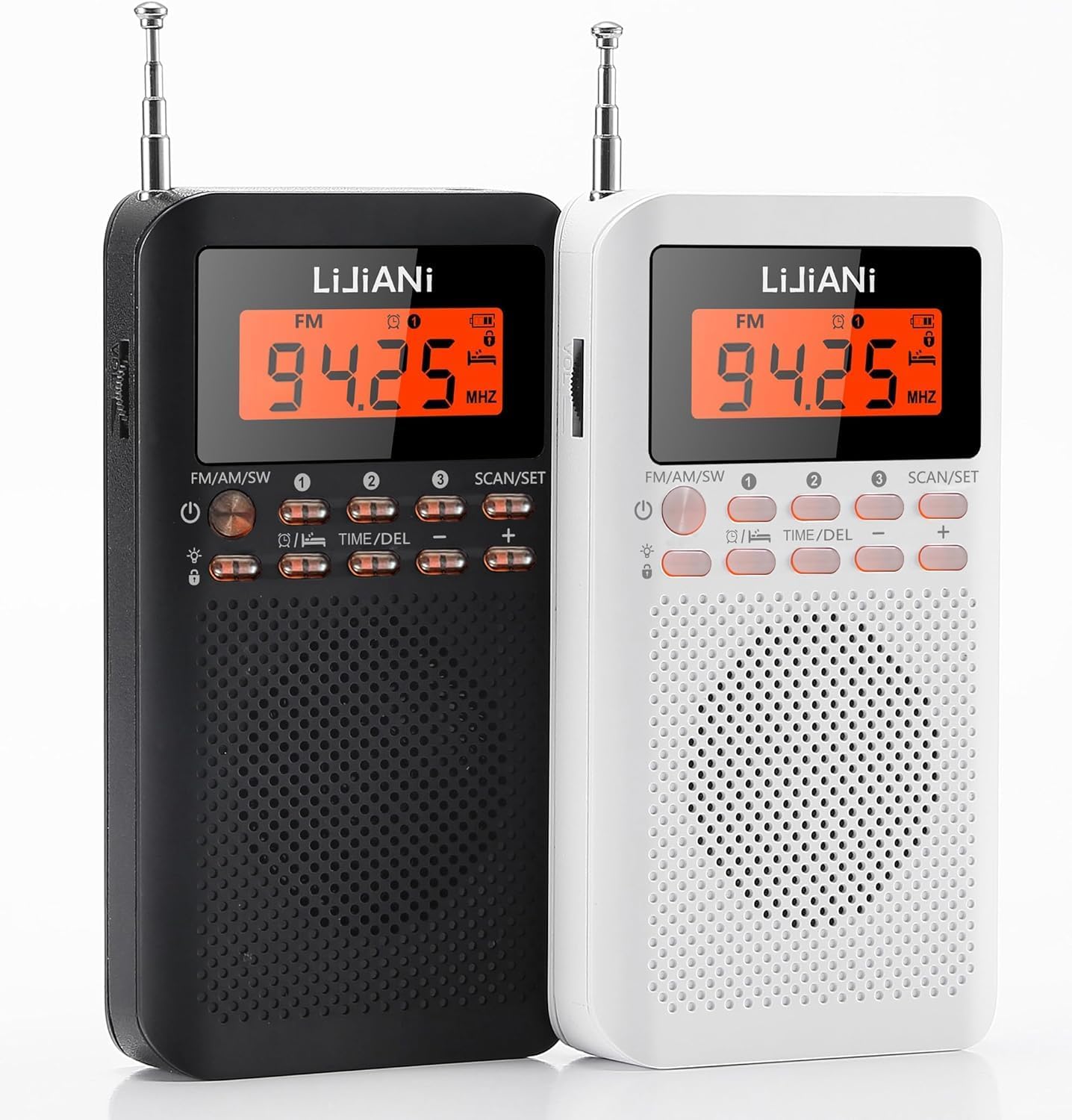
Figure 2.2: Side-by-side view of the black and white LIJIANI RD218 portable radios, showing their compact design.

Figure 2.3: A hand holding the white LIJIANI RD218 radio, demonstrating its small dimensions (4.9 inches height, 2.7 inches width, 0.8 inches thickness).
3. Setup
3.1 Battery Installation
- Locate the battery compartment cover on the back of the radio.
- Slide the cover open.
- Insert two AA (UM-3) batteries, ensuring correct polarity (+/-) as indicated inside the compartment.
- Close the battery compartment cover securely.
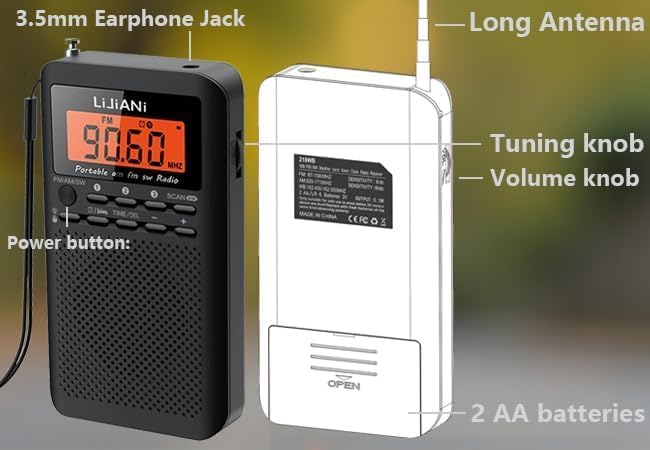
Figure 3.1: Diagram illustrating the back and side components of the LIJIANI RD218 radio, including the 3.5mm earphone jack, long antenna, tuning knob, volume knob, and battery compartment for 2 AA batteries.
4. Operating Instructions
4.1 Power On/Off
To power on the radio, press and hold the POWER button. The display will light up. To power off, press and hold the POWER button again.
Video 4.1: Demonstration of the LIJIANI RD218 radio's basic functions, including power on, automatic station scanning, and manual tuning.
4.2 Band Selection (FM/AM/SW)
Use the FM/AM/SW button to cycle through the available frequency bands: FM, AM, and Shortwave (SW).
4.3 Tuning for Stations
- Automatic Scan: Press and hold the SCAN button to automatically search for and save available stations. The radio will scan through the frequencies and store them in memory.
- Manual Tuning: Use the "+" and "-" buttons to manually adjust the frequency in small increments.
- Accessing Saved Stations: After an automatic scan, use the 1, 2, 3 preset buttons to quickly switch between your favorite saved stations.
4.4 Volume Adjustment
Adjust the listening volume using the dedicated Volume Knob located on the side of the radio.
4.5 Digital Clock, Alarm, and Sleep Timer
- Setting the Clock: Press and hold the TIME/DEL button for 3 seconds to display the clock. Follow the on-screen prompts and use the "+" and "-" buttons to set the time.
- Alarm Function: The radio includes a digital alarm clock. Refer to the on-screen indicators and buttons to set and activate the alarm.
- Sleep Timer: Utilize the sleep timer function to automatically turn off the radio after a set period, conserving battery life.
4.6 Backlit Buttons
The radio features orange backlit buttons, making it easy to operate in low-light conditions or at night. The backlight activates automatically with button presses.
Video 4.2: This video demonstrates the backlit buttons and various operational features of the RD218 radio, including power on, automatic station search, saving favorite stations, deleting stations, setting the clock, and adjusting volume.
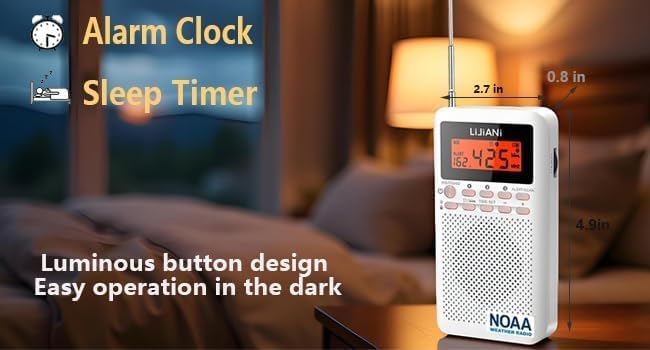
Figure 4.1: The white LIJIANI RD218 radio on a bedside table at night, showcasing its alarm clock, sleep timer, and luminous button design for easy dark operation.
4.7 Using Headphones
For private listening, plug standard 3.5mm headphones into the headphone jack located on the side of the radio.
5. Maintenance
- Cleaning: Wipe the radio with a soft, dry cloth. Do not use liquid cleaners or abrasive materials.
- Battery Care: If the radio will not be used for an extended period, remove the batteries to prevent leakage and damage.
- Storage: Store the radio in a cool, dry place away from direct sunlight and extreme temperatures.
6. Troubleshooting
| Problem | Possible Cause | Solution |
|---|---|---|
| Radio does not turn on. | Batteries are dead or incorrectly inserted. | Replace batteries with new ones, ensuring correct polarity. |
| Poor reception or static. | Weak signal, antenna not extended, or interference. | Extend the antenna fully. Try repositioning the radio. For AM, rotate the radio for best reception. |
| No sound from speaker/headphones. | Volume is too low, or headphones are not fully plugged in. | Increase the volume. Ensure headphones are securely connected. |
| Digital clock is incorrect. | Time has not been set or batteries were removed. | Reset the digital clock following the instructions in Section 4.5. |
7. Specifications
| Feature | Detail |
|---|---|
| Tuner Type | AM/FM/SW |
| Brand | LIJIANI |
| Color | White |
| Included Components | Instruction Manual |
| Manufacturer | LIJIANI |
| Material | Plastic |
| Model Number | RD218 |
| Connectivity | AUX |
| Batteries Included | No |
| Package Dimensions | 14.2 x 10.6 x 2.9 cm; 120 g |
| Product Features | Built-in AM antenna, Built-in clock |
| Size | Approx. 2x7x13 cm |
| Battery Use | Yes |
| Additional Features | Ultra-thin, Built-in timer, Built-in speaker, High sensitivity reception FM/AM/SW three-band small receiver, Orange keyboard light |
| Product Weight | 120 grams |
| Connectivity Technology | AUX |
| Product Dimensions | 7 length x 13 width x 2 height cm |
| Tuner Technology | AM/FM/SW |
| Style | Classic |
| Power Source | Corded Electric (Note: The product primarily uses AA batteries for portability.) |
| Supported Radio Frequencies | 3 Bands |
8. Warranty and Support
For warranty information or technical support, please refer to the contact details provided with your purchase or visit the official LIJIANI website. Keep your purchase receipt as proof of purchase for any warranty claims.


