
1. Safety Information
Please read this manual thoroughly before assembly and use. Retain this manual for future reference. Failure to follow these instructions may result in injury or damage to the product.
- Consult a physician before starting any exercise program.
- Ensure all parts are securely fastened before each use.
- Keep children and pets away from the equipment during operation.
- Place the exercise bike on a flat, stable surface.
- Maximum user weight capacity: 260 lbs.
- Wear appropriate exercise attire and footwear.
2. Package Contents
Upon unboxing your USLIM X-Bike 816, verify that all components are present:
- Main Frame (70% pre-assembled)
- Seat and Seat Post
- Handlebar and Monitor Assembly
- Front and Rear Stabilizers
- Pedals
- Resistance Bands
- Hardware Kit (bolts, washers, nuts)
- Installation Tools (wrenches, Allen keys)
- Instruction Manual
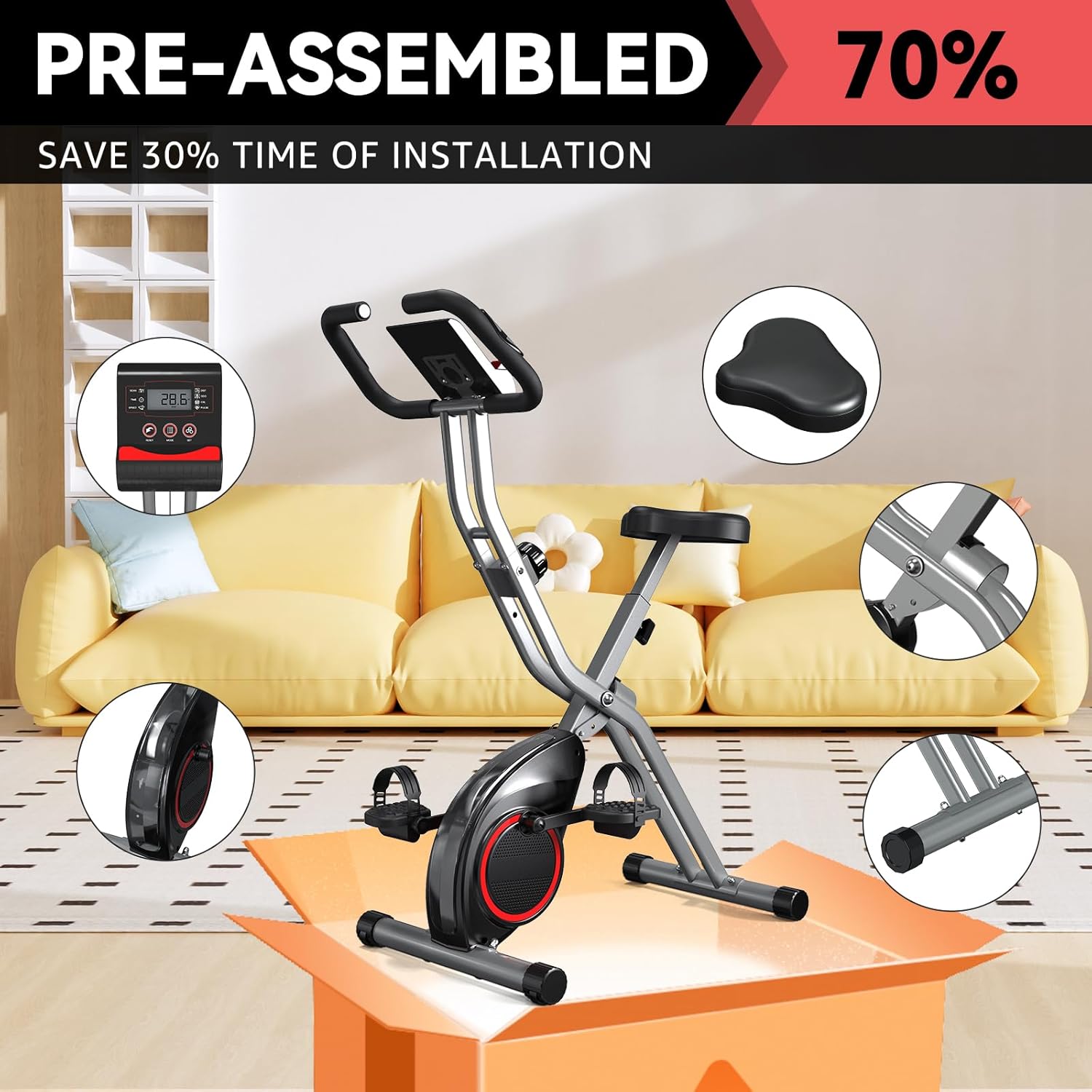
Figure 2.1: Main components of the USLIM X-Bike 816, highlighting its 70% pre-assembled state.
3. Setup and Assembly
The USLIM X-Bike 816 is designed for rapid setup with 70% pre-assembly. The following steps detail the remaining installation process, which typically takes less than an hour.
3.1 Attaching Stabilizers
- Identify the front and rear stabilizers. The rear stabilizer typically includes transport wheels.
- Align the stabilizers with the main frame's attachment points.
- Secure them using the provided bolts, washers, and nuts. Ensure they are tightened firmly for stability.

Figure 3.1: The bike's base with transport wheels for easy mobility.
3.2 Installing the Seat
- Attach the seat to the seat post using the provided hardware.
- Insert the seat post into the main frame.
- Adjust the seat height to a comfortable position (five adjustments available for users 5'0" to 6'1") and secure it with the adjustment knob.
3.3 Attaching Handlebar and Monitor
- Connect the handlebar to the main frame.
- Mount the LCD monitor onto the handlebar assembly.
- Connect the sensor wires from the main frame to the monitor.
- Install the batteries into the monitor (batteries are typically included).
3.4 Installing Pedals
- Identify the left (L) and right (R) pedals.
- Thread the pedals into the crank arms. Note that the left pedal threads counter-clockwise.
- Tighten securely with a wrench.
3.5 Attaching Resistance Bands
If included, attach the resistance bands to the designated points on the bike frame for additional upper body workouts.
4. Operating Instructions
4.1 Adjusting Resistance
The USLIM X-Bike 816 features a stepless magnetic resistance system with 16 levels. To adjust the resistance:
- Locate the resistance knob on the main frame.
- Turn the knob clockwise to increase resistance (higher intensity).
- Turn the knob counter-clockwise to decrease resistance (lower intensity).
- Adjust resistance as needed during your workout for optimal challenge.

Figure 4.1: The 16-level magnetic resistance knob for varied workout intensity.
4.2 Using the LCD Monitor
The LCD monitor provides real-time feedback on your workout. It features an auto-start/stop function, activating when you begin pedaling and pausing when you stop.
- SCAN: Automatically cycles through all display functions.
- TIME: Displays the duration of your workout.
- SPEED: Shows your current cycling speed.
- DIST (Distance): Tracks the distance covered during your session.
- ODO (Odometer): Records the total accumulated distance.
- CAL (Calories): Estimates calories burned.
- PULSE: Displays your heart rate when holding the pulse sensors on the handlebars.
- RESET: Press to clear current workout data.
- MODE: Press to select a specific display function or activate SCAN mode.
- SET: Used for setting target values (e.g., time, distance, calories) if available.

Figure 4.2: The LCD monitor providing essential workout data.
4.3 Folding and Storage
To fold the bike for storage:
- Locate the folding pin or knob on the main frame.
- Pull or loosen the pin/knob to release the frame.
- Carefully fold the bike until it locks into the compact storage position.
- Use the integrated transport wheels to move the folded bike.

Figure 4.3: The bike folded for compact storage and easy transport.
5. Maintenance
Regular maintenance ensures the longevity and safe operation of your USLIM Indoor Exercise Bike.
- Cleaning: Wipe down the bike with a damp cloth after each use to remove sweat and dust. Avoid abrasive cleaners.
- Inspection: Periodically check all bolts, nuts, and moving parts for tightness. Tighten any loose components.
- Lubrication: The magnetic resistance system is generally maintenance-free. If any squeaking or unusual noises occur, consult customer service.
- Storage: Store the bike in a dry, cool place away from direct sunlight and extreme temperatures.
6. Troubleshooting
If you encounter any issues with your exercise bike, refer to the following common problems and solutions:
- No display on LCD monitor: Check if batteries are correctly installed and have sufficient charge. Replace if necessary. Ensure all sensor wires are securely connected.
- Unstable or wobbling bike: Ensure the bike is placed on a flat surface. Adjust the 6-position stabilizer calibration feet on the base to eliminate wobble. Verify all assembly bolts are tightened.
- Resistance not changing: Check the resistance knob for proper function. Ensure the resistance cable is not kinked or disconnected.
- Unusual noises during operation: Inspect for any loose parts or foreign objects. Ensure pedals are securely tightened. If the noise persists, contact customer service.
7. Specifications
| Feature | Detail |
|---|---|
| Brand | USLIM |
| Model Number | US816-CW |
| Resistance Mechanism | Magnetic |
| Number of Resistance Levels | 16 |
| Maximum Weight Recommendation | 260 Pounds |
| Item Weight | 31 Pounds |
| Product Dimensions (LxWxH) | 32"D x 16"W x 47"H |
| Material | Alloy Steel |
| Special Features | Quiet Operation, Lightweight, Foldable, Adjustable Resistance Level, Adjustable Seat |
| Recommended Uses | Indoor Cycling, Home Workout |

Figure 7.1: Product dimensions and key details.
8. Warranty and Customer Support
Your USLIM X-Bike 816 comes with a 12-month warranty from the date of purchase. This warranty covers manufacturing defects and ensures the quality of your product.
For any questions, technical assistance, or warranty claims, please contact USLIM customer service:
- Phone: 1-909-905-5221 (US), Monday - Friday 9am-5pm (PST)
- Email: sp-gtamz@outlook.com
Please have your model number (US816-CW) and purchase information ready when contacting support.