
1. Introduction
The Hosyond ZK-5KX is a versatile DC-DC buck-boost power converter designed for precise voltage and current regulation. It features an adjustable output voltage range from 0.6V to 36V and an adjustable current limit from 0A to 5A. This module is equipped with a clear LCD for real-time monitoring of various parameters and incorporates multiple protection mechanisms to ensure safe and reliable operation. It is suitable for electronic device power management, DIY electronics, laboratory adjustable power supplies, battery charging and discharging, LED drivers, and motor power supplies.
2. Safety Information
WARNING: Improper handling of electrical components can cause electric shock, fire, or damage to equipment. Always follow safety guidelines.
- Always ensure proper wiring and insulation for all connections.
- Do not exceed the specified input voltage (5V-30V DC) or output current (5A) limits.
- Disconnect power before making any connections, disconnections, or adjustments to the module.
- Ensure adequate ventilation around the module during operation to prevent overheating.
- Keep the module away from moisture, dust, and flammable materials.
3. Product Overview
The Hosyond ZK-5KX Buck-Boost Power Converter features a compact design with an integrated LCD display and intuitive controls for easy operation.

Figure 3.1: Front and rear view of the ZK-5KX converter.

Figure 3.2: Front panel layout and controls.
3.1. Components and Controls
- LCD Display: Shows input/output voltage, current, power, capacity, time, and temperature.
- SW Key: Used to switch between different display parameters on the LCD.
- U/I Key: Used to switch between input/output voltage and current display, and to enter/exit setting modes.
- Rotary Encoder: Used to adjust voltage and current values in setting mode, and to turn the output ON/OFF with a short press.
- CC Indicator: Illuminates when the module is operating in Constant Current mode.
- ON Indicator: Illuminates when the output is active.
- Input Terminals (IN+/IN-): For connecting the DC input power source (5V-30V).
- Output Terminals (OUT+/OUT-): For connecting the load (0.6V-36V).
4. Specifications
Detailed technical specifications for the Hosyond ZK-5KX DC-DC Buck-Boost Power Converter.
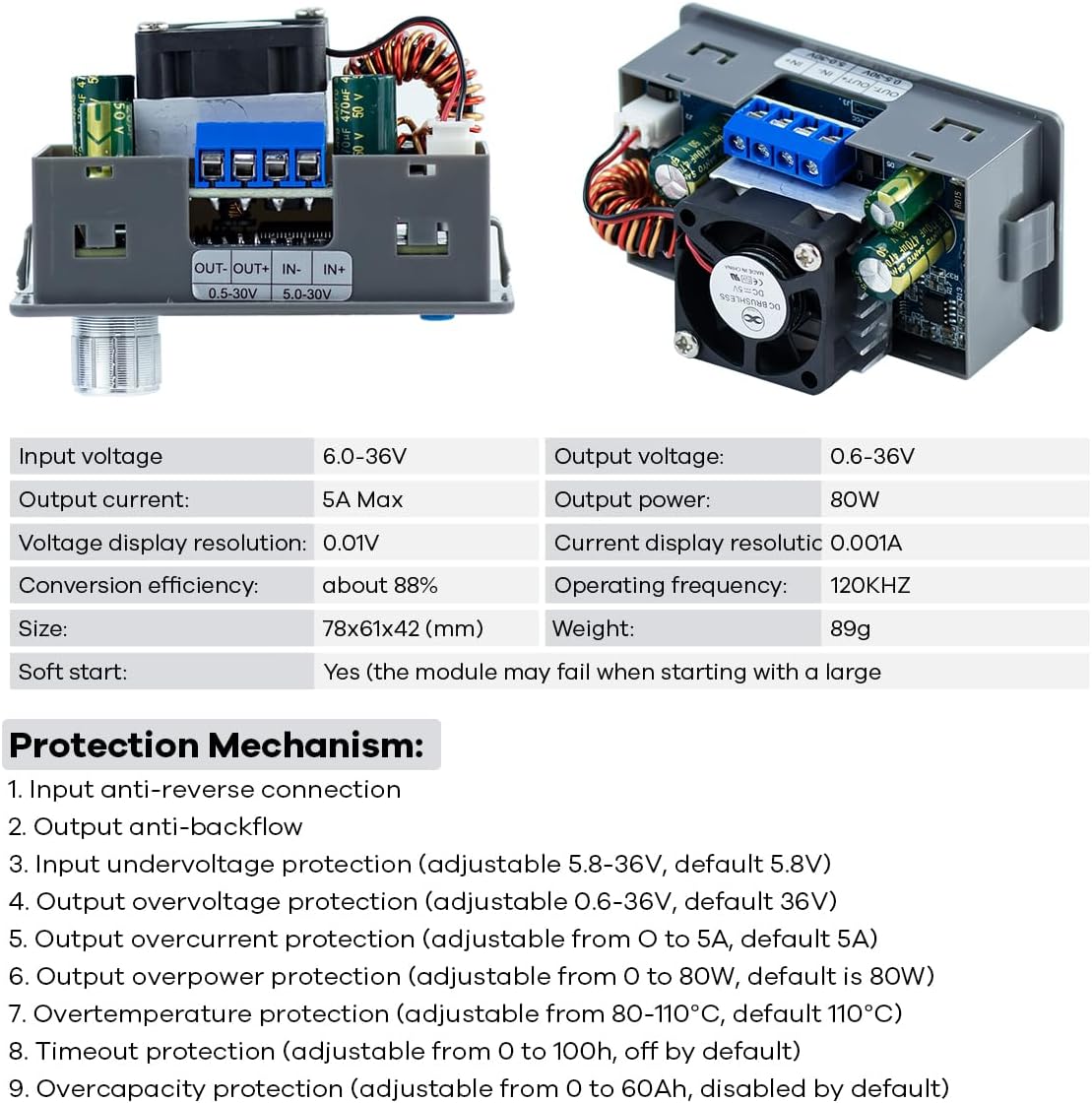
Figure 4.1: Key specifications and protection mechanisms.
| Parameter | Value |
|---|---|
| Product Name | ZK-5KX DC-DC Buck-Boost Regulator |
| Casing Material | ABS |
| Input Voltage Range | 5V-30V DC |
| Output Voltage Range | 0.6V-36V DC (Adjustable) |
| Output Current Range | 0-5A (Adjustable, with current limiting) |
| Output Power | Maximum 80W |
| Conversion Efficiency | Approximately 88% (typical) |
| Voltage Resolution | 0.01V |
| Current Resolution | 0.001A |
| Module Dimensions | 7.9 × 4.3 × 6 cm (approx.) |
| Weight | Approximately 93g |
| Operating Frequency | 120KHz |
5. Setup and Installation
5.1. Wiring Connections
Connect your DC input power source to the IN+ and IN- terminals, observing polarity. Connect your load to the OUT+ and OUT- terminals. Ensure all connections are secure.

Figure 5.1: Input and Output Terminal Connections.
- IN+: Positive terminal for DC input (5V-30V).
- IN-: Negative terminal for DC input.
- OUT+: Positive terminal for DC output (0.6V-36V).
- OUT-: Negative terminal for DC output.
5.2. Mounting and Dimensions
The module can be integrated into a panel. Refer to the dimensions below for appropriate panel cutout.

Figure 5.2: Module dimensions and suggested panel opening.
6. Operating Instructions
This section details how to operate the ZK-5KX converter, including setting voltage and current limits.

Figure 6.1: Normal operating interface and setting interface.
6.1. Power On/Off
- After connecting the input power, the LCD will display information.
- Short press the Rotary Encoder to toggle the output ON or OFF. The 'ON' indicator light will show the output status.
6.2. Display Modes
- Short press the SW Key to cycle through different display parameters on the main interface (e.g., Input Voltage, Output Voltage, Output Current, Output Power, Output Capacity, Output Time, Temperature).
- Short press the U/I Key to switch between displaying input voltage/current and output voltage/current.
6.3. Setting Output Voltage and Current
- From the main interface, long press the U/I Key to enter the setting mode. The 'SET' indicator will appear, and the output voltage value will blink.
- Rotate the Rotary Encoder to adjust the desired output voltage.
- Short press the Rotary Encoder to move the cursor to the next digit for fine adjustment, or to switch between setting voltage and current.
- Once the voltage is set, rotate the Rotary Encoder to adjust the desired output current limit.
- Long press the U/I Key again to save the settings and exit the setting mode. The module will resume normal operation with the new parameters.
6.4. Calibration
The module supports calibration for voltage and current. For precise calibration, a trusted multimeter is recommended. Refer to advanced user guides or contact support for detailed calibration procedures.
7. Protection Mechanisms
The ZK-5KX converter includes comprehensive protection features to safeguard the module and connected devices:
- Input Anti-Reverse Connection: Protects against damage from incorrect input polarity.
- Output Anti-Backflow: Prevents current from flowing back into the module from the output.
- Input Undervoltage Protection: Adjustable from 5.8-36V (default 5.8V). Shuts off output if input voltage drops below the set threshold.
- Output Overvoltage Protection: Adjustable from 0.6-36V (default 36V). Shuts off output if output voltage exceeds the set threshold.
- Output Overcurrent Protection: Adjustable from 0-5A (default 5A). Shuts off output if output current exceeds the set threshold.
- Output Overpower Protection: Adjustable from 0-80W (default 80W). Shuts off output if output power exceeds the set threshold.
- Overtemperature Protection: Adjustable from 80-110°C (default 110°C). Shuts off output if internal temperature exceeds the set threshold.
- Timeout Protection: Adjustable from 0 to 100h (disabled by default). Shuts off output after a set operating time.
- Overcapacity Protection: Adjustable from 0 to 60Ah (disabled by default). Shuts off output after a set accumulated output capacity.
8. Maintenance
The Hosyond ZK-5KX is designed for reliable operation with minimal maintenance.
- Cooling Fan: The intelligent temperature-controlled fan automatically activates when the module temperature exceeds 50°C or the current exceeds 1A. Ensure the fan's air intake and exhaust are not obstructed to allow for proper heat dissipation.
- Cleaning: Keep the module clean and free from dust and debris. Use a soft, dry cloth for cleaning. Do not use liquids or abrasive cleaners.
- Storage: Store the module in a dry, cool environment when not in use.
9. Troubleshooting
If you encounter issues with your ZK-5KX converter, consider the following:
- No Power/Display: Check the input voltage connections and ensure the input voltage is within the 5V-30V DC range. Verify power supply functionality.
- No Output: Ensure the output is turned ON (short press the Rotary Encoder). Check if any protection mechanisms (e.g., overvoltage, overcurrent) have been triggered. Verify load connections and ensure the load is not short-circuited.
- Unstable Output: Check for loose connections. Ensure the input power supply can provide sufficient current for the desired output. Verify that the load requirements are within the module's specifications.
- Fan Not Running: The fan is temperature-controlled and will only activate when the module's temperature exceeds 50°C or the output current exceeds 1A. This is normal operation.
- Inaccurate Readings: If output voltage or current readings appear inaccurate, consider performing a calibration using a precise multimeter.
If problems persist after attempting these steps, please contact customer support.
10. Warranty and Support
For technical assistance, warranty claims, or further inquiries regarding your Hosyond ZK-5KX DC-DC Buck-Boost Power Converter, please contact Hosyond customer service through your original purchase platform. Please retain your purchase receipt as proof of purchase for warranty validation.