1. Introduction
Welcome to your new NEWISION D11 10-inch Android 15 Tablet. This manual provides essential information to help you get started, understand its features, and maintain your device for optimal performance. Please read this manual thoroughly before using your tablet.
2. What's in the Box
Upon unboxing, please ensure all items listed below are present:
- 1*tablet
- 1*tablet charger
- 1*charging cable

This image displays the NEWISION D11 tablet, a quick start guide, a Type-C cable, and a 5V/2A charger. It also highlights the tablet's physical features such as the Type-C interface, MicroSD card slot, 2.0MP rear camera, headphone jack, volume keys, power switch, reset button, 2.0MP front camera, and speakers.
3. Product Overview
The NEWISION D11 tablet features a sleek design and intuitive layout. Familiarize yourself with the device's physical components:
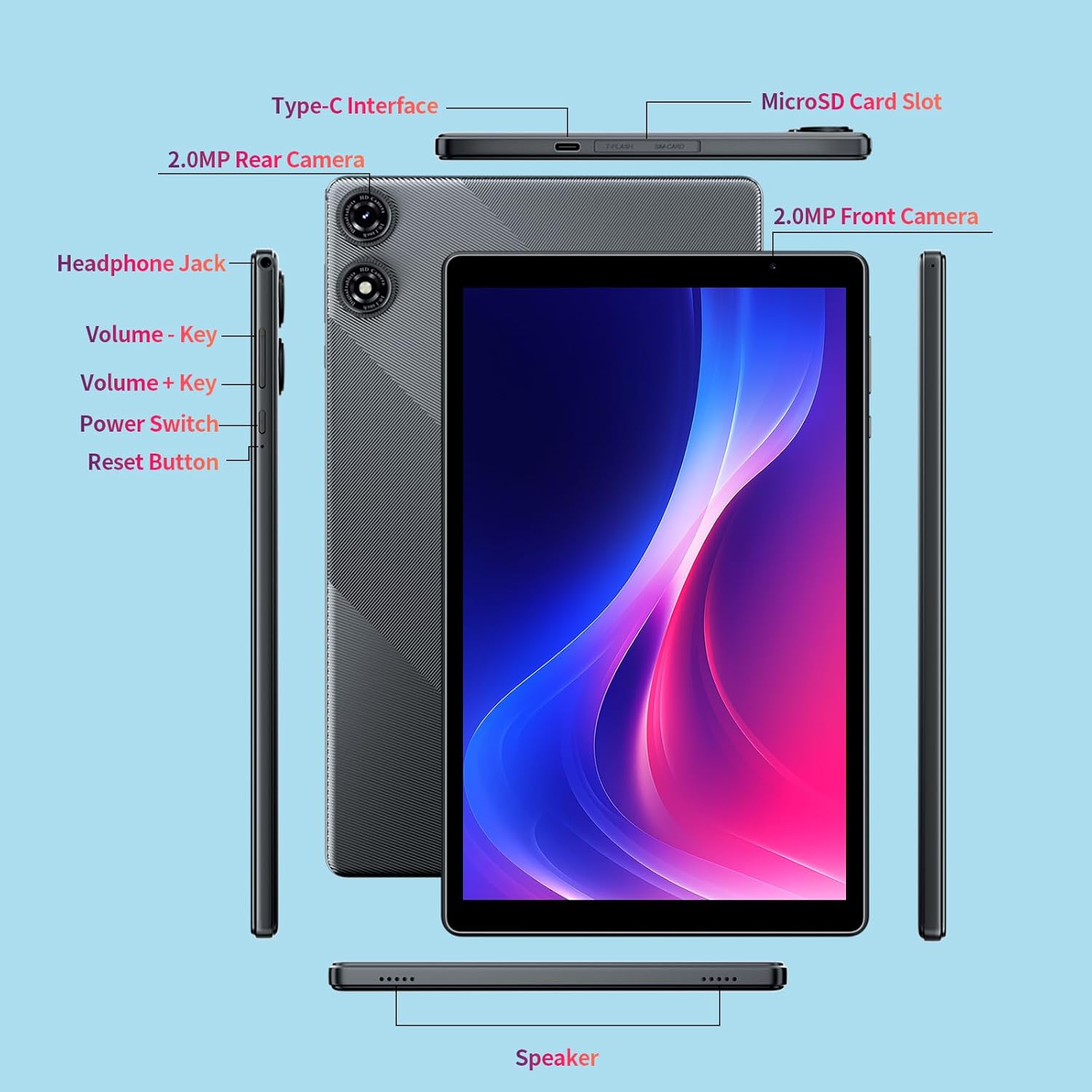
This diagram illustrates the various ports and buttons on the NEWISION D11 tablet. Key features include the Type-C interface for charging and data transfer, a MicroSD card slot for expandable storage, a 3.5mm headphone jack, volume control keys, a power switch, a reset button, and dual cameras (front and rear).

This image provides a visual summary of the tablet's main features, including its Android 15 operating system, Penta Core A333 Processor, 8GB RAM (with 3+5GB expansion), 64GB ROM, WiFi 6 (2.4GHz+5GHz) connectivity, 6000mAh battery, and 1280x800 IPS display.
4. Setup
4.1 Initial Power On
- Press and hold the Power Switch button located on the side of the tablet until the screen lights up.
- Follow the on-screen prompts to select your language, region, and accept the terms and conditions.
4.2 Wi-Fi Connection
- During the initial setup, you will be prompted to connect to a Wi-Fi network. Select your preferred network from the list.
- Enter the Wi-Fi password if required and tap 'Connect'.
- To connect later, go to Settings > Network & internet > Wi-Fi.
4.3 Google Account Setup
Your NEWISION D11 tablet is GMS (Google Mobile Services) certified, providing full access to the Google Play Store and other Google services.
- Sign in with your existing Google account or create a new one when prompted during setup.
- This account will be used for app downloads, email, and cloud synchronization.

This image highlights the benefits of the tablet being Google GMS Certified with Android 15, including better compatibility, faster operation, a simple interface, and more personalized and private settings.
5. Operating Instructions
5.1 Basic Navigation
The tablet runs on Android 15, offering an intuitive user experience. Swipe gestures and on-screen buttons are used for navigation:
- Home Screen: Access your apps and widgets.
- Notifications: Swipe down from the top of the screen to view notifications and quick settings.
- App Drawer: Swipe up from the bottom of the screen to access all installed applications.
5.2 App Management
Download and manage applications through the Google Play Store. The tablet comes with 32GB of internal storage, expandable up to 1TB via a microSD card.

This image details the tablet's storage capabilities, including 8GB RAM (with 3GB physical and 5GB virtual expansion), 32GB ROM, and support for up to 1TB microSD card expansion.
5.3 Parental Controls
The tablet includes parental control features to manage screen time and content access, making it suitable for family use. These settings can be configured through your Google account or specific parental control apps available on the Play Store.
5.4 Connectivity
- Wi-Fi: Supports dual-band Wi-Fi (2.4GHz/5GHz) for stable and high-speed internet access.
- Bluetooth: Connect to external devices such as headphones, speakers, or game controllers.
- Type-C: Use the Type-C port for charging and data transfer.

This image demonstrates the tablet's versatile connectivity options, supporting both 5.0GHz and 2.4GHz Wi-Fi bands and Bluetooth for connecting to a range of peripherals.
5.5 Camera Usage
The tablet is equipped with dual cameras (2.0MP front and 2.0MP rear) for photos and video calls.

This image highlights the tablet's dual camera system, showing examples of photos captured using both the front and rear cameras.
5.6 Display Features
Enjoy a vibrant 10-inch 1280x800 IPS HD display with wide viewing angles and dual speakers for an immersive experience.
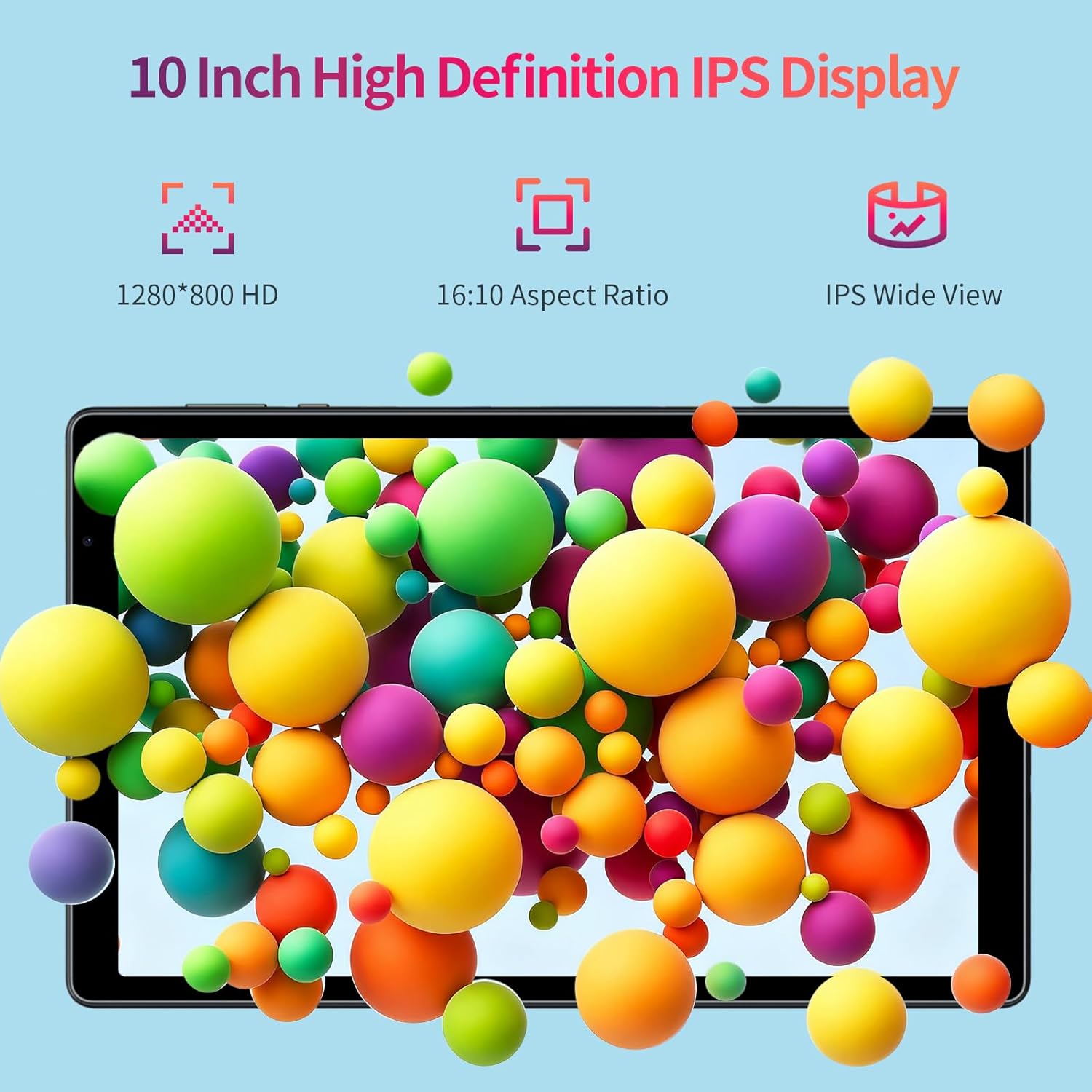
This image illustrates the tablet's 10-inch High Definition IPS Display, featuring 1280x800 HD resolution, a 16:10 aspect ratio, and wide IPS viewing angles.
This video provides a brief overview of the NEWISION D11 10-inch Android 15 Tablet, showcasing its design and key functionalities.
6. Maintenance
6.1 Battery Care
The tablet is equipped with a 6000mAh battery for extended use.
- Use only the provided charger and cable to prevent damage.
- Avoid extreme temperatures, as they can affect battery life.
- For optimal battery longevity, avoid fully discharging the battery frequently.

This image highlights the tablet's 6000mAh large capacity battery, indicating long-lasting power for various activities.

This infographic provides estimated usage times for the 6000mAh battery, including 4 hours of video playback, 21 hours of music playback, 72 hours of standby, 3 hours of mixed daily use, and 5 hours of reading/web browsing, along with Type-C charging.
6.2 Storage Management
Regularly manage your tablet's storage to ensure smooth performance. Delete unnecessary files, uninstall unused apps, and utilize the microSD card slot for additional storage.
6.3 Cleaning
Use a soft, lint-free cloth to clean the screen and body of the tablet. Avoid using harsh chemicals or abrasive materials.
7. Troubleshooting
7.1 Slow Performance
- Close unused applications running in the background.
- Clear cache data for frequently used apps.
- Ensure sufficient free storage space.
- Restart the tablet.
7.2 Charging Issues
- Verify that the charging cable and adapter are securely connected.
- Use the original charger and cable provided with the tablet.
- Try a different power outlet.
7.3 Screen Unresponsive
- Perform a soft reset by pressing and holding the Power Switch button for about 10-15 seconds until the tablet restarts.
- If the issue persists, use the dedicated Reset Button (may require a pin or paperclip to press).
8. Specifications
| Feature | Specification |
|---|---|
| Model Name | D11 (M10) |
| Operating System | Android 15 |
| Screen Size | 10.1 Inches |
| Screen Resolution | 1280 x 800 Pixels (IPS HD) |
| Processor | 5-Core A333 Processor (1.8 GHz) |
| RAM | 8GB (3GB physical + 5GB virtual expansion) |
| Internal Storage | 32GB |
| Expandable Storage | Up to 1TB via MicroSD Card |
| Battery Capacity | 6000mAh Lithium Polymer |
| Connectivity | Dual-band Wi-Fi (802.11b/g/n 2.4GHz/5GHz), Bluetooth |
| Cameras | 2.0MP Front, 2.0MP Rear |
| Ports | Type-C, 3.5mm Headphone Jack, MicroSD Card Slot |
| Item Weight | Approx. 1.96 pounds (890g) |
| Product Dimensions | 9.8 x 6.6 x 0.39 inches |
9. Warranty and Support
For warranty information and customer support, please refer to the warranty card included in your product packaging or visit the official NEWISION website. Keep your purchase receipt as proof of purchase for warranty claims.


