
1. Introduction
This manual provides detailed instructions for the setup, operation, and maintenance of your WOOPKER AK50 Stereo Amplifier. Please read this manual thoroughly before using the product to ensure proper functionality and to extend its lifespan.
1.1 Product Overview
The WOOPKER AK50 is a multi-function 2-channel stereo amplifier designed for home audio systems. It features Bluetooth 5.0 connectivity, FM radio, USB and SD card playback, and multiple input options for various audio sources. It is suitable for driving passive speakers in home theater, studio, or karaoke setups.

Image 1.1: WOOPKER AK50 Stereo Amplifier and Remote Control
This image displays the WOOPKER AK50 stereo amplifier, a compact black unit with blue illuminated knobs, alongside its black remote control. The amplifier features a central LED display, USB and SD card slots, microphone inputs, and controls for volume, bass, and treble.
1.2 Key Features
- Output Power: Provides a maximum output of 400W + 400W, compatible with 4-16 inch passive speakers.
- Versatile Input Options: Supports Bluetooth, AUX, MIC, USB, and SD card inputs. Connects to external devices such as CD/DVD players, TVs, PCs, smartphones, and projectors.
- Bluetooth 5.0: Integrated Bluetooth 5.0 for stable wireless audio streaming. Optimal connection range is within 30 feet (10 meters) without obstructions.
- Tone Controls: Independent knobs for adjusting Bass, Treble, Microphone Volume, and Echo effects.
- Remote Control: Includes a remote for convenient adjustment of input modes and volume from a distance.
2. Important Safety Instructions
To reduce the risk of electric shock, fire, or injury, please observe the following safety precautions:
- Do not expose this appliance to rain or moisture.
- Do not open the casing. Refer all servicing to qualified personnel.
- Ensure proper ventilation. Do not block any ventilation openings.
- Place the unit on a stable, flat surface.
- Keep the unit away from direct sunlight, heat sources, and excessive dust.
- Disconnect the power cord from the wall outlet if the unit is to be left unused for a long period.
- Do not operate the unit with wet hands.
3. Package Contents
Verify that all items listed below are included in your package:
- WOOPKER AK50 Stereo Amplifier
- Remote Control
- Power Cable
- FM Antenna
- User's Manual (this document)
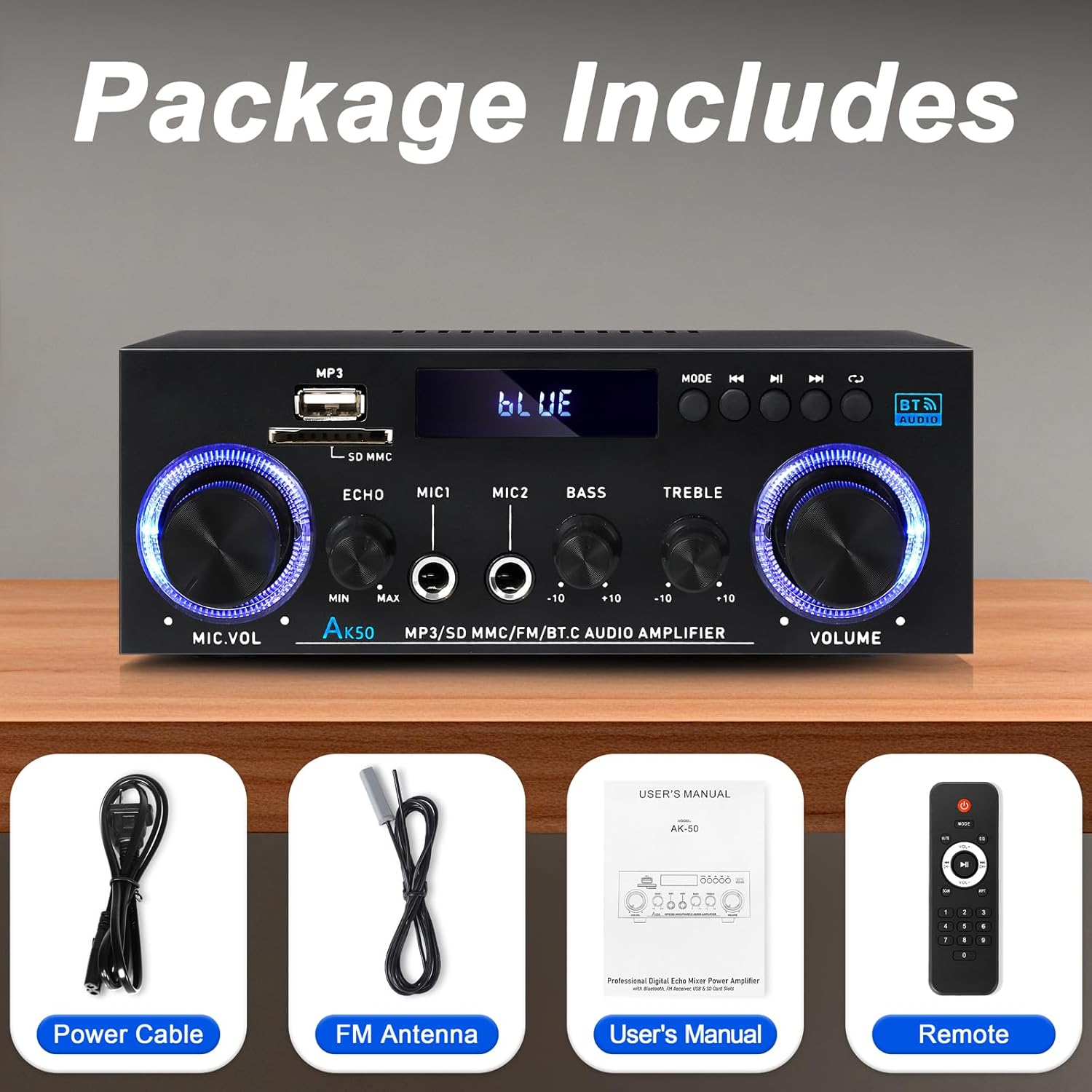
Image 3.1: Included Accessories
This image shows the items included in the WOOPKER AK50 package: the amplifier unit, a power cable, an FM antenna, a user's manual, and a remote control.
4. Product Layout
4.1 Front Panel

Image 4.1: Front Panel Controls and Indicators
This diagram illustrates the front panel of the AK50 amplifier, highlighting its various controls and ports. Key features include the USB/SD port, LED display, mode selection buttons, microphone inputs, and rotary knobs for microphone volume, echo, bass, treble, and master volume.
- USB/SD Port: For playing audio files from USB drives or SD cards.
- LED Display: Shows current mode, track information, and other status indicators.
- Mode Button: Switches between input modes (Bluetooth, AUX, USB, SD, FM).
- Previous Button: Navigates to the previous track/station.
- Play/Pause Button: Controls playback for USB/SD/Bluetooth.
- Next Button: Navigates to the next track/station.
- Cycle Button: Repeats playback mode for USB/SD.
- Mic Volume Knob: Adjusts the volume of connected microphones.
- Echo Knob: Adjusts the echo effect for microphones.
- Mic Input Jacks (MIC1, MIC2): 6.35mm jacks for connecting microphones.
- Bass Knob: Adjusts the low-frequency audio output.
- Treble Knob: Adjusts the high-frequency audio output.
- Master Volume Knob: Controls the overall output volume.
4.2 Rear Panel

Image 4.2: Rear Panel Connections
This diagram details the rear panel of the AK50 amplifier, showing the various input and output terminals. It includes the FM antenna jack, power switch, audio input/output jacks, speaker output terminals, and power input ports.
- FM Antenna Jack: Connects to the included FM antenna for radio reception.
- Power Switch: Turns the amplifier ON or OFF.
- Audio Input Jacks (AUX/LINE): RCA jacks for connecting external audio sources (e.g., CD player, TV).
- Speaker Output Terminals: Connects to passive speakers (4-16Ω impedance).
- DC 12V/5A Power Input: For DC power supply (if applicable, check model specifications).
- AC 90-240V Power Input: Connects to the main power supply using the provided power cable.
5. Setup Guide
Follow these steps to set up your AK50 Stereo Amplifier:
5.1 Speaker Connection
- Ensure the amplifier is turned OFF and unplugged from the power outlet.
- Connect your passive speakers to the Speaker Output Terminals on the rear panel. Ensure correct polarity (red to red, black to black) for each speaker.
- The amplifier supports speakers with an impedance of 4-16Ω.
5.2 Audio Source Connection
You can connect various audio sources to the AK50 amplifier:
- AUX/LINE Input: Use RCA cables to connect devices like CD players, DVD players, TVs, or PCs to the Audio Input Jacks on the rear panel.
- USB/SD Card: Insert a USB flash drive or SD card (pre-loaded with audio files) into the respective port on the front panel.
- Bluetooth: Refer to Section 6.3 for Bluetooth pairing instructions.
- FM Antenna: Connect the included FM antenna to the FM Antenna Jack on the rear panel for radio reception. Extend the antenna for better signal.
5.3 Power Connection
- Connect the provided power cable to the AC 90-240V Power Input on the rear panel.
- Plug the other end of the power cable into a suitable wall outlet.
- Ensure the Power Switch on the rear panel is in the OFF position before plugging in.

Image 5.1: Example Connection Diagram
This image illustrates various connection possibilities for the AK50 amplifier, including connecting to speakers, a CD player, a DVD player, a PC/laptop, and a TV/Blu-ray player. It also shows the FM antenna and power connections.
6. Operating Instructions
6.1 Power On/Off
After all connections are made, flip the Power Switch on the rear panel to the ON position. The LED display on the front panel will illuminate.
6.2 Mode Selection
Press the Mode Button on the front panel or the remote control to cycle through the available input modes: Bluetooth, AUX, USB, SD, and FM.
6.3 Volume and Tone Control
- Master Volume: Rotate the Master Volume Knob to adjust the overall sound level.
- Bass/Treble: Use the Bass Knob and Treble Knob to fine-tune the low and high frequencies of the audio output.
- Mic Volume/Echo: If microphones are connected, use the Mic Volume Knob to adjust their volume and the Echo Knob to add an echo effect.

Image 6.1: Bass and Treble Controls
This image highlights the Bass and Treble control knobs on the front panel of the AK50 amplifier, indicating their function in adjusting audio frequencies.
6.4 Bluetooth Pairing
- Switch the amplifier to Bluetooth mode using the Mode Button. The LED display will show "BLUE" or a similar indicator, and the unit will enter pairing mode.
- On your Bluetooth-enabled device (e.g., smartphone, tablet), enable Bluetooth and search for available devices.
- Select "AK50" (or similar device name) from the list to pair.
- Once paired, the amplifier will indicate a successful connection, and you can play audio from your device.
- Maintain a distance of within 30 feet (10 meters) for optimal Bluetooth performance.

Image 6.2: Bluetooth Connection
This image demonstrates the Bluetooth pairing process, showing a smartphone displaying available Bluetooth devices and the AK50 amplifier in Bluetooth mode, indicating a successful connection.

Image 6.3: Bluetooth Range
This image illustrates the effective Bluetooth range of the AK50 amplifier, indicating a maximum distance of 32 feet (10 meters) for stable wireless connection between the amplifier and a paired device.
6.5 USB/SD Playback
Insert a USB drive or SD card into the corresponding slot. The amplifier will automatically switch to USB/SD mode and begin playing audio files. Use the Previous, Play/Pause, and Next buttons to control playback.
6.6 FM Radio Operation
- Switch the amplifier to FM mode using the Mode Button.
- The amplifier will automatically scan and store available FM stations.
- Use the Previous and Next buttons to navigate between stored stations.
- Adjust the FM antenna position for optimal reception.
6.7 Remote Control Usage
The included remote control allows for convenient operation of the amplifier from a distance. Ensure the plastic isolation sheet is removed from the battery compartment before first use.

Image 6.4: Remote Control
This image displays the remote control for the AK50 amplifier, showing buttons for power, mode selection, EQ, volume adjustment, track navigation, and numerical input for direct track selection.
7. Maintenance
Proper maintenance ensures the longevity and optimal performance of your amplifier:
- Cleaning: Use a soft, dry cloth to clean the exterior of the unit. Do not use liquid cleaners or abrasive chemicals.
- Ventilation: Ensure that the ventilation openings are clear of dust and debris to prevent overheating.
- Storage: If storing the amplifier for an extended period, unplug it from the power outlet and store it in a cool, dry place.
- Power Cord: Regularly inspect the power cord for any damage. If damaged, discontinue use and replace it with an appropriate cord.
8. Troubleshooting
If you encounter issues with your AK50 amplifier, refer to the following common problems and solutions:
| Problem | Possible Cause | Solution |
|---|---|---|
| No power | Power cable not connected; Power switch off; Power outlet faulty. | Check power cable connection; Turn power switch ON; Test outlet with another device. |
| No sound output | Speakers not connected; Incorrect input mode; Volume too low; Audio source issue. | Check speaker connections and polarity; Select correct input mode; Increase master volume; Verify audio source is playing. |
| Bluetooth not connecting | Amplifier not in Bluetooth mode; Device not in pairing mode; Too far from amplifier. | Switch amplifier to Bluetooth mode; Ensure device Bluetooth is ON and searching; Move device closer to amplifier. |
| Remote control not working | Battery isolation sheet not removed; Batteries depleted; Obstruction between remote and amplifier. | Remove plastic sheet; Replace batteries; Ensure clear line of sight to amplifier's IR receiver. |
| Poor FM reception | FM antenna not connected or positioned incorrectly. | Connect FM antenna securely; Adjust antenna position for better signal. |
If the problem persists after trying these solutions, please contact customer support.
9. Specifications
| Feature | Specification |
|---|---|
| Model Number | AK50 |
| Brand | WOOPKER |
| Output Power | 400 Watts (Peak) |
| Surround Sound Channel Configuration | 2.0 Channel |
| Connectivity Technology | Bluetooth 5.0, Auxiliary (RCA), USB, SD Card |
| Compatible Devices | Speakers, Smartphones, Tablets, PCs, CD/DVD Players |
| Audio Output Mode | Stereo |
| Color | Black |
| Item Weight | 1.98 pounds |
| Package Dimensions | 8.66 x 7.87 x 3.54 inches |
10. Warranty and Support
For warranty information or technical support, please refer to the documentation provided at the time of purchase or contact WOOPKER customer service through their official channels. Keep your purchase receipt as proof of purchase.


