1. Product Overview
The Furologee L-Shaped Gaming Desk is designed for versatility and functionality, suitable for gaming, home office, or study environments. It features a reversible L-shaped configuration, integrated power outlets, LED lighting, multiple storage options including fabric drawers and printer shelves, and a full monitor stand.

Image 1.1: Overview of the Furologee L-Shaped Gaming Desk, showcasing its L-shaped configuration, monitor stand, drawers, and integrated lighting.
2. Safety Information
Please read and understand all safety instructions before assembly and use. Failure to follow these instructions may result in injury or damage to the product.
- Always assemble the desk according to the provided instructions.
- Ensure the desk is properly anchored to the floor to prevent tipping, especially when fully loaded with items.
- Be cautious when using the power outlets and LED lights to avoid electrical hazards.
- Keep the desk and its components away from heat sources and liquids.
- Do not use the desk if any parts are damaged or missing.
3. Package Contents
Verify that all components are present before beginning assembly. Refer to the assembly diagram for specific part identification.
- Desk panels (various sizes for L-shape and monitor stand)
- Metal frame components (legs, support bars)
- 6 Fabric drawers (5 standard, 1 file cabinet)
- Recessed power strip with 3 AC outlets, 1 USB port, 1 Type-C port
- LED light strip with remote control
- Assembly hardware (screws, bolts, L-wrench)
- Adjustable foot pads
- Instruction manual
4. Assembly Instructions
Assembly requires two people. Follow the steps carefully to ensure proper construction. An assembly video is provided for visual guidance.
Video 4.1: Furologee L-Shaped Desk Installation Tutorial. This video provides a step-by-step visual guide for assembling the desk, including frame construction, panel attachment, and drawer installation.
4.1. Frame Construction
Begin by assembling the metal frame components. Ensure all screws are tightened securely but do not overtighten until all parts are aligned.
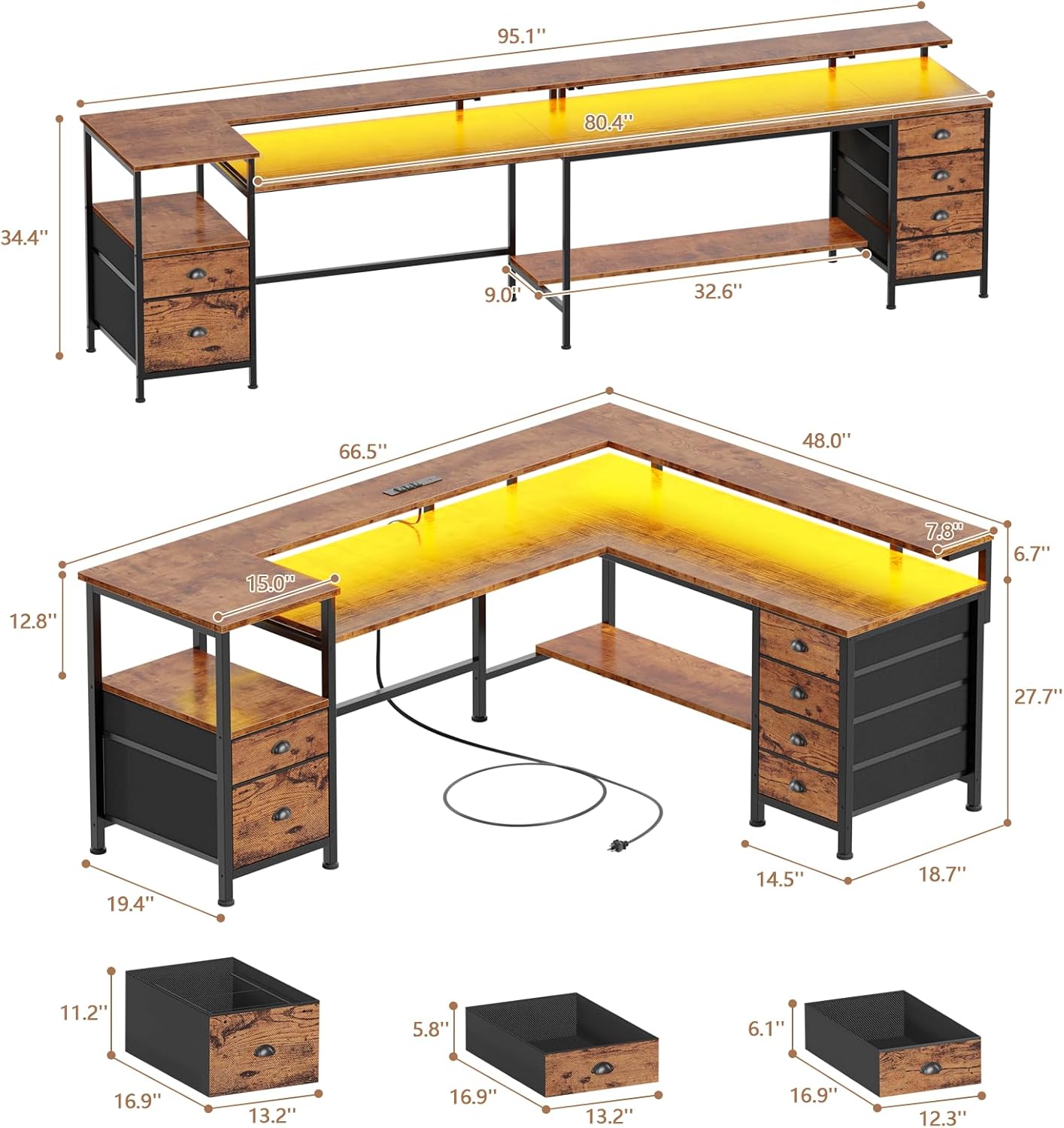
Image 4.1.1: Detailed dimensions and structural components of the desk, illustrating how the L-shape can be configured.
4.2. Attaching Desk Panels
Carefully place the wooden desk panels onto the assembled frame. Secure them using the provided hardware. Note that the desk is reversible, allowing you to choose the orientation of the L-shape during this step.

Image 4.2.1: Visual representation of the desk's reversible design, showing how the L-shape can be assembled to face left or right.
4.3. Installing Drawers and Shelves
Assemble the fabric drawers and file cabinet according to their individual instructions. Insert them into the designated slots in the desk frame. The adjustable shelves can be positioned based on your storage needs.
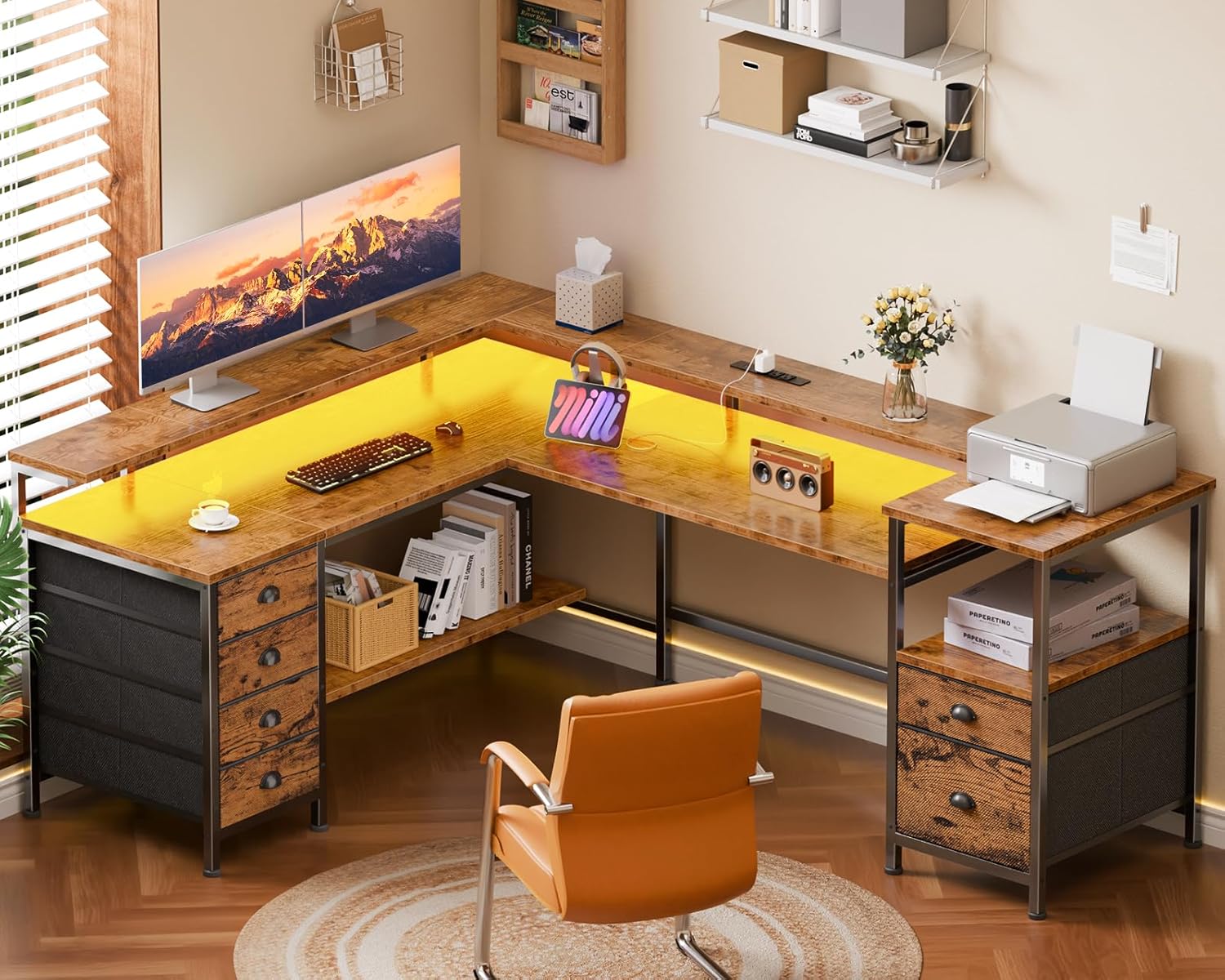
Image 4.3.1: Detailed view of the fabric drawers, highlighting their capacity and design for organizing office supplies and gaming accessories.

Image 4.3.2: Illustration of the adjustable storage shelf, demonstrating how its height can be modified to accommodate different items like a CPU tower or books.
4.4. Power Outlets and LED Lights Installation
Integrate the recessed power strip into the designated slot on the desk surface. Connect the LED light strip along the underside of the monitor stand or main desk surface as desired. Plug the power strip into a wall outlet.

Image 4.4.1: Detailed view of the integrated power strip, showing its three AC outlets, one USB port, and one Type-C port for convenient device charging.

Image 4.4.2: Visual of the RGB LED light strip and its remote control, highlighting the customizable lighting options including 20 colors, 22 dynamic modes, 5 brightness grades, and 10 rhythm modes.
5. Operating Instructions
5.1. Using the Power Outlets
The desk includes a built-in power strip with 3 standard AC outlets, 1 USB-A port (5V/2A), and 1 USB-C port (5V/2A). Plug your devices directly into these ports for convenient power access. Ensure the desk's main power cord is connected to a functional wall outlet.
5.2. Controlling the LED Lights
The RGB LED light strip is controlled via the included remote. Use the remote to select from 20 colors, 22 dynamic modes, 5 brightness levels, and 10 rhythm modes to customize your lighting environment.
5.3. Reversible Configuration
The L-shaped design of the desk is reversible, allowing you to configure the longer or shorter side to your left or right during assembly to best fit your room layout and personal preference.
5.4. Monitor Stand Usage
The full monitor stand is designed to elevate your monitors to an ergonomic height, reducing neck strain. It can accommodate 2-4 monitors, depending on their size, and also serves as additional storage space.

Image 5.4.1: Illustration demonstrating the ergonomic benefits of using the monitor stand to maintain a healthy sitting posture and reduce neck fatigue.
6. Maintenance
- Cleaning: Wipe the desk surfaces with a dry cloth. Avoid abrasive cleaners or harsh chemicals that may damage the finish.
- Hardware Check: Periodically check all screws and bolts to ensure they remain tight. Retighten as necessary.
- Drawer Care: The fabric drawers can be spot cleaned with a damp cloth and mild detergent if needed. Ensure they are completely dry before reinserting.
- Adjustable Feet: The adjustable foot pads can be rotated to level the desk on uneven surfaces and protect your floors.

Image 6.1: Detail of the adjustable foot pads, designed to provide stability and protect flooring.
7. Troubleshooting
- Desk Wobbles: Ensure all assembly screws are fully tightened. Adjust the foot pads on the bottom of the legs to level the desk on uneven floors.
- LED Lights Not Working: Check if the power strip is plugged into a live outlet. Ensure the LED strip is properly connected to its power source. Verify the remote control batteries are functional.
- Power Outlets Not Functioning: Confirm the desk's main power cord is securely plugged into a working wall outlet. Test the wall outlet with another device.
- Missing or Damaged Parts: If any parts are missing or damaged upon arrival, please contact customer support immediately for assistance.
8. Specifications
| Feature | Detail |
|---|---|
| Brand | Furologee |
| Model Number | CTHK-CD-035V1-CL-66-1-RB |
| Shape | L-Shape (Reversible) |
| Product Dimensions (L-Shape) | 66.5" L x 48.0" W x 34.4" H |
| Product Dimensions (Long Desk) | 95.1" L x 19.4" W x 34.4" H |
| Color | Rustic Brown |
| Material | Engineered Wood, Metal |
| Power Outlets | 3 AC (120V/12A), 1 USB (5V/2A), 1 Type-C (5V/2A) |
| LED Lights | RGB, 20 Colors, 22 Dynamic Modes, 5 Brightness, 10 Rhythm Modes |
| Drawers | 6 Fabric Drawers (including 1 file cabinet) |
| Monitor Stand | Full-size, 95.1 inches long |
| Assembly Required | Yes (Recommended 2 people) |
| Item Weight | 66.58 Pounds |
9. Warranty and Support
This Furologee product comes with a limited warranty. For specific warranty details, please refer to the warranty card included in your package or contact Furologee customer support.
If you have any questions, require assistance with assembly, or need to report missing/damaged parts, please contact our customer support team:
Customer Support: support@furologee.com
Please provide your model number (CTHK-CD-035V1-CL-66-1-RB) and purchase date when contacting support.


