
SWZEC M8
SWZEC Meacode AI Translation Earbuds M8 User Manual
Model: M8
1. Introduction
The SWZEC Meacode AI Translation Earbuds M8 are designed to facilitate seamless communication across language barriers and provide a versatile audio experience. These earbuds feature real-time translation capabilities, active noise reduction, and a comfortable open-ear design for extended wear. This manual provides essential information for setting up, operating, maintaining, and troubleshooting your earbuds.
2. Package Contents
Before using your SWZEC Meacode AI Translation Earbuds M8, please ensure all items are present in the package:
- SWZEC Meacode AI Translation Earbuds M8 (Left and Right)
- Charging Case
- USB Charging Cable
- User Manual
3. Product Overview
Familiarize yourself with the components of your SWZEC Meacode AI Translation Earbuds M8.

The image displays the SWZEC Meacode AI Translation Earbuds M8 in white, housed within their charging case. The earbuds feature an open-ear design with an ear hook for a secure fit. The charging case shows a digital display indicating battery levels.

This image shows the SWZEC Meacode AI Translation Earbuds M8 in black, presented in their charging case. This variant illustrates the design consistency across different color options.
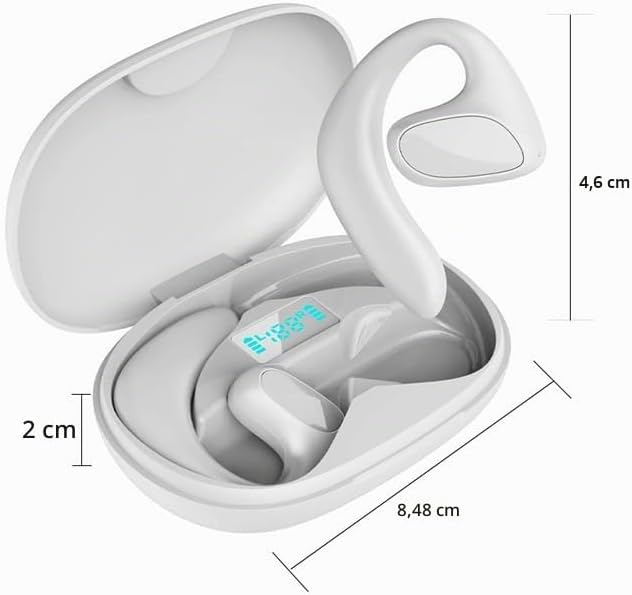
This image provides the dimensions of the SWZEC Meacode AI Translation Earbuds M8 and their charging case. The case measures approximately 8.48 cm in length and 2 cm in height, while the earbud extends about 4.6 cm from the case.
4. Setup
4.1 Initial Charging
Before first use, fully charge the earbuds and the charging case. Connect the USB charging cable to the charging case and a power source. The digital display on the case will indicate the charging status.
4.2 Bluetooth Pairing
- Open the charging case. The earbuds will automatically power on and enter Bluetooth pairing mode.
- On your smartphone or tablet, go to the Bluetooth settings.
- Select 'SWZEC M8' from the list of available devices to connect.
- Once connected, a voice prompt will confirm successful pairing.
4.3 App Installation
For full access to translation features, download and install the dedicated 'One-Click' application on your smartphone. Follow the in-app instructions for initial setup, language selection, and feature activation.
5. Operating Instructions
5.1 Power On/Off
- Power On: The earbuds automatically power on when removed from the charging case.
- Power Off: Place the earbuds back into the charging case to automatically power them off and begin charging.
5.2 Music Playback
Use the touch controls on the earbuds to manage music playback:
- Play/Pause: Single tap on either earbud.
- Next Track: Double tap on the right earbud.
- Previous Track: Double tap on the left earbud.

A woman is shown listening to music using the SWZEC Meacode AI Translation Earbuds M8, demonstrating their use for audio entertainment.
5.3 Call Management
Manage phone calls using the touch controls:
- Answer/End Call: Single tap on either earbud.
- Reject Call: Press and hold the touch area on either earbud for 2 seconds.
5.4 Translation Mode
The primary function of these earbuds is real-time language translation:
- Ensure the earbuds are connected to your smartphone with the 'One-Click' app installed and running.
- Open the 'One-Click' app and select the desired source and target languages from the 144 supported languages.
- Activate the translation mode within the app. Speak into your phone's microphone or the earbud's microphone, and the translation will be played through the earbuds.
- Offline Translation: Note that offline translation functionality may require a separate subscription within the 'One-Click' application.

A man is shown using the SWZEC Meacode AI Translation Earbuds M8 while interacting with a smartphone, illustrating the real-time translation feature in a conversational setting.

This image depicts two men engaged in a discussion, with one wearing the SWZEC Meacode AI Translation Earbuds M8, highlighting their utility in facilitating multilingual conversations.
5.5 Active Noise Reduction
The earbuds feature active noise reduction technology to minimize ambient sounds, ensuring clearer audio for translations, calls, and music, especially in noisy environments.

A woman is pictured in a classroom environment, wearing the SWZEC Meacode AI Translation Earbuds M8, suggesting their use for focused listening or learning with noise reduction capabilities.
5.6 Open-Ear Design
The open-ear design allows you to remain aware of your surroundings while using the earbuds, enhancing safety during outdoor activities or in busy environments.

A woman is shown on an airplane, using the SWZEC Meacode AI Translation Earbuds M8, highlighting their suitability for travel and maintaining situational awareness.

This image shows a group of people examining a map outdoors, with one individual wearing the SWZEC Meacode AI Translation Earbuds M8, suggesting their utility for travel and navigation while staying aware of the environment.
6. Maintenance
6.1 Cleaning
Wipe the earbuds and charging case with a soft, dry, lint-free cloth. Do not use abrasive cleaners, solvents, or immerse the devices in water. Ensure charging contacts are clean and free of debris.
6.2 Storage
When not in use, store the earbuds in their charging case to protect them from dust and damage, and to keep them charged.
6.3 Battery Care
Avoid exposing the earbuds and charging case to extreme temperatures. Charge the devices regularly to maintain optimal battery health. The earbuds provide up to 30 hours of total battery life with the charging case.
7. Troubleshooting
If you encounter issues with your SWZEC Meacode AI Translation Earbuds M8, refer to the following common solutions:
- Earbuds not pairing:
Ensure the earbuds are charged and in pairing mode (removed from the case). Turn off and on Bluetooth on your device. Try restarting your smartphone or tablet. - Translation issues:
Verify that your smartphone has a stable internet connection (for online translation). Check the 'One-Click' app settings for correct language selection. Ensure the microphone on the earbuds or phone is not obstructed. Remember that offline translation may require a paid subscription. - No sound from earbuds:
Check the volume levels on both the earbuds and your connected device. Ensure the earbuds are properly connected via Bluetooth. Try re-pairing the earbuds. - Charging problems:
Ensure the USB charging cable is securely connected to both the charging case and a functional power source. Clean the charging contacts on both the earbuds and the case if they appear dirty. - Earbuds uncomfortable or falling out:
Ensure the earbuds are correctly positioned with the ear hook securely over your ear. The open-ear design is intended for a comfortable and secure fit without pressure on the ear canal.
8. Specifications
| Brand | SWZEC |
| Model | M8 |
| Color | White |
| Connectivity | Wireless (Bluetooth) |
| Impedance | 80 Ohms |
| Noise Control | Active Noise Cancellation |
| Battery Life | Up to 30 hours (with charging case) |
| Translation Languages | 144 (online), offline available with subscription |
| Form Factor | Open-ear, Extra-auricular |
| Water Resistance | Waterproof |
9. Warranty and Support
For detailed warranty information, technical support, or service inquiries regarding your SWZEC Meacode AI Translation Earbuds M8, please refer to the official SWZEC website or contact the retailer from whom you purchased the product. Please retain your proof of purchase for any warranty claims.
Ask a question about this manual
Ask about setup, troubleshooting, compatibility, parts, safety, or missing instructions. Manuals+ will review the question and use this page’s manual context to help answer it.