
1. Introduction
This manual provides detailed instructions for the setup, operation, and maintenance of your SWZEC Sekoda GPS Sports Smartwatch. Please read this manual thoroughly before using the device to ensure proper function and to maximize its capabilities. This smartwatch is designed to monitor your health, optimize sports performance, and enhance daily life with a blend of fashion and technology.
2. Package Contents
Verify that all items are present in the package:
- 1 x SWZEC Sekoda GPS Sports Smartwatch
- 1 x Charging Cable
- 1 x User Manual
3. Setup
3.1 Charging the Smartwatch
Before initial use, fully charge the smartwatch. Connect the charging cable to the charging port on the back of the watch and plug the USB end into a power adapter (not included) or a computer's USB port. The battery icon on the screen will indicate charging status.
Note: The smartwatch has a 380 mAh battery capacity, providing approximately 15 days of daily use or 35 hours in GPS mode.
3.2 Powering On/Off
- To Power On: Press and hold the power button (usually on the side) until the screen illuminates.
- To Power Off: Press and hold the power button, then select "Power Off" on the screen.
3.3 Pairing with Your Smartphone
The smartwatch uses Bluetooth 5.3 for connectivity. To pair:
- Download the official SWZEC companion app from your smartphone's app store (compatible with iOS and Android devices).
- Ensure Bluetooth is enabled on your smartphone.
- Open the SWZEC app and follow the on-screen instructions to add your device.
- Select the "SWZEC Sekoda" from the list of available devices in the app.
- Confirm the pairing request on both your smartphone and the smartwatch.

Image: Smartwatch displaying a pairing screen, with a smartphone nearby showing the companion app interface. This illustrates the device's connectivity features.
4. Operating Instructions
4.1 Navigating the Interface
The smartwatch features a 1.43-inch AMOLED touchscreen display. Navigation is primarily touch-based:
- Swipe Up/Down: Scroll through menus and notifications.
- Swipe Left/Right: Access different widgets or quick settings.
- Tap: Select an item or confirm an action.
- Press Side Buttons: The physical buttons on the side provide shortcuts to specific functions (e.g., "SPORT" button for workout modes, "BACK" button to return to the previous screen).

Image: Close-up of the smartwatch's 1.43-inch AMOLED display, showcasing its high-definition visuals and vibrant colors. The screen displays time, date, and other metrics.
4.2 GPS Functionality
The smartwatch integrates a high-precision GPS system supporting GPS, GLONASS, BDS, Galileo, and NAVIC for accurate positioning and route tracking. This is particularly useful for outdoor sports activities.
- Activating GPS: GPS automatically activates when you start an outdoor workout mode (e.g., running, cycling).
- Route Tracking: Your route will be recorded and can be viewed on the smartwatch or the companion app after your activity.
- Altitude and Pressure: The watch can display real-time altitude and air pressure data, useful for hiking and mountaineering.

Image: The smartwatch screen showing a recorded GPS route on a map, with a smartphone displaying a more detailed map view in a mountainous outdoor setting. This highlights the GPS tracking capabilities.
4.3 Sports Modes
The smartwatch supports over 170 sports modes. To access:
- Press the "SPORT" button or navigate to the Sports menu.
- Select your desired activity (e.g., running, cycling, swimming).
- The watch will automatically begin tracking relevant metrics such as duration, distance, calories burned, and heart rate.

Image: The smartwatch displaying a menu of various sports modes, indicating its versatility for different physical activities.
4.4 Health Monitoring
The device offers 24/7 health monitoring:
- Heart Rate: Continuous heart rate monitoring with alerts for abnormal readings.
- Blood Oxygen (SpO2): Measures blood oxygen levels.
- Stress Monitoring: Tracks stress levels throughout the day.
- Sleep Tracking: Monitors sleep stages (deep, light, REM) and provides sleep quality analysis.
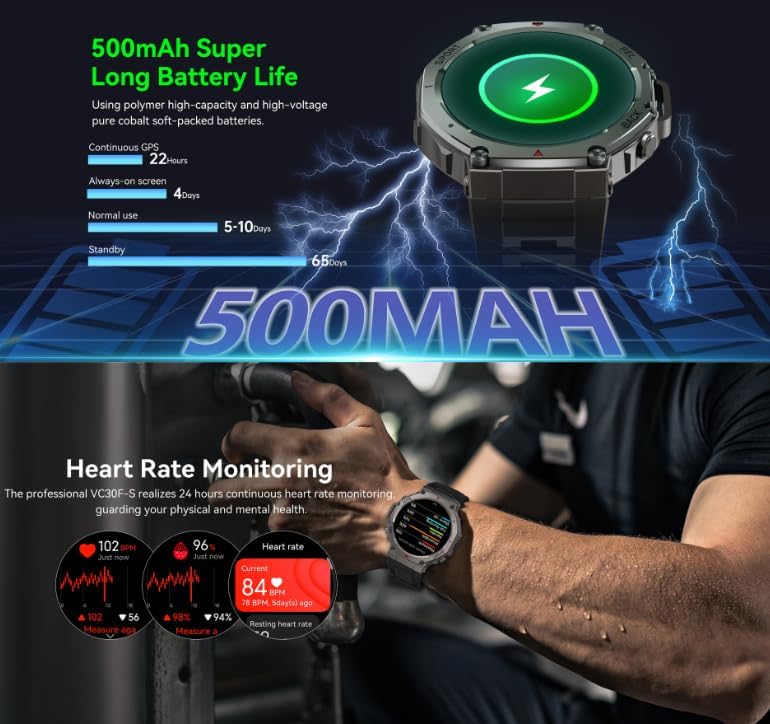
Image: The smartwatch screen showing detailed heart rate monitoring data, including current heart rate, historical trends, and resting heart rate. This demonstrates the device's health tracking capabilities.

Image: The smartwatch displaying sleep stage data, including total sleep duration, breakdown of deep, submerged, rapid eye movement, and awake times, with a person sleeping in the background. This illustrates the sleep monitoring feature.
4.5 Bluetooth Calling
With its high-fidelity waterproof speakers and Bluetooth hands-free call functionality, you can answer calls directly from your smartwatch when paired with your phone.
- Answering Calls: When a call comes in, tap the green answer icon on the watch screen.
- Rejecting Calls: Tap the red reject icon.
- Making Calls: Use the dialer or contact list within the smartwatch interface (requires phone connection).

Image: A hand interacting with the smartwatch, which displays an incoming call with the caller's number and options to answer or reject. This demonstrates the Bluetooth call feature.
5. Key Features
- Advanced GPS Positioning: Dual-band, six-satellite system (GPS, GLONASS, BDS, Galileo, NAVIC) for precise location and route recording.
- Automatic Activity Recognition: Intelligently identifies movement to automatically record workout data.
- Comprehensive Sport & Health Monitoring: Multifunctional sensors track over 170 sports and health data points.
- 24/7 Health Guardian: Real-time monitoring of heart rate, blood oxygen, and stress with safety alerts.
- Ultra-Long Battery Life: Up to 15 days of daily use or 35 hours in GPS mode.
- Military-Grade Durability: Zinc alloy construction, water, and dust resistant design for challenging environments.
- Smart Connectivity: Bluetooth 5.3, multi-system, and multi-language support for seamless integration.
- HD Display & Comfort: High-definition touchscreen and ergonomic design for smooth operation and maximum comfort.

Image: The smartwatch displaying its core functions, including simultaneous joint positioning of multiple satellites, 1.43-inch AMOLED screen, ATS3085L chip, 170+ sport modes, 5ATM waterproof rating, and 500mAh battery capacity.
6. Maintenance
6.1 Cleaning
- Wipe the watch screen and body with a soft, damp cloth.
- Avoid using harsh chemicals or abrasive materials, as they may damage the finish.
- Ensure the charging contacts are clean and dry before charging.
6.2 Water Resistance
The smartwatch is water-resistant. However, it is not recommended for hot water activities, saunas, or deep diving. After exposure to water, especially saltwater, rinse the watch with fresh water and dry it thoroughly.
6.3 Storage
Store the smartwatch in a cool, dry place when not in use. Avoid extreme temperatures.
7. Troubleshooting
7.1 Watch Not Turning On
- Ensure the watch is fully charged. Connect it to the charger for at least 30 minutes.
- Press and hold the power button for 10-15 seconds to attempt a forced restart.
7.2 Pairing Issues
- Make sure Bluetooth is enabled on your smartphone and the smartwatch.
- Ensure the smartwatch is within the Bluetooth range of your phone.
- Restart both your smartphone and the smartwatch.
- Try unpairing and re-pairing the device through the companion app.
7.3 Inaccurate GPS Readings
- Ensure you are in an open outdoor area with a clear view of the sky.
- Wait for the GPS signal to acquire before starting your activity. This may take a few moments.
- Ensure the smartwatch firmware is up to date via the companion app.
7.4 Screen Unresponsive
- Restart the smartwatch.
- Ensure the screen is clean and dry.
8. Specifications
| Feature | Detail |
|---|---|
| Model Number | 159c5293-7f85-4161-b59d-b4b51a255a38 |
| Brand | SWZEC |
| Display Type | 1.43-inch AMOLED Digital Touchscreen |
| Connectivity Technology | Bluetooth 5.3 |
| GPS | Integrated (GPS, GLONASS, BDS, Galileo, NAVIC) |
| Battery Capacity | 380 mAh |
| Average Battery Life | 15 Days (typical use) |
| Water Resistance Level | Water Resistant (5ATM, suitable for swimming, not hot water) |
| Compatible Devices | Smartphones (iOS and Android), Laptops, Tablets, PCs |
| Band Material Type | Silicone |
| Health Monitoring | Heart Rate Monitor, Blood Oxygen Monitor, Stress Monitor |
| Supported Application | SWZEC Companion App (for GPS data, health tracking, etc.) |
| Product Dimensions | 52.2mm (watch face width), 13.5mm (thickness), 260mm (total length with strap) |
9. Warranty & Support
The SWZEC Sekoda GPS Sports Smartwatch comes with a limited warranty. Please refer to the warranty card included in your package for specific terms and conditions. For technical support, troubleshooting assistance, or warranty claims, please contact SWZEC customer service through the official website or the contact information provided in the companion app.
Return Policy: The product has a return policy duration of 14 days for refund/replacement, as per standard terms.