
Introduction
This manual provides comprehensive instructions for the safe and efficient operation, installation, and maintenance of your HASWING W40-GPS Electric Trolling Motor. Designed for fishing kayaks, this motor features a GPS spot-lock function, wireless remote control, and a powerful 12V brushless motor suitable for both saltwater and freshwater environments. Please read this manual thoroughly before using the product to ensure optimal performance and safety.

Figure 1: Overview of the HASWING W40-GPS Electric Trolling Motor.
Product Components
The HASWING W40-GPS Trolling Motor package includes the following main components:
- W40-GPS Trolling Motor Unit
- Wireless Remote Controller (2.4 GHz)
- Emergency Magnetic Kill Switch
- Shafts for International Standard Kayaks (12mm x2)
- Shafts for British Standard Kayaks (1/2 inch x2)
- User Manual (this document)

Figure 2: Detailed diagram showing key components such as the Magnetic Kill Switch, Adjustment Knob, Propeller Alignment Lever, Detent Axis, DD Brushless Motor, and Wireless Remote Controller.

Figure 3: Illustration of the real-time voltage display and the two sets of included shafts for different kayak standards.
Setup and Installation
- Unpacking: Carefully remove all components from the packaging. Verify that all listed parts are present.
- Shaft Selection: Select the appropriate shafts (12mm for International standard or 1/2 inch for British standard) for your kayak hull.
- Motor Mounting:
- Ensure the propeller alignment lever is pressed down to align the propeller blades vertically. This allows the motor to be inserted into the kayak scupper.
- Insert the motor into the designated scupper hole on your kayak.
- Secure the motor firmly using the provided mounting hardware.
- Battery Connection: Connect the motor to a 12V deep cycle battery (1 x 10⁵AH recommended). Ensure correct polarity: red to positive (+), black to negative (-).
- Emergency Kill Switch: Attach the emergency magnetic kill switch to the motor and yourself or your kayak. This switch is a critical safety feature that immediately cuts power to the motor if disconnected.
- Remote Control Pairing: Refer to the separate remote control manual for initial pairing instructions, if necessary. The remote operates on 2.4 GHz.
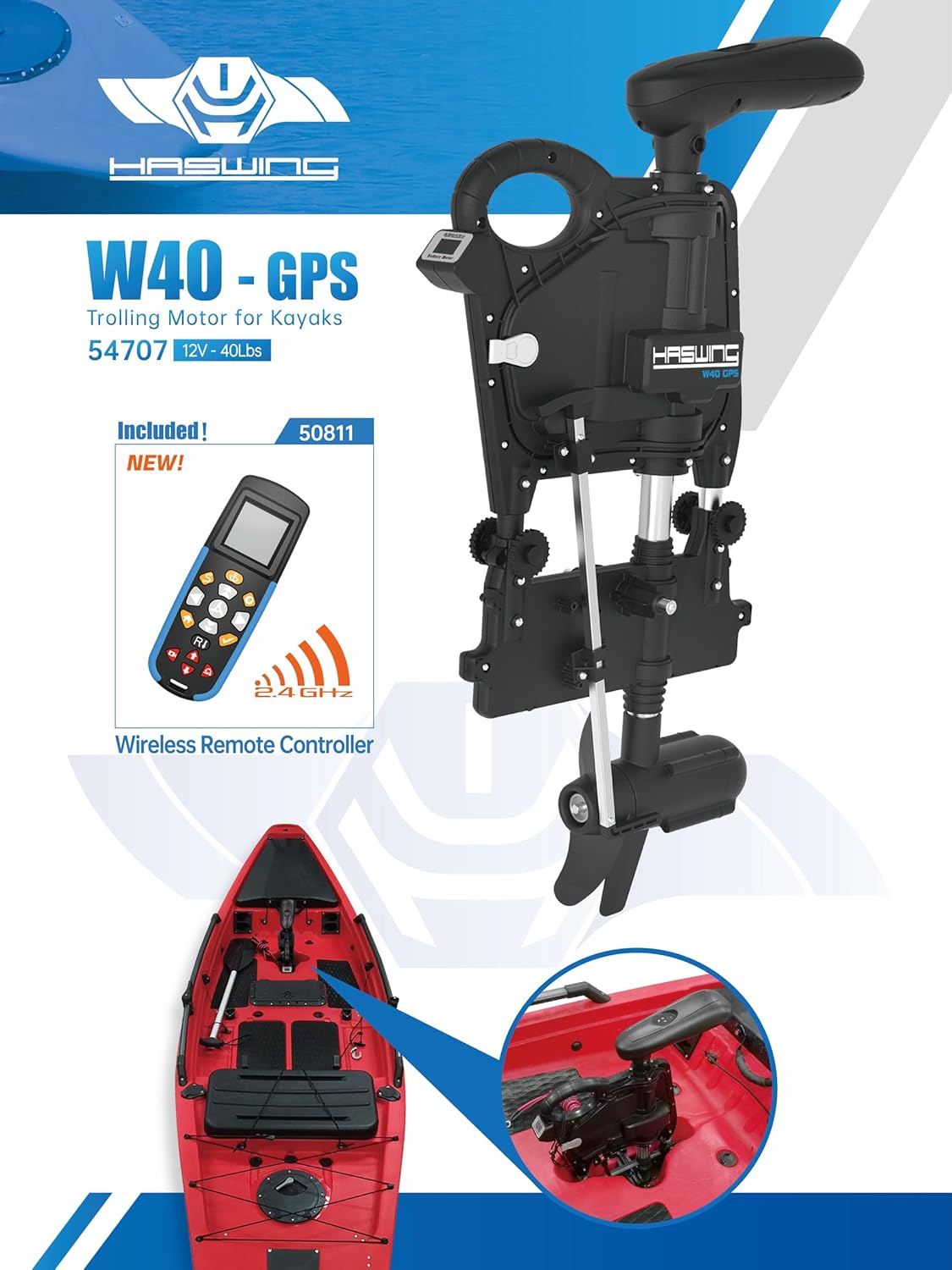
Figure 4: The W40-GPS Trolling Motor correctly installed on a kayak, ready for operation.
Operating Instructions
Before Operation:
- Ensure the emergency magnetic kill switch is properly engaged.
- Verify battery charge level using the digital battery status display on the motor.
- Pull the propeller alignment lever up before starting the motor to allow the propeller to spin freely.
Using the Wireless Remote Control:
The wireless remote control provides multi-directional movement and speed adjustments. Familiarize yourself with the remote's buttons and functions before launching.
- Power On/Off: Use the designated button to activate or deactivate the motor.
- Speed Control: Adjust motor thrust using the speed control buttons or dial. The motor offers variable speed for precise control.
- Steering: Navigate your kayak using the directional controls on the remote. The motor provides 360-degree steering control.
GPS Smart Navigation System:
The integrated GPS module offers advanced navigation features:
- Spot-Lock (Anchor) Function: Activates GPS to maintain your kayak's position against current and wind, allowing you to focus on fishing without drifting.
- Record Routes: Save your preferred fishing paths for future use.
- GPS Navigation: Follow pre-recorded routes or navigate to specific waypoints.
- Cruise Control: Maintain a consistent speed for extended periods.
- Heading Lock: Keep the motor pointed in a specific direction, regardless of kayak movement.

Figure 5: Explanation of GPS functions including Record Routes, GPS Navigation, Anchor, Cruise Control, and Heading Lock, alongside the propeller alignment mechanism.
Maintenance
- After Each Use:
- Rinse the motor thoroughly with fresh water, especially after saltwater use, to prevent corrosion.
- Inspect the propeller for any fishing line, weeds, or debris. Remove carefully if present.
- Check all connections for tightness and signs of wear.
- Battery Care:
- Always disconnect the battery when the motor is not in use or during transport.
- Charge the battery fully after each use and before long-term storage.
- Store the battery in a cool, dry place.
- General Inspection: Periodically check the motor housing, shaft, and mounting hardware for any damage or loose components.
Troubleshooting
| Problem | Possible Cause | Solution |
|---|---|---|
| Motor does not start |
|
|
| Reduced thrust or unusual noise |
|
|
| Remote control not responding |
|
|
Specifications
| Feature | Detail |
|---|---|
| Model | W40-GPS |
| Part Number | 54707-W40-GPS |
| Brand | HASWING (Manufactured by Haswing, Brand PARKHO) |
| Engine Type | Electric, Brushless |
| Voltage | 12 Volts (DC) |
| Shaft Power | 40 lbs |
| Power (Max) | 600W |
| Amp (Max) | 50A |
| Prop Type | 2-blade prop / 7.6 inch diameter |
| Prop Speed at Full Power | Max. 1500 rpm underwater |
| Battery Type Required | 1 x 10⁵AH deep cycle |
| Steering | 360 degree control |
| Decibel Level (db) | < 55db |
| Weight (N.W.) | 6.2kg |
| Color | Black |
| Max Boat Length (Suggestion) | 5m |
| Mounting Type | Bow Mount |
| Compatibility | International and British-standard kayak hulls; Saltwater and Freshwater use |
Warranty and Support
For warranty information, please refer to the documentation included with your purchase or visit the official HASWING website. The standard return policy is 30 days for refund/replacement.
For technical support, troubleshooting assistance beyond this manual, or to inquire about replacement parts, please contact HASWING customer service. Contact details can typically be found on the manufacturer's website or your purchase receipt.
Online Resources:
- Visit the PARKHO Store on Amazon
- Refer to the manufacturer's official website for the most up-to-date information and support.


