
Introduction
The ZIBOO FT-2000W Solar Panel Tester MPPT Meter is a professional-grade instrument designed for evaluating the performance of photovoltaic (PV) modules. It accurately measures maximum power (Pmax), open-circuit voltage (Voc), and short-circuit current (Isc), along with peak voltage (Vmp) and peak current (Imp). This device is essential for R&D, manufacturing, and field maintenance, helping users identify panel degradation or shading issues to maximize energy harvest and return on investment for solar systems.
Setup
Before using your ZIBOO FT-2000W Solar Panel Tester, ensure all components are present and the device is properly prepared for operation.
Package Contents
The package includes:
- ZIBOO FT-2000W Solar Panel Tester MPPT Meter
- Special Test Leads (MC4 connectors)
- Alligator Clip Test Leads
- 3 x AAA Batteries
- User Manual
- Carrying Strap
- Special Interface Wrench Tools (2 pieces)
- Carrying Pouch
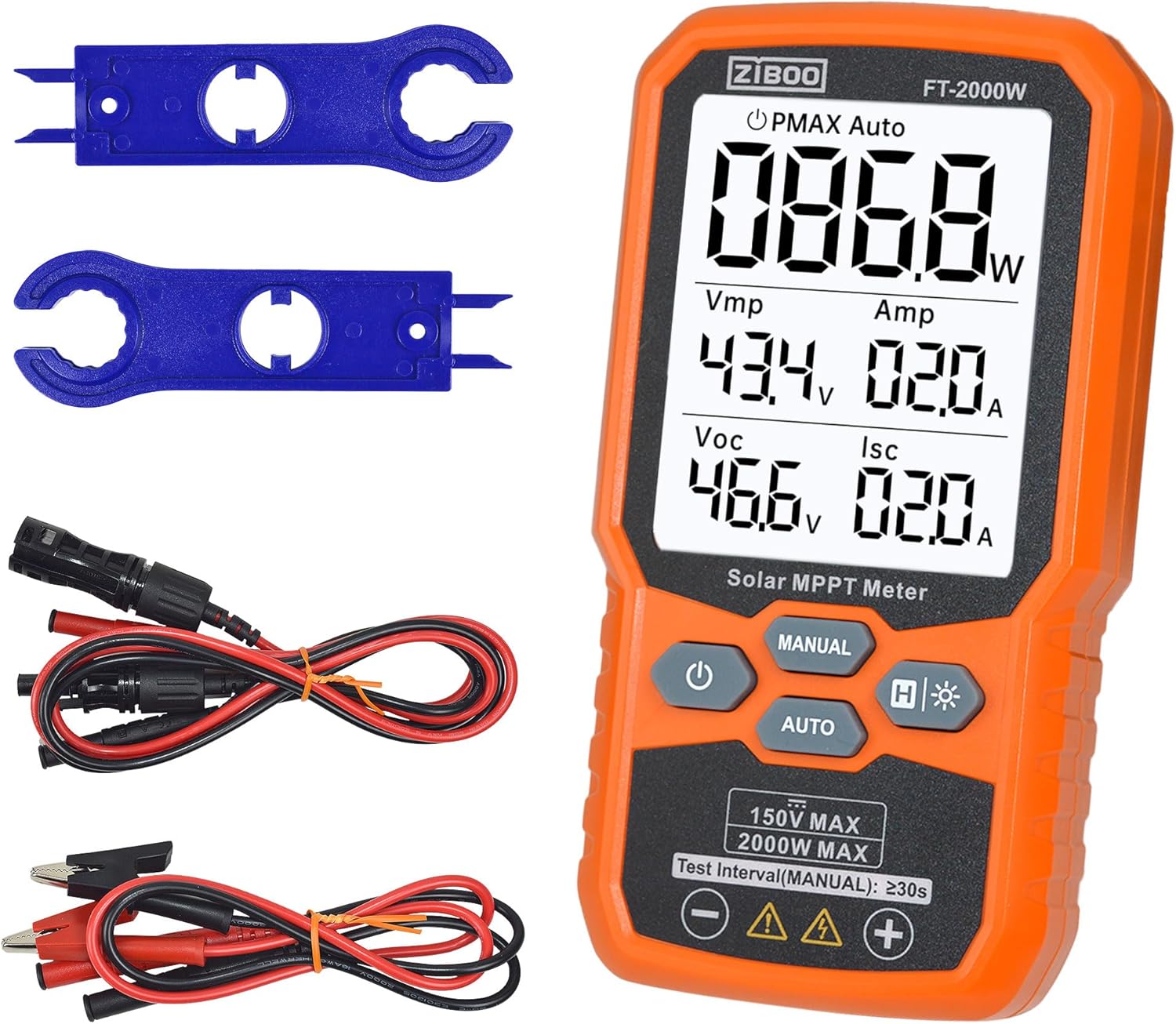
Image: ZIBOO FT-2000W Solar Panel Tester and its complete set of accessories.
Battery Installation
The device requires 3 AAA batteries for operation. To install:
- Locate the battery compartment on the back of the meter.
- Use a screwdriver to open the battery compartment cover.
- Insert 3 AAA batteries, ensuring correct polarity (+/-).
- Replace the battery compartment cover and secure it with the screw.
Connecting Test Leads
Connect the appropriate test leads to the meter and the solar panel for testing.
- For standard solar panel connections, use the Special Test Leads (MC4 connectors).
- For other applications or direct battery testing, use the Alligator Clip Test Leads.
- Ensure the red lead is connected to the positive (+) terminal and the black lead to the negative (-) terminal on both the meter and the panel.

Image: Close-up of the ZIBOO FT-2000W Solar Panel Tester's test leads and accessories.
Video: Unboxing and Setup Demonstration
Video: A seller demonstrates the unboxing and initial setup of the ZIBOO FT-2000W Solar Panel Tester, showing included accessories and basic connections.
Operating Instructions
The ZIBOO FT-2000W offers both manual and automatic measurement modes for comprehensive solar panel testing.
Powering On/Off
- To power on: Press and hold the power button (U) for 3 seconds.
- To power off: Press and hold the power button (U) for 2 seconds.
Measurement Modes
The meter features a large, backlit LCD display showing Pmax, Vmp, Amp, Voc, and Isc readings.

Image: The ZIBOO FT-2000W display showing various solar panel performance metrics.
- Manual Measurement: Press the MANUAL button to initiate a single measurement. This mode is useful for quick checks.
- Automatic Measurement: Press the AUTO button. The meter will automatically take measurements at regular intervals (approximately every 10 seconds). This is ideal for monitoring performance over time.

Image: Annotated diagram of the ZIBOO FT-2000W buttons and their functions.
Data Hold and Backlight
- Data Hold: Press the H button once to freeze the current reading on the display. Press again to release.
- Backlight: Long press the H button to turn the backlight on/off. This is useful for reading in low-light conditions.
Important Safety Warning
Always measure within the rated voltage and power range of the device. DO NOT test panels in series or parallel connections, as transient high voltage may cause damage to the internal circuit board of the instrument or lead to injury.

Image: Visual warning against incorrect series or parallel connections during testing.
Video: Solar Panel Testing in Action
Video: A seller demonstrates the ZIBOO FT-2000W Solar Panel Tester in use, showing real-time measurements of a solar panel's output.
Maintenance
Proper maintenance ensures the longevity and accuracy of your ZIBOO FT-2000W Solar Panel Tester.
Cleaning
Wipe the device with a soft, dry cloth. Do not use abrasive cleaners or solvents. Ensure the test leads are clean and free of debris before and after each use.
Battery Replacement
When the low battery indicator appears on the display, replace the 3 AAA batteries as described in the Setup section. Always use fresh batteries of the correct type.
Storage
Store the meter and its accessories in the provided carrying pouch in a cool, dry place away from direct sunlight and extreme temperatures. Remove batteries if storing for extended periods to prevent leakage.
Troubleshooting
If you encounter issues with your ZIBOO FT-2000W Solar Panel Tester, refer to the following common problems and solutions:
- No Display/Device Not Powering On:
- Check if batteries are correctly installed and have sufficient charge. Replace if necessary.
- Ensure the power button is pressed and held for the required 3 seconds.
- Inaccurate Readings:
- Verify that test leads are securely connected to both the meter and the solar panel.
- Ensure the solar panel is receiving adequate sunlight and is not shaded. Shading can significantly impact performance.
- Confirm that the test is being performed within the meter's specified voltage (12-150V) and current (0-35A) ranges.
- Avoid testing panels in series or parallel configurations, as this can lead to incorrect readings or damage (refer to Important Safety Warning).
- Display Not Changing in AUTO Mode:
- The AUTO mode updates approximately every 10 seconds. Allow sufficient time for readings to refresh.
- Ensure stable light conditions for consistent readings.
Specifications
Below are the key technical specifications for the ZIBOO FT-2000W Solar Panel Tester:
| Feature | Specification |
|---|---|
| Maximum Power (Pmax) | Up to 2000W |
| Open Circuit Voltage (Voc) | 12-150V |
| Short Circuit Current (Isc) | Up to 35A |
| Peak Voltage (Vmp) | Up to 150V |
| Peak Current (Imp) | Up to 35A |
| Accuracy | ±0.8% |
| Safety Rating | CAT III 1000V / CAT IV 600V (IEC/EN 61010 standards) |
| Display | Large Backlit LCD |
| Power Source | 3 x AAA Batteries |
| Dimensions (L x W x H) | 5.51" x 2.99" x 1.26" (14cm x 7.6cm x 3.2cm) |
| Item Weight | 10.4 ounces (295g) |
| Material | Aluminum, Tempered Glass |
| Features | Data Hold, Auto-ranging, Auto Power Off, Low Battery Indication, Reverse Input Protection, IP54 Dust/Water Resistance |
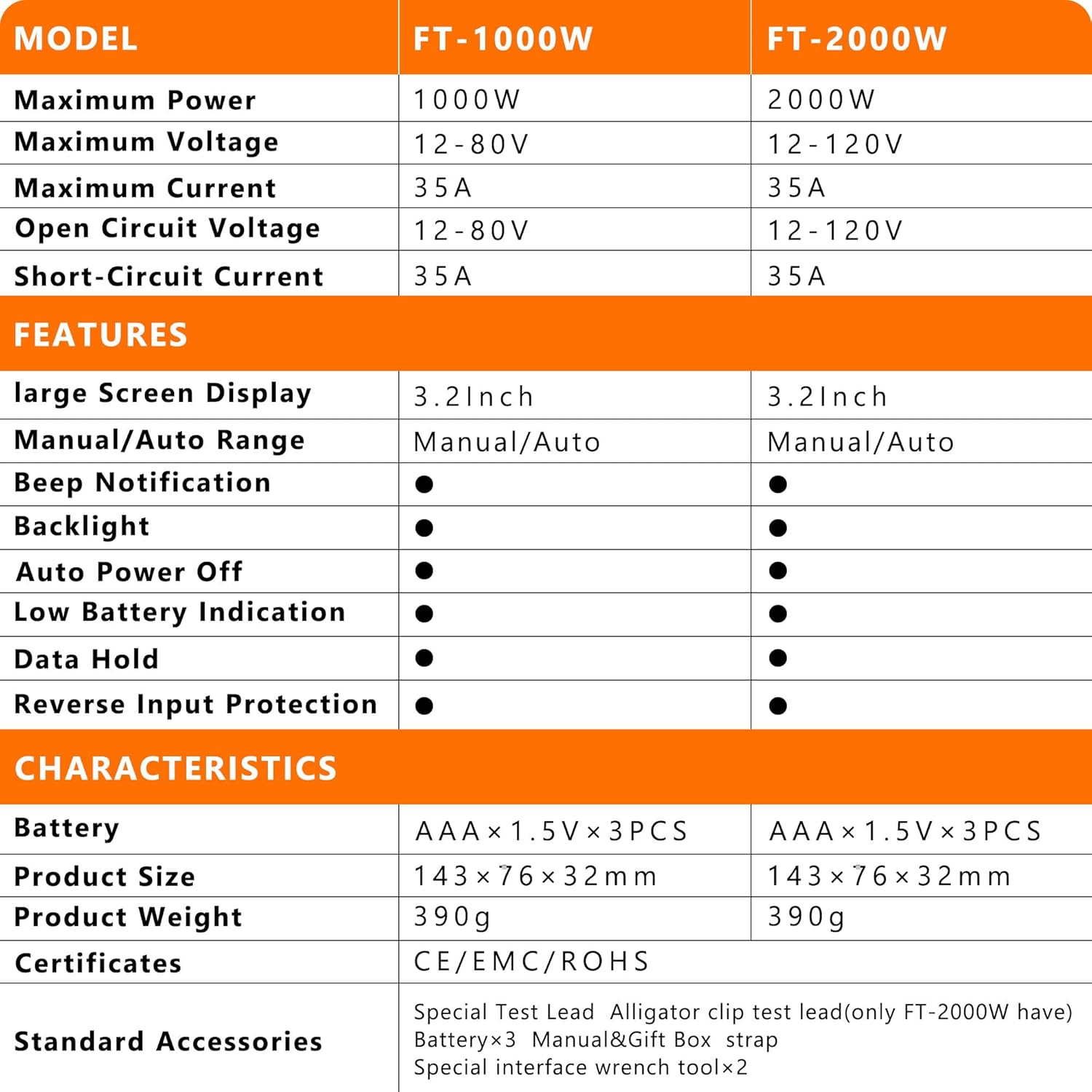
Image: Detailed comparison of ZIBOO FT-1000W and FT-2000W models' specifications and features.
Warranty and Support
For warranty information, technical support, or service inquiries regarding your ZIBOO FT-2000W Solar Panel Tester, please refer to the contact details provided in the product packaging or visit the official ZIBOO website. Protection plans may be available for extended coverage.


