
Introduction
The Gicorino H30 4-Pack Wireless Lavalier Microphone system is designed for high-quality audio capture across various platforms. This plug-and-play system supports simultaneous connection of up to four microphones, ideal for multi-person recordings without complex setup. Featuring smart noise reduction and 360° omnidirectional pickup, it ensures crystal-clear audio. It offers wide compatibility with iOS and Android devices, including iPhones (Lightning and Type-C) and most Android phones, as well as computers and tablets. With 2.4GHz wireless transmission, it provides a range of up to 65 feet and offers up to 6 hours of continuous use on a single charge, with the added convenience of charging your phone via the receiver during recording.

Image: The Gicorino H30 system allows multiple users to record simultaneously.
What's in the Box
- 4 x Mini Microphones
- 4 x Microphone Clips
- 1 x 3-in-1 Receiver (with 3.5mm, Lightning, and USB-C connectors)
- 1 x Type-C to USB Adapter
- 4 x Windproof Furry Covers
- 2 x USB-C Charging Cables
- 1 x Pair of Wired Headphones
- 1 x Storage Case
- 1 x Detailed Instruction Booklet

Image: All components included in the Gicorino H30 4-Pack Wireless Lavalier Microphone kit.
Setup Instructions
- Insert the Receiver: Plug the 3-in-1 receiver into your recording device's port (Lightning for iPhone, USB-C for Android/newer iPhone/PC, or 3.5mm jack).
- Power On Microphones: Press and hold the power button on each mini microphone you intend to use. The indicator light will turn green.
- Automatic Pairing: The microphones will automatically pair with the receiver. The indicator lights on the receiver will show a stable green light for each connected microphone.
- Android OTG Function: For Android devices, ensure the "OTG" function is enabled in your phone's settings before use.
No app downloads or Bluetooth configuration is required for this plug-and-play system.

Image: Visual guide for connecting the wireless microphone system.
Video: Quick Setup Guide
Video: A brief demonstration of the microphone's plug-and-play setup and clear audio quality.
Operating Instructions
- Wearing the Microphone: Use the integrated clip to securely attach the mini microphone to your clothing, such as a shirt collar or lapel. Ensure the microphone head is facing towards your mouth for optimal sound capture.
- Indicator Lights: The LED display on the microphone and receiver provides status updates. Green lights typically indicate connection and active status.
- Noise Reduction: The microphone features smart noise reduction technology. This function is automatically active to minimize background noise.
- Mute Function: If available, a dedicated button on the microphone may allow you to mute your audio temporarily. Refer to the detailed instruction booklet for specific button functions.
- Windproof Covers: For outdoor use or in windy conditions, attach the provided windproof furry covers to the microphones to further reduce wind noise and improve audio clarity.

Image: Proper placement of the lavalier microphone on clothing.

Image: LED indicators on the microphone for various functions.
Compatibility
The Gicorino H30 wireless lavalier microphone system offers broad compatibility with a variety of devices:
- iOS Devices: Supports iPhone 14 and earlier models (via Lightning connector) and newer iPhone models (iPhone 15/16/17) with Type-C interface.
- Android Devices: Compatible with the vast majority of Android phones, including brands like Samsung and Motorola (via USB-C or 3.5mm jack). Remember to enable the "OTG" function in Android settings if necessary.
- Computers & Laptops: Connects to PCs and laptops via USB-C or the provided Type-C to USB adapter.
- Cameras: Compatible with various cameras using the appropriate connector (e.g., 3.5mm jack).

Image: Visual representation of the receiver's multi-device compatibility.
Battery Life & Charging
- Microphone Battery: Each mini microphone (transmitter) is equipped with a built-in rechargeable Lithium-Ion battery.
- Usage Time: Enjoy up to 6 hours of continuous recording on a full charge.
- Charging Time: A full charge typically takes approximately 1.5 hours.
- Simultaneous Charging: The receiver's Type-C port allows you to charge your phone while recording, ensuring uninterrupted creative sessions with minimal latency (0.01 seconds).
- Charging Cables: Two USB-C charging cables are included for convenient recharging of the microphones.
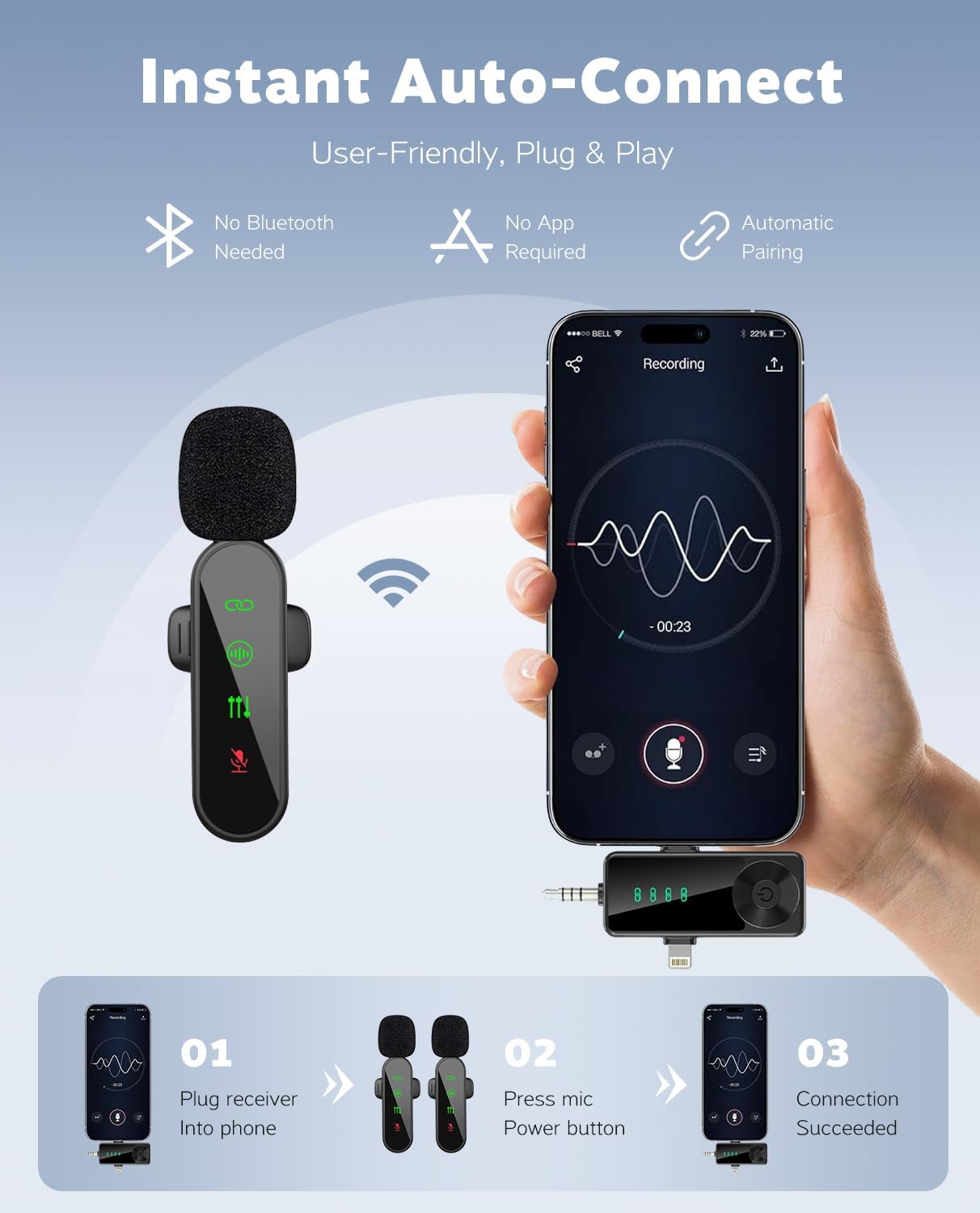
Image: Information on battery duration and charging capabilities.
Noise Reduction & Audio Quality
- Smart Noise Reduction: The system incorporates advanced noise reduction technology to effectively filter out ambient background noise, ensuring your voice remains clear and prominent.
- Omnidirectional Pickup: With 360° omnidirectional pickup technology, the microphones capture sound from all directions, providing comprehensive audio coverage.
- High Fidelity Sound: Designed to deliver crystal-clear audio quality, making it suitable for professional-grade recordings.
- Signal-to-Noise Ratio: Features an 80 dB signal-to-noise ratio for minimal interference.
- Audio Sensitivity: Rated at 90 Decibels for sensitive sound capture.

Image: Highlighting the noise reduction capabilities for clear audio.
Specifications
| Brand | Gicorino |
| Model Name | H30 |
| Microphone Form Factor | Handheld (Lavalier Clip-on) |
| Connectivity Technology | 2.4GHz Wireless |
| Connector Type | USB Type-C, Lightning, 3.5mm Jack |
| Compatible Devices | Camera, Laptop, PC, Smartphone (iOS & Android) |
| Polar Pattern | Omnidirectional |
| Audio Sensitivity | 90 Decibels |
| Signal-to-Noise Ratio | 80 dB |
| Frequency Response | 20 KHz |
| Wireless Range | Up to 65 feet (20 meters) |
| Battery Type | Lithium Ion (rechargeable) |
| Continuous Use Time | Up to 6 hours |
| Charging Time | Approx. 1.5 hours |
| Item Weight | 0.635 ounces (18 Grams) per microphone |
Troubleshooting
- No Sound/Poor Audio Quality:
- Ensure the receiver is fully inserted into your device's port.
- Verify that both the microphone(s) and receiver are powered on and successfully paired (indicated by solid green lights).
- Check your device's audio input settings to ensure the external microphone is selected.
- Confirm the microphone is not muted.
- Test the microphone at a closer range to the receiver to rule out range issues.
- Ensure the windproof cover is properly attached if recording outdoors.
- Pairing Issues:
- Power off both the microphone(s) and receiver, then restart them.
- Ensure no other wireless devices are causing interference.
- For Android devices, confirm the "OTG" function is enabled in settings.
- Short Battery Life:
- Ensure microphones are fully charged before use.
- Avoid extreme temperatures, which can affect battery performance.
Maintenance
- Cleaning: Use a soft, dry cloth to clean the microphones and receiver. Avoid using liquids or abrasive cleaners.
- Storage: Store the microphone system in the provided storage case when not in use to protect it from dust, moisture, and physical damage.
- Battery Care: For optimal battery longevity, avoid fully discharging the batteries frequently. Charge them regularly, even if not in constant use.
Warranty and Support
Your Gicorino H30 Wireless Lavalier Microphone purchase includes:
- One Year Product Support: Assistance with any product-related inquiries or issues.
- 30-Day Consumer Protection: Additional coverage to ensure your satisfaction and confidence in the product's quality and durability.
For further assistance, please refer to the detailed instruction booklet or contact Gicorino customer support.
