
Introduction
Thank you for choosing the CNBRO Camera Glasses AIMB-G1. These smart glasses integrate advanced technology to enhance your daily experiences, offering features such as high-definition video recording, real-time AI translation, and intelligent image recognition. With interchangeable lenses, they adapt to various environments and needs. Please read this manual thoroughly to understand the product's functions and ensure optimal performance and longevity.
Product Overview
The CNBRO Camera Glasses AIMB-G1 are designed for versatility and smart functionality. They feature a discreet camera for capturing moments, Bluetooth connectivity for audio and smart features, and a robust AI engine for translation and image recognition. The frame is designed to accommodate three types of interchangeable lenses: blue light blocking, sunglasses, and brown gradient lenses.

Image: The CNBRO Camera Glasses AIMB-G1 shown with clear lenses and a selection of interchangeable lenses below.
Package Contents
Ensure all items are present in the package:
- 1 * Camera Glasses (AIMB-G1)
- 3 * Interchangeable Lenses (Blue Light Blocking, Sunglasses, Brown Gradient)
- 1 * Charging Cable
- 1 * User Manual (this document)
- 1 * Exquisite Packaging Box
Specifications
| Memory | 32GB |
| Camera | 500W (5 Megapixel) |
| Video Resolution | 1080P at 30 frames per second |
| Battery Capacity | 270mAh |
| Music Playback Time | Up to 30 hours |
| Charging Time | Approximately 1.5 hours |
| Product Dimensions | 0.39 x 0.39 x 0.39 inches (approximate) |
| Model Number | AIMB-G1 |
Setup
1. Lens Replacement
The CNBRO Camera Glasses come with three types of interchangeable lenses. To replace the lenses:
- Gently push the current lens out from the front of the frame.
- Align the desired new lens with the frame and carefully press it into place until it clicks securely.

Image: Visual guide for replacing the interchangeable lenses, showing blue light blocking, sunglass, and brown gradient options.
Video: Demonstration of how to easily replace the 3-in-1 interchangeable lenses on the AIMB-G1 Camera Glasses.
2. Charging the Glasses
Before first use, fully charge the glasses. Connect the provided charging cable to the charging port on the glasses and to a USB power source. The charging indicator light will show the charging status. A full charge takes approximately 1.5 hours.
3. App Installation and Bluetooth Pairing
To utilize the AI features (translation, image recognition) and manage recordings, download the dedicated companion app from your smartphone's app store. Follow the in-app instructions to pair your CNBRO Camera Glasses via Bluetooth. Ensure Bluetooth is enabled on your smartphone.
Operating Instructions
1. Power On/Off
Refer to the specific button on your glasses for power control. Typically, a long press of the main button will power the device on or off.
2. Video Recording
The glasses are equipped with a 500W HD camera capable of recording 1080P video at 30 frames per second. Recordings are automatically segmented and saved to the internal 32GB memory. Consult the app for specific controls to start, stop, and manage recordings.
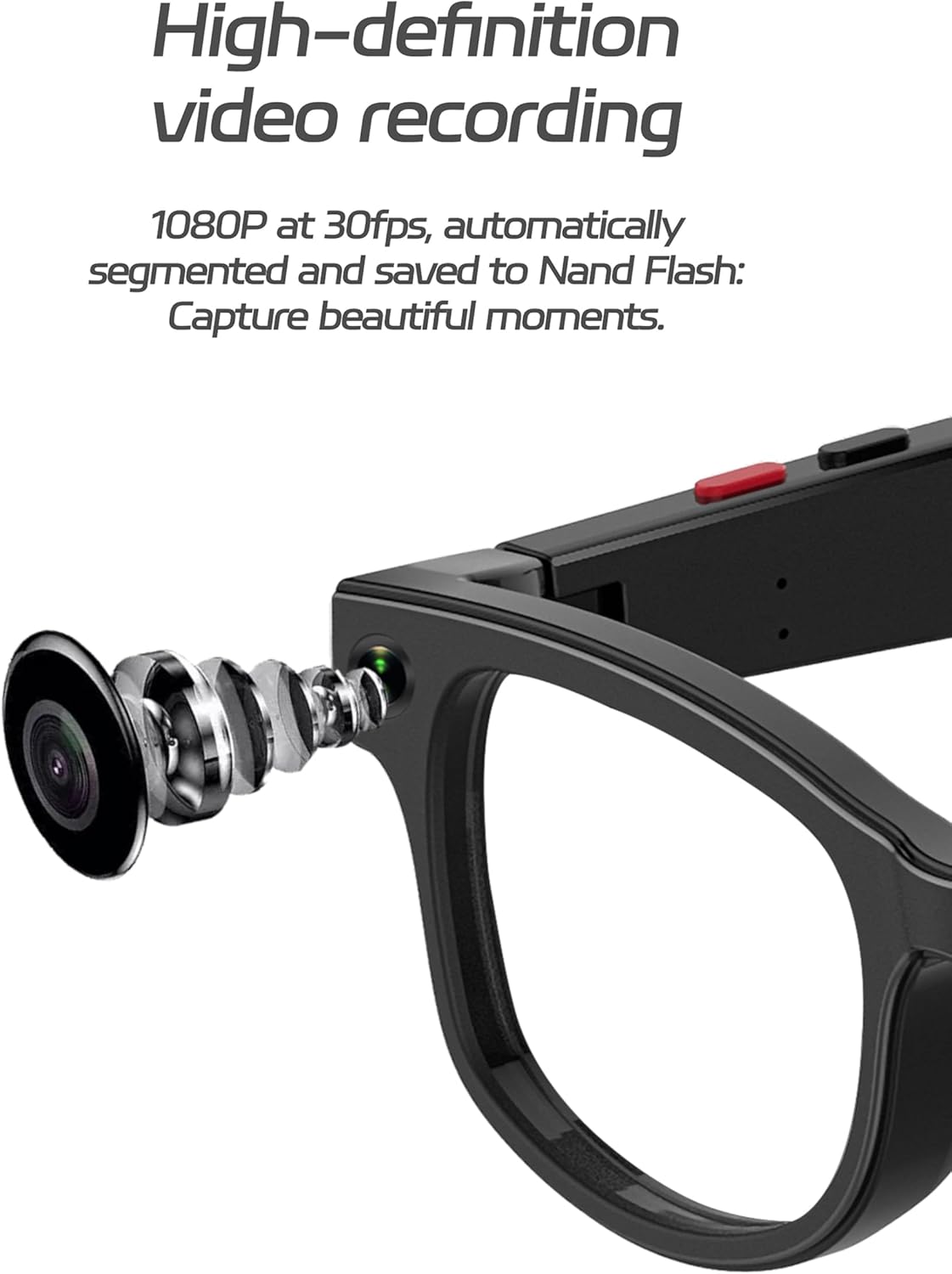
Image: Detailed view of the integrated 500W HD camera lens on the smart glasses, highlighting its discreet design.
3. Real-Time AI Translation
Utilize the real-time translation feature through the companion app. When activated, the glasses can help break language barriers by translating spoken language. This feature is ideal for travel and international communication.

Image: A smartphone screen displaying the real-time translation function of the glasses, showing a conversation being translated from Chinese to English.
4. AI Image Recognition
The intelligent image recognition feature allows the glasses to identify and analyze objects in your field of view. This information is then processed and displayed via the companion app, providing instant visual analysis and supplementing your knowledge.

Image: A smartphone screen demonstrating the AI image recognition capability, where the glasses identify objects in a scene (e.g., a tea set) and provide descriptive text.
5. Audio Playback and Sound-Conducting Tube Attachment
The glasses support audio playback for music or translated speech. For enhanced audio clarity and volume, attach the sound-conducting tubes. These tubes are designed with a non-slip feature and align with the speaker's audio output to amplify sound.

Image: A close-up diagram illustrating the attachment of the sound-conducting tube to the glasses, indicating the alignment for optimal audio amplification.
Maintenance
- Cleaning: Use a soft, lint-free cloth to clean the lenses and frame. Avoid abrasive materials or harsh chemicals.
- Storage: Store the glasses in their protective case when not in use to prevent scratches and damage.
- Water Exposure: The glasses are not waterproof. Avoid exposure to water or high humidity.
- Temperature: Do not expose the glasses to extreme temperatures (hot or cold).
Troubleshooting
- Glasses not powering on:
- Ensure the glasses are fully charged. Connect to the charging cable and wait for the charging indicator.
- Unable to pair with smartphone:
- Make sure Bluetooth is enabled on your smartphone.
- Ensure the glasses are in pairing mode (refer to app instructions).
- Restart both the glasses and your smartphone.
- Check if the glasses are already paired with another device.
- Video recording issues:
- Check available memory (32GB internal).
- Ensure the camera lens is clean and unobstructed.
- Verify the glasses are powered on and functioning correctly.
- AI features (translation, image recognition) not working:
- Ensure the glasses are successfully paired with the companion app.
- Check your smartphone's internet connection, as AI features may require online processing.
- Update the companion app to the latest version.
Warranty and Support
For warranty information, please refer to the documentation provided at the time of purchase or contact CNBRO customer support. If you encounter any issues not covered in this manual, or require further assistance, please contact our support team through the official CNBRO website or the contact information provided in your purchase documentation.
Note: If you receive a defective product or have any questions during use, please feel free to contact us.