
Introduction
This manual provides detailed instructions for the safe and effective use of your WORKPRO 1/2-inch Drive Digital Torque Adapter. This electronic adapter converts any standard 1/2-inch drive ratchet or breaker bar into a precise digital torque wrench, offering accurate torque measurements for various applications. Please read this manual thoroughly before operation and retain it for future reference.
Safety Information
Always observe basic safety precautions when using power tools and accessories to reduce the risk of personal injury. Failure to follow these instructions may result in electric shock, fire, and/or serious injury.
- Read all instructions: Familiarize yourself with the tool's operation and limitations.
- Wear appropriate safety gear: Always wear safety glasses and gloves.
- Keep work area clean and well-lit: Cluttered or dark areas invite accidents.
- Do not overreach: Maintain proper footing and balance at all times.
- Use the correct tool for the job: Do not force the tool or attachment to do a job for which it was not designed.
- Store idle tools: When not in use, tools should be stored in a dry, high, or locked-up place, out of reach of children.
- Battery safety: Ensure batteries are inserted correctly. Do not mix old and new batteries. Remove batteries if the tool is not used for an extended period.
Package Contents
Verify that all items listed below are present and in good condition:
- WORKPRO Digital Torque Adapter (1/2" Drive)
- 3/8" Drive Adapter
- 1/4" Drive Adapter
- Screwdriver (for battery compartment)
- AAA Batteries (x2)
- User Manual (this document)
- Durable Storage Case

Image: The WORKPRO Digital Torque Adapter, along with its 3/8" and 1/4" adapters, screwdriver, AAA batteries, and storage case, laid out for inspection.
Product Features
- High Accuracy: Provides precise torque measurements with ±3% accuracy, suitable for critical fastening tasks.
- Wide Torque Range: Measures from 7.38 to 147.5 ft-lb (10 to 200 Nm).
- Versatile Compatibility: Converts any 1/2-inch drive ratchet into a digital torque wrench. Includes 3/8-inch and 1/4-inch adapters for broader socket compatibility.
- Multiple Units: Easily switch between N·m, ft·lb, in·lb, and kg·cm.
- Preset Torque Values: Save up to 8 common torque settings (M1-M8) for quick recall and efficient workflow.
- Audible and Visual Alerts: A built-in buzzer and LED indicators alert you when the target torque is reached, preventing overtightening.
- Durable Construction: Features a Cr-Mo Steel core for strength and durability, with an anti-rust finish.
- Data Storage: Ability to save the first reading by pressing the "C" button.

Image: The WORKPRO Digital Torque Adapter highlighting its key features: buzzer & LED, two modes, four units, ±3% accuracy, data storage, and preset value function.
Setup
1. Battery Installation
- Locate the battery compartment cover on the back of the torque adapter.
- Use the provided screwdriver to remove the screw securing the cover.
- Insert the two AAA batteries, ensuring correct polarity (+/-).
- Replace the battery compartment cover and secure it with the screw.
2. Attaching to a Ratchet
- Select a 1/2-inch drive ratchet or breaker bar.
- Insert the square drive of the torque adapter into the drive of your ratchet until it clicks securely into place.
- If using 3/8-inch or 1/4-inch sockets, attach the appropriate adapter to the torque adapter's output drive before attaching the socket.

Image: A WORKPRO Digital Torque Adapter attached to a 1/2-inch drive ratchet, demonstrating how it converts a standard ratchet into a digital torque tool for precise readings.
Operating Instructions
1. Power On/Off
Press the "C" button to power on the device. The display will light up. To power off, press and hold the "C" button for a few seconds, or the device will automatically shut off after a period of inactivity to conserve battery life.
2. Mode Selection (Peak / Track)
Press the "M" button to cycle between the two operating modes:
- Track Mode: Displays real-time torque values as force is applied.
- Peak Mode: Records and displays the maximum torque value achieved during the fastening process.
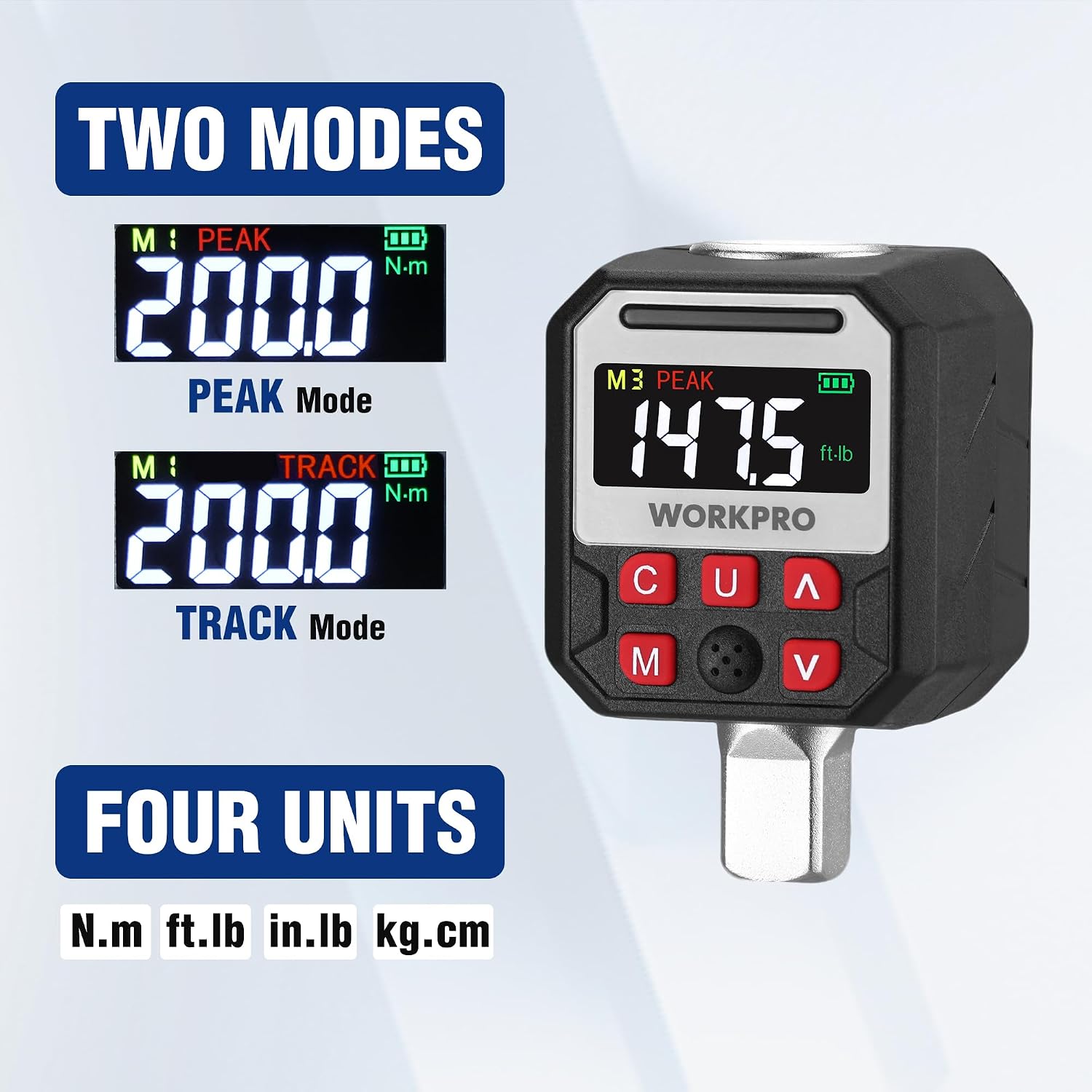
Image: The digital display of the torque adapter showing both "Peak Mode" and "Track Mode" with example torque readings, illustrating the two available measurement modes.
3. Unit Selection
Press the "U" button to cycle through the available torque units:
- N·m (Newton-meters)
- ft·lb (Foot-pounds)
- in·lb (Inch-pounds)
- kg·cm (Kilogram-centimeters)
4. Setting Target Torque and Presets (M1-M8)
To set a target torque value:
- Press the "M" button to enter the preset memory mode (M1-M8).
- Use the "Λ" (Up) and "V" (Down) buttons to adjust the desired torque value.
- Once the desired value is set, press the "C" button to save it to the current preset (e.g., M1).
- You can store up to 8 different preset torque values.

Image: The digital display of the torque adapter showing a target torque value (e.g., 102.3 ft-lb) in Track Mode, with indicators for LED flash and buzzer alarm when the target is reached.
5. Using the Adapter for Fastening
- Attach the adapter to your ratchet and the appropriate socket to the adapter.
- Select your desired mode (Track or Peak) and torque unit.
- Set the target torque value if using a preset.
- Begin applying force to the fastener. The display will show the real-time torque.
- As you approach the target torque, the LED indicator will flash, and the buzzer will sound, indicating that the target torque has been reached. Stop applying force immediately to avoid overtightening.
6. Data Storage
In Peak Mode, after a fastening operation, you can press the "C" button to save the first peak reading. This allows for review of the achieved torque value.

Image: A hand pressing the "C" button on the WORKPRO Digital Torque Adapter's display, illustrating the data storage function to save the first reading.
Maintenance
- Cleaning: Wipe the adapter with a clean, dry cloth after each use. Do not use harsh chemicals or abrasive cleaners.
- Storage: Store the torque adapter in its protective case in a dry, cool place, away from direct sunlight and extreme temperatures.
- Battery Replacement: Replace batteries when the low battery indicator appears on the display. Always use new AAA batteries.
- Calibration: For professional applications requiring certified accuracy, periodic calibration by a qualified service center is recommended.
Troubleshooting
| Problem | Possible Cause | Solution |
|---|---|---|
| Device does not power on. | Dead or incorrectly installed batteries. | Check battery polarity. Replace with new AAA batteries. |
| Inaccurate torque readings. | Adapter not properly seated; calibration required. | Ensure adapter is securely attached to the ratchet. Consider professional calibration if issues persist. |
| Buzzer/LED alert not working. | Feature disabled or malfunction. | Ensure the device is in the correct mode. If problem persists, contact support. |
| Display is dim or flickering. | Low battery power. | Replace batteries. |
Specifications
| Brand | WORKPRO |
| Model | B0FPLN5W5K |
| Drive Size | 1/2 inch (includes 3/8 inch and 1/4 inch adapters) |
| Torque Range | 7.38-147.5 ft-lb (10-200 Nm) |
| Accuracy | ±3% |
| Torque Units | N·m, ft·lb, in·lb, kg·cm |
| Modes | Peak, Track |
| Power Source | 2 x AAA Batteries |
| Material | Cr-Mo Steel Core |
| UPC | 820909625322 |
Warranty and Support
WORKPRO products are manufactured to high-quality standards. For warranty information, technical support, or service inquiries, please refer to the warranty card included with your product or visit the official WORKPRO website. Please have your product model number (B0FPLN5W5K) and purchase date available when contacting support.
For more information, you may visit the WORKPRO Store on Amazon.