
1. Introduction
This manual provides essential information for the safe and efficient operation of your 5TH WHEEL V40 PRO Adult Electric Scooter. Please read this manual thoroughly before using the scooter to ensure proper assembly, operation, and maintenance. Retain this manual for future reference.
2. Safety Information
Your safety is paramount. Always wear a helmet and appropriate protective gear while riding. Adhere to all local traffic laws and regulations. The V40 PRO is UL2272 Certified, ensuring electrical safety standards are met.
- Visibility: The scooter is equipped with a bright front headlight, taillight, and integrated turn signals for enhanced visibility, especially during night rides.
- Braking: Utilize the dual braking system, featuring front EABS and rear disc brakes, for effective stopping power.
- Tires: 10-inch solid tires provide a stable ride and eliminate the risk of punctures.
- Suspension: Dual suspension (front and rear) helps absorb shocks for a smoother ride.
3. Package Contents
Upon unpacking, verify that all items are present:
- 5TH WHEEL V40 PRO Electric Scooter
- Charger
- Tool Kit
- User Manual (this document)
4. Assembly and Initial Setup
The scooter comes partially assembled. Follow these steps to complete the setup:
- Handlebar Attachment: Securely attach the handlebars to the main stem using the provided screws and tool kit. Ensure all connections are tight.
- Initial Charge: Before first use, fully charge the scooter. Connect the charger to the charging port located on the deck. A full charge typically takes approximately 4-6 hours.
- App Download & Pairing: Download the official 5TH WHEEL app (Invanti app mentioned in reviews) from your smartphone's app store. Follow the in-app instructions to pair your scooter via Bluetooth. The app allows for advanced controls and settings.
Video: Unboxing and initial assembly of the 5TH WHEEL V40 PRO Electric Scooter.
5. Product Overview
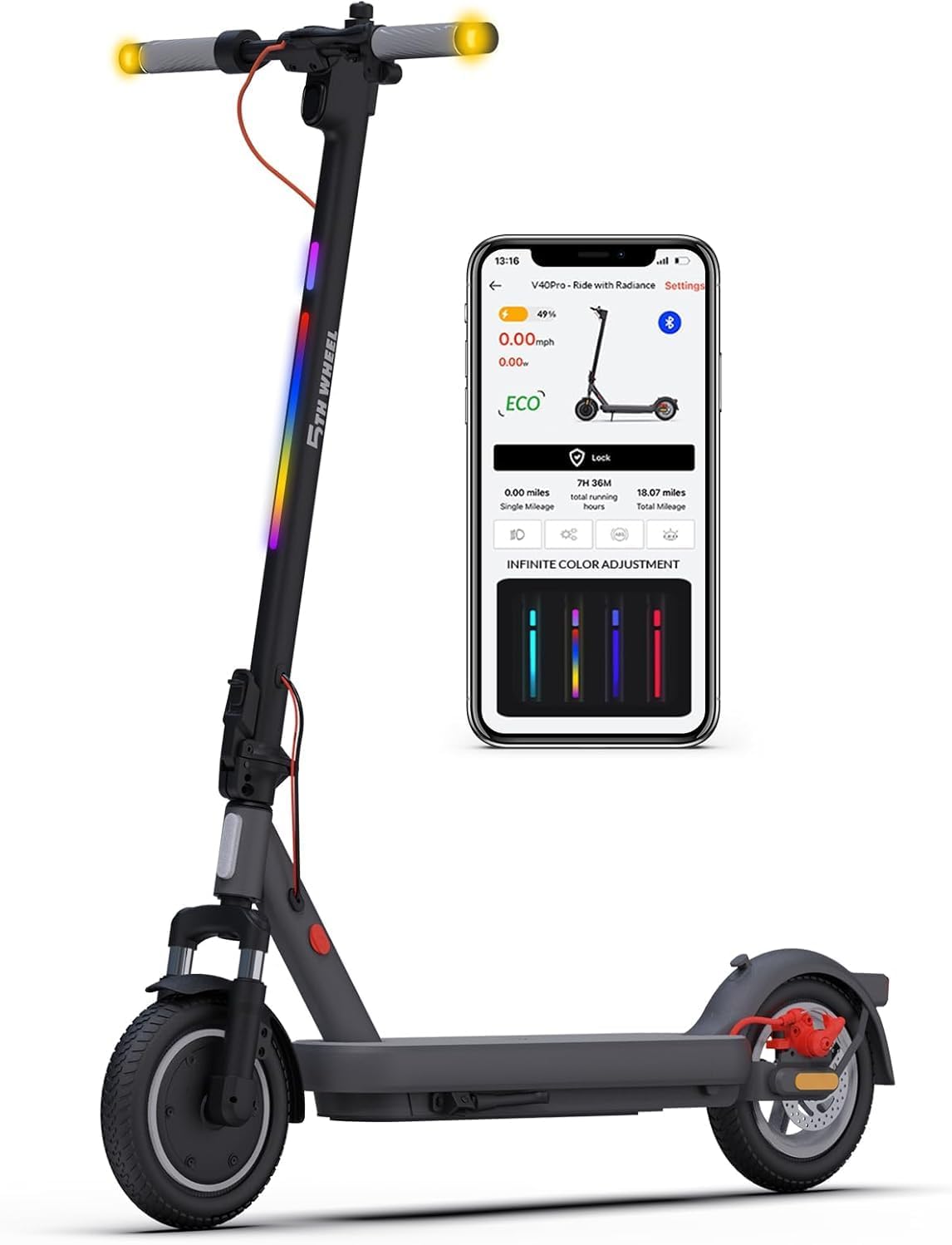
Image: Overview of the 5TH WHEEL V40 PRO Electric Scooter and its smart app control.
Key Components:
- Motor: 48V 400W brushless motor (800W peak) for efficient power delivery.
- Tires: 10-inch solid tires, maintenance-free and puncture-resistant.
- Suspension: Dual suspension system (front fork and rear spring) for improved ride comfort.
- Brakes: Front EABS (Electronic Anti-lock Braking System) and rear disc brake for reliable stopping.
- Lighting: Ultra-bright headlight, taillight, turn signals, and customizable ambient light.
- Display: Digital display on the handlebar shows speed, battery level, and mode.
- Folding Mechanism: User-friendly 3-second folding for portability and storage.

Image: Detailed dimensions of the 5TH WHEEL V40 PRO Electric Scooter.
6. Operating Instructions
6.1 Power On/Off
- Power On: Short press the power button on the handlebar display.
- Power Off: Press and hold the power button for 2 seconds, or the scooter will automatically turn off after 5 minutes of inactivity.
6.2 Starting the Scooter
For safety, the scooter requires a kick-start:
- Kick to reach a speed over 3 MPH (5 KM/H).
- Then, twist the throttle to accelerate.
6.3 Speed Modes
Toggle between modes by short-pressing the power button while the scooter is on:
- ECO Mode: Energy-saving mode for extended range and lower speed.
- D Mode: Standard drive mode for balanced performance.
- S Mode (Sport): High-performance mode for maximum speed (up to 20 MPH) and acceleration.
6.4 Cruise Control
- Activation: While riding (over 3 MPH), hold a steady speed for 3 seconds. After 5 seconds, you will hear two beeps confirming cruise control is active.
- Deactivation: Twist the throttle or apply the brake to deactivate cruise control.
6.5 Lighting and Signals
- Headlight/Taillight: Can be controlled via the app or by pressing the power button.
- Turn Signals: Activated via dedicated buttons on the handlebar. Press the same button again to turn off the signal.
- Ambient Light: Customize colors and patterns via the smartphone app.
Video: Quick review of the 5TH WHEEL V40 PRO Electric Scooter, highlighting features like lights and app control.
7. Charging
To charge your scooter, connect the provided charger to a standard power outlet and then to the scooter's charging port. The charging time for a full battery is approximately 4-6 hours.
8. Maintenance
- Cleaning: Wipe the scooter with a damp cloth. Avoid using high-pressure water or harsh chemicals.
- Tires: The 10-inch solid tires are maintenance-free and do not require inflation. Regularly inspect for wear and tear.
- Brakes: Periodically check the disc brake for proper function and wear. Adjust brake sensitivity via the app if needed.
- Storage: When not in use, store the scooter in a cool, dry place. The folding mechanism allows for compact storage.
9. Troubleshooting
Common issues and their solutions:
- Scooter not turning on: Ensure the battery is charged. Short press the power button.
- Scooter not accelerating after turning on: Remember to kick-start the scooter to over 3 MPH before twisting the throttle. This is a default security setting.
- Reduced battery life/motor power/max speed: Battery life and performance can be affected by weight load, slope, temperature, riding habits, and terrain.
- App connectivity issues: Ensure Bluetooth is enabled on your smartphone and the scooter is powered on. Try restarting both the app and the scooter.
- Cruise control not activating: Ensure you hold a steady speed for at least 3 seconds (over 3 MPH) for activation.
10. Specifications
| Brand | 5TH WHEEL |
| Model Name | ES14 (V40 PRO) |
| Motor Power | 400W (800W Peak) |
| Top Speed | 20 Mph |
| Max Range | 24.9 Miles |
| Battery | 48V 7.5Ah Lithium |
| Charging Time | 4-6 Hours |
| Tire Type | 10-inch Solid Tires |
| Suspension | Dual Suspension (Front & Rear) |
| Brake System | Front EABS, Rear Disc Brake |
| Max Load | 264.5 Pounds (120 KG) |
| Item Weight | 37 Pounds |
| Product Dimensions | 45.43"L x 22.04"W x 49.6"H |
| Certification | UL2272 Certified |
11. Warranty and Support
5TH WHEEL provides a 12-month limited warranty for the V40 PRO Electric Scooter. For any questions, technical assistance, or warranty claims, please contact our customer service team.
Customer Service Email: service@ride5thwheel.com
Our 24/7 online customer service is available to assist you.


