
1. Introduction
Welcome to the user manual for your new TCL 55C6K 55-inch 4K QLED Mini LED Smart Google TV. This television combines advanced display technologies like 4K resolution, QLED, and Mini LED with a high 144Hz refresh rate for exceptional visual clarity and smoothness. Enjoy immersive audio with the integrated Onkyo 2.1 Hi-Fi sound system and Dolby Atmos. Powered by Google TV, it offers a smart and intuitive user experience with access to a wide range of applications and voice control capabilities. This manual provides essential information for setup, operation, maintenance, and troubleshooting to ensure you get the most out of your television.
2. Safety Information
Before operating your television, please read all instructions carefully. Keep this manual for future reference. Adhere to all warnings and instructions marked on the product.
- Power Source: Only use the power cord supplied with the TV. Ensure the voltage matches your local power supply.
- Ventilation: Do not block ventilation openings. Allow adequate space around the TV for proper airflow to prevent overheating.
- Water and Moisture: Do not expose the TV to rain or moisture. Do not place objects filled with liquids, such as vases, on the TV.
- Cleaning: Unplug the TV before cleaning. Use a soft, dry cloth. Do not use liquid cleaners or aerosol cleaners.
- Placement: Place the TV on a stable, level surface. Avoid placing it in direct sunlight or near heat sources.
- Children: Supervise children to prevent them from climbing on the TV or stand.
- Servicing: Do not attempt to service this product yourself. Refer all servicing to qualified service personnel.
3. Package Contents
Verify that all items are present in the package:
- TCL 55C6K 55-inch 4K QLED Mini LED Smart Google TV
- Remote Control
- Power Cable
- User Manual (this document)
- Warranty Card
- TV Stand Components (if applicable)
4. Setup
4.1 Unpacking
Carefully remove the TV from its packaging. It is recommended to have two people for this process due to the size and weight of the unit. Retain the packaging materials for future transport or servicing.
4.2 Stand Installation / Wall Mounting
Stand Installation:
- Place the TV screen-down on a soft, flat surface (e.g., a blanket or foam) to prevent damage.
- Attach the stand components to the designated slots on the bottom of the TV using the provided screws. Ensure they are securely fastened.
Wall Mounting:
If you plan to wall mount your TV, please refer to the separate wall mount instruction manual provided with your wall mount kit. Ensure you use a VESA-compatible mount and follow all safety guidelines. Professional installation is recommended.

Figure 4.2.1: TCL 55C6K TV Dimensions
4.3 Connecting Devices
Your TCL 55C6K TV offers various connectivity options. Refer to the image below for port locations.

Figure 4.3.1: Side View with Ports
- HDMI Ports (x4): Connect Blu-ray players, gaming consoles, soundbars, and other HDMI-enabled devices. Supports ARC/eARC on one port and VRR 2.1 for enhanced gaming.
- USB Port (x1): Connect USB storage devices for media playback. Supports VRR 3.0.
- RF In (x1): Connect an antenna or cable for digital broadcast reception (DVB-T/T2/S/S2).
- LAN Port (x1): Connect an Ethernet cable for a wired internet connection.
- Digital Audio Out (Optical) (x1): Connect to an external audio receiver or sound system for high-quality digital audio.
- Wi-Fi: Built-in 5G Wi-Fi for wireless internet connectivity.
- Bluetooth: Version 5.4 for connecting wireless headphones, speakers, or other Bluetooth devices.
4.4 Initial Power On
- Connect the power cable to the TV and then to a power outlet.
- Press the power button on the remote control or on the TV itself.
- Follow the on-screen instructions to complete the initial setup, including language selection, network connection, and Google TV account setup.
5. Operating Instructions
5.1 Remote Control Overview
The remote control allows you to navigate the TV's features. Familiarize yourself with the buttons for power, volume, channel, input selection, and smart TV functions.
5.2 Google TV Interface and Smart Features
Your TCL 55C6K runs on Google TV, providing a personalized and intuitive smart TV experience.
- Navigation: Use the directional pad and OK button on your remote to browse content and settings.
- Apps: Access pre-installed apps like Netflix, YouTube, and Amazon Prime Video. Download more apps from the Google Play Store.
- Voice Control: Use the built-in Google Assistant for voice commands. The TV supports Far Field Voice Control, allowing you to use voice commands without the remote.
- Chromecast Built-in & AirPlay 2: Cast content directly from your smartphone or tablet to the TV.
- Other Smart Features: Time Shift, EPG (Electronic Program Guide), Recording, Sleep Timer, OSD Multi-language, Favorite Channel List, Channel Editor, PVR (Personal Video Recorder), Parental Control.
5.3 Picture Settings
Optimize your viewing experience with various picture settings.
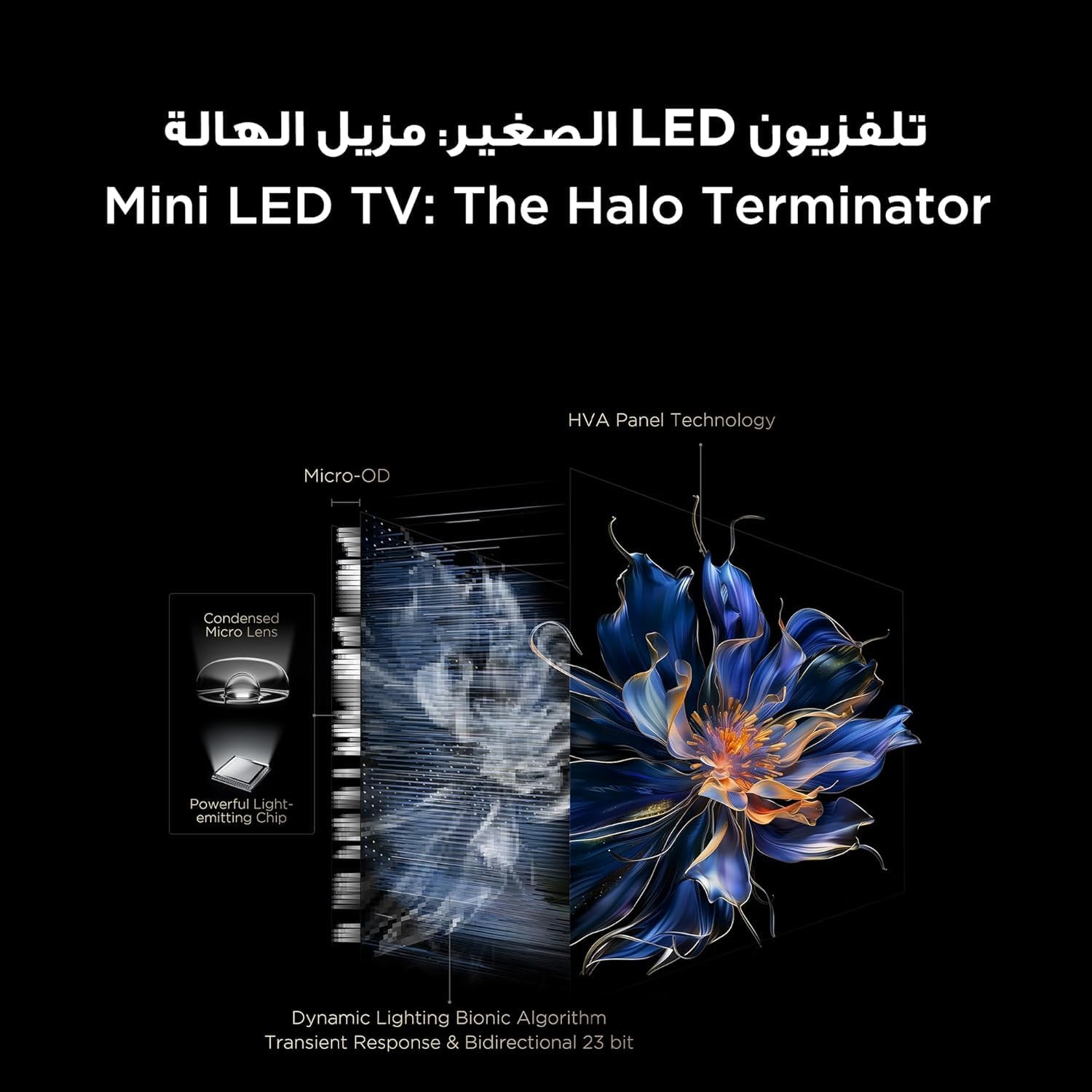
Figure 5.3.1: TV Feature Overview
- Picture Modes: Standard, Sports, Filmmaker Mode, Film, Game, Smart Game.
- HDR Technology: Supports Dolby Vision IQ, HDR 10+, and HLG for enhanced contrast and color.
- QLED Display: Enjoy over a billion hues of vivid color with 93% DCI-P3 color space.
- Mini LED Backlight: Precise dimming zones for deep blacks and high brightness.
- MEMC: Motion Estimation, Motion Compensation for smoother fast-moving scenes.
- iMax Contrast Enhancer: Improves contrast for a more dynamic picture.
- Color Temperature: Adjust between Normal, Cool, and Warm settings.

Figure 5.3.2: QLED Color Technology

Figure 5.3.3: Mini LED Technology
5.4 Sound Settings
Experience rich and immersive audio with your TV's advanced sound system.
- Audio Technology: Features Dolby Atmos and DTS Virtual X for multi-dimensional sound.
- Onkyo 2.1 Hi-Fi Audio: Integrated Onkyo sound system with 10W x 2 speakers and a 20W subwoofer for powerful and clear audio.
- Sound Modes: Dynamic, Standard, Film, Music, Voice, Game, Sports.

Figure 5.4.1: Onkyo 2.1 Sound System
5.5 Gaming Features
The TCL 55C6K is designed for an enhanced gaming experience.
- 144Hz Native Refresh Rate: Enjoy ultra-smooth motion for fast-paced games.
- VRR (Variable Refresh Rate): Synchronizes the display's refresh rate with the game's frame rate to eliminate screen tearing and stuttering.
- FreeSync Premium Pro: Provides fluid, tear-free gameplay at peak performance.
- ALLM (Auto Low Latency Mode): Automatically switches the TV to a low-latency mode when a game console is detected, reducing input lag.
- Game Master: A dedicated suite of gaming features for optimal performance.

Figure 5.5.1: 144Hz Native Refresh Rate
6. Maintenance
6.1 Cleaning Your TV
- Screen: Gently wipe the screen with a soft, lint-free cloth. For stubborn marks, slightly dampen the cloth with water or a specialized screen cleaner (ensure it's safe for TV screens) and wipe gently. Never spray liquid directly onto the screen.
- Frame: Use a soft, dry cloth to wipe the TV frame and stand.
- Always unplug the TV from the power outlet before cleaning.
6.2 Software Updates
Your TV may receive software updates to improve performance and add new features. It is recommended to keep your TV connected to the internet to receive these updates automatically. You can also manually check for updates in the TV's settings menu.
7. Troubleshooting
If you encounter issues with your TV, refer to the following common problems and solutions:
| Problem | Possible Solution |
|---|---|
| No power | Check if the power cable is securely connected to the TV and the power outlet. Ensure the power outlet is working. Try a different outlet. |
| No picture, but sound is present | Check the input source. Ensure the connected device is powered on and functioning correctly. Try a different HDMI cable. |
| No sound, but picture is present | Check the volume level and mute status. Ensure external audio devices are connected correctly and powered on. Check audio output settings on the TV. |
| Remote control not working | Replace the batteries. Ensure there are no obstructions between the remote and the TV's IR sensor. |
| Network connection issues | Restart your router and modem. Check Wi-Fi password. Try a wired Ethernet connection if available. |
| Picture quality issues (e.g., blurry, distorted) | Check the source resolution. Adjust picture settings (brightness, contrast, sharpness). Ensure the TV's software is up to date. |
If the problem persists after trying these solutions, please contact TCL customer support or your retailer for further assistance.
8. Specifications
Detailed technical specifications for the TCL 55C6K TV:
| Feature | Specification |
|---|---|
| Display Size | 55 inches |
| Resolution | 3840 x 2160 (4K Ultra HD) |
| Display Technology | QLED Mini LED |
| Aspect Ratio | 16:9 |
| Viewing Angle | 178 degrees |
| Refresh Rate | 144Hz (Native) |
| VRR Support | 144Hz, FreeSync Premium Pro |
| HDR Support | Dolby Vision IQ, HDR 10+, HLG |
| Internal Memory | 32 GB |
| Operating System | Google TV |
| Audio System | Onkyo 2.1 Hi-Fi Audio |
| Audio Output Power | 2 x 10W (speakers) + 20W (subwoofer) |
| Audio Technology | Dolby Atmos, DTS Virtual X |
| HDMI Ports | 4 (ARC/eARC, VRR 2.1 compatible) |
| USB Ports | 1 (VRR 3.0 compatible) |
| Connectivity | Wi-Fi 5G, Bluetooth 5.4, LAN, RF In, Digital Audio Out (Optical) |
| Power Supply | 220-240V / 50-60Hz |
| Power Consumption (Operating) | 220W |
| Power Consumption (Standby) | 0.5W |
| Dimensions (without stand, WxHxD) | 1229 x 713 x 55.9 mm |
| Dimensions (with stand, WxHxD) | 1229 x 776 x 297 mm |
| Net Weight | 12.4 kg |
| Gross Weight | 16.3 kg |
| Country of Origin | Egypt |
9. Warranty and Support
9.1 Warranty Information
Your TCL 55C6K television comes with a 2-year full free warranty from the date of purchase. Please refer to the warranty card included in your package for detailed terms and conditions. Keep your proof of purchase for warranty claims.
9.2 Customer Support
For technical assistance, troubleshooting beyond this manual, or warranty service, please contact TCL customer support. You can find contact information on the warranty card or the official TCL website for your region. When contacting support, please have your TV model number (55C6K) and serial number ready.


