1. Introduction
The MOMAX Mini Portable Bluetooth Speaker (Model BS8) is a compact and versatile audio device designed for on-the-go use. Featuring a balanced sound profile and a strong built-in magnet, it offers convenient attachment to metal surfaces. This speaker supports True Wireless Stereo (TWS) pairing for an enhanced audio experience and is rated IPX4 for splash resistance, making it suitable for various environments. Enjoy up to 12 hours of continuous playtime and hands-free calling with its integrated microphone.
2. What's in the Box
- MOMAX Mini Portable Bluetooth Speaker (BS8)
- USB-C Charging Cable
- Instruction Manual
- Magnetic Sheet for non-MagSafe devices
The package includes the speaker, a USB-C cable for charging, and an instruction manual. A magnetic sheet is also provided for attaching the speaker to devices without built-in magnetic capabilities.

Image: The MOMAX Mini Portable Bluetooth Speaker attached to a smartphone, illustrating its key features including True Wireless capability, IPX4 water resistance, and its function as both a speaker and a phone stand.
3. Product Overview
Key Features
- Premium Sound & Strong Magnet: Delivers balanced audio with a wide soundstage and attaches effortlessly to metal surfaces.
- True Wireless Stereo (TWS): Pair two BS8 speakers for immersive left and right channel sound.
- IPX4 Waterproof: Resists water splashes from all directions, suitable for various environments.
- Ultra Portable & Long Battery Life: Lightweight, compact design with up to 12 hours of playtime.
- Versatile Use & Hands-Free Calling: Built-in microphone for clear calls, usable in diverse settings.
Components
- Speaker Grille: Top surface for audio output.
- Power/Multi-function Button: Located on the bottom for power control and other functions.
- USB-C Charging Port: For charging the device.
- LED Indicator: Displays device status (pairing, charging, power).
- Magnetic Base: For secure attachment to metal surfaces.

Image: The MOMAX Mini Portable Bluetooth Speaker demonstrating its magnetic attachment feature, securely connected to the back of a smartphone.
4. Setup
4.1 Power On/Off
- To Power On: Press and hold the Power/Multi-function button on the bottom of the speaker for approximately 3 seconds until you hear an audible prompt and the LED indicator lights up.
- To Power Off: Press and hold the Power/Multi-function button for approximately 3 seconds until you hear an audible prompt and the LED indicator turns off.
4.2 Bluetooth Pairing
- Ensure the speaker is powered off.
- Press and hold the Power/Multi-function button for 3-5 seconds until the LED indicator flashes blue rapidly, indicating it is in pairing mode.
- On your device (smartphone, tablet, etc.), enable Bluetooth and search for available devices.
- Select "MOMAX BS8" from the list of found devices.
- Once connected, the LED indicator will turn solid blue, and you will hear a confirmation tone.
4.3 True Wireless Stereo (TWS) Pairing
To achieve a stereo sound experience, you can pair two MOMAX Mini Portable Bluetooth Speakers together:
- Ensure both BS8 speakers are powered off and not connected to any other Bluetooth device.
- Power on both speakers. They will automatically enter pairing mode.
- Double-press the Power/Multi-function button on one of the speakers. This speaker will become the primary unit.
- The two speakers will automatically search for and pair with each other. Once connected, you will hear a confirmation tone, and the LED indicators on both speakers will show a synchronized status (e.g., solid blue).
- Now, connect your device to the primary speaker (the one you double-pressed) via Bluetooth as described in section 4.2.

Image: The MOMAX Mini Portable Bluetooth Speaker positioned beside a smartphone, demonstrating its seamless Bluetooth connection for music playback.
5. Operating Instructions
5.1 Music Playback
- Play/Pause: Short press the Power/Multi-function button once.
- Next Track: Double-press the Power/Multi-function button.
- Previous Track: Triple-press the Power/Multi-function button.
- Volume Control: Adjust volume directly from your connected device.
5.2 Hands-Free Calling
When connected to your smartphone, the speaker can be used for hands-free calls:
- Answer Call: Short press the Power/Multi-function button once.
- End Call: Short press the Power/Multi-function button once during a call.
- Reject Call: Press and hold the Power/Multi-function button for 2 seconds.
5.3 Magnetic Attachment
The speaker features a strong magnet for convenient attachment:
- Attach the speaker directly to MagSafe-compatible devices or other metal surfaces.
- For non-MagSafe devices, use the provided magnetic sheet by adhering it to the back of your phone or phone case.
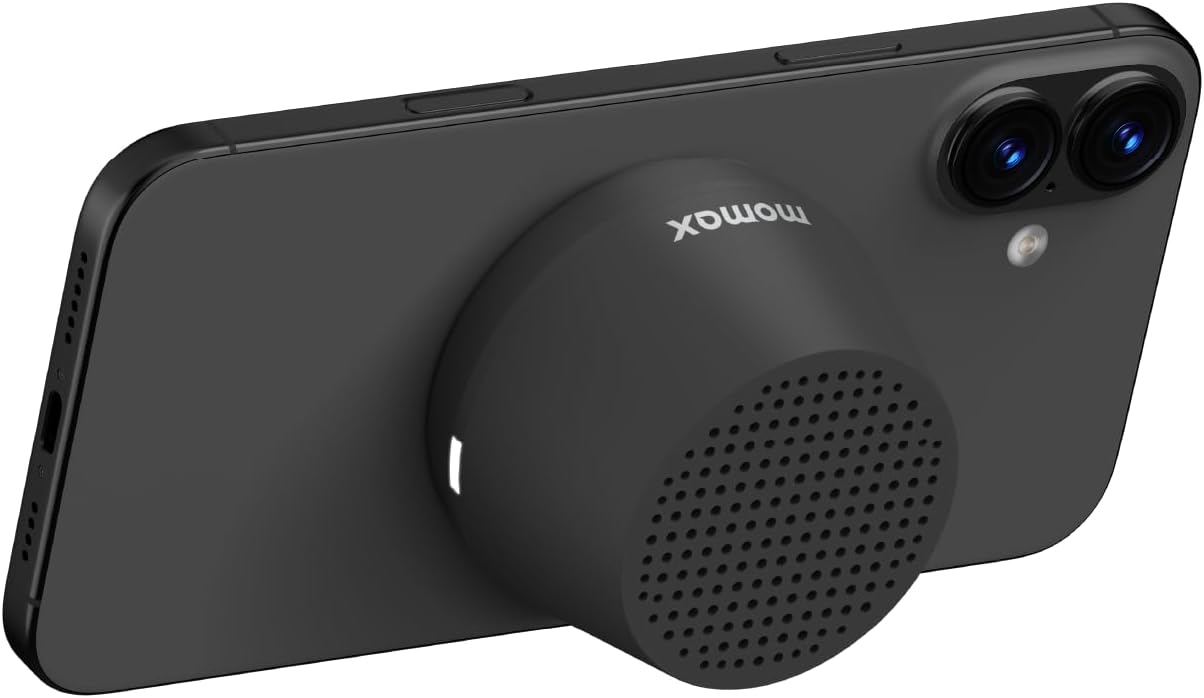
Image: The MOMAX Mini Portable Bluetooth Speaker attached to a smartphone, demonstrating its use as a kickstand for hands-free horizontal viewing.
6. Charging
The MOMAX Mini Portable Bluetooth Speaker is equipped with a USB-C charging port.
- Connect the provided USB-C charging cable to the speaker's charging port.
- Connect the other end of the cable to a USB power adapter (5V/500mA recommended) or a computer's USB port.
- The LED indicator will show a specific color (e.g., red) during charging and change (e.g., turn off or green) when fully charged.
- A full charge provides up to 12 hours of playtime.

Image: A close-up view of the MOMAX Mini Portable Bluetooth Speaker showing the USB-C charging port with a cable connected, indicating the charging process.
7. Maintenance
- Cleaning: Use a soft, dry cloth to clean the speaker. Do not use abrasive cleaners or solvents.
- Water Resistance: The speaker is IPX4 rated, meaning it is splash-proof. Do not submerge it in water or expose it to strong jets of water. Ensure the USB-C port cover (if present) is securely closed before exposure to water.
- Storage: Store the speaker in a cool, dry place away from extreme temperatures and direct sunlight.
- Battery Care: To prolong battery life, charge the speaker regularly and avoid fully discharging it for extended periods.
Video: A demonstration of the MOMAX BS8 magnetic speaker, showcasing its features and design. This video is provided by MOMAX DIRECT.
8. Troubleshooting
| Problem | Possible Cause | Solution |
|---|---|---|
| Speaker does not power on. | Low battery. | Charge the speaker using the provided USB-C cable. |
| Cannot pair with device. | Speaker not in pairing mode; Bluetooth disabled on device; device too far. | Ensure speaker is in pairing mode (flashing blue LED). Enable Bluetooth on your device. Move device closer to speaker (within 10 meters). |
| No sound or low volume. | Volume too low on speaker or device; speaker not connected. | Increase volume on both the speaker (via connected device) and your device. Re-establish Bluetooth connection. |
| TWS pairing fails. | Speakers not reset; incorrect pairing steps. | Ensure both speakers are disconnected from other devices. Follow TWS pairing steps carefully (Section 4.3). |
| Magnetic attachment is weak. | Device not MagSafe compatible; magnetic sheet not applied correctly. | Ensure your device is MagSafe compatible or apply the magnetic sheet to your phone/case as instructed. |
9. Specifications
| Feature | Detail |
|---|---|
| Model Name | Portable Bluetooth Speaker (BS8) |
| Brand | MOMAX |
| Connectivity Technology | Bluetooth |
| Speaker Type | Portable Speaker |
| Audio Output Mode | Mono (Stereo with TWS pairing) |
| Speaker Maximum Output Power | 3 Watts |
| Frequency Response | 40 KHz |
| Battery Life | Up to 12 hours |
| Charging Port | USB-C (Input: 5V/500mA) |
| Water Resistance Rating | IPX4 |
| Mounting Type | Tabletop Mount, Magnetic Attachment |
| Material | Metal, Plastic |
| Product Dimensions | 1"D x 1"W x 1"H |
| Item Weight | 74 Grams (2.61 ounces) |
10. Warranty and Support
Warranty Information
This MOMAX product comes with a 12-month warranty from the date of purchase. Please retain your proof of purchase for warranty claims. The warranty covers manufacturing defects and malfunctions under normal use.
Return Policy
A 30-day return policy is typically offered for refunds or replacements, subject to the retailer's terms and conditions.
Customer Support
For further assistance, technical support, or warranty inquiries, please contact MOMAX customer service through their official website or the retailer where the product was purchased.
Official MOMAX Website: www.momax.net


