1. Important Safety Information
Before operating the Niceday CT21PRO Elliptical Exercise Machine, please read and understand all safety instructions. Retain this manual for future reference.
- Consult a physician before starting any exercise program.
- Ensure the machine is placed on a flat, stable surface. Use a mat to protect flooring.
- Keep children and pets away from the machine during operation.
- Inspect the machine for loose parts or damage before each use. Do not use if damaged.
- Wear appropriate exercise attire and athletic shoes. Avoid loose clothing that could get caught.
- Do not exceed the maximum user weight of 400 lbs (181 kg).
- Maintain a clear space of at least 2 feet (0.6 meters) around the machine during use.
- Stop exercising immediately if you feel faint, dizzy, or experience pain.
2. Product Overview
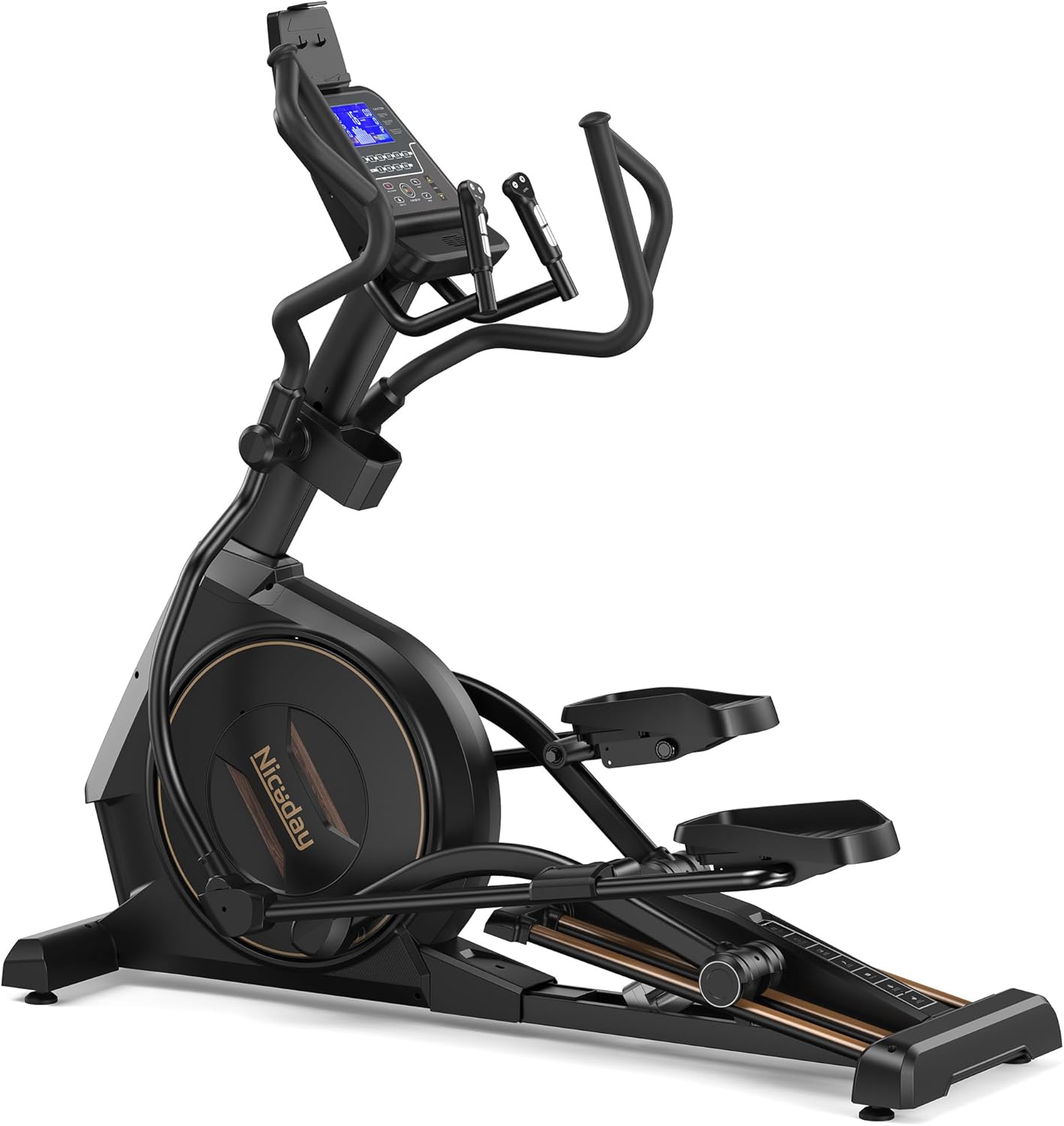
The Niceday CT21PRO is a high-performance elliptical exercise machine designed for home use, offering a comprehensive cardio workout with advanced features.
Key Features:
- Commercial-Grade Longevity: Constructed with an aerospace-grade steel frame and oxidized track, designed for durability and resistance to deformation over extensive use.
- Heavy-Duty Construction: Features an upgraded 5CM-thick alloy frame and rib-reinforced pedals, supporting users up to 400 lbs (181 kg) with enhanced stability.
- Ergonomic 20-Inch Stride: A front-mounted flywheel and four-link drive system provide a natural, knee-friendly movement trajectory, suitable for users up to 6'5".
- 32-Level Adjustable Resistance: Motorized magnetic resistance system with one-thumb control for precise and rapid adjustments, accommodating various fitness levels.
- Whisper-Quiet Operation: Aluminum alloy 4-track design and a 25 lbs (11.3 kg) flywheel with a silent magnetic drive system ensure quiet workouts, operating as low as 10dB.
- 20-Level Biomechanical Incline: Electric incline system (up to 12°) allows for targeted muscle engagement, strengthening glutes, core, and legs, and enhancing calorie burn.
- Multi-Functional Console: A 7-inch backlit display shows exercise data, offers 12 built-in programs, and integrates with iConsole and Kinomap apps. Includes a tablet holder for convenience.
- Enhanced Performance: Features widened non-slip pedals for comfort, dynamic multi-grip handles for varied workouts, and transport wheels for easy relocation.
Product Diagram:
3. Setup and Assembly
The Niceday CT21PRO Elliptical Exercise Machine is designed for straightforward assembly, with approximately 90% of components pre-installed. Please follow the detailed instructions provided in the included assembly guide and refer to the HD installation video for visual assistance.
Assembly Steps:
- Unpacking: Carefully remove all components from the packaging. Verify that all parts listed in the assembly guide are present.
- Base Stabilization: Place the main frame on a level surface. Adjust the leveling feet if necessary to ensure stability.
- Connecting Upright Post: Attach the upright post to the main frame, securing it with the provided bolts and washers. Ensure all cables are properly routed and connected.
- Handlebar Installation: Install the moving handlebars and stationary handles according to the instructions, ensuring they are securely fastened.
- Pedal Arm Attachment: Connect the pedal arms to the flywheel mechanism and the handlebars. Pay close attention to left and right designations.
- Console Mounting: Mount the console onto the upright post and connect the necessary electrical cables.
- Final Checks: Before first use, double-check all bolts, nuts, and connections to ensure they are tight and secure.

4. Operating Instructions
Familiarize yourself with the console and controls before beginning your workout.
Console Overview:

- Display: The 7-inch backlit display shows time, distance, calories, speed, resistance level, incline level, and heart rate (if applicable).
- Resistance Controls: Use the 'LEVEL' buttons on the one-thumb control handles to increase or decrease the 32 levels of magnetic resistance.
- Incline Controls: Use the 'INCLINE' buttons on the one-thumb control handles to adjust the 20 levels of electric incline, up to 12 degrees.
- Program Selection: Access 12 built-in workout programs via the console. Refer to the detailed program descriptions in the full manual.
- App Integration: Connect to iConsole and Kinomap apps for expanded workout options and tracking.
- Tablet Holder: Securely place your tablet or smartphone for entertainment or app use during your workout.
Starting a Workout:
- Step onto the pedals, ensuring your feet are centered and secure.
- Grasp the stationary or moving handlebars.
- Begin pedaling. The console will automatically activate.
- Adjust resistance and incline to your desired levels using the one-thumb controls.
- Select a pre-set program or begin a manual workout.


5. Maintenance
Regular maintenance ensures the longevity and optimal performance of your Niceday CT21PRO Elliptical.
- Cleaning: Wipe down the machine with a damp cloth after each use to remove sweat and dust. Avoid abrasive cleaners.
- Inspection: Periodically check all bolts, nuts, and moving parts for tightness. Tighten any loose fasteners to prevent wobbling or noise.
- Track Maintenance: The oxidized track is designed for durability. Keep the track free of debris. No lubrication is typically required for the sealed magnetic resistance system.
- Storage: When not in use, store the elliptical in a dry, cool place away from direct sunlight and moisture. Use the transport wheels to move the machine carefully.
6. Troubleshooting
This section addresses common issues you might encounter with your elliptical. For problems not listed here, please contact customer support.
- Machine Not Powering On:
- Ensure the power adapter is securely plugged into both the machine and a working electrical outlet.
- Check if the power outlet is functional by plugging in another device. - Resistance Not Changing:
- Verify that the console cables are properly connected.
- If using a program, ensure it is not overriding manual resistance adjustments.
- Contact customer support if the issue persists. - Wobbling or Noise During Use:
- Check and tighten all assembly bolts, especially those connecting the handlebars and pedal arms.
- Ensure the machine is on a level surface and adjust the leveling feet if needed.
- Inspect the track for any obstructions or debris. - Console Display Malfunction:
- Turn off the machine, unplug it, wait 30 seconds, then plug it back in and restart.
- Check for any loose cable connections behind the console.
7. Specifications
Detailed technical specifications for the Niceday CT21PRO Elliptical Exercise Machine.
| Specification | Value |
|---|---|
| Model Name | CT21PRO |
| Brand | Niceday |
| Product Dimensions (LxWxH) | 68.89" x 23.22" x 68.5" |
| Material | Aluminum |
| Resistance Mechanism | Magnetic |
| Maximum Weight Recommendation | 400 Pounds (181 kg) |
| Maximum Stride Length | 20 Inches (50.8 cm) |
| Screen Size | 7 Inches |
| Item Weight | 209 Pounds (94.8 kg) |
| Number of Resistance Levels | 32 |
| Incline Levels | 20 (up to 12°) |
| Flywheel Weight | 25 Pounds (11.3 kg) |
| Included Components | Assembly Tools, Elliptical Machine, User Manual |
8. Warranty and Support
Warranty Information:
The Niceday CT21PRO Elliptical Exercise Machine comes with a 1-Year Warranty. This warranty covers manufacturing defects and ensures the product meets quality standards. Please retain your proof of purchase for warranty claims.
Customer Support:
Niceday is committed to providing outstanding product experience and comprehensive service support. If you have any questions, require assistance with assembly, or encounter any issues with your elliptical, please do not hesitate to contact our customer service team.
We aim to provide a reliable response service and assist with any questions you may have. Detailed instructions and HD installation videos are also available to support your experience.
For support, please refer to the contact information provided with your purchase or visit the official Niceday website.


