
1. Introduction
This manual provides essential information for the safe operation and maintenance of your FINOTI XIL 017 4K Camera Drone. Please read this manual thoroughly before operating the drone to ensure proper usage and to prevent damage or injury. The XIL 017 is a lightweight, foldable quadcopter equipped with a 4K camera and a 3-axis gimbal, designed for high-quality aerial photography and videography.
2. Safety Guidelines
Operating a drone requires responsibility. Adhere to the following safety guidelines:
- Read the Manual: Understand all instructions and warnings before flight.
- Pre-Flight Check: Ensure the drone, remote control, and batteries are in good condition and fully charged.
- Environmental Awareness: Fly in open areas, away from people, animals, buildings, and obstacles. Avoid flying over private property without permission.
- Weather Conditions: Do not fly in strong winds (above Level 5), rain, snow, or fog.
- Maintain Line of Sight: Always keep the drone within your visual line of sight.
- Respect Privacy: Do not use the drone to photograph or record individuals without their consent.
- Battery Safety: Use only approved chargers and batteries. Do not overcharge or puncture batteries. Store batteries in a cool, dry place.
- Emergency Procedures: Familiarize yourself with emergency landing procedures.
3. Package Contents
Verify that all items are present in your package:
- FINOTI XIL 017 Drone
- Remote Control with Built-in Screen
- Intelligent Flight Batteries (Quantity may vary based on purchase, e.g., Triple Battery)
- USB Charging Cable
- Spare Propellers
- Screwdriver
- User Manual
4. Product Overview
4.1 Drone Components
The FINOTI XIL 017 drone features a compact, foldable design for portability and ease of use. It weighs under 249g, which may exempt it from certain registration requirements in some regions.

Image: The FINOTI XIL 017 drone in both its folded, compact state and its unfolded, flight-ready configuration. The image highlights its portability and its weight being under 249g, indicating no registration is required in some jurisdictions.
- Foldable Arms: For compact storage and transport.
- Propellers: Efficient flight.
- 4K Camera with 3-Axis Gimbal: Provides stable, high-resolution video and photos.
- Battery Compartment: Houses the intelligent flight battery.
- TOF Sensors: For precise positioning and stable hovering.
4.2 Remote Control
The remote control features a built-in screen for direct live view, eliminating the need for a separate smartphone. It offers a stable 10KM HD image transmission range.

Image: The remote control for the FINOTI XIL 017 drone, featuring a large built-in screen that displays live footage. The image emphasizes the 10KM HD image transmission range and the convenience of not needing a separate phone.

Image: A detailed diagram illustrating the various buttons and functions of the remote control, including roller camera adjustment, record button, speed key, throttle, steering, one-touch takeoff/landing, return button, forward/backward/left/right flying keys, obstacle avoidance switch, GPS switch, and On/Off key.
- Control Sticks: For flight direction and altitude.
- Built-in Display: For real-time video feed and flight data.
- Function Buttons: Dedicated buttons for takeoff/landing, return to home, photo/video, gimbal control, and flight modes.
- Antennas: For stable signal transmission.
5. Setup
5.1 Charging Batteries
- Connect the USB charging cable to the intelligent flight battery.
- Plug the other end of the USB cable into a compatible USB power adapter (not included).
- Charge until the battery indicator lights show a full charge.
- Charge the remote control using its dedicated charging port and cable.
5.2 Unfolding the Drone
- Gently unfold the front arms of the drone until they lock into place.
- Then, unfold the rear arms.
- Ensure all propellers are free to rotate.
5.3 Installing the Battery
- Slide the fully charged intelligent flight battery into the battery compartment on the drone until it clicks securely into place.
- Ensure the battery is firmly seated to prevent dislodgement during flight.
5.4 Powering On/Off
- Drone: Press the power button once briefly, then press and hold for 2 seconds until the indicator lights illuminate.
- Remote Control: Press the power button once briefly, then press and hold for 2 seconds.
- To power off, repeat the same sequence.
5.5 Pairing the Drone and Remote Control
The drone and remote control are typically pre-paired. If re-pairing is necessary, refer to the specific instructions in the full manual or the drone's companion app for the pairing procedure.
6. Operating the Drone
6.1 Pre-Flight Checklist
- Ensure drone and remote control batteries are fully charged.
- Check propellers for damage and ensure they are securely attached.
- Verify the camera gimbal is free to move.
- Choose an open, clear flying area.
- Wait for sufficient GPS signal acquisition before takeoff.
6.2 Takeoff and Landing
- One-Touch Takeoff: Press the dedicated takeoff button on the remote control. The drone will ascend to a safe altitude and hover.
- Manual Takeoff: Push both control sticks down and outwards to start the motors, then slowly push the left stick up to ascend.
- One-Touch Landing: Press the dedicated landing button. The drone will descend and land automatically.
- Manual Landing: Slowly pull the left control stick down to descend. Once landed, push both sticks down and inwards to stop the motors.
6.3 Basic Flight Controls
Refer to the remote control diagram for button locations.
- Left Stick (Throttle/Yaw): Up/Down for altitude, Left/Right for rotation (yaw).
- Right Stick (Pitch/Roll): Up/Down for forward/backward movement (pitch), Left/Right for left/right movement (roll).
- Speed Key: Adjusts flight speed (e.g., beginner, normal, sport modes).
6.4 Camera Operation
The drone is equipped with a 4K camera and a 3-axis brushless gimbal for stable, clear shots.

Image: A detailed view of the drone's 3-axis brushless gimbal, showing its range of motion for stabilization. It also highlights the 4K HD video capability and electronic image stabilization (EIS).
- Photo/Video Button: Press once to take a photo, press and hold to start/stop video recording.
- Gimbal Control: Use the roller on the remote control to adjust the camera's vertical angle (90° adjustable).
- AI Night Scene: The camera automatically enhances low-light scenes for clearer images.
6.5 Intelligent Flight Modes
Utilize smart features for cinematic results.

Image: A composite image detailing the drone's intelligent flight capabilities. This includes 360° Smart Tracking, which follows a subject, Smart Flight Path Planning, allowing users to draw a route, and TOF Visual & Optical Flow Positioning for stable hovering.
- 360° Smart Tracking: The drone can lock onto and follow a designated subject from any direction.
- Smart Flight Path Planning: Draw a desired flight route in the companion app, and the drone will follow it automatically.
- TOF Visual & Optical Flow Positioning: Achieves precise and stable hovering, especially useful in indoor environments or when GPS is weak.
6.6 HD Image Transmission
The drone provides up to 10KM HD digital transmission, allowing for smooth, real-time viewing of footage directly on the remote control's screen.
7. Maintenance
7.1 Cleaning
- Wipe the drone body with a soft, dry cloth.
- Clean the camera lens with a microfiber cloth designed for optics.
- Remove any debris from propellers and motors.
7.2 Battery Care
- Store batteries in a cool, dry place, away from direct sunlight.
- Do not store fully charged or completely depleted batteries for extended periods. Charge them to approximately 50-60% for long-term storage.
- If a battery appears swollen, damaged, or leaks, discontinue use immediately and dispose of it properly.
7.3 Propeller Replacement
If a propeller is damaged, replace it with a new one from the spare parts kit. Use the provided screwdriver to remove and install propellers, ensuring they are correctly oriented (e.g., 'A' with 'A', 'B' with 'B').
8. Troubleshooting
| Problem | Possible Cause | Solution |
|---|---|---|
| Drone does not power on | Battery depleted or not installed correctly. | Charge battery fully. Reinstall battery securely. |
| No image on remote control screen | Drone and remote not paired. Signal interference. | Ensure drone and remote are paired. Move to an area with less interference. |
| Drone drifts during flight | Insufficient GPS signal. Calibration needed. Wind interference. | Wait for strong GPS signal. Perform IMU/compass calibration. Avoid flying in strong winds. |
| Poor video/photo quality | Dirty camera lens. Gimbal obstruction. Low light conditions. | Clean lens. Check gimbal for obstructions. Utilize AI Night Scene feature. |
| Short flight time | Battery not fully charged. Old/damaged battery. Aggressive flying. | Ensure full charge. Replace old batteries. Fly more conservatively. |
9. Specifications
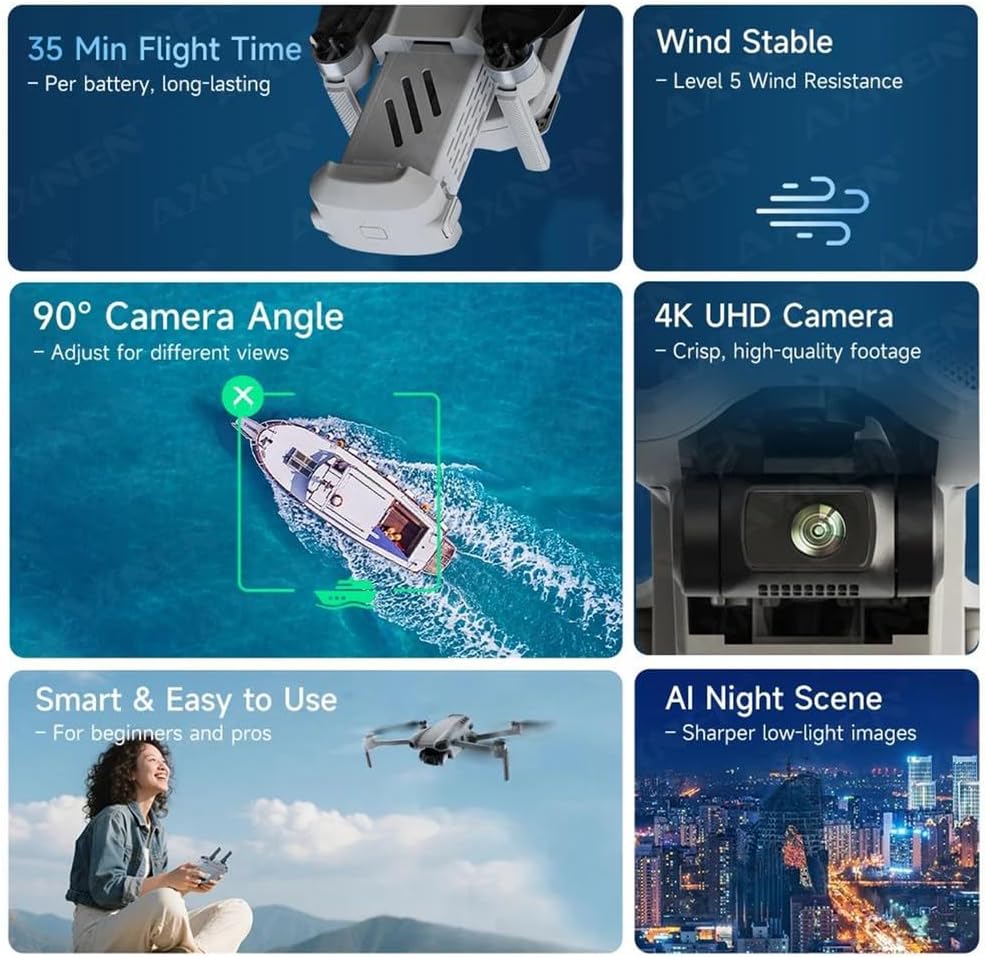
Image: An infographic summarizing key performance features of the drone, including 35 minutes of flight time per battery, Level 5 wind resistance, a 90° adjustable camera angle, 4K UHD camera capabilities, ease of use, and AI Night Scene enhancement.

Image: A diagram illustrating the physical dimensions of the FINOTI XIL 017 drone, both in its folded state (e.g., 11cm x 20cm x 8.5cm) and unfolded state, providing clear measurements for portability and operational size.
- Model: XIL 017
- Weight: Under 249g
- Camera: 4K UHD
- Gimbal: 3-Axis Brushless
- Flight Time: Up to 35 minutes per battery
- Image Transmission: 10KM HD
- Wind Resistance: Level 5
- Positioning: GPS, TOF Visual, Optical Flow
- Adjustable Camera Angle: 90°
10. Warranty and Support
For warranty information and technical support, please refer to the warranty card included with your product or visit the official FINOTI website. Keep your proof of purchase for warranty claims. If you encounter issues not covered in this manual, contact FINOTI customer service for assistance.