
1. Introduction
Thank you for choosing the FINOTI s880 GPS Drone. This professional-grade drone is equipped with advanced features such as a 3-axis gimbal, 4K HD camera, 12km transmission range, and intelligent obstacle avoidance, designed for an exceptional aerial photography and flight experience. Please read this manual thoroughly before operating the drone to ensure safe and optimal performance.
2. Safety Guidelines
- Always operate the drone in open areas, away from people, buildings, and obstacles.
- Maintain a safe distance from the drone during flight.
- Do not fly in strong winds (wind resistance level 5 is supported, but caution is advised).
- Ensure batteries are fully charged before each flight.
- Avoid flying near airports or restricted airspace.
- Always follow local regulations and laws regarding drone operation.
- Perform a pre-flight check before every flight.
3. Package Contents
Verify that all items are present in your package:
- FINOTI s880 GPS Drone
- Remote Control with Touchscreen
- 11.4V 9800mAh Intelligent Flight Battery (Dual Battery version includes two)
- USB Charging Cable (for drone and remote control)
- Spare Propellers
- Screwdriver
- User Manual
4. Product Overview
4.1 Drone Components
Familiarize yourself with the main parts of your FINOTI s880 drone.

Image: Front view of the FINOTI s880 drone highlighting its dual cameras, 120-degree wide-angle lens, 90-degree electric adjustment, and EIS stabilized gimbal for smooth footage.

Image: The FINOTI s880 drone in flight over a mountainous landscape, illustrating its intelligent dual cameras and three-axis pan-tilt system for aerial photography.
4.2 Remote Control
The remote control features a built-in touchscreen for real-time video transmission and flight data.

Image: The FINOTI s880 drone alongside its remote control, highlighting key features such as a 20-kilometer remote control range with screen, three-axis pan-tilt, 50-minute battery life, and all-round obstacle avoidance.
5. Setup
5.1 Charging Batteries
- Drone Battery: Connect the 11.4V 9800mAh drone battery to the USB charging cable. Plug the cable into a standard USB power adapter (do not use fast charging heads). The battery charges in approximately 2 hours. The light will flash during charging and remain solid when fully charged.
- Remote Control Battery: Connect the remote control to the USB charging cable. The 3.7V 9200MAH built-in battery charges in approximately 2.5 hours.
5.2 Drone Assembly
- Unfold the drone arms carefully until they lock into place.
- Attach propellers if they are not pre-installed, ensuring they are correctly oriented (A and B propellers).
- Insert the fully charged flight battery into the drone's battery compartment until it clicks securely.
5.3 Remote Control Setup and Pairing
- Power on the remote control.
- Power on the drone by pressing the power button once, then pressing and holding it until the indicator lights turn on.
- The drone and remote control will automatically attempt to pair. Follow any on-screen prompts on the remote control's touchscreen.
- Once paired, calibrate the drone's compass and gyroscope as instructed by the remote control or app.
6. Operating Instructions
6.1 Pre-Flight Checklist
- Ensure drone and remote control batteries are fully charged.
- Check propellers for damage and ensure they are securely attached.
- Verify that the camera gimbal is free to move.
- Confirm sufficient GPS signal (indicated on the remote control screen).
- Check for any obstacles in the takeoff and landing area.
6.2 Takeoff and Landing
The FINOTI s880 supports one-key takeoff and landing for ease of use.
- One-Key Takeoff: After calibration and GPS lock, press the one-key takeoff button on the remote control. The drone will automatically ascend to a safe altitude and hover.
- One-Key Landing: Press the one-key landing button. The drone will slowly descend and land automatically.
6.3 Flight Controls
Use the joysticks on the remote control to maneuver the drone:
- Left Joystick: Controls altitude (up/down) and yaw (rotate left/right).
- Right Joystick: Controls forward/backward and left/right movement.
6.4 Camera Operation
The drone features a 4K camera with a 3-axis gimbal for stable footage.
- Photo/Video: Use the dedicated buttons on the remote control to capture photos (JPEG) or start/stop video recording (MP4).
- Gimbal Control: Adjust the camera's pitch angle using the scroll wheel on the remote control.
- Digital Zoom: Utilize the 3x digital zoom function via the remote control.
6.5 Intelligent Flight Modes
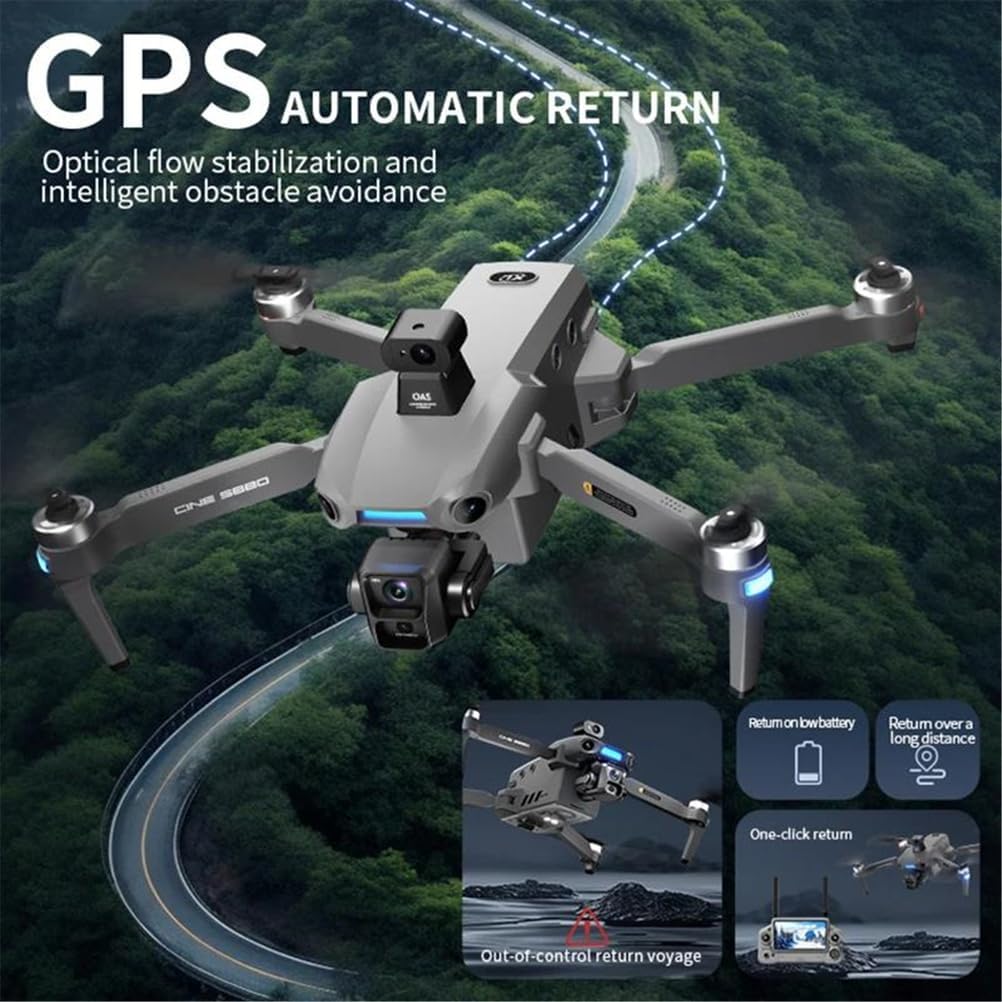
Image: The FINOTI s880 drone demonstrating its GPS Automatic Return capabilities, including optical flow stabilization, intelligent obstacle avoidance, return on low battery, return over a long distance, and one-click return.
- GPS Automatic Return: The drone will automatically return to its takeoff point in case of low battery, loss of signal, or when activated manually via the one-click return button.
- Obstacle Avoidance: The innovative liftable obstacle avoidance system can be adjusted mid-flight via the remote control, enhancing safety in complex environments.
- Optical Flow Stabilization: Provides stable hovering indoors or in areas with weak GPS signals.
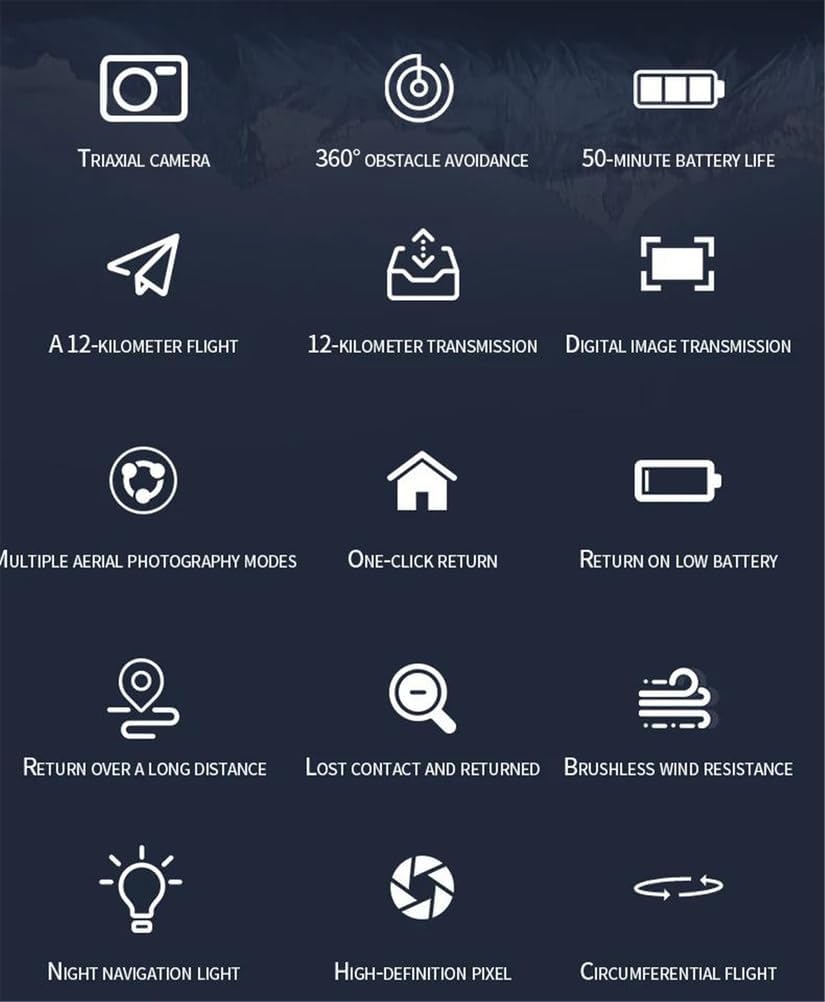
Image: A visual summary of the FINOTI s880 drone's features, including its triaxial camera, 360-degree obstacle avoidance, extended battery life, long flight and transmission range, digital image transmission, various photography modes, and intelligent return functions.
7. Maintenance
7.1 Cleaning
- Wipe the drone body with a soft, dry cloth.
- Ensure the camera lens and obstacle avoidance sensors are clean and free of dust.
- Do not use liquid cleaners directly on electronic components.
7.2 Battery Care
- Store batteries in a cool, dry place.
- Do not overcharge or over-discharge batteries.
- If storing for extended periods, charge batteries to approximately 50-60%.
7.3 Propeller Replacement
- If a propeller is damaged, replace it immediately using the provided screwdriver and spare propellers.
- Ensure the correct propeller type (A or B) is installed on the corresponding motor.
8. Troubleshooting
| Problem | Possible Cause | Solution |
|---|---|---|
| Drone does not power on | Low battery; Battery not inserted correctly | Charge battery; Reinsert battery securely |
| No GPS signal | Flying indoors; Obstructions; Weak satellite signal | Move to an open outdoor area; Wait for more satellites to connect |
| Drone drifts during flight | Improper calibration; Strong wind | Recalibrate compass and gyroscope; Avoid flying in strong winds |
| Camera image blurry | Dirty lens; Gimbal obstruction; EIS not active | Clean lens; Check gimbal movement; Ensure EIS is enabled |
| Remote control loses connection | Out of range; Interference; Low remote battery | Fly within range; Avoid areas with strong interference; Charge remote battery |
9. Specifications
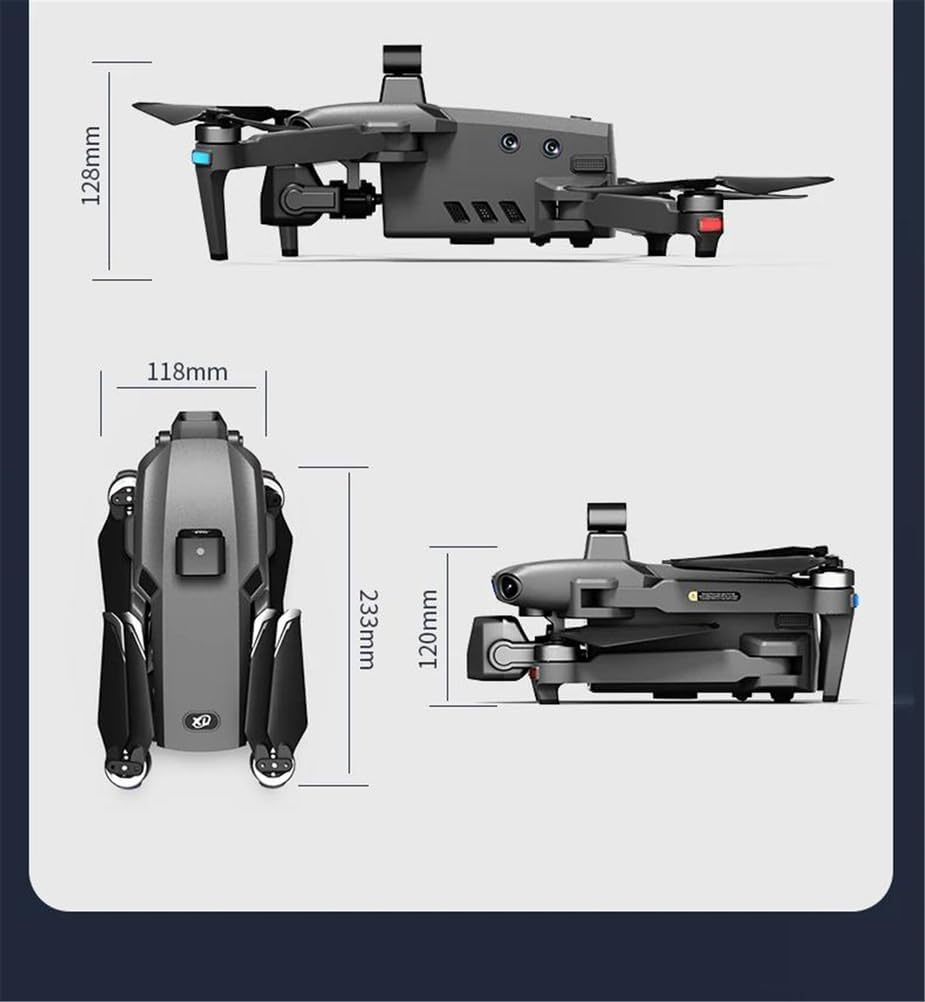
Image: Dimensional diagram of the FINOTI s880 drone, illustrating its folded size (23 x 12 x 13 CM) and unfolded size (42 x 42 x 12.8 CM).
| Feature | Detail |
|---|---|
| Model Name | s880 (Model Number: 66593495-DUALBATTERY-NOOAS) |
| Remote Control Distance | 12 KM |
| Flight Time | 50 minutes |
| Flight Altitude | 800M |
| Aircraft Battery | 11.4V 9800mAh (Charging time: approx. 2 hours) |
| Remote Control Battery | 3.7V 9200MAH built-in (Charging time: approx. 2.5 hours) |
| Wind Resistance Level | 5 levels |
| Working Frequency | 5G |
| Camera Angle | 110° |
| Digital Zoom Range | 3x |
| Camera Resolution | 3840 * 2160 (TF), 7680 * 4320 (APP) |
| Video Resolution | 4096 * 2160 (4K) |
| Transmission Frame Rate | 25-30fps |
| Photo Format | JPEG |
| Video Format | MP4 |
| Memory Card Support | Max 256GB (not included) |
| Folding Size | 23 * 12 * 13 CM |
| Unfolding Size | 42 * 42 * 12.8 CM |
| Weight | 750g (including battery) |
10. Warranty Information
FINOTI products are manufactured to high-quality standards. For specific warranty details, please refer to the warranty card included in your product packaging or contact customer support. The warranty typically covers manufacturing defects for a limited period from the date of purchase.
11. Customer Support
If you encounter any issues or have questions regarding your FINOTI s880 GPS Drone, please contact our customer support team. Refer to your product packaging or the official FINOTI website for contact information.