1. Introduction
The XINFUTE RM-L1130+X MAX is a universal TV remote control designed to operate various television brands, including Panasonic, Samsung, and TCL. This remote serves as a replacement unit and is engineered to function effectively with compatible devices. It features an ergonomic design for comfortable handling.
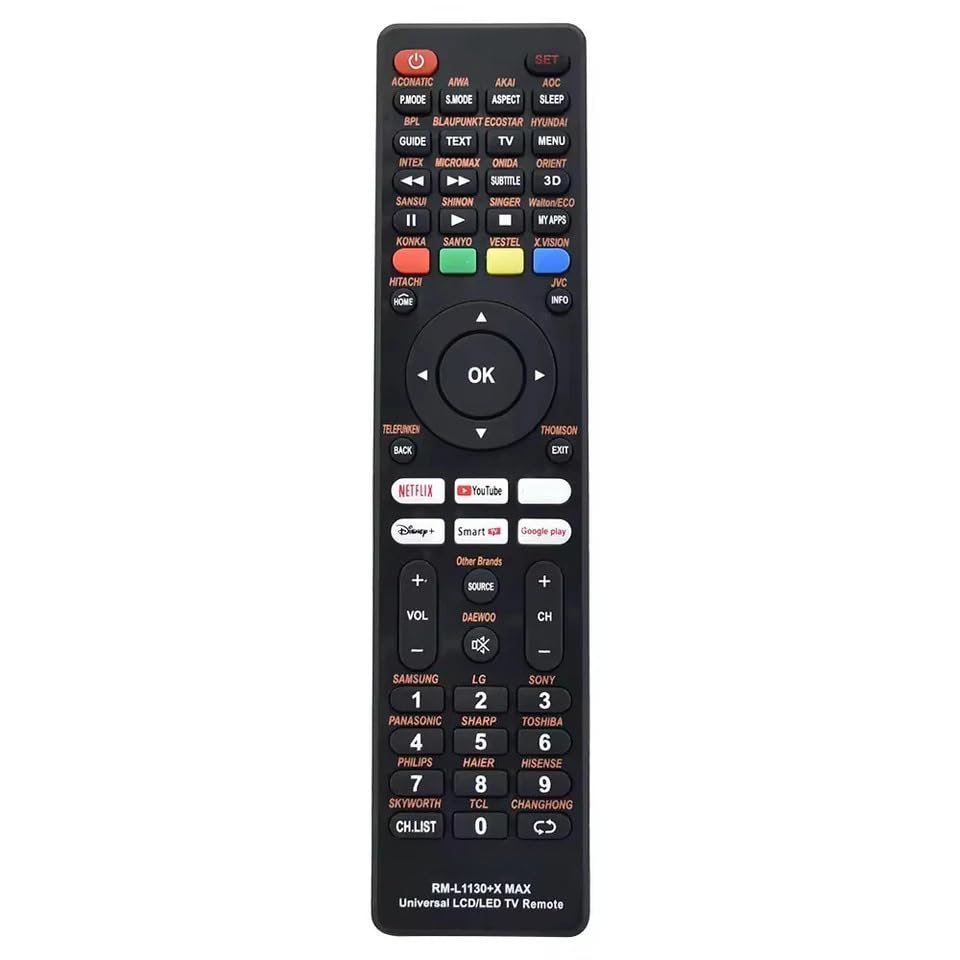
Figure 1: Front view of the XINFUTE RM-L1130+X MAX Universal TV Remote Control.
2. Package Contents
Upon opening the package, please ensure all items are present and in good condition.
- 1 x XINFUTE RM-L1130+X MAX Universal TV Remote Control
- Note: AAA batteries are not included and must be purchased separately.
3. Setup
3.1 Battery Installation
The remote control requires two AAA batteries for operation. Follow these steps to install them:
- Locate the battery compartment cover on the back of the remote control.
- Slide the cover downwards or press the latch (if present) to open the compartment.
- Insert two AAA batteries, ensuring the positive (+) and negative (-) terminals align correctly with the markings inside the compartment.
- Replace the battery compartment cover by sliding it back into place until it clicks securely.

Figure 2: Battery compartment with cover removed, showing battery placement.
3.2 Brand Express Setup
This remote control features a "Brand Express" function for quick setup with various TV brands. Follow these steps to program the remote:
- Turn on your TV manually.
- Keep pressing the "Brand+" key (e.g., "Pansonic", "Samsung", "TCL" buttons on the remote). It will start searching.
- Notice when the "VOL+" mark appears on the TV screen. Release the button immediately.
- Check if the remote control functions correctly with your TV.
- If it works, the setting is finished. If not, repeat the process.
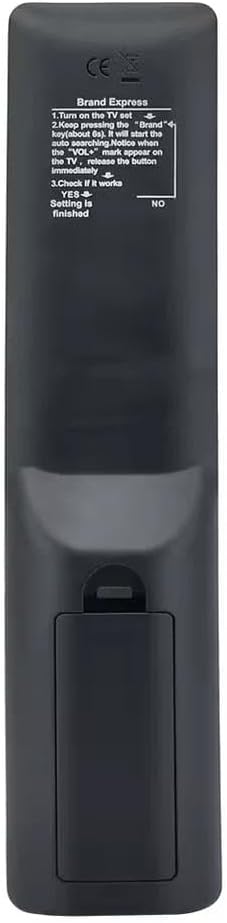
Figure 3: Brand Express setup instructions located on the back of the remote control.
4. Operating Instructions
Once the remote control is set up with your TV, you can use its various buttons to control your television's functions. The remote includes standard TV control buttons such as power, volume, channel selection, navigation, and dedicated buttons for popular streaming services.
- Power Button: Turns the TV on or off.
- Volume Up/Down: Adjusts the TV's audio level.
- Channel Up/Down: Changes TV channels.
- Navigation Pad (OK, Up, Down, Left, Right): Used for menu navigation and selection.
- Source/Input: Switches between different input sources (HDMI, AV, etc.).
- Netflix, YouTube, Disney+, Smart TV: Dedicated buttons for quick access to these applications.
- Number Pad: For direct channel entry.
Refer to Figure 1 for the layout of all buttons.
5. Maintenance
To ensure the longevity and optimal performance of your remote control, follow these maintenance guidelines:
- Cleaning: Wipe the remote control regularly with a soft, dry cloth. For stubborn dirt, slightly dampen the cloth with water; avoid harsh chemicals or abrasive cleaners.
- Battery Replacement: Replace batteries when the remote's response becomes sluggish or stops working. Always replace both batteries at the same time with new ones of the same type (AAA).
- Storage: Store the remote in a cool, dry place away from direct sunlight and extreme temperatures. If not used for an extended period, remove the batteries to prevent leakage.
- Avoid Drops: Protect the remote from physical impact, as drops can damage internal components.
6. Troubleshooting
If you encounter issues with your remote control, refer to the following troubleshooting steps:
- Remote Not Responding:
- Check if the batteries are inserted correctly with the correct polarity.
- Replace old batteries with new AAA batteries.
- Ensure there are no obstructions between the remote control and the TV's infrared receiver.
- Try re-performing the "Brand Express Setup" (Section 3.2).
- Specific Buttons Not Working:
- This may indicate a compatibility issue with that specific function on your TV model. While universal, some advanced functions may not be fully supported across all TV brands.
- Ensure the remote is correctly paired using the "Brand Express Setup."
- Short Range:
- Ensure batteries are fresh.
- Clean the infrared emitter on the front of the remote and the receiver on the TV.
7. Specifications
| Feature | Detail |
|---|---|
| Model Number | RM-L1130+X MAX |
| Brand | XINFUTE |
| Compatible Devices | Television (Universal fit for various brands including Panasonic, Samsung, TCL) |
| Power Source | 2 x AAA Batteries (not included) |
| Material | ABS Material |
| Color | As Shown (Typically Black) |
| Product Dimensions | 6 x 3 x 1 inches |
| Item Weight | 2.82 ounces |
| Special Feature | Ergonomic Design |
8. Warranty and Support
XINFUTE provides a warranty and support for this product:
- Warranty: Enjoy a one-year warranty on all purchases. This warranty covers manufacturing defects and ensures the product functions as intended under normal use.
- Customer Support: All goods are inspected before shipment. If you are not satisfied with your purchase, please contact XINFUTE customer support within 24 hours of receipt. For further assistance or inquiries, refer to the seller's contact information provided at the point of purchase.


