
Dowinx LS-6650D
Dowinx Gaming Chair LS-6650D User Manual
Model: LS-6650D (ASIN: B0FPCWQM7L)
1. Introduction
This manual provides detailed instructions for the assembly, operation, and maintenance of your Dowinx Gaming Chair LS-6650D. Please read this manual thoroughly before assembly and use to ensure proper function and safety. Keep this manual for future reference.

Image 1.1: The Dowinx Gaming Chair LS-6650D, featuring a black and gold design with a lumbar massage pillow.
2. Safety Information
- Ensure all components are securely fastened before use.
- Do not stand on the chair or use it as a step stool.
- Keep hands and fingers clear of moving parts during adjustment.
- Do not exceed the maximum weight capacity of 300 lbs (136 kg).
- For models with electrical features (massage/heating), ensure the power cord is not damaged and is connected to a suitable power source. Disconnect power when not in use or during cleaning.
- Keep children and pets away from the chair during assembly and adjustment.
3. Package Contents
Verify that all parts are present before beginning assembly. If any parts are missing or damaged, contact customer support.
- Backrest
- Seat Cushion with Armrests
- Base (5-star)
- Casters (5x)
- Gas Lift Cylinder
- Gas Lift Cover
- Mechanism Plate
- Lumbar Support Pillow with Massage/Heating Function
- Headrest Pillow
- Footrest Assembly
- Hardware Kit (screws, washers, Allen wrench)
- Instruction Manual
4. Assembly Instructions
Follow these steps carefully to assemble your Dowinx Gaming Chair. It is recommended to have two people for assembly.
- Attach Casters to Base: Insert the five casters into the holes at the end of each leg of the 5-star base. Push firmly until they click into place.
- Install Gas Lift: Place the gas lift cylinder into the center hole of the assembled base. Cover the gas lift with the telescopic plastic cover.
- Attach Mechanism Plate: Align the mechanism plate with the screw holes on the underside of the seat cushion. Ensure the front of the mechanism faces the front of the seat. Secure with screws using the provided Allen wrench.
- Connect Seat to Gas Lift: Carefully place the assembled seat cushion onto the gas lift cylinder, ensuring it is centered and stable.
- Attach Backrest: Align the backrest with the mounting brackets on the seat cushion. Secure with screws on both sides.
- Install Lumbar and Headrest Pillows: Attach the lumbar support pillow and headrest pillow using their integrated straps.
- Assemble Footrest: Slide the footrest assembly into the designated slots under the seat.

Image 4.1: The assembled Dowinx Gaming Chair LS-6650D positioned in a home office environment.
5. Operating Instructions
5.1. Height Adjustment
To adjust the chair height, pull the lever located under the right side of the seat upwards. While holding the lever, stand up to raise the chair or sit down to lower it. Release the lever at the desired height.
5.2. Reclining Function
The chair features a multi-position reclining mechanism from 90° to 135°.
- To Recline: Pull the lever on the left side of the seat upwards and lean back to the desired angle. Release the lever to lock the backrest in place.
- To Return Upright: Pull the lever on the left side upwards and lean forward slightly. The backrest will return to its upright position.

Image 5.1: Visual representation of the chair's reclining capability, illustrating 90° (game), 110° (read), and 135° (relax) positions.
5.3. Adjustable Armrests
The padded armrests can be adjusted vertically to suit your preference. Locate the button or lever on the side of each armrest. Press it and move the armrest up or down. Release the button/lever to lock it.

Image 5.2: Detail of the padded adjustable armrests, showing the 2.36-inch lift adjustment range.
5.4. Retractable Footrest
To use the footrest, pull it out from under the seat. To retract, push it back in until it is fully stored.
5.5. Heated Massage Lumbar Pillow
The lumbar pillow provides 3D Shiatsu massage and a heating function. Ensure the pillow is connected to a USB power source (e.g., power bank, USB adapter).
- Step 1: Press the button on the pillow to activate the massage and heating function.
- Step 2: Press again to change the direction of rotation for the massage nodes.
- Step 3: Press again to switch off the heating function while keeping massage active.
- Step 4: Press again to switch off the massage function, turning off both features.

Image 5.3: Step-by-step instructions for operating the two-way rotational massage and heating system of the lumbar pillow.

Image 5.4: Detailed view of the 3D Shiatsu massage nodes and integrated heating elements within the lumbar support pillow.
6. Maintenance
- Cleaning: Wipe the chair's surface with a soft, damp cloth. For stubborn stains, use a mild soap solution and wipe dry immediately. Avoid harsh chemicals or abrasive cleaners.
- Inspection: Periodically check all screws and bolts to ensure they are tight. Re-tighten if necessary.
- Lubrication: The gas lift and reclining mechanism are generally maintenance-free. If squeaking occurs, a small amount of silicone-based lubricant can be applied to pivot points, avoiding plastic components.
- Electrical Components: Ensure the massage pillow's USB cable is not kinked or damaged. Disconnect from power when not in use.
7. Troubleshooting
| Problem | Possible Cause | Solution |
|---|---|---|
| Chair does not adjust height. | Gas lift not engaged or faulty. | Ensure the height adjustment lever is fully pulled. If issue persists, contact support. |
| Backrest does not recline or lock. | Recline lever not fully engaged or mechanism obstruction. | Check for obstructions. Ensure the recline lever is pulled completely. |
| Massage/Heating pillow not working. | Not connected to power, faulty cable, or pillow malfunction. | Verify USB connection to a working power source. Check cable for damage. If still not working, contact support. |
| Chair squeaks or wobbles. | Loose screws or components. | Tighten all assembly screws. Apply silicone lubricant to pivot points if necessary. |
8. Specifications
| Feature | Detail |
|---|---|
| Brand | Dowinx |
| Model | LS-6650D |
| Color | Gold Black |
| Product Dimensions (D x W x H) | 18.5"D x 21.3"W x 52.8"H |
| Backrest Height | 31.9" |
| Seat Width | 21.3" |
| Seat Depth | 18.5" |
| Adjustable Height Range | 17.9" - 20.9" |
| Armrest Height Range | 26" - 29.1" |
| Recline Angle | 90° to 135° |
| Weight Capacity | 300 lbs (136 kg) |
| Special Features | Heated Massage Lumbar, Sofa-Grade Spring Cushion, Adjustable Footrest, Adjustable Armrests |
| Material | Stain-resistant leather, Sponge fill, Steel frame |

Image 8.1: Key dimensions and specifications of the Dowinx Gaming Chair LS-6650D.
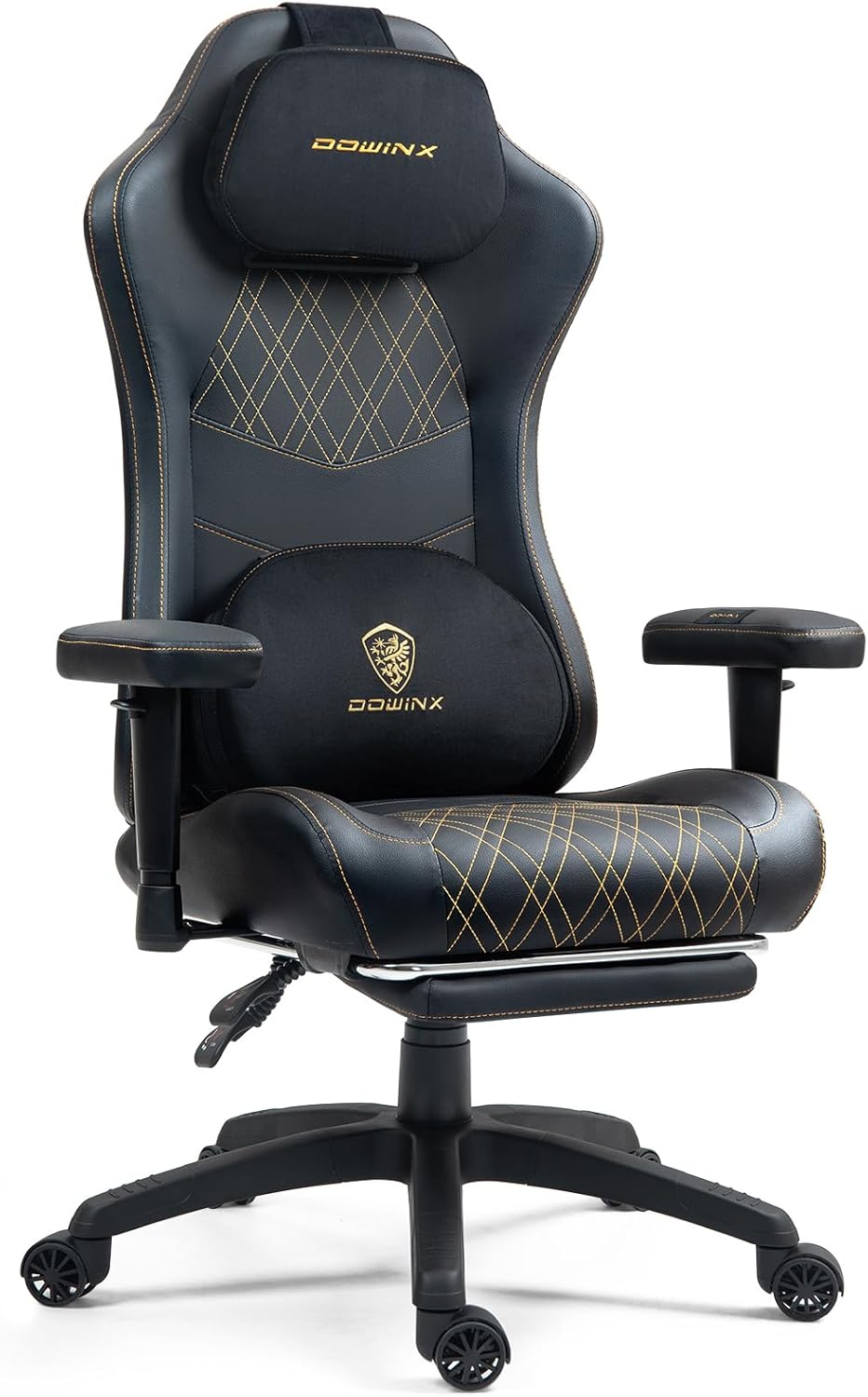
Image 8.2: Illustration of the independent pocket springs within the cushion, designed for high resilience, durability, and precise support.
9. Warranty and Support
Dowinx provides a limited warranty for this product. For specific warranty terms, please refer to the warranty card included with your purchase or visit the official Dowinx website. For technical support, missing parts, or any inquiries, please contact Dowinx customer service through their official channels.
Contact Information: Please refer to your purchase documentation or the Dowinx official website for the most current customer support contact details.
Related documentsLS-6650D


Ask a question about this manual
Ask about setup, troubleshooting, compatibility, parts, safety, or missing instructions. Manuals+ will review the question and use this page’s manual context to help answer it.