
1. Introduction
Thank you for choosing the CROSSIO Mid Century Modern Chandelier. This manual provides essential information for the safe installation, operation, and maintenance of your new lighting fixture. Please read these instructions thoroughly before beginning installation and retain them for future reference.

Image 1.1: The CROSSIO Mid Century Modern Chandelier with green glass shades.
2. Safety Information
WARNING: To reduce the risk of fire, electric shock, or personal injury, always follow these safety precautions:
- Disconnect Power: Always turn off the electrical supply at the main fuse box or circuit breaker before beginning installation or performing any maintenance.
- Qualified Electrician: Installation should be performed by a qualified electrician or a person with adequate electrical knowledge.
- Grounding: Ensure the fixture is properly grounded to avoid potential electrical shocks.
- Handle with Care: Glass components are fragile. Handle them carefully to prevent breakage.
- Bulb Requirements: Use only G9 bulbs as specified. Do not exceed the maximum wattage indicated on the fixture.
- Avoid Water: Do not install this fixture in damp or wet locations. It is designed for indoor use only.
- Secure Mounting: Ensure the mounting surface can support the weight of the fixture.
3. Package Contents
Verify that all components are present before discarding packaging materials. If any parts are missing or damaged, contact customer support.
- Chandelier Frame Assembly
- Green Glass Shades (16 pieces + 1 replacement)
- Mounting Hardware (Canopy, Mounting Plate, Screws, Wire Nuts)
- Adjustable Downrods (2 x 11.8 inches, 2 x 23.62 inches)
- Instruction Manual

Image 3.1: The package includes one replacement lampshade.
4. Specifications
| Feature | Detail |
|---|---|
| Brand | CROSSIO |
| Model Name | GLS-HLP084GR |
| Color | Gold+Green |
| Material | Glass, Metal |
| Style | Mid Century Modern / Art Deco |
| Product Dimensions | 39"L x 10"W x 70.87"H (Maximum) |
| Power Source | Corded Electric |
| Installation Type | Semi Flush Mount |
| Light Source Type | LED (G9 bulbs recommended, not included) |
| Number of Light Sources | 16 |
| Bulb Base | G9 |
| Special Features | Adjustable Height, Dimmable, 180° Rotatable for Sloped Ceilings |
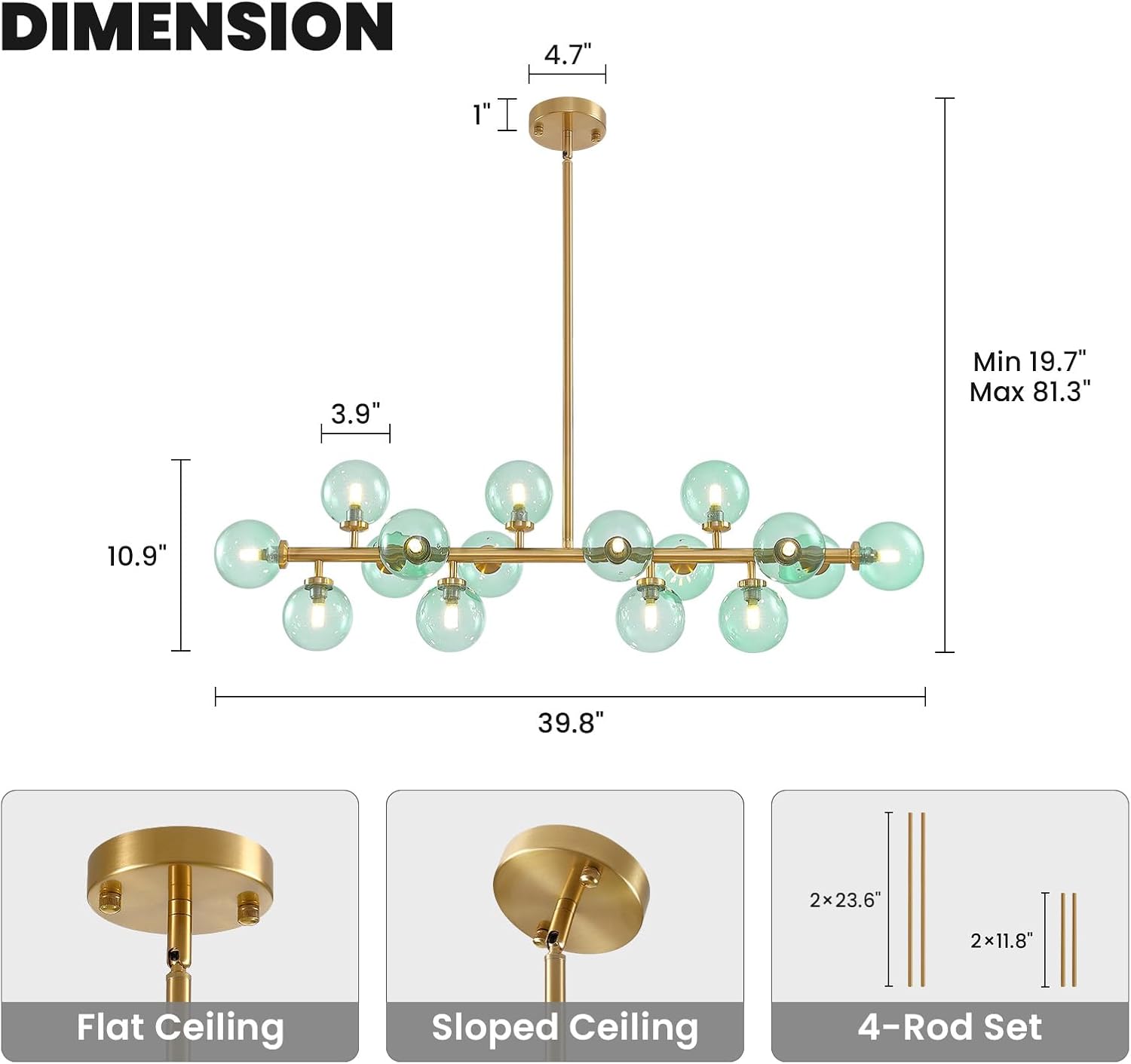
Image 4.1: Chandelier dimensions and adjustable downrod options.
5. Setup and Installation
Follow these steps for proper installation. It is recommended to have two people for installation due to the size and weight of the fixture.
- Prepare for Installation: Turn off power at the circuit breaker. Clear the work area.
- Mounting Plate Installation: Secure the mounting plate to the junction box in the ceiling using the provided screws. Ensure it is firmly attached.
- Adjust Height: Select the appropriate combination of downrods (11.8" x 2, 23.62" x 2) to achieve your desired hanging height. The fixture can be adjusted from a minimum of 19.7" to a maximum of 81.3". For sloped ceilings, the canopy is 180° rotatable.
- Wire Connections: Connect the fixture's wires to the household electrical wires according to local electrical codes. Typically, black to black (live), white to white (neutral), and green/bare copper to green/bare copper (ground). Secure connections with wire nuts.
- Canopy Attachment: Carefully push the wires into the junction box and secure the canopy to the mounting plate with the provided screws.
- Install Bulbs: Insert 16 G9 bulbs (not included) into the lamp holders. Ensure bulbs are securely seated.
- Attach Glass Shades: Carefully screw each green glass shade onto its respective lamp holder. Avoid overtightening.
- Restore Power: Once installation is complete, turn the power back on at the circuit breaker.

Image 5.1: Equipped with four downrods for adjustable hanging height.

Image 5.2: The 180° rotatable canopy allows for installation on sloped ceilings.

Image 5.3: G9 LED light socket for easy bulb installation.
6. Operation
The CROSSIO Chandelier is designed for ease of use and offers versatile lighting options.
6.1 Power On/Off
Operate the chandelier using a standard wall switch. Flip the switch to turn the light fixture on or off.

Image 6.1: Chandelier in a room, demonstrating on and off states.
6.2 Dimmable Functionality
This chandelier is fully dimmable when used with compatible G9 dimmable bulbs and a suitable dimmer switch (both not included). This allows you to adjust the light intensity to create the desired ambiance.

Image 6.2: The chandelier is fully dimmable with compatible bulbs and dimmer switch.
6.3 Light Color Effects
If you use color-changing G9 bulbs (not included), you can achieve different light color effects (Cool White, Neutral White, Warm White) by quickly toggling your standard ON/OFF wall switch. This feature depends entirely on the capabilities of the bulbs you install.

Image 6.3: Example of 3 light color effects achievable with compatible bulbs.
7. Maintenance
Regular maintenance ensures the longevity and appearance of your chandelier.
- Cleaning: Always turn off the power before cleaning. Use a soft, dry cloth to wipe the metal frame and glass shades. Do not use abrasive cleaners, solvents, or polishes as they may damage the finish.
- Bulb Replacement: Ensure the fixture is cool before attempting to replace bulbs. Follow the safety instructions for disconnecting power.
- Inspection: Periodically check all connections and mounting hardware to ensure they remain secure.

Image 7.1: Product details including durable ceiling plate, sleek iron body, and G9 light socket.
8. Troubleshooting
If you encounter issues with your chandelier, refer to the following common problems and solutions:
| Problem | Possible Cause | Solution |
|---|---|---|
| Light does not turn on | No power, loose wiring, faulty bulb, faulty switch. | Check circuit breaker. Ensure all wire connections are secure. Replace bulbs. Test the wall switch. |
| Lights flicker | Loose bulb, incompatible dimmer, loose wiring. | Tighten bulbs. Ensure dimmer switch and bulbs are compatible. Check wire connections. |
| Bulbs burn out frequently | Incorrect bulb type/wattage, voltage fluctuations, poor quality bulbs. | Ensure G9 bulbs are used and wattage is not exceeded. Consider higher quality LED G9 bulbs. Consult an electrician for voltage issues. |
| Glass shades fall off | Shades not tightened properly, damaged threads. | Ensure shades are securely screwed onto the lamp holders. Do not overtighten. If threads are damaged, contact support for replacement parts. |
9. Warranty and Support
CROSSIO is committed to providing quality products and customer satisfaction.
- 1-Year Warranty: This product is covered by a 1-year warranty. Contact us for free replacement if any quality issues arise within this period.
- Quality Service: If you have any questions or require assistance, our customer service team is available to provide a solution within 24 hours.
- Customization Service: For specific product customization inquiries, please feel free to contact us for consultation.

Image 9.1: CROSSIO Warranty and Service Information.
For support, please visit the CROSSIO Store on Amazon or contact us directly through your purchase platform.