
SimPure Y10H
SimPure Y10H Instant Hot Reverse Osmosis Water Filter Countertop Instruction Manual
Your guide to setting up, operating, and maintaining your SimPure Y10H water filtration system.
Introduction
Thank you for choosing the SimPure Y10H Instant Hot Reverse Osmosis Water Filter Countertop. This system provides purified, heated water on demand, offering convenience and enhanced water quality. Please read this manual thoroughly before operating the device to ensure safe and efficient use.

Image: SimPure Y10H Instant Hot Reverse Osmosis Water Filter Countertop unit.
Product Components
The SimPure Y10H system includes the following main components:
- Y10H Water Purifier Main Unit: The primary device housing the filtration system, heating elements, and control panel.
- MRO Filter: Multi-Reverse Osmosis filter.
- CTO Filter: Activated Carbon Block filter.
- Water Pitcher: A removable 0.32-gallon pitcher for purified water.
- Instruction Manual: This document.

Image: Exploded view of the SimPure Y10H system components.
Setup and Initial Use
The SimPure Y10H requires no complex installation. Simply plug it in and follow these steps:
- Unpack the Unit: Carefully remove all components from the packaging. Ensure all tape and protective films are removed.
- Place the Unit: Position the unit on a stable, flat countertop. Ensure there is at least 17 inches of height clearance above the unit for easy water tank removal.
- Fill the Feed Water Tank: Remove the feed water tank from the back of the unit using its handle. Fill it with potable tap water. Do not exceed the maximum fill line. Place the tank back into the system securely.
- Plug In: Connect the power cord to an electrical outlet. The system will power on.
- Initial Flushing: Before first use, the system requires flushing to prepare the filters. This process removes air and any residual carbon fines from the new filters. You will need to perform 3-5 flush cycles. To do this:
- Place a large container under the dispensing spout.
- Press the "Ambient" button on the control panel. The system will dispense purified water.
- Allow the system to fill the container completely.
- Empty the container and repeat the process 3-5 times.
- After flushing, the system is ready for use.
Operating Instructions
Control Panel Overview

Image: SimPure Y10H control panel with various function buttons and indicators.
Dispensing Water
- Ambient Temperature Water: Press the "Ambient" button to dispense purified water at room temperature.
- Hot Water Dispensing: The system offers 4 preset temperature modes:
- Formula (113°F): Ideal for baby formula.
- Coffee (185°F): Suitable for drip coffee.
- Tea (200°F): Perfect for tea, oatmeal, or instant noodles.
- To dispense, first unlock the system (see Safety Lock below), then press the desired temperature button.
- Custom Temperature Setting: For the "Tea" mode, you can adjust the temperature in 5°F increments. Press and hold the "Tea (+/-)" button for 3 seconds to enter temperature setting mode. Press the button repeatedly to cycle through temperature options. Press and hold again for 3 seconds to confirm your selection.
Safety Lock
The system features an automatic safety lock to prevent accidental dispensing of hot water. The lock activates after 1 minute of inactivity. To unlock, press the "Lock" button. The lock indicator light will turn off, allowing you to select a dispensing option.
Portable Purified Water Pitcher
The Y10H includes a detachable 0.32-gallon purified water pitcher. When the pitcher is placed on its base, the system automatically detects the water level and refills it with purified water from the main reservoir. You can remove the pitcher to serve water directly or take it with you.

Image: Detachable purified water pitcher being used.
Filtration System
The SimPure Y10H utilizes an advanced 6-stage purification process to ensure high-quality drinking water. This system meets NSF standards and achieves a 99.99% removal rate of various contaminants.
6-Stage Purification Process:

Image: Diagram of the 6-stage advanced filtration process.
- Sediment Filter (1st Stage): Removes large particles.
- Sediment Filter (2nd Stage): Removes small particles.
- Activated Carbon Filter: Absorbs chlorine and odors.
- Sediment Filter (4th Stage): Removes small particles and protects the RO membrane.
- RO Membrane: Removes heavy metals (lead, mercury, arsenic, cadmium), PFOA/PFOS, chlorate, fluorides, nitrates, and TDS.
- Post Activated Carbon Filter: Improves water taste.
This comprehensive filtration ensures unparalleled pure water.
Maintenance
Filter Replacement
The Y10H system has two filters: the MRO Filter and the CTO Filter. The control panel displays indicators for each filter's lifespan. It is recommended to replace filters when the indicator shows 1 or 0 light remaining.
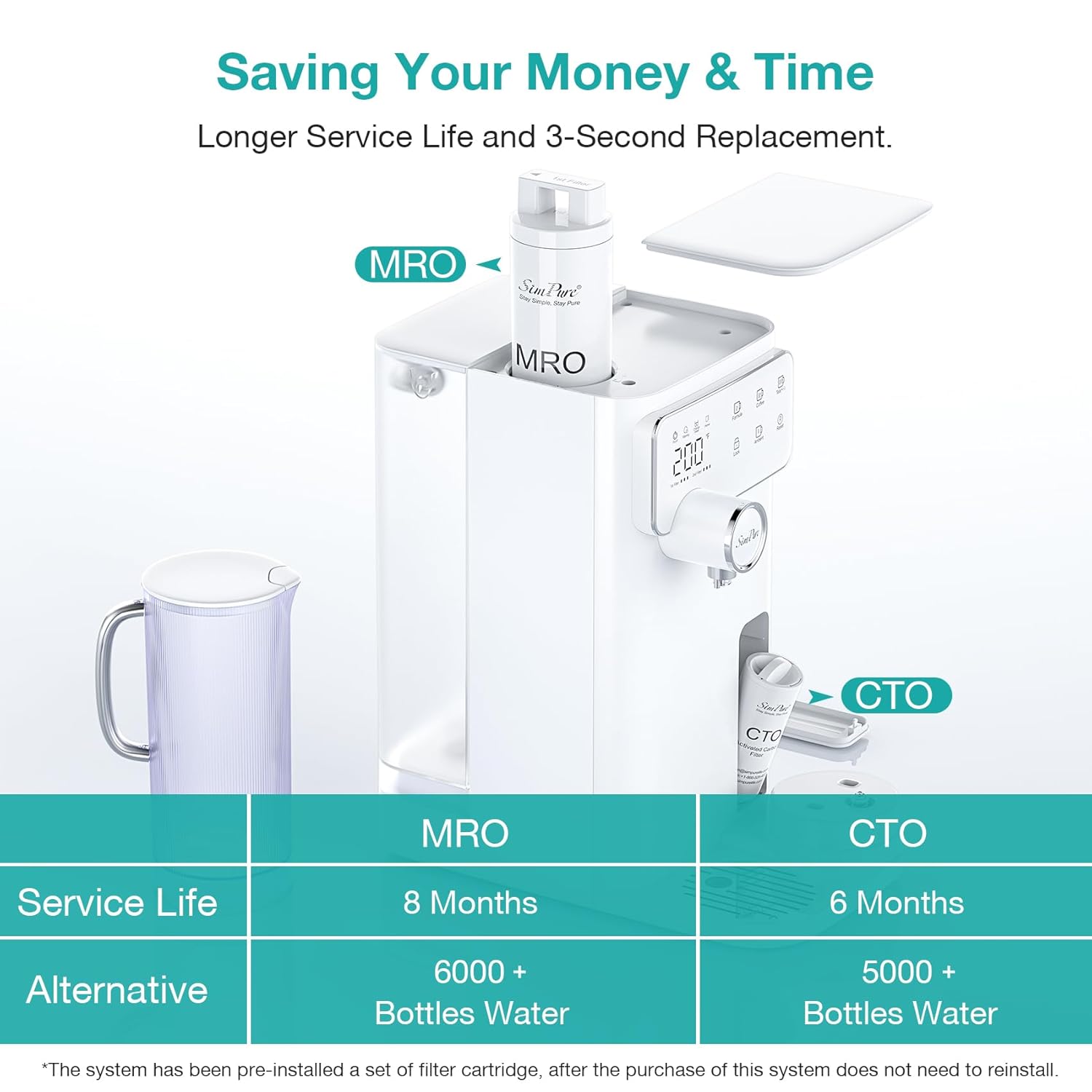
Image: Filter replacement process for MRO and CTO filters.
- MRO Filter (Top): Service life is approximately 8 months or 6,000 bottles of water. To replace, open the upper cover, use the provided wrench to rotate the filter counterclockwise, remove it, insert the new filter, and rotate clockwise to lock.
- CTO Filter (Front): Service life is approximately 6 months or 5,000 bottles of water. To replace, press the raised part of the front cap to remove it, gently tilt the filter at a 45° angle, rotate it counterclockwise to pull it out, insert the new filter, and rotate clockwise to lock.
- Reset Filter Life: After replacing a filter, press and hold the "Reset" button on the control panel for 3 seconds to reset the filter life indicator.
Video: Instructions on how to change the Y10 Series filter cartridge.
Cleaning
- Drip Tray: The drip tray is removable for easy cleaning. Empty and clean it regularly to prevent water overflow and maintain hygiene.
- Water Tanks: Clean the feed water tank and purified water pitcher periodically with mild soap and water. Rinse thoroughly.
- Descaling: If mineral buildup occurs, refer to the detailed instructions in the full owner's manual for descaling procedures.
Troubleshooting
- "Change Water" Chime: If the system emits an audible chime indicating "Change Water," it means the feed water tank is low or empty. Refill the feed water tank with potable tap water.
- System in Low Power Mode: The Y10H automatically enters sleep mode after 10 minutes of inactivity to save energy. To reactivate, simply press any button on the control panel.
- No Water Dispensing: Ensure the system is plugged in, the feed water tank is properly seated and filled, and the safety lock is disengaged. Check filter life indicators.
- Water Taste/Odor Issues: Ensure filters are new and properly flushed. If issues persist after flushing, replace filters.
Specifications
| Feature | Detail |
|---|---|
| Product Dimensions | 15.7"L x 14.4"W x 8.3"H |
| Item Model Number | Y10H |
| Manufacturer | SimPure |
| Special Feature | Adjustable Temperature, Change Filter Indicator, Child Lock, Fast Heat Dissipation, Reduce TDS |
| Package Information | Pitcher |
| Installation Type | Countertop (No Installation) |
| Power Source | Corded Electric |
| Item Weight | 16.8 Pounds |
| Lower Temperature Rating | 4 Degrees Celsius |
| Maximum Flow Rate | 0.06 Gallons Per Minute |
Warranty and Support
SimPure is committed to providing top-notch water filtration solutions. For any questions or technical assistance, please reach out to our trained water specialists. Customer satisfaction is our priority, and we are here to support you throughout the product's lifespan.
SimPure is based in Seattle, WA, and has been providing trusted service since 2006.
Related documentsY10H

Ask a question about this manual
Ask about setup, troubleshooting, compatibility, parts, safety, or missing instructions. Manuals+ will review the question and use this page’s manual context to help answer it.