
1. Product Overview
The Comgrow SH03 is a 3D printer filament dryer designed to remove moisture from various filament types, improving print quality and filament durability. It features dual independent heating chambers, automatic dehumidification, and a user-friendly touchscreen interface.

Image 1.1: Overview of the Comgrow SH03 Filament Dryer highlighting its key features.
Key Features:
- 4-Spool Capacity: Designed to dry up to four 1kg spools simultaneously (2+2 configuration).
- Dual Independent Temperature Chambers: Each chamber has separate temperature and power control, allowing simultaneous drying of different filament materials.
- Dual 200W PTC Heating System: Reaches adjustable temperatures between 45°C and 85°C for effective moisture removal.
- Automatic Dehumidification: Activates drying when high humidity is detected and stops automatically when optimal levels are reached.
- 360° Hot Air Circulation: Ensures uniform heat distribution, preventing hot spots and filament damage.
- Touchscreen Operation: Intuitive controls for adjusting temperature and drying time, with real-time monitoring.
- Quadruple Overheat Protection: Includes air outlet temperature monitoring, PTC overheat circuit breaker, fan rotation monitoring, and main control board temperature monitoring.
2. Setup Instructions
2.1 Unpacking and Placement
- Carefully remove the Comgrow SH03 filament dryer from its packaging.
- Inspect the unit for any signs of damage during transit. If damaged, contact customer support.
- Place the dryer on a stable, flat, and heat-resistant surface. Ensure adequate ventilation around the unit.
- Keep the unit away from direct sunlight, moisture, and flammable materials.
2.2 Power Connection
- Connect the power cable to the power input port on the back of the dryer.
- Plug the other end of the power cable into a standard 120V 60Hz electrical outlet.
- The unit will power on, and the touchscreen display will illuminate.
2.3 Loading Filament
- Open the transparent lids of the drying chambers.
- Place up to two 1kg filament spools in each chamber. The dryer supports spools with a maximum width of 70mm for four spools, or two spools with a maximum width of 150mm.
- Ensure the filament unwinds smoothly from the spool.
- If feeding filament directly to a 3D printer, guide the filament through the designated output ports.
- Close the transparent lids securely.
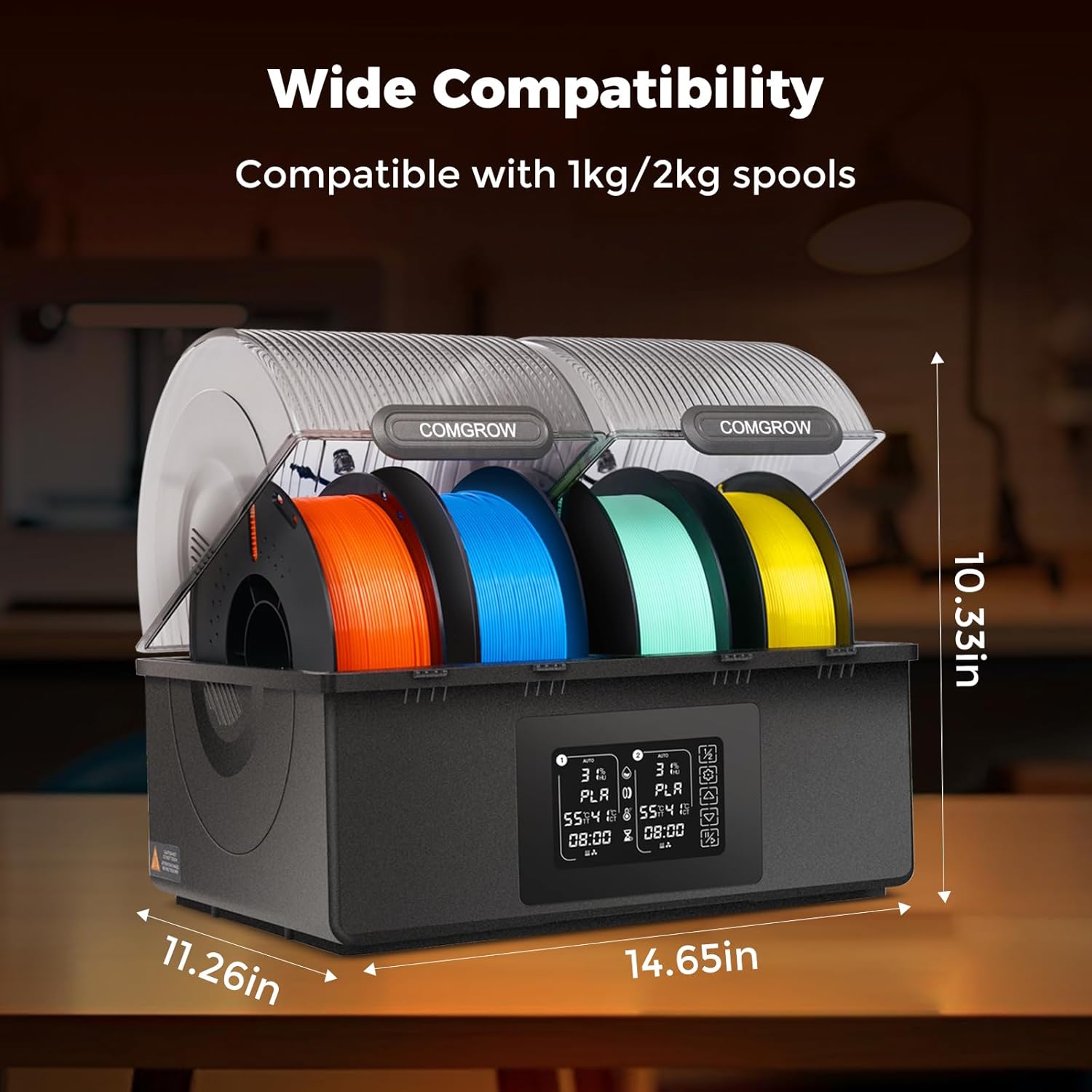
Image 2.1: Filament loading and compatibility details.
3. Operating Instructions
3.1 Touchscreen Interface
The Comgrow SH03 features a touchscreen display for controlling drying parameters. The display shows real-time humidity, real-time temperature, target temperature, and set drying time for each chamber.

Image 3.1: Real-time monitoring display.
3.2 Manual Drying Mode
- Select Chamber: Short-press the chamber switch button to toggle between Chamber 1, Chamber 2, or dual-chamber simultaneous operation.
- Adjust Temperature: Use the up/down arrows to set the desired drying temperature (45°C - 85°C).
- Set Drying Time: Use the time adjustment buttons to set the desired drying duration (up to 98 hours).
- Start/End: Press the Start/End button to begin or stop the drying process.
- Copy Parameters: Long-press the chamber switch button for 2 seconds to copy one chamber's parameters directly to the other.
3.3 Automatic Drying Mode
In Automatic Drying mode, the dryer tracks humidity levels. If humidity falls below the set threshold, heating and the fan will turn off. If humidity rises above the threshold, a 30-minute countdown initiates, and the unit cycles between these states to maintain optimal conditions. To enter or exit auto mode, long-press the Start/End button for 2 seconds until "AUTO" appears or disappears on the display.
3.4 Recommended Drying Parameters
The following table provides recommended drying temperatures and times for common filament types:
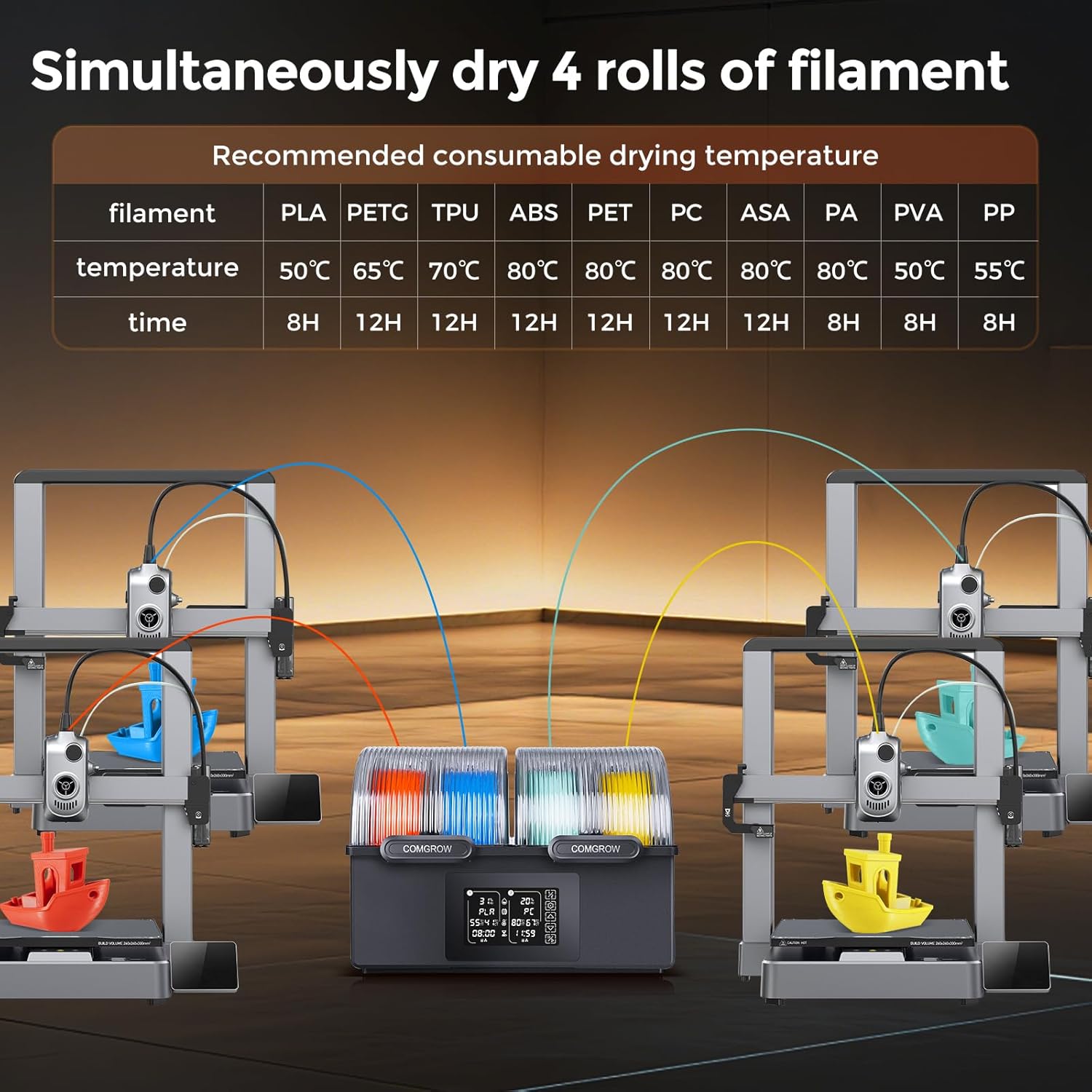
Image 3.2: Recommended drying parameters for various filaments.
| Filament Type | Drying Temperature | Drying Time |
|---|---|---|
| PLA | 50°C | 4-12 hours |
| PETG | 65°C | 4-8 hours |
| TPU | 70°C | 12 hours |
| ABS | 80°C | 8-12 hours |
| PET | 80°C | 8-12 hours |
| PC | 80°C | 8-12 hours |
| ASA | 60°C | 8-12 hours |
| PA | 70°C | 12 hours |
| PVA | 50°C | 8 hours |
| PP | 55°C | 8 hours |
4. Maintenance
4.1 Cleaning
- Ensure the unit is powered off and unplugged before cleaning.
- Wipe the exterior surfaces with a soft, dry cloth.
- Do not use abrasive cleaners or solvents, as these can damage the unit.
- Keep the air intake and exhaust vents clear of dust and debris to ensure proper airflow.
4.2 Storage
When not in use for extended periods, store the filament dryer in a cool, dry place. Ensure all filament spools are removed and the unit is clean.
5. Troubleshooting
5.1 Common Issues and Solutions
- Filament not drying effectively:
- Ensure the lids are properly closed.
- Verify that the correct temperature and drying time are set for the filament type. Refer to the recommended drying parameters.
- Check for obstructions in the air vents.
- Unit not powering on:
- Check if the power cable is securely connected to both the unit and the electrical outlet.
- Test the electrical outlet with another device to ensure it is functional.
- Filament getting stuck or tangled:
- Ensure the filament is properly spooled and not cross-wound.
- Verify that the filament path to the printer is clear and unobstructed.
5.2 Overheat Protection
The Comgrow SH03 is equipped with quadruple overheat protection mechanisms to ensure safe operation:
- Air outlet temperature monitoring function.
- PTC overheat circuit breaker function.
- Fan rotation monitoring function.
- Main control board temperature monitoring function.
If the PTC temperature surpasses 130°C, heating will automatically shut off. Heating will resume once the temperature drops below 90°C.

Image 5.1: Quadruple Overheat Protection details.
6. Specifications
| Parameter | Value |
|---|---|
| Brand | Comgrow |
| Model Number | SH03 |
| Input Voltage | 120V 60Hz |
| Rated Power | 400W |
| Filament Diameter Compatibility | 1.75mm / 2.85mm |
| Maximum Consumable Capacity | 4 rolls (≤70mm width each) or 2 rolls (≤150mm width each) |
| Display Humidity Range | 0-99% |
| Display Temperature Range | 0-99°C |
| Operating Temperature Range | 45°C - 85°C |
| Dimensions (L x W x H) | 14.65in x 11.34in x 10.35in |
| Product Weight | 7.5lb |
| Environmental Parameters | 5°C - 40°C |
| Compatible Filaments | PLA, ABS, PETG, TPU, PVA, ASA, PA, PP, PC, PET |

Image 6.1: Detailed SH03 Filament Dryer Parameters.
7. Warranty and Support
7.1 Product Warranty
The Comgrow SH03 Filament Dryer comes with a 1-year product warranty. Please retain your proof of purchase for warranty claims.
7.2 Customer Support
For technical assistance, troubleshooting, or warranty inquiries, please contact Comgrow customer service. Refer to the contact information provided with your product packaging or visit the official Comgrow website for support resources.

