1. Introduction
This manual provides detailed instructions for the assembly, operation, and maintenance of your Sairedel Upholstered Bed (Model 01028). This bed features a 140 x 200 cm sleeping surface, integrated LED ambient lighting controllable via app or remote, convenient USB charging ports, power outlets, and practical storage drawers. Please read this manual thoroughly before assembly and use to ensure proper installation and safe operation.
2. Safety Information
Always follow these safety precautions to prevent injury or damage to the product:
- Keep all small parts and packaging materials away from children.
- Ensure all connections are secure before using the bed.
- Do not exceed the maximum weight capacity of the bed (specific weight capacity not provided, general warning).
- Use only the provided power adapter for the LED lights and charging ports.
- Avoid exposing electrical components to moisture.
- Assembly should be performed by at least two adults.
3. Package Contents
Your Sairedel Upholstered Bed is shipped in three separate packages. Please verify that all components are present before beginning assembly. In case of missing or damaged parts, contact customer service.
Expected components include:
- Headboard sections with integrated storage, LED lighting, USB ports, and power outlets.
- Side rails and footboard.
- Bed slats and support legs.
- Two storage drawers.
- Assembly hardware (screws, bolts, tools).
- LED light remote control and power adapter.
4. Setup & Assembly
Follow these steps for assembling your upholstered bed. It is recommended to have at least two people for assembly.
4.1 Unpacking and Preparation
- Open all three packages and carefully remove all components.
- Lay out all parts on a clean, soft surface (e.g., a rug or blanket) to prevent scratches.
- Identify all hardware and components using the included parts list.
4.2 Headboard Assembly
Assemble the headboard sections, ensuring the integrated storage, LED lights, USB ports, and power outlets are correctly positioned and connected.


4.3 Bed Frame Assembly
- Attach the side rails to the headboard and footboard using the provided hardware. Ensure all bolts are tightened securely.
- Install the central support beam and any additional support legs.
- Place the bed slats onto the side rails, ensuring they are evenly spaced and secured if necessary.
4.4 Drawer Assembly and Installation
- Assemble the two storage drawers according to the separate drawer assembly instructions (if provided).
- Slide the assembled drawers into the designated spaces under the bed frame.

4.5 Electrical Connections
- Connect the LED light strip to the power adapter.
- Plug the power adapter for the LED lights, USB ports, and power outlets into a wall socket.
- Ensure all cables are neatly tucked away and not pinched.

5. Operating Instructions
5.1 LED Ambient Lighting
The integrated LED lighting can be controlled via a remote control or a smartphone application.
- Remote Control: Use the provided remote to turn the lights on/off, change colors, adjust brightness, and select lighting modes.
- Smartphone App: Download the designated app (refer to packaging or a sticker on the LED controller for app name/QR code). Pair your device with the bed's LED controller via Bluetooth to access advanced controls, custom color settings, and scheduling features.


5.2 USB Charging Ports and Power Outlets
The headboard includes integrated USB charging ports and standard power outlets for convenient device charging.
- Simply plug your USB charging cables or power adapters into the respective ports.
- Ensure devices are compatible with the provided voltage and current.
5.3 Storage Drawers
The two integrated drawers provide additional storage space under the bed.
- Pull the drawers out gently to access the storage space.
- Push them back in until they are flush with the bed frame for a neat appearance.
- Avoid overloading the drawers to ensure smooth operation and prevent damage.
6. Maintenance
6.1 Cleaning the Upholstery
- Regularly vacuum the upholstered surfaces using a soft brush attachment to remove dust and debris.
- For spills, blot immediately with a clean, dry cloth. Do not rub.
- For stubborn stains, use a mild fabric cleaner specifically designed for upholstery. Test on an inconspicuous area first.
- Avoid using harsh chemicals or abrasive cleaners, as these can damage the fabric.
6.2 Electrical Components
- Ensure the power cord and connections are free from damage.
- Wipe the LED strips and charging ports with a dry, soft cloth. Do not use liquid cleaners directly on electrical parts.
6.3 General Care
- Periodically check all bolts and screws and tighten them if necessary to maintain stability.
- Avoid dragging the bed when moving it; lift it to prevent damage to the frame and floor.
7. Troubleshooting
| Problem | Possible Cause | Solution |
|---|---|---|
| LED lights do not turn on. |
|
|
| USB ports/Power outlets not working. |
|
|
| Bed feels unstable or squeaks. |
|
|
8. Specifications
| Feature | Detail |
|---|---|
| Product Type | Upholstered Bed |
| Model Number | 01028 |
| Brand | Sairedel |
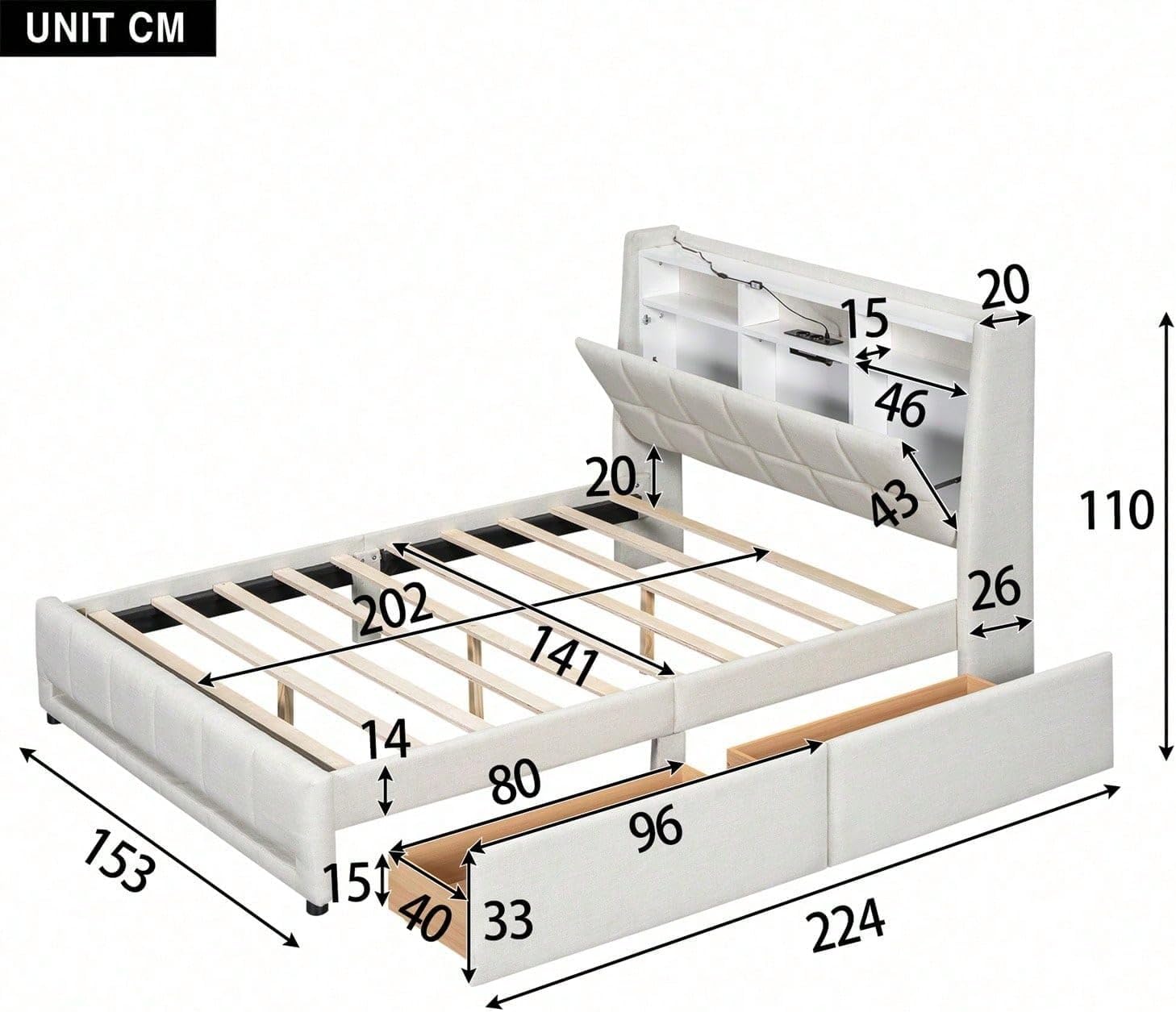
| Overall Dimensions (L x W x H) | 224 cm x 153 cm x 110 cm |
| Mattress Size Compatibility | 140 cm x 200 cm (Mattress not included) |
| Main Material | Linen, MDF |
| Color | Beige |
| Lighting | LED Ambient Light (APP & Remote Control) |
| Charging Features | Integrated USB Charging Ports, Power Outlets |
| Storage | Headboard shelves, 2 Under-bed Drawers |
| Net Weight | 65.5 kg |
| Assembly Required | Yes |
9. Warranty & Support
For warranty information, please refer to the purchase documentation or contact your retailer. If you encounter any issues during assembly or operation, or if you have questions about your Sairedel Upholstered Bed, please contact our customer support team. Details for customer service can typically be found on the product packaging or the retailer's website.
When contacting support, please have your model number (01028) and purchase date available.