
1. Introduction
Welcome to the world of advanced aerial photography and flight with your new LKHLTBF GT8 6K Dual Battery Drone. This professional-grade, foldable RC drone features a 6K camera, FPV capabilities, and obstacle avoidance technology, designed for both beginners and experienced pilots. This manual will guide you through the setup, operation, maintenance, and troubleshooting to ensure a safe and enjoyable flight experience.

Image: The LKHLTBF GT8 Drone in flight, controlled by a user, demonstrating its advanced design and user-friendly interface.
2. What's in the Box
Your LKHLTBF GT8 package includes the following components:
- GT8 Quadcopter (Drone)
- Remote Control Transmitter with 4.3-inch Screen
- Storage Bag
- Memory Card + Card Reader
- USB Charging Cable
- Screwdriver
- User Manuals (2 copies)
- Spare Propeller Blades (8 pieces)
3. Product Features
- Extended Flight Time & High-Quality Imaging: Experience 15-20 minutes of flight with the robust 1503 brushless motor. Capture stunning aerial footage with your choice of 5G WiFi 4K/6K camera, featuring a 120° wide-angle lens and Electronic Image Stabilization (EIS). The 1300mAh battery ensures prolonged adventures.
- Precision Flight & Exceptional Clarity: Achieve stable, hands-free hovering and precise positioning both indoors and outdoors, thanks to optical flow technology and altitude hold. The front WiFi HD 4K camera offers lens stabilization and adjustable angles for sharp, blur-free photos and videos. Enjoy seamless control via the integrated 4.3-inch screen transmitter.
- Powerful & Ultra-Portable: Weighing only 177g, this foldable brushless drone effortlessly complies with aviation regulations in many regions. Its 4000 KV brushless motors provide exceptional power and durability, offering a remarkable 3000-meter remote control distance and extended motor life, all within a compact, travel-ready design.
- Intelligent Functions & Intuitive Control: Command your drone like a professional using the 2.4G remote control's integrated 4.3-inch display. Utilize practical features such as gesture photography, custom path creation via the app, headless mode, and one-touch takeoff/landing. The six-axis gyroscope ensures responsive and stable flight.

Image: The GT8 Drone highlighting its simple control features like one-click takeoff, landing, headless mode, and speed adjustment.

Image: An illustration of the drone's brushless motor, emphasizing its power, efficiency, and enhanced wind resistance.

Image: The GT8 Drone in flight, with an overlay indicating its 3.7V, 1300mAh battery capacity and 20 minutes of flight duration.
4. Setup
4.1. Battery Charging and Installation
- Charge the drone battery using the provided USB charging cable until fully charged.
- Insert the charged battery into the drone's battery compartment.
- Ensure the remote control is also charged or has fresh batteries.
4.2. Propeller Installation
Attach the propellers to the corresponding motor shafts. Ensure they are securely fastened and the correct propellers (A and B) are placed on the designated motors as per the drone's markings.
4.3. Pairing the Drone and Remote Control
- Place the drone on a flat, level surface.
- Power on the drone, then power on the remote control.
- The drone and remote will automatically attempt to pair. Wait for the indicator lights to stabilize, indicating a successful connection.
4.4. Compass Calibration
For stable GPS flight, compass calibration is essential before the first flight and whenever flying in a new location.
Video: This video illustrates the compass calibration process for GPS drones, a crucial step for stable flight with the LKHLTBF GT8 Drone.
5. Operating Instructions
5.1. Basic Flight Controls
Familiarize yourself with the remote control layout and functions:

Image: A detailed view of the remote control, labeling each button and joystick function for easy understanding.
Video: This video demonstrates the functions and controls of a drone remote, similar to the LKHLTBF GT8's controller, providing a visual guide for operation.
- Left Joystick (Throttle/Yaw): Push up/down to control altitude. Push left/right to rotate the drone.
- Right Joystick (Pitch/Roll): Push up/down to move forward/backward. Push left/right to move left/right.
- One-Click Takeoff/Landing: Press the designated button for automatic takeoff or landing.
- Speed Adjustment: Use the speed button to switch between different flight speeds (e.g., low, medium, high).
5.2. Advanced Features
- Headless Mode: In headless mode, the drone's orientation is irrelevant; it will move according to the remote control's direction. Useful for beginners.
- Obstacle Avoidance: The drone is equipped with sensors to detect and avoid obstacles, enhancing flight safety.
- Gesture Photography: Perform specific hand gestures to trigger photo or video recording. Refer to the app for detailed gestures.
- Custom Path Flight: Use the companion app to draw a desired flight path on your screen, and the drone will follow it automatically.
- FPV (First Person View): Connect your smartphone to the drone's Wi-Fi to view real-time camera feed on the remote's screen or your phone.
Video: A guide to the basic operational steps for a drone, including power-on, pairing, and initial flight procedures, applicable to the LKHLTBF GT8 Drone.
Video: This video highlights features of a drone remote control with an integrated screen, similar to the LKHLTBF GT8's controller, demonstrating its capabilities.
6. Maintenance
6.1. Battery Care
- Always use the original charging cable.
- Do not overcharge or over-discharge the battery.
- Store batteries in a cool, dry place away from direct sunlight.
- If not used for an extended period, charge the battery to about 50% every three months.
6.2. Cleaning
- Use a soft, dry cloth to clean the drone body and camera lens.
- Avoid using harsh chemicals or solvents.
- Ensure no dust or debris obstructs the motors or sensors.
6.3. Propeller Replacement
If propellers are damaged, replace them immediately with the provided spare parts. Ensure the correct A and B propellers are installed on their respective motor shafts.
7. Troubleshooting
- Drone not powering on: Ensure the battery is fully charged and correctly installed. Check the power button.
- Remote control not connecting: Ensure both drone and remote are powered on and within range. Re-attempt the pairing process.
- Unstable flight: Perform compass calibration. Check for damaged propellers and replace if necessary. Ensure flight in calm weather conditions.
- Poor camera feed/no image: Ensure your smartphone is correctly connected to the drone's Wi-Fi. Check the camera lens for obstructions.
- Short flight time: Ensure the battery is fully charged. Battery performance can degrade over time; consider replacing if significantly reduced.
- Obstacle avoidance not working: Ensure sensors are clean and unobstructed. Avoid flying in complex environments with many small obstacles.
8. Specifications
| Feature | Detail |
|---|---|
| Product Code | GT8 |
| Frequency | 2.4 GHz |
| Motor | Brushless 1503 4000 KV |
| Quadcopter Battery | 3.7 V 1300 mAh 4.81 Wh |
| Remote Control Battery | USB Rechargeable |
| Flight Time | 15-20 minutes |
| Charging Time | 90 minutes |
| Remote Control Distance | 3000 meters |
| Camera Options | 5G WiFi 4K HD / 5G WiFi 6K |
| Field of View (FOV) | 120° Wide-angle |
| Optical Flow | Yes |
| Folded Dimensions | 13 x 8.9 x 7.2 cm |
| Unfolded Dimensions | 28.5 x 26 x 7.2 cm |
| Weight | 177g |
| Material | Plastic |
| Age Range | Adults |
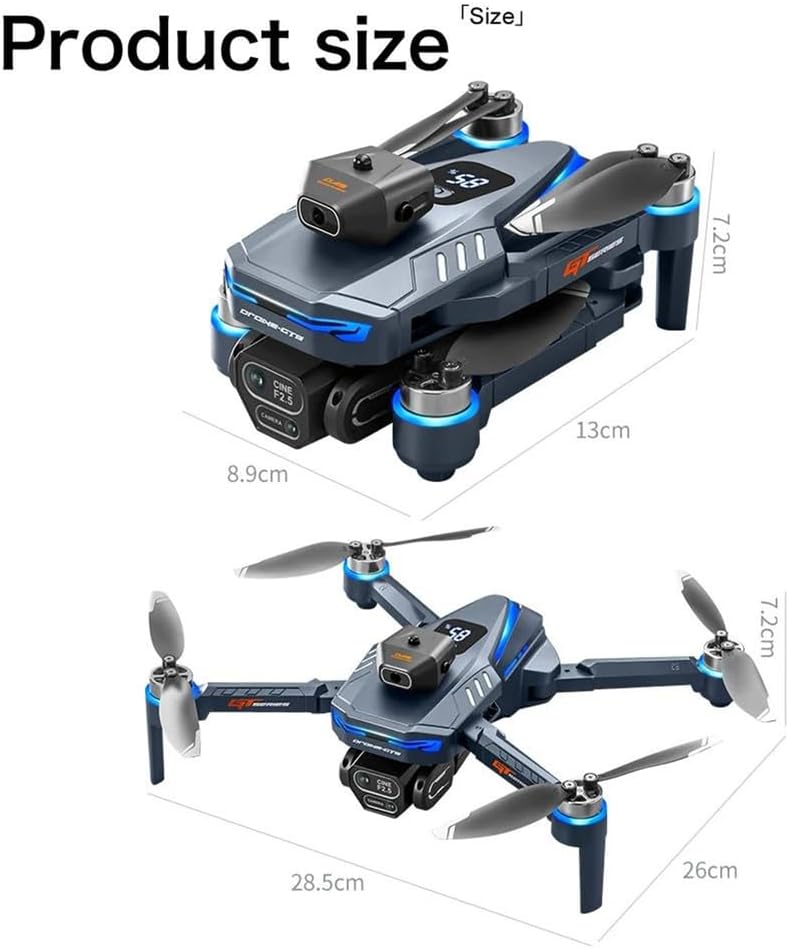
Image: Visual representation of the LKHLTBF GT8 Drone's dimensions when folded and unfolded.
9. Warranty & Support
For warranty information and customer support, please refer to the documentation included with your purchase or contact the retailer. Keep your proof of purchase for any warranty claims.
For technical assistance or further inquiries, please visit the official LKHLTBF website or contact their customer service department.