
Introduction
Thank you for choosing the sprtoybat Q22 Bluetooth 5.3 Wireless Earbuds. These earbuds are designed to provide a high-quality audio experience with extended battery life, advanced noise cancellation, and a durable waterproof design. This manual will guide you through the setup, operation, and maintenance of your new earbuds to ensure optimal performance and longevity.
Package Contents
Please check the package for the following items:
- 2 x Earbuds
- 1 x 2600 mAh Charging Case
- 1 x USB Type-C Charging Cable
- 6 x Silicone Eartips (S/M/L sizes)
- 1 x User Manual
Product Overview
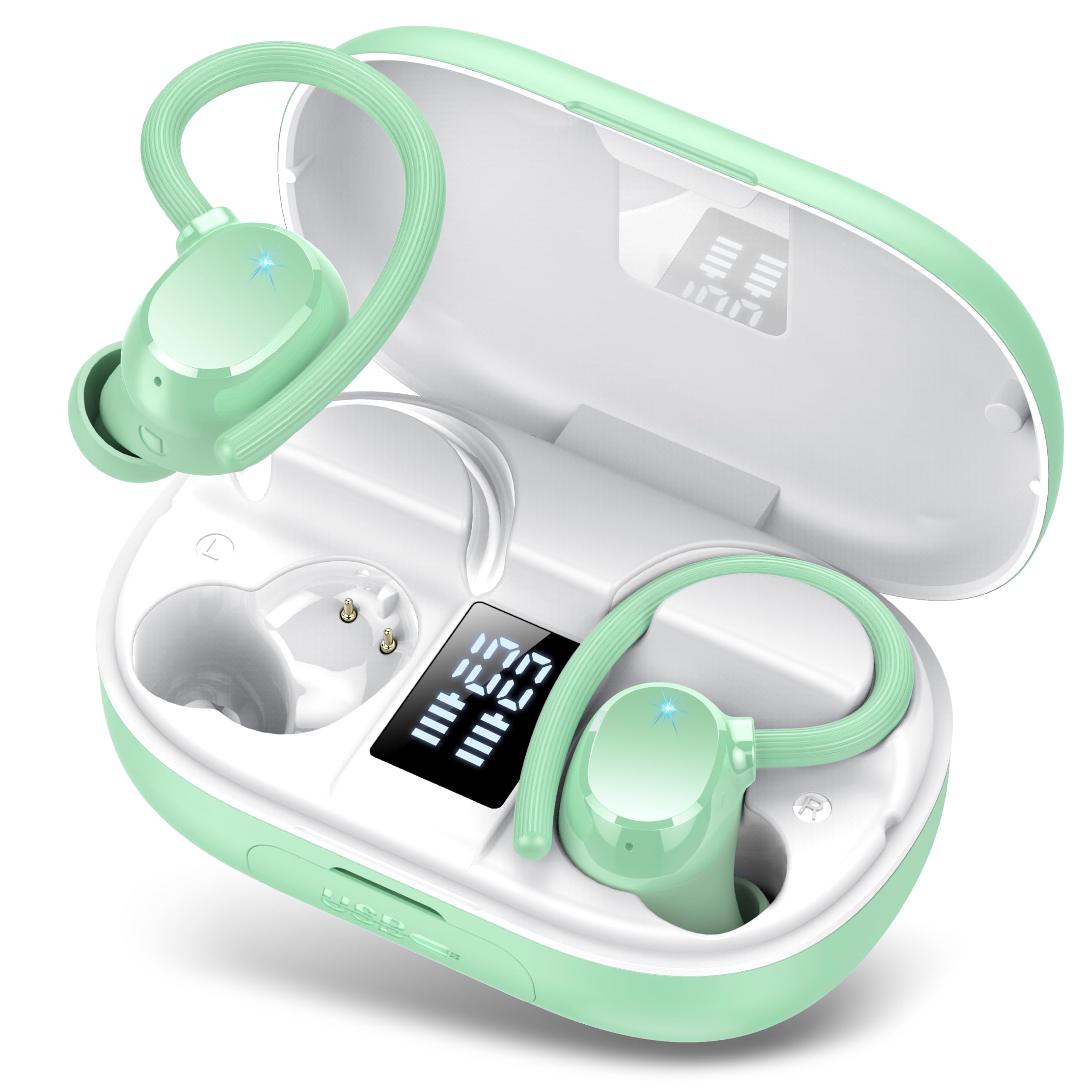
Image: The sprtoybat Q22 wireless earbuds shown with their charging case. The earbuds feature an in-ear design with flexible ear hooks, and the charging case has an LED display.
Setup
1. Charging the Earbuds and Case
Before first use, fully charge the earbuds and the charging case. Connect the USB Type-C charging cable to the charging port on the case and to a power source. The LED digital display on the charging case will show the battery level. A full charge for the earbuds takes approximately 2 hours, and the charging case also takes about 2 hours.
- Earbud Battery Life: Up to 8 hours on a single charge.
- Charging Case Capacity: 2600 mAh, providing up to 15 full charges for the earbuds, extending total playback to 128 hours.
- Power Bank Function: The charging case can also serve as an emergency power bank for other devices.
2. Pairing with a Bluetooth Device
- Ensure the earbuds are charged and placed in the charging case.
- Open the charging case. The earbuds will automatically enter pairing mode.
- On your device (smartphone, tablet, laptop), enable Bluetooth and search for available devices.
- Select "Q22" from the list of found devices to connect.
- Once paired, the earbuds will automatically reconnect to your device when taken out of the case.
Note: The latest Bluetooth 5.3 technology ensures stable connection up to 15 meters.
3. Wearing the Earbuds
The Q22 earbuds feature an ergonomic design with flexible ear hooks for a secure and comfortable fit. Choose the appropriate silicone eartip size (S/M/L) for your ears to ensure optimal sound quality and comfort. Gently place the earbud into your ear canal and adjust the ear hook over your ear until it feels secure.
Operation
Smart Touch Controls
The earbuds are equipped with smart touch controls for easy management of audio playback and calls. The specific touch functions are typically detailed in a diagram within the full manual, but common functions include:
- Play/Pause: Single tap on either earbud.
- Next Track: Double tap on the right earbud.
- Previous Track: Double tap on the left earbud.
- Volume Up: Triple tap on the right earbud.
- Volume Down: Triple tap on the left earbud.
- Answer/End Call: Single tap on either earbud during an incoming call.
- Reject Call: Press and hold either earbud for 2 seconds during an incoming call.
- Activate Voice Assistant: Press and hold either earbud for 3 seconds.
LED Digital Display
The charging case features a dual LED digital display that accurately shows the remaining power of both the charging case and each individual earbud. This allows you to monitor battery status in real-time.
Maintenance
Water Resistance (IP7)
The sprtoybat Q22 earbuds are IP7 waterproof, meaning they are protected against the effects of temporary immersion in water (up to 1 meter for 30 minutes). They are resistant to sweat and rain, making them suitable for sports and outdoor activities. However, they are not designed for swimming or prolonged submersion. Ensure the earbuds are dry before placing them back in the charging case.
Cleaning
Regularly clean your earbuds and charging case with a soft, dry, lint-free cloth. Do not use abrasive cleaners or immerse the charging case in water. Remove eartips and clean them separately with mild soap and water if necessary, ensuring they are completely dry before reattaching.
Troubleshooting
If you encounter any issues with your sprtoybat Q22 earbuds, please refer to the following common solutions:
| Problem | Solution |
|---|---|
| Earbuds not pairing |
|
| Only one earbud working |
|
| Charging case not charging |
|
Specifications
| Feature | Detail |
|---|---|
| Model Number | Q22 |
| Bluetooth Version | 5.3 |
| Bluetooth Range | Up to 15 meters |
| Earbud Battery Life | Up to 8 hours (single charge) |
| Total Playback Time | Up to 128 hours (with charging case) |
| Charging Case Capacity | 2600 mAh |
| Charging Time (Earbuds) | Approx. 2 hours |
| Charging Time (Case) | Approx. 2 hours |
| Water Resistance Rating | IP7 |
| Noise Control | ENC (Environmental Noise Cancellation) for calls, Passive Noise Cancellation for listening |
| Driver Type | Dynamic (13.44mm dual-layer graphite vibration membrane) |
| Control Method | Smart Touch |
| Product Dimensions | 2 x 1 x 1 cm (earbud); 0.05 g (earbud) |
Warranty and Support
Your sprtoybat Q22 earbuds come with a standard manufacturer's warranty. For detailed warranty information, product support, or technical assistance, please refer to the contact information provided with your purchase or visit the official sprtoybat website. Please retain your proof of purchase for warranty claims.