
1. Introduction
Product Overview
The Arlo Essential 3 HD wireless outdoor security camera system provides comprehensive surveillance capabilities, even in low-light conditions. Featuring crisp HD video, color night vision, and an integrated spotlight, this system ensures you capture every detail and deter potential intruders. When paired with Arlo Secure (subscription required), it offers intelligent AI detection to distinguish between people, vehicles, animals, and even fires. Installation is quick and easy via dual-band Wi-Fi, complemented by two-way audio and an integrated alarm for immediate threat response.

Arlo Essential 3 HD cameras with solar panels and a smartphone displaying the Arlo Secure app with an 'Animal detected' notification.
Key Features
- Crisp HD Image, Day and Night: Clear HD video and color night vision allow you to clearly observe what is happening, even in the dark.
- Precision on What Matters: With a 130° field of view and 12x zoom, you won't miss any faces, license plates, or movements.
- New Arlo Secure App: React faster; customize your settings and gain better control of your security with the Arlo Secure app.
- No Monthly Fees: Enjoy motion detection, live streaming, and two-way audio without a mandatory subscription; a free trial of Arlo Secure is included to discover premium features.
- Arlo Secure Subscription: Receive advanced AI-based motion alerts (people, packages, animals); define custom activity zones, benefit from cloud storage, and camera replacement in case of theft — cancellable at any time.
- Compatible with Your Connected Devices: The Arlo wired spotlight works with your favorite voice assistants and connected devices, such as Alexa, for simple and convenient use.
- Remote Threat Protection: The integrated siren and spotlight deter intruders as soon as they are detected.
- Real-Time Verbal or Deterrent Response: Use two-way audio to greet visitors, give instructions, or warn intruders, wherever you are.
- Camera View Angle Management: Highlight key areas to monitor with activity zones and mask private spaces with custom privacy zones.
- No Blind Spots: Combine and mix indoor, outdoor, and PTZ cameras to cover every corner, without any blind spots.
2. Setup and Installation
What's Included
Your Arlo Essential 3 HD camera system package includes the following components:
- 2 x Arlo Essential Outdoor Cameras
- 2 x Solar Panels with Adapters
- 2 x Wall Mounts
- 1 x Charging Cable (USB)
- 2 x Wall Plates
- 1 x Screw Kit
- 1 x Arlo Smart Security Sticker

All components included in the box for easy installation.
Mounting the Camera
Follow these steps for secure wall mounting:
- Unscrew the mounting base from the camera.
- Attach the mounting base to your desired location using the provided screws. Ensure it is securely fastened.
- Click the camera onto the mounted base.
- Adjust the camera angle as needed for optimal coverage.

A visual guide demonstrating the four steps for mounting your Arlo camera.
3. Operating Your Arlo Essential 3 HD Camera
Video Quality and Night Vision
The Arlo Essential 3 HD camera delivers clear 1080p HD video resolution. Its advanced color night vision ensures that details are visible even in complete darkness, providing a comprehensive view around the clock.

A visual comparison illustrating clear HD image quality during day, twilight, and night with color night vision.
Field of View and Zoom
With a wide 130-degree viewing angle and 12x digital zoom, the camera allows you to monitor large areas and focus on specific details without missing critical events.
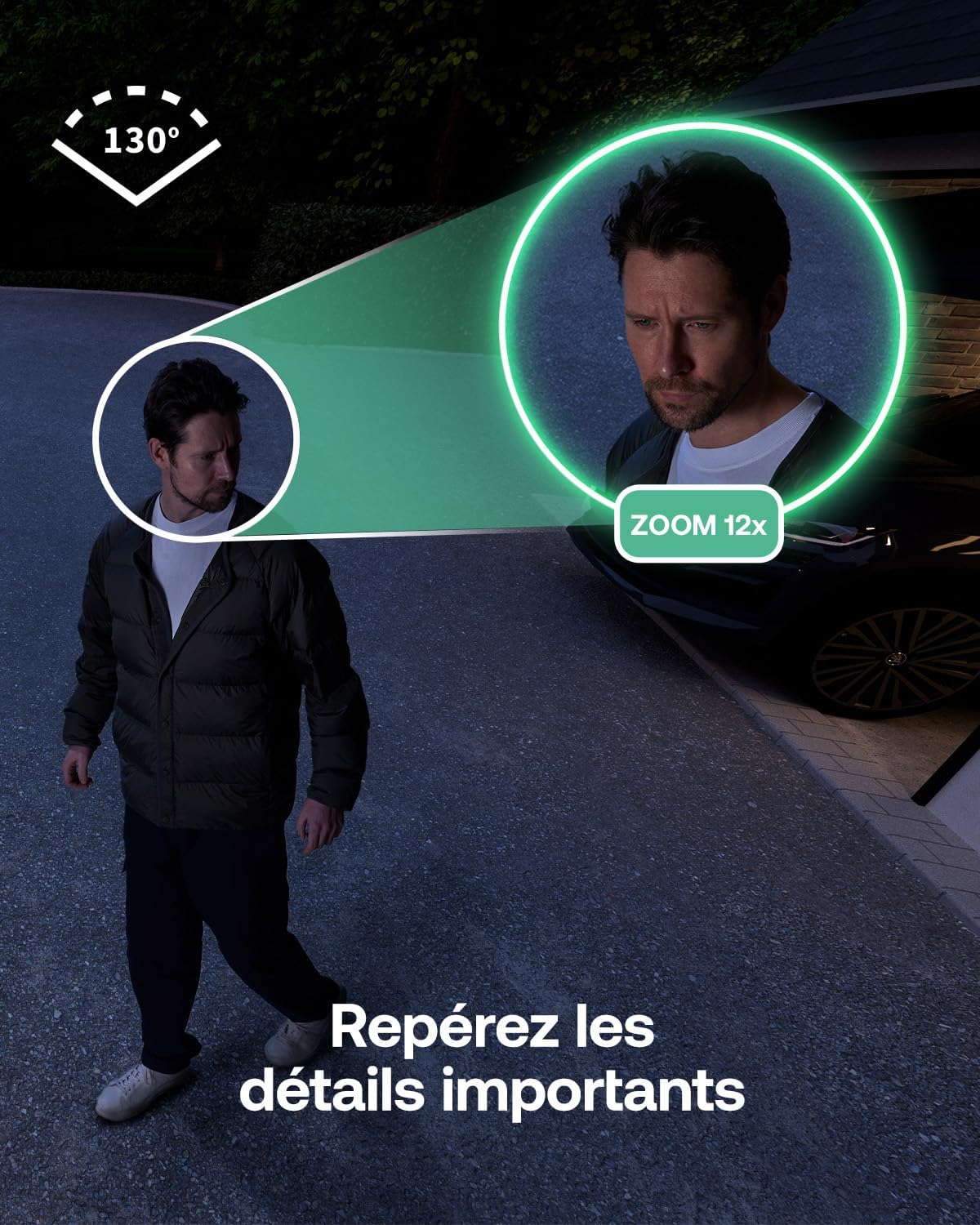
An image demonstrating the 130-degree field of view and 12x zoom capability to spot important details.
Two-Way Audio and Siren
The integrated two-way audio feature enables real-time communication with visitors or allows you to deter unwanted guests. The built-in siren can be activated remotely or automatically upon detection to scare off intruders.

An image illustrating real-time verbal interaction via two-way audio, with a person reacting to a camera's voice command.

Two Arlo cameras with spotlights, showing how they deter intruders before they get close.
Activity Zones and Privacy Zones
Customize your surveillance by defining specific activity zones to focus on critical areas and receive relevant alerts. Additionally, privacy zones can be set up to mask private spaces from recording, ensuring your privacy.

An illustration showing a camera's view with a privacy zone (masked area) and an activity zone (monitored area) over a car, demonstrating control over what the camera sees.
Arlo Secure App Integration
Manage your Arlo Essential 3 HD cameras, customize settings, view live feeds, and access recorded footage through the intuitive Arlo Secure app. The app provides enhanced control and faster response capabilities for your security system.
Smart Home Compatibility
The Arlo Essential 3 HD camera system is compatible with popular smart home ecosystems, including Amazon Alexa and Google Assistant, allowing for convenient voice control and integration into your existing smart home setup.

An image showing the Arlo Essential 3 HD camera's compatibility with Google Assistant, Alexa, and Apple HomeKit (requires Arlo SmartHub).
4. Maintenance
To ensure optimal performance and longevity of your Arlo Essential 3 HD camera system, consider the following maintenance tips:
- Cleaning: Regularly wipe the camera lens and housing with a soft, damp cloth to remove dust and dirt. Avoid abrasive cleaners.
- Solar Panel Care: Keep the solar panels clean and free from obstructions (leaves, snow, etc.) to ensure efficient charging.
- Battery Life: While the cameras offer a 6-month battery life, environmental factors and usage patterns can affect this. Monitor battery levels via the Arlo Secure app.
- Firmware Updates: Ensure your camera's firmware is always up to date through the Arlo Secure app to benefit from the latest features and security enhancements.
5. Troubleshooting
If you encounter issues with your Arlo Essential 3 HD camera system, try the following basic troubleshooting steps:
- Connectivity Issues: Ensure your Wi-Fi network is stable and the camera is within range of your router. Restarting your router or camera may resolve temporary connection problems.
- Poor Video Quality: Check for obstructions on the camera lens. Ensure adequate lighting for optimal image capture, especially if color night vision is not performing as expected.
- Battery Not Charging: Verify that the solar panel is clean and receiving direct sunlight. Check the charging cable connection.
- Motion Detection Problems: Review your activity zone settings in the Arlo Secure app. Ensure the camera's view is not obstructed.
- App Issues: Ensure your Arlo Secure app is updated to the latest version. Try force-closing and reopening the app, or reinstalling it if problems persist.
For more detailed troubleshooting or persistent issues, please refer to the official Arlo support website or contact Arlo customer service.
6. Technical Specifications
| Feature | Specification |
|---|---|
| Model Number | VMC2080 |
| Model Name | Essential3 HD Security Camera |
| Mounting Type | Wall Mount |
| Video Recording Resolution | 1080p |
| Color | White |
| Number of Items | 2 (Cameras) |
| Wireless Communication Technology | Wi-Fi |
| Viewing Angle | 130 Degrees |
| Night Vision Range | 8 Meters |
| Frame Rate | 24 frames per second |
| Material | Polycarbonate (PC) |
| Item Dimensions (L x W x H) | 6 x 5.3 x 9.3 cm |
| Water Resistance Level | Water-repellent |
| Special Features | Two-way audio, Brightness Control, Built-in Light, Motion Detector, Weatherproof |
| Usage | 360 Degree Coverage, Surveillance |
| Battery(ies) Included | Yes |
| Battery Composition | Lithium-ion |
| Weight | 199.5 Grams |
| Connectivity Technology | Wireless |
| Indoor/Outdoor Use | Outdoor, Indoor |
| Compatible Devices | Laptop, Smartphone, Tablet |
| Power Source | Battery Powered |
| Connectivity Protocol | Wi-Fi |
| Controller Type | Amazon Alexa, Google Assistant, IFTTT, SmartThings |
7. Warranty and Support
Specific warranty information for the Arlo Essential 3 HD Wireless Outdoor Security Camera System is not provided within this manual. For detailed warranty terms, conditions, and registration, please refer to the official Arlo website or the documentation included with your purchase.
For technical support, product registration, or to access additional resources, please visit the Arlo support portal online. You can also find FAQs and community forums for common questions and solutions.


